TrackEdge: Turn Your MacBook Trackpad Edges into AI Shortcuts

TrackEdge turns MacBook trackpad edges into customizable shortcut control zones.
TrackEdge is a productivity tool for Mac users that transforms the trackpad's four edges and two top corners into customizable trigger zones: swipe the right edge for volume, the left for brightness, the bottom for media playback, and double-tap top corners to mute, open apps, or run Shortcuts actions. Its "AI buttons" invoke system-level intelligence through Shortcuts rather than a built-in LLM. It earned 69 upvotes and 5 comments on Product Hunt, ranking 18th that day. Its value is turning the trackpad into an always-available control panel, though accidental-touch risk and recognition accuracy remain key variables.
The MacBook trackpad is plenty large, but most of the time it's only used for moving the cursor. A new tool called TrackEdge wants to change that: it turns the trackpad edges into customizable control zones and uses AI capabilities to enable smarter shortcuts.
A New Use for Trackpad Edges
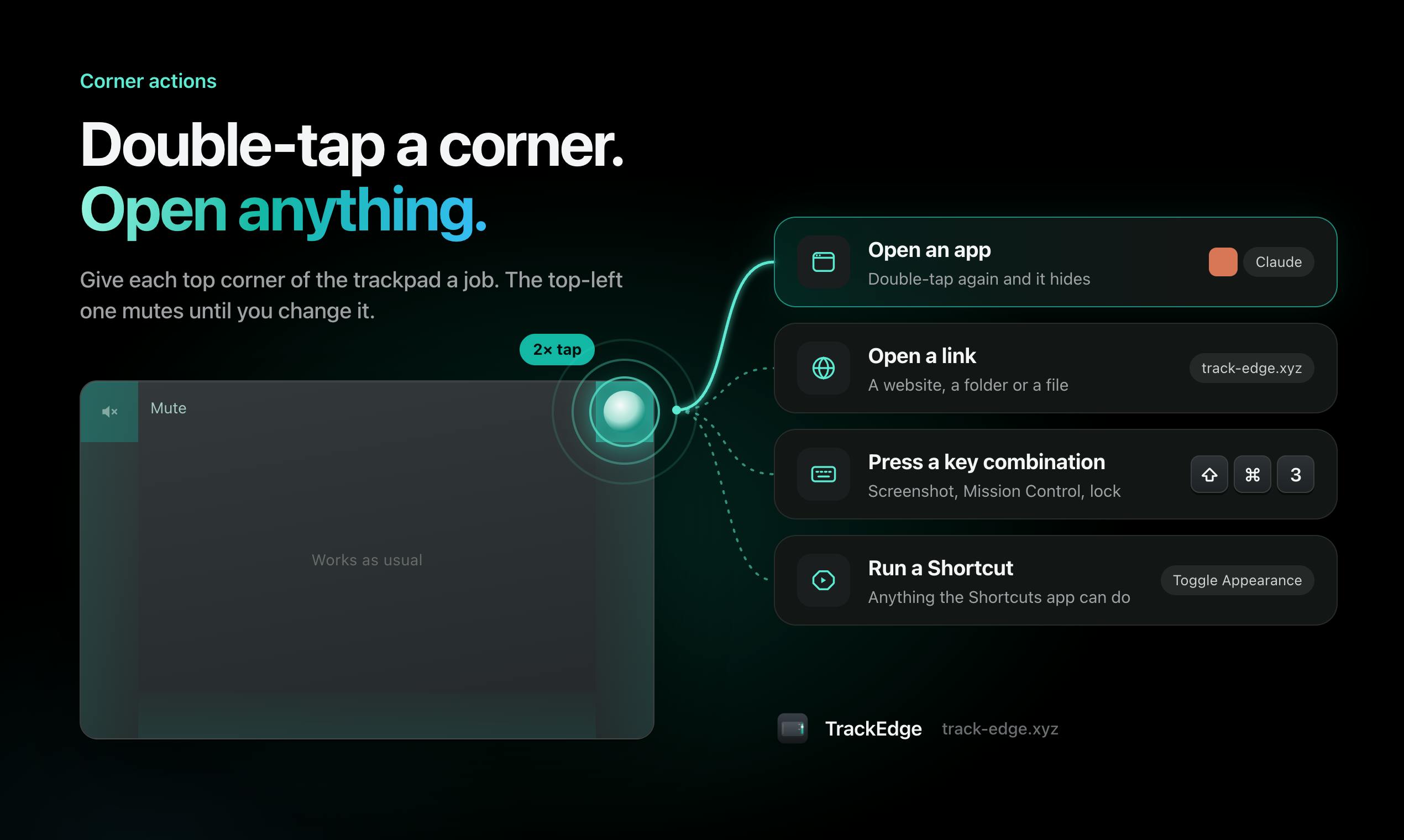
TrackEdge's core idea is straightforward: turn the four edges and two top corners of the trackpad into trigger zones. According to the product description on Product Hunt, sliding along the right edge of the trackpad adjusts volume, the left edge controls screen brightness, and the bottom edge handles media playback controls. Double-tapping either top corner can trigger mute, open an app or website, execute a keyboard shortcut, or run a Shortcuts action.
This means users can complete common system operations without leaving the keyboard area. For those accustomed to keyboard shortcuts, this interaction may feel more natural than function keys or the menu bar.
Where the AI Buttons Come In
The product tagline mentions "Hidden AI buttons," but based on the available description, TrackEdge itself doesn't have built-in LLM chat or generative AI features. Its "AI" aspect is more about invoking system-level intelligent capabilities through Shortcuts actions—for example, users can configure an edge gesture to trigger an AI app or automation workflow.
This design approach is not uncommon among productivity tools: the tool itself provides the trigger entry point, while the actual intelligent capabilities come from the system or other apps. TrackEdge's value lies in turning the trackpad into an always-available quick-launch panel, reducing the cost of hunting through menus or switching windows.
Shortcuts is an automation framework introduced by Apple in iOS 12 and macOS Monterey. Users can visually compose multiple app actions into a single shortcut and assign triggers such as keyboard shortcuts, the menu bar, Siri voice, or third-party app invocation. On macOS, Shortcuts supports calling system-level APIs, running shell scripts, and integrating third-party apps that support App Intents, so it is often used by productivity tools as an "action execution layer." TrackEdge maps edge gestures to Shortcuts actions, essentially borrowing this ready-made automation ecosystem so the tool can cover a wide range of operation scenarios without building its own plugin system.
Who It's For
Judging from its positioning, TrackEdge targets Mac users who prioritize operational efficiency—especially those who frequently use keyboard shortcuts, Shortcuts automations, or need to adjust volume and brightness often. With 69 upvotes and 5 comments on Product Hunt, it has already attracted some attention, ranking 18th among products that day.
However, edge gestures on the trackpad carry the risk of accidental triggers—the edge of your palm may inadvertently brush across the trackpad while typing. The actual experience of such tools depends heavily on gesture recognition accuracy and customizability, and the current product description doesn't reveal specific accidental-touch prevention mechanisms.
Trackpad accidental touches are a core engineering challenge for edge-gesture solutions. macOS's trackpad driver itself supports palm rejection, but its detection logic mainly targets cursor movement and clicks, and it can't always accurately distinguish intentional continuous gestures like "sliding inward from the edge." Common mitigations include requiring gestures to start within a certain range of the screen's outer edge, setting minimum swipe distance and speed thresholds, and activating edge zones only when a small finger contact area is detected. Whether these parameters are exposed for user adjustment often determines whether an edge-gesture tool is usable in everyday typing scenarios.
Customization Is the Main Selling Point
TrackEdge lets users assign different actions to each trigger zone, including opening specific apps or websites, running keyboard shortcuts, and executing Shortcuts actions. This flexibility makes it more than a fixed volume-control tool—it's a control layer that can be customized to individual workflows.
For users already deeply invested in Shortcuts, TrackEdge is essentially an extra set of physical shortcuts—no need to remember complex key combinations; just swipe or tap on the trackpad edge.
Summary
TrackEdge's approach is to expand the MacBook trackpad from a single-purpose pointer input device into a multi-functional control panel. Its real-world effectiveness depends on gesture recognition accuracy and how well users adapt to edge operations. For Mac users who enjoy tinkering with productivity tools, this is a small tool worth watching; but for those who don't use Shortcuts often or are sensitive to accidental triggers, it may be worth waiting to see how the actual experience turns out.
One-line Summary
TrackEdge turns MacBook trackpad edges into customizable shortcut control zones.
Paragraph Summary
TrackEdge is a productivity tool for Mac users whose core idea is to transform the four edges and two top corners of the trackpad into customizable trigger zones: sliding on the right edge adjusts volume, the left controls brightness, the bottom controls media playback, and double-tapping the top corners can trigger mute, open apps, or run Shortcuts actions. The "AI buttons" in the product tagline don't refer to a built-in LLM; instead, they invoke system-level intelligent capabilities through Shortcuts, with the tool itself only providing the trigger entry point. The product received 69 upvotes and 5 comments on Product Hunt, ranking 18th that day. Its value lies in expanding the trackpad into an always-available control panel, but the risk of accidental edge gestures and recognition accuracy remain key variables in the actual experience.
Related articles

Prompt Engineering for Beginners: From Writing Prompts to Engineering Thinking
Starting from the essence and four functions of prompts, this article systematically explains the six-step process, four success criteria, learning value, and practical limitations of prompt engineering to help you build a complete understanding.

Anthropic Launches Nasdaq IPO: AI Giant's Listing and Risk Disclosures
Anthropic officially launches its Nasdaq IPO under ticker ANT, with market valuation expected to potentially exceed SpaceX's record. The prospectus devotes nearly 100 pages to AI risks, while first-half revenue grew over 14x but net losses widened sharply, reigniting the AI bubble debate.

Rust cURL Clone Uses 4,832 unsafe Blocks—Is the Memory Safety Myth Broken?
A Rust cURL clone uses 4,832 unsafe keywords, challenging Rust's memory safety narrative. We analyze what unsafe really means, compare Fil-C, and examine rewrite motives.