Trae Agent Open-Sourced: Complete Guide to ByteDance's Free AI Coding CLI Tool

ByteDance open-sources Trae Agent CLI tool, topping SWE-bench at 75.2% to challenge paid competitors.
ByteDance has open-sourced Trae Agent, a Python-based command-line AI coding tool that tops the SWE-bench benchmark with a 75.2% resolution rate. It features file operations, command execution, structured reasoning, and MCP protocol extensibility, enabling a complete code generation and execution verification loop directly in the terminal. As a fully free MIT-licensed project, it forms a dual-product matrix with Trae IDE, putting significant pricing pressure on paid products like Cursor and Claude Code, though it still has gaps in GUI, plugin ecosystem, and stability.
ByteDance recently open-sourced a command-line AI coding tool called Trae Agent. This Python-based interactive CLI agent achieved a 75.2% resolution rate on the SWE-bench leaderboard, claiming the top spot and quickly sparking buzz in the developer community. Completely free, MIT-licensed, and supporting multiple LLM providers — it sounds enticing, but how does it actually perform? This article covers everything from core features, installation and configuration, hands-on demos, to competitor comparisons to help you fully understand this tool.
What Is Trae Agent?
Trae Agent is an open-source command-line AI agent released by ByteDance as part of the Trae AI ecosystem. The previously released Trae IDE is a free AI-integrated development environment supporting Claude 4 Sonnet, Opus, and OpenAI models. Trae Agent, on the other hand, focuses on terminal scenarios — developers can use natural language directly in the command line to complete various software engineering tasks without opening an IDE.
Notably, Trae IDE (formerly MarsCode) is one of ByteDance's core products in its systematic push into AI coding. Built on the VS Code architecture, it includes free usage quotas for mainstream models like Claude and GPT, directly competing with Cursor and GitHub Copilot. The launch of Trae Agent fills the gap for terminal-based workflows, forming an "IDE + CLI Agent" dual-product matrix. From a business strategy perspective, ByteDance is pursuing a "free tools to acquire users, build developer ecosystem" approach — rapidly capturing market share with free products first, then monetizing through value-added services and ecosystem effects. This strategy puts significant pricing pressure on commercial products like Cursor (starting at $20/month) and Claude Code (dependent on paid APIs).
The official positioning describes it as: a modular, research-friendly AI agent architecture, particularly suited for customization and experimentation. It's still in beta, and the team says they'll continue iterating and optimizing.
Core Features at a Glance
- Multi-model support: Compatible with major LLM providers including OpenAI, Anthropic, and OpenRouter
- Rich built-in tools: File editing, command execution, and script running all included
- MCP protocol support: Flexible extensibility through the Model Context Protocol
- Interactive CLI interface: Real-time conversation, status viewing, and debugging
- Trajectory logging: Complete execution traces saved as JSON files for review and debugging
- Lakeview feature: One-click summaries of the agent's execution flow
MCP (Model Context Protocol) is an open standard proposed by Anthropic in late 2024, designed to establish a unified communication interface between AI models and external tools and data sources. Before MCP, every AI tool needed custom integration code for different external services, leading to severe ecosystem fragmentation. MCP uses a client-server architecture where the AI agent acts as a client communicating with MCP servers via standardized JSON-RPC messages, while servers encapsulate access to databases, APIs, file systems, and other resources. Trae Agent's MCP support means developers can quickly extend the Agent's capabilities by writing or connecting to existing MCP servers — for example, connecting to Jira to query tasks, accessing private databases, or calling internal APIs — without modifying the Agent's own code.
Installation and Configuration Guide
Trae Agent's installation process isn't overly complex, but there are a few prerequisites to confirm.
System Requirements
Before getting started, make sure your system meets the following conditions:
- Python 3.12 or higher
- Git installed
- A valid API key (it's recommended to start with OpenRouter's free API for testing — it has rate limits but is sufficient to run through basic functionality)

Detailed Installation Steps
# 1. Clone the repository
git clone <repository-link>

# 2. Enter the project directory
cd trae-agent

# 3. Install dependencies
auv sync

# 4. Set API key (via environment variable)
export <API_KEY>=your_key
Besides environment variables, you can also directly edit the JSON configuration file in the project to set parameters like max tokens, temperature, and more. Here's a brief explanation of these two key parameters: temperature is a sampling parameter used during LLM inference, typically ranging from 0 to 2 — lower temperatures produce more deterministic and conservative outputs, while higher values yield more random and diverse results. For coding scenarios, lower temperature values (e.g., 0.1-0.3) are generally recommended since code generation requires high precision and consistency. Max tokens limits the maximum length of a single model response — for complex code generation tasks, you may need to set a larger value (e.g., 8192 or higher) to ensure the model can fully output its solution. Once configured, run the startup command to enter interactive mode.
Three Operating Modes
Trae Agent offers flexible usage modes to accommodate different workflows:
- Interactive mode: Enter natural language prompts directly in the terminal, getting real-time AI responses and execution
- Command mode: Use
trae runplus your prompt to execute tasks in a single command - Specify model: Choose a specific provider and model, such as specifying OpenRouter as the backend
- Custom working directory: Set a project folder path to have the Agent operate on files in a specified directory
Toolset and Real-World Demo
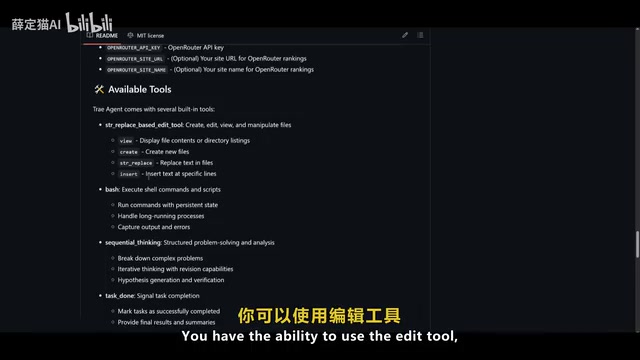
Trae Agent comes with a fairly comprehensive built-in toolkit — this is precisely what distinguishes it from ordinary AI chatbots.
To understand this distinction, you need to grasp the fundamental difference between AI agent architecture and traditional chatbots. Ordinary chatbots follow a single-turn or multi-turn "input-output" conversation pattern: the user asks, the model answers, and the interaction ends there. AI agents, however, possess autonomous planning and action capabilities: upon receiving a high-level goal, they independently decompose it into multiple subtasks, sequentially invoking tools (such as file read/write, command execution, code search, etc.) to complete each step, dynamically adjusting subsequent strategies based on intermediate results. This "think-act-observe" loop (commonly called the ReAct framework) enables agents to handle complex tasks requiring multi-step reasoning and environmental interaction. Trae Agent's "structured thinking" tool is a manifestation of this mechanism — it forces the model to perform explicit reasoning and planning before executing actions, improving task completion accuracy and explainability.
Built-in Tool Capabilities
| Tool Type | Description |
|---|---|
| File operation tools | Create, edit, view, and manage project files |
| Command execution tools | Run command-line instructions and scripts |
| Structured thinking | Methodically decompose complex tasks and complete them step by step |
| Bash modular tools | Support automated workflow orchestration |
Real-World Test Results
Here are two actual test cases demonstrating Trae Agent's real performance:
Test 1: Hello World Script Generation
After setting the working directory to the desktop, the Agent quickly generated a Python script and automatically saved the execution trajectory as a JSON file. The value of this trajectory file goes far beyond simple debugging — in the AI agent field, this mechanism is called "Trajectory Logging." The trajectory file records every step of the Agent's operation in detail: including the prompts received by the model, the thinking process, tools called and their parameters, tool return results, and the model's next decision based on those results. In research scenarios, researchers can analyze trajectory data to understand the Agent's decision patterns, identify failure causes, and optimize prompting strategies; in team collaboration, trajectory files serve as supplementary materials for code review, helping other developers understand the reasoning logic behind AI-generated code; in benchmarking, trajectory records are also key evidence for reproducing and verifying experimental results. The "Lakeview" feature mentioned by the team provides a visual summary of trajectory data, lowering the barrier to reading raw JSON.
Test 2: Minesweeper Game Development
This task was more challenging. The Agent developed a Minesweeper game with easy, medium, and hard difficulty levels in just a few seconds, even adding animation effects. The entire process demonstrated Trae Agent's ability to handle multi-step complex tasks — from project structure setup to code writing to execution verification, all in one seamless flow.
Key Differences from Competitors
The command-line AI coding tool space is currently highly competitive, with Trae Agent, Claude Code, Gemini CLI, and OpenCode each having their own focus. Understanding their differences is essential to choosing the tool that best fits your needs.
Trae Agent vs Claude Code
| Comparison | Trae Agent | Claude Code |
|---|---|---|
| Price | Completely free (MIT license) | Paid subscription |
| System operations | Can execute real system operations in the terminal | Supported but in different ways |
| Automation | Workflow orchestration via Bash and modular tools | Relies on built-in toolchain |
| Reasoning approach | Multi-step structured agent reasoning | Primarily single-turn conversation |
| Interface experience | CLI-focused, weaker GUI | More mature graphical interface |
| Tool ecosystem | Developing | More rich and mature |
Trae Agent vs OpenCode
There's a critical distinction to note here: OpenCode is essentially closer to a pure chat assistant — while it can generate code, it cannot actually execute that code on your system. Trae Agent's core differentiator is precisely this — it can not only write code but also directly run and verify results in your system environment. This closed-loop capability of "code generation + execution verification" is the fundamental advantage of AI agent architecture over traditional chat-based code assistants.
What Does SWE-bench 75.2% Mean?
SWE-bench is a benchmark that evaluates AI tools' ability to resolve real GitHub Issues. Developed by a Princeton University research team in 2023, it's currently one of the most authoritative AI coding capability benchmarks recognized by the industry. It collects real GitHub Issues and corresponding Pull Requests from 12 popular Python open-source projects (such as Django, scikit-learn, sympy, etc.), requiring AI tools to autonomously locate problems, understand code logic, and generate correct patches within the context of a complete code repository. Unlike simple code generation tests, SWE-bench evaluates end-to-end software engineering capabilities — including code retrieval, cross-file understanding, test verification, and more.
Trae Agent achieving a 75.2% resolution rate and topping the leaderboard means it can autonomously fix three-quarters of real software defects — a level that surpasses records previously held by commercial closed-source tools. What's even more noteworthy is that this result was achieved by a completely free open-source tool — something that was hard to imagine before.
Current Limitations and Future Outlook
Despite its impressive performance, Trae Agent as a beta product still has some notable shortcomings:
- Weak graphical interface: The CLI experience is solid, but the barrier is relatively high for developers accustomed to GUIs
- Limited model access: Needs to continuously integrate more LLMs to cover more use cases
- Insufficient plugin ecosystem: Compared to mature competitors, available third-party plugins and tools are still relatively scarce
- Stability to be verified: Edge cases and unknown bugs are inevitable during the beta phase
From an industry perspective, ByteDance's open-sourcing of Trae Agent puts direct competitive pressure on commercial products like Cursor in the AI coding tool space. The combination of "free + open-source + SWE-bench #1" makes Trae Agent an impossible-to-ignore new player in the current AI coding tool ecosystem.
Summary and recommendations: If you prefer working in the terminal and want a free AI assistant that can truly execute system operations, Trae Agent is worth trying. If you prioritize graphical interfaces and a mature tool ecosystem, Claude Code remains the safer choice for now. Regardless, the competition between these tools is accelerating progress across the entire AI coding field, and ultimately every developer benefits.
Related articles
 Product Reviews
The Programmer's Desk Setup Guide: Building a Workspace That Feels Like Home
Discover how programmers build productive, comfortable workspaces. From multi-monitor setups to ergonomic design, explore the desk philosophy that drives focus and flow.
 Product Reviews
Qoder vs Cursor Real-World Comparison: Which $20/Month AI IDE Is Better?
Hands-on comparison of Qoder vs Cursor AI IDEs: Agent autonomy, human interaction count, and architecture decisions. Qoder needed only 2 interactions vs Cursor's 8.
 Product Reviews
Cursor Cloud Agent Demo: Eliminating Bottlenecks Across the Entire Software Development Lifecycle
Deep analysis of Cursor's Cloud Agent demo showing how cloud VMs, automated test artifacts, and a full-chain control plane systematically eliminate human bottlenecks across the software development lifecycle.