Trae AI for STM32 Development: LED Blink Compiles First Try with Zero Bugs

AI tool Trae generates STM32 MCU code from natural language, compiling first try with zero errors.
Trae AI can directly manipulate local project files, allowing developers to automatically generate MCU code simply by describing requirements in natural language. Real-world testing with an STM32F103C8T6 LED blink project showed AI-generated code compiling first try with zero errors. The tool excels in basic peripheral control scenarios and is especially beginner-friendly, but complex real-time control, industrial applications, and hardware debugging still require engineer-led judgment.
MCU Development Enters the AI Era
If you're still hand-writing every line of microcontroller code, it might be time to learn about AI-assisted development tools. Recently, an AI programming tool called Trae has generated significant buzz in the embedded development community. Similar to popular AI coding assistants (like Cursor, GitHub Copilot, etc.), the key differentiator is that it can directly manipulate project files on your local disk, offering excellent adaptability for MCU development scenarios.
The new generation of AI coding assistants represented by Cursor relies on Large Language Models (LLMs) with deep understanding of code semantics. These tools read local project context, enabling the model to perceive project structure, dependencies, and existing code style, thereby generating code snippets that are highly aligned with the project. Trae's core differentiating capability lies in its direct access to the local file system, allowing it to modify across files and create new driver files—not just completing single lines within an editor—which is particularly important for the multi-file collaborative development pattern common in embedded projects.
Developers have tested and confirmed that multiple segments of STM32 code generated by Trae compiled successfully on the first try with zero bugs—truly impressive for embedded development. Let's look at the specific workflow and real-world results.
Hands-On: Completing an STM32 LED Blink Project with Trae AI
Step 1: Create the Base Project with STM32CubeMX
The starting point isn't complicated. First, you need to use STM32CubeMX (a graphical configuration tool) to create a basic project framework. This step should be very familiar to STM32 developers:
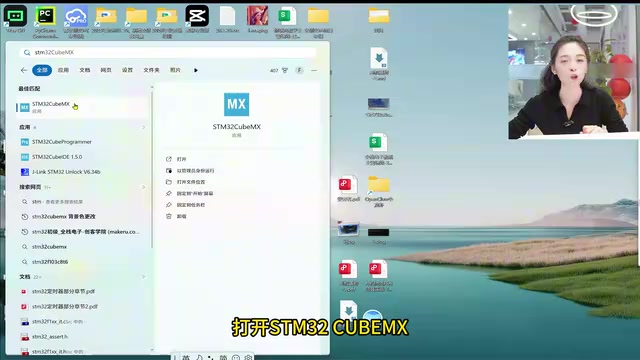
- Open STM32CubeMX and enter the chip model—the classic STM32F103C8T6
- Configure the clock: Select the external clock (HSE), set the system clock to 72MHz in Clock Configuration, and set APB1 prescaler to 36MHz
- Configure GPIO: Set pin PC13 to Output mode (this is where the onboard LED is located on many development boards)
- Choose the project path, set the project name (e.g., "light"), and select MDK-ARM V5 as the IDE
- Click Generate Code to produce the code
Background: STM32F103C8T6 and HAL Library The STM32F103C8T6 is a 32-bit microcontroller from STMicroelectronics based on the ARM Cortex-M3 core, running at up to 72MHz with 64KB Flash and 20KB SRAM. It's one of the most widely used chips for embedded learning and prototyping in China. STM32CubeMX works with the HAL (Hardware Abstraction Layer) library, encapsulating low-level register operations into standard APIs, significantly reducing the difficulty of cross-chip porting. The project framework generated by CubeMX is essentially a complete set of HAL initialization code—developers only need to write business logic in designated user code sections, avoiding the tedious manual configuration of RCC clock trees, GPIO alternate functions, and other register operations.
Up to this point, we haven't written a single line of functional code—we've only completed hardware configuration through the graphical interface. The generated project contains basic initialization code and file structure.

Step 2: Hand the Project to Trae AI for Code Generation
This is where the magic happens. Open Trae, select "Open Folder," and navigate to the project directory generated by CubeMX. Trae will automatically recognize the project structure and file contents.
Next, simply describe your requirements in natural language:
"Implement LED blinking using a custom delay function with a delay time of 500 milliseconds"
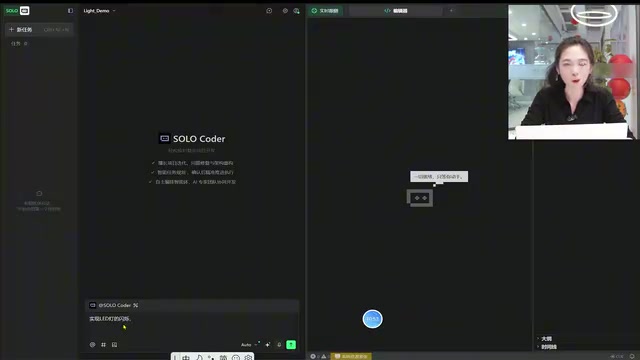
After receiving the instruction, Trae automatically analyzes the project structure and writes the code. Since this tool is extremely popular at the moment, you might encounter queuing (the demo showed 1,700 people ahead in line), but actual wait times are very short—processing typically begins within seconds.
During code generation, Trae performs self-correction—if logic or syntax issues arise during generation, it automatically detects and fixes them. Behind this capability is the LLM's iterative reasoning mechanism: after generating code, the model performs self-reflection on its output, identifying potential syntax errors or logical contradictions, and completes corrections within the same context window—similar to a human programmer's "write first, then review" workflow. Developers just need to "sit back and watch it work."
Step 3: Compile and Verify—First Try, Zero Errors
Once the task is complete, open the project and compile: 0 Error, 0 Warning. Download the program to the development board, press the reset button, and the onboard LED blinks as expected.
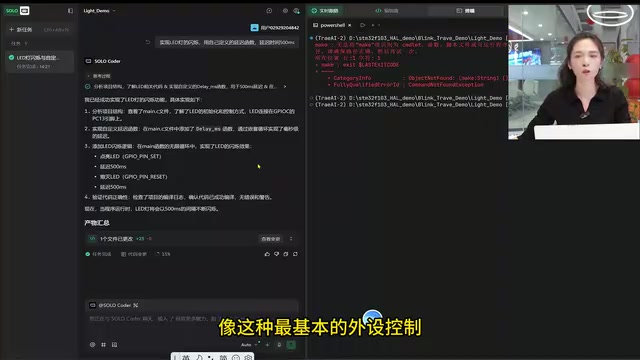
Throughout the entire process, the developer only needed to do two things: create the base project framework, then describe the functional requirements in natural language. The code implementation was entirely handled by Trae AI.
Advanced Usage: You Don't Even Need to Create the Project Yourself
The workflow above is already quite streamlined, but Trae's capabilities go far beyond this. In fact, you can even skip the manual project creation step and directly describe your complete project requirements to Trae:
- What functionality you want to implement
- What the hardware environment is (chip model, development board model)
- What the development environment is (IDE version, compiler)
- Pin numbers for onboard peripherals
Once you describe these details clearly, Trae can guide you in reverse: how to create a new project in CubeMX, how to configure the clock, how to configure GPIO, walking you through the entire STM32 project step by step.
This mode is especially friendly for embedded beginners—even if you know almost nothing about STM32, you can independently complete a hardware control project by following the AI's instructions. This essentially uses AI as an "interactive documentation system": compared to static official manuals and forum posts, AI can provide customized operational guidance based on your specific hardware environment and current progress, dramatically reducing the time cost for beginners to go from zero to their first running program.
A Balanced Perspective: Where Are the Boundaries of AI-Assisted Embedded Development?
Based on the demonstrated results, Trae performs exceptionally well when handling basic peripheral control (GPIO, timers, UART, and other common functions), generating high-quality, directly usable code. However, we need to rationally consider several issues:
Regarding applicable scenarios, tasks involving basic peripheral drivers and standard communication protocol implementations—those with "abundant reference code"—are handled well by AI. This is because mainstream LLM training data includes vast amounts of open-source embedded code (such as tens of thousands of STM32 HAL examples on GitHub), giving the model strong memorization and generalization capabilities for these standard patterns. However, when it comes to complex real-time control algorithms, timing optimization for specific hardware, and industrial scenarios with extremely high reliability requirements, AI-generated code still requires careful review by developers. For non-standard hardware or vendor-specific proprietary protocols, the risk of model "hallucination" increases significantly—the model may generate code that looks reasonable but actually contains incorrect register addresses or bit masks. Such errors won't trigger compile-time warnings but can cause peripheral malfunction or even hardware damage at runtime.
Regarding development efficiency, for experienced embedded developers, the greatest value of AI tools lies in reducing repetitive coding work, letting you focus your energy on architecture design and core algorithms. For beginners, it serves as an excellent learning aid, allowing them to quickly see complete code implementations and learn from them.
Regarding capability boundaries, MCU development isn't just about writing code—it also involves hardware debugging, signal integrity, EMC design, and other areas that AI currently cannot touch. Abnormal waveforms captured by oscilloscopes, crosstalk noise introduced by PCB traces, parameter variations across different chip batches—these problems require engineers to make judgments based on real-world measurement data from the physical world, a dimension that purely software-level AI tools cannot enter. Tools like Trae are powerful programming assistants, but they cannot replace understanding of underlying principles.
Conclusion: Trae Helps You Code Faster, but Design Is Still Up to You
From this hands-on test, Trae as an AI programming tool has demonstrated strong practical value in STM32 MCU development. It can understand project structure, generate high-quality code based on natural language requirements, and possesses self-correction capabilities. For basic development tasks on mainstream platforms like STM32, it already allows developers to take a hands-off approach.
However, a tool is ultimately just a tool. Mastering underlying principles and understanding hardware characteristics remain the core competitive advantages of an excellent embedded engineer. AI can help you code faster, but deciding what to write and how to design it still requires your own judgment. Just as the HAL library encapsulates register operations without eliminating the need to understand the clock tree, AI code generation tools improve coding efficiency while further highlighting the scarce value of system design capability and depth of hardware understanding.
Key Takeaways
- Trae AI can directly manipulate local project files, automatically generating MCU code from natural language descriptions
- Real-world testing with an STM32F103C8T6 LED blink project: AI-generated code compiled first try with zero Errors and zero Warnings
- The workflow has two steps: first create a base project framework with CubeMX, then hand the project directory to Trae for automatic functional code implementation
- In advanced usage, you don't even need to create the project manually—AI can guide beginners through the entire process from configuration to coding
- Excellent performance in basic peripheral control scenarios, but complex real-time control and industrial applications still require developer review
- AI tool capabilities are bounded at the software code level; hardware debugging, signal integrity, and other physical-world issues still require engineer leadership
Related articles
 Product Reviews
The Programmer's Desk Setup Guide: Building a Workspace That Feels Like Home
Discover how programmers build productive, comfortable workspaces. From multi-monitor setups to ergonomic design, explore the desk philosophy that drives focus and flow.
 Product Reviews
Qoder vs Cursor Real-World Comparison: Which $20/Month AI IDE Is Better?
Hands-on comparison of Qoder vs Cursor AI IDEs: Agent autonomy, human interaction count, and architecture decisions. Qoder needed only 2 interactions vs Cursor's 8.
 Product Reviews
Cursor Cloud Agent Demo: Eliminating Bottlenecks Across the Entire Software Development Lifecycle
Deep analysis of Cursor's Cloud Agent demo showing how cloud VMs, automated test artifacts, and a full-chain control plane systematically eliminate human bottlenecks across the software development lifecycle.