Trae Builder Hands-On Review: Can ByteDance's AI IDE Generate Full-Stack Projects in One Click?
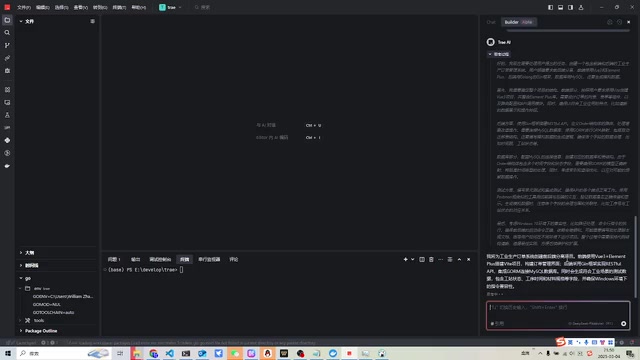
Hands-on test of ByteDance's AI IDE Trae generating a full-stack project with its Builder feature
This article provides a hands-on review of ByteDance's AI-native IDE Trae and its Builder feature, testing its project-level code generation capabilities through a Vue+Go+MySQL full-stack project (industrial production order management system). Testing revealed that Trae, powered by DeepSeek R1, demonstrates solid requirement understanding and architectural planning abilities, but exhibits context continuity issues such as directory switching during execution—reflecting typical state management deficiencies in AI Agent systems.
Introduction
ByteDance recently launched a brand-new AI IDE called Trae, touted as China's first AI-native integrated development environment. Compared to AI plugins in VS Code (such as CodeGPT, Continue, etc.), Trae's biggest selling point is its Builder feature: rather than being limited to conversational code snippet generation, it can generate entire projects directly from requirements.
AI-native IDEs differ fundamentally from traditional IDE plugins at the architectural level. Traditional approaches like VS Code + GitHub Copilot or Continue essentially layer a language model invocation layer on top of a mature editor. The AI's perception is limited to the plugin's context window—typically only able to "see" the currently open file or manually selected code snippets. AI-native IDEs, on the other hand, embed large model capabilities into the core scheduling logic of the entire development environment, theoretically perceiving project file trees, terminal states, build logs, dependency relationships, and other global information, enabling cross-file, cross-layer collaborative operations. This architectural difference means the two approaches have fundamentally different ceilings for "project-level tasks"—the plugin model excels at local completions, while the native model is what's actually capable of driving end-to-end project generation workflows.
This article tests Trae's Builder feature through an actual full-stack mini-project (Vue + Go + MySQL) to see how it truly performs in real development scenarios.
Test Plan Design
Requirements Description
The test chose a typical CRUD scenario—an industrial production order management system, with the following specific requirements:
- System Environment: Windows 10
- Frontend: Vue + Element UI
- Backend: Go (Gin framework)
- Database: MySQL
- Features: Order creation, editing, modification, deletion, with simulated test data
This is a very basic full-stack demo. If Trae can run it successfully, it meets the baseline expectation.
Trae Builder Feature Hands-On Process
Thinking and Planning Phase
Trae calls the DeepSeekAd R1 large model under the hood. After submitting the requirements, it first displayed a detailed thinking process, demonstrating a solid understanding of the requirements.
DeepSeek R1 is a reasoning-enhanced large language model released by DeepSeek in early 2025. Its core feature is that before generating the final answer, the model outputs a visible "Thinking Process." This mechanism originates from a reinforcement learning training paradigm—the model learns to perform explicit intermediate step derivation before answering through reward signals from numerous reasoning tasks. Unlike the implicit reasoning chains used by OpenAI's o1/o3 series, R1 fully exposes the thinking process to users. In programming scenarios, this means developers can observe how the AI decomposes requirements, selects the tech stack, and plans module dependencies, allowing them to judge whether its understanding is accurate and intervene early for corrections, rather than discovering directional errors only after code generation is complete.
From a developer's perspective, R1's thinking chain display is a highly valuable feature—it not only validates whether the AI correctly understood the requirements but also helps developers expand their own architectural thinking.
Project Creation and Dependency Installation
Trae's Builder feature falls within the "AI Agent" category in technical terms. Its workflow relies on Tool Use / Function Calling capabilities: the model no longer just outputs text but can invoke a predefined toolset, including file system operations, terminal command execution (npm install, go mod tidy, etc.), error log reading, and more. The entire process forms a "perceive-plan-execute-feedback" closed loop, an engineering implementation of the ReAct (Reasoning + Acting) framework, corresponding to Trae's working pattern: output instruction → wait for execution → read results → continue thinking. This is more automated than purely conversational AI assistants.
However, in actual execution, the first problem appeared:
- Trae created the Vite frontend framework but didn't automatically switch to the frontend directory before starting dependency installation, requiring a manual cd
- When creating the backend, a similar directory issue occurred—it attempted to operate within the backend folder without creating it first
Although these are minor issues, they reflect that Trae still needs optimization in instruction context continuity. Essentially, this is a context management deficiency in the Agent's maintenance of execution state (Working Directory State), a typical pain point for such systems.

Code Generation Phase
After dependency installation was complete, Trae began generating code. The overall architectural approach was sound:
- Create data models (Model)
- Create the main.go file, including routes and database auto-migration
- Create controller methods (CRUD)
- Create frontend views and routes
- Add simulated data
The backend uses Gin, the most mainstream HTTP framework in the Go ecosystem, paired with GORM for database operations. GORM's AutoMigrate feature can automatically create or update database table structures based on Go struct definitions, which is why main.go includes "database auto-migration".
Related articles
 Product Reviews
The Programmer's Desk Setup Guide: Building a Workspace That Feels Like Home
Discover how programmers build productive, comfortable workspaces. From multi-monitor setups to ergonomic design, explore the desk philosophy that drives focus and flow.
 Product Reviews
Qoder vs Cursor Real-World Comparison: Which $20/Month AI IDE Is Better?
Hands-on comparison of Qoder vs Cursor AI IDEs: Agent autonomy, human interaction count, and architecture decisions. Qoder needed only 2 interactions vs Cursor's 8.
 Product Reviews
Cursor Cloud Agent Demo: Eliminating Bottlenecks Across the Entire Software Development Lifecycle
Deep analysis of Cursor's Cloud Agent demo showing how cloud VMs, automated test artifacts, and a full-chain control plane systematically eliminate human bottlenecks across the software development lifecycle.