Trae IDE in Practice: Building a Student Management System from Scratch with AI Conversational Programming

Building a student management system from scratch using Trae IDE's AI conversational programming approach.
This article documents the complete process of using ByteDance's Trae IDE to build a student management system through hand-drawn prototypes and AI dialogue. It covers homepage generation, student list page development, code structure analysis, the distinction between static and dynamic pages, and discusses the proper mindset for leveraging AI programming tools effectively.
Introduction: Project Development in the AI Programming Era
In traditional web development, building a student management system requires hand-writing HTML, CSS, and JavaScript, combined with backend languages and databases—a time-consuming and labor-intensive process. Now, with AI programming tools, we can rapidly generate code through "drawing + conversation," dramatically improving development efficiency.
This article documents a university programming instructor's live stream where they used Trae (an AI IDE launched by ByteDance) to build a student management system from scratch, demonstrating both the practical applications and limitations of AI programming tools in real projects.
Trae is an AI integrated development environment launched by ByteDance in early 2025, positioned as an intelligent programming assistant for developers. Built on Large Language Model (LLM) technology, it can understand natural language instructions and generate corresponding code. In the AI IDE space, Trae's competitors include Microsoft's GitHub Copilot (integrated into VS Code), Cursor (an AI-first IDE based on VS Code), and Google's Project IDX. The core capability of these tools lies in transforming developer intent (described through natural language or images) into executable code, essentially shifting "programming" from "writing code by hand" to "describing requirements + reviewing code."
Project Preparation: Design Before Coding
The Importance of Hand-Drawn Prototypes
The first step in developing any project isn't writing code—it's design. The instructor emphasized a core principle: Draw what you want it to look like first, then hand it to AI for coding.
The specific steps are:
- Create a project folder on your local disk (e.g.,
student_manager) - Hand-draw page prototypes to clarify the interface layout
- Submit the prototype drawings as references to the AI
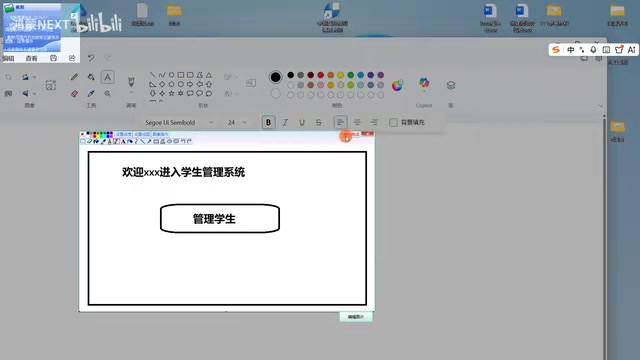
The homepage design is very simple: a welcome title (displaying the logged-in username), the text "Student Management System," and a "Manage Students" button. This design-first-then-implement approach remains equally important even in the AI-assisted programming era.
Hand-drawn prototypes fall under the category of "Low-fidelity Prototypes" in software engineering. In traditional development workflows, product managers typically use professional tools like Axure, Figma, or Sketch to create high-fidelity prototypes before handing them to development teams. In AI programming scenarios, hand-drawn prototypes have gained new life—multimodal large models (such as GPT-4V, Claude, etc.) can "understand" hand-drawn sketches and interpret the layout intent within them. This means developers don't need to master professional design tools; they only need to sketch out the interface framework with pen and paper, and AI can transform it into structured HTML/CSS code. This approach is particularly suitable for scenarios where you want to quickly validate ideas.
AI Conversational Development with Trae IDE
Choosing Between IDE Mode and SOU Mode
Trae offers two working modes:
- SOU Mode: Designed for users without programming experience, with simpler operations
- IDE Mode: Designed for developers with programming foundations, allowing precise control over every feature detail
SOU Mode (sometimes called Builder Mode or No-Code Mode) draws its design philosophy from Low-Code/No-Code platforms, where users build applications through visual operations and natural language descriptions without touching underlying code. IDE Mode retains the full capabilities of a traditional integrated development environment—code editor, file management, terminal, debugging tools, etc.—with AI embedded as a "copilot." The core difference between the two modes lies in control granularity: SOU Mode is suitable for quickly building MVPs (Minimum Viable Products), while IDE Mode allows developers to review and modify every line of code, making it suitable for scenarios requiring precise control over code quality and architecture.
The instructor chose IDE Mode because it enables more precise control over every element and feature of the software. After opening Trae, select the project folder (student_manager), trust the workspace, and you can begin AI conversational development.
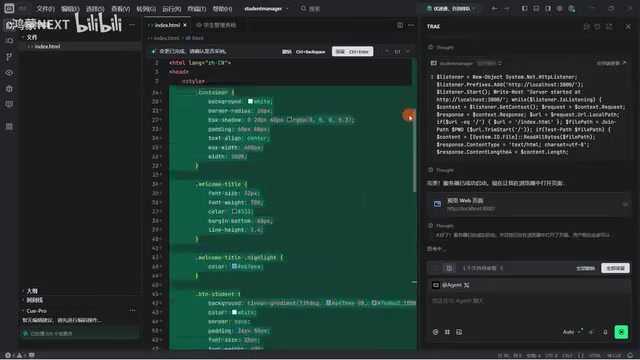
Step 1: Generate the Homepage via Prompt
In the AI dialog box, enter the prompt:
"Based on the reference image, create an HTML page for me and add some styles to beautify it"
Upload the hand-drawn prototype at the same time, and the AI automatically generates a complete index.html file, including HTML structure and CSS styles. The entire process requires no manual code writing.
Step 2: Generate the Student List Page
Next, the second page needs to be designed—a student information table page. The instructor again hand-drew a prototype containing the following fields: student ID, name, age, class, home address, and gender, filled with sample data (Zhang San, Li Si, etc.).
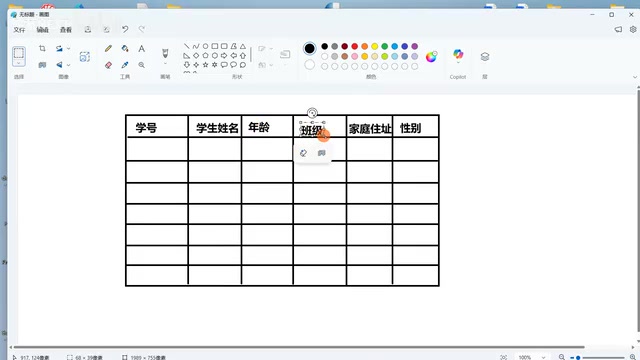
Using Trae's "Select Element" feature, after selecting the button on the homepage, enter the prompt:
"Clicking the button should navigate to another HTML page. The page content should reference the image above, and add some styles for beautification"
The AI automatically completed:
- Creating the
student.htmlpage - Writing the table structure and styles
- Adding a click event to the homepage button (implementing page navigation via
window.location.href) - Adding a "Return to Homepage" function
Key Technical Analysis
Code Structure Explanation for AI-Generated Code
The AI-generated code contains several core parts:
- Style tags: Control page layout, colors, alignment, and other styles
- H1/H2 tags: Control heading text sizes
- Button + onclick event: Implement page navigation
- window.location.href: A property of the BOM (Browser Object Model) used to change the page the current window points to
It's worth noting that window.location.href strictly belongs to the BOM (Browser Object Model) interface, not the DOM (Document Object Model). The DOM is responsible for describing the tree structure of HTML documents, while the BOM provides the ability to interact with the browser window, including page navigation, history, screen information, etc. When JavaScript executes window.location.href = 'student.html', the browser initiates a new HTTP request (or local file request), loads the target page, and completely replaces the current page content. This is fundamentally different from frontend routing used in modern Single Page Applications (SPAs) like React Router or Vue Router—SPAs dynamically replace partial page content through JavaScript without triggering a full page refresh.
The instructor demonstrated the effect of removing styles to show how the page becomes "ugly," intuitively illustrating the role of CSS styling.

Limitations of Static Pages
The instructor specifically pointed out that what has been created so far are only static pages—data is hardcoded in the HTML. A real project architecture should be:
Database (stores data) → Java program (handles business logic) → Web page (renders display)
The fundamental difference between static pages and dynamic pages lies in the data source. All content on a static page is determined when the HTML file is written, and every user sees exactly the same content; dynamic pages generate content in real-time on the server or client side based on requests, with data typically coming from a database. Transitioning from static pages to a dynamic system requires introducing an entire technology stack: backend frameworks (such as Spring Boot, Django, Express.js) handle HTTP requests and business logic; databases (such as MySQL, PostgreSQL, MongoDB) handle persistent data storage; API interfaces (typically following RESTful or GraphQL specifications) handle data communication between frontend and backend. This is why the instructor emphasized that the current project is just "the tip of the iceberg"—frontend page work typically accounts for only 20%-30% of a complete project.
Each of the three layers has its own responsibility:
- Database: Only responsible for storage, doesn't understand business logic—"you give me something and I store it"
- Java backend: Handles business logic, such as user permission verification, data queries, etc.
- Frontend web pages: Responsible for rendering data—"give me data and I'll make it look nice"
This "Database → Java program → Web page" structure is called Three-tier Architecture in software engineering and is closely related to the MVC (Model-View-Controller) design pattern. Its core idea is "Separation of Concerns": the Presentation Layer handles the user interface, the Business Logic Layer handles core business rules, and the Data Access Layer handles database interaction. The benefit of this layered design is that each layer can be developed, tested, and maintained independently—frontend developers can focus on user experience, backend developers can focus on business logic, and database administrators can focus on data optimization. In modern microservice architectures, this layered thinking is further extended, with each business module potentially having its own independent three-tier structure.
Users cannot directly modify data in the code; they must operate the database through the management system—this is why dynamic data is necessary.
The Right Approach to AI Programming
The instructor repeatedly emphasized one viewpoint: Don't bother learning what AI can do for you; focus on learning what it can't—that's how you'll master things quickly. But they also warned:
"For a complete beginner who hasn't learned anything, trying to use this software directly—I'm telling you, you won't be able to handle it. It's like riding a horse. This is definitely a thoroughbred, but if you've never ridden a horse before, you'll get thrown off immediately."
This means:
- Foundational knowledge is still necessary (HTML structure, DOM concepts, frontend-backend separation thinking)
- AI is an efficiency tool, not a replacement
- Understanding principles enables you to make precise requests to AI
- Learning focus should be on areas AI cannot replace (architecture design, business understanding, requirements analysis)
This viewpoint is highly consistent with current industry consensus. Even the most advanced AI programming tools still heavily depend on developers' professional judgment when facing complex system architecture decisions, cross-module dependency management, performance optimization strategies, security vulnerability detection, and other advanced tasks. AI excels at transforming clear requirements into code implementations, but "formulating the right requirements" itself requires deep technical expertise. As the field of Prompt Engineering reveals: the deeper your understanding of the problem, the more precise your prompts will be, and the higher the quality of AI's output.
Conclusion
Through this student management system hands-on case study, we can see that Trae IDE can indeed compress traditional frontend page development that would take hours into just a few minutes. But this is only the tip of the iceberg for a complete project—subsequent work still requires connecting a Java backend and database to build a truly functional dynamic system.
AI programming tools lower the barrier to coding but raise the requirements for developers' systems thinking and architectural capabilities. Mastering the workflow of "hand-drawn prototype → AI conversational code generation → understand and adjust" is the key to efficiently using AI programming tools.
Key Takeaways
Related articles

Vibe Coding Full-Stack in Practice: AI Programming from Beginner to Enterprise Deployment
From Cursor to Claude Code, this Bilibili AI programming course uses four progressive projects to cover full-stack development, open-source secondary development, and team collaboration. The article analyzes the shock to frontend roles, the efficiency shift from 50 people to 5, and the methodology required for enterprise-grade projects.

David Blaine's Global Quest for Real Magic: From South Africa to Japan and India
David Blaine travels to South Africa, Japan, and India in his Do Not Attempt special, documenting Spinning drivers, black mamba rescuers, iaijutsu masters, and ascetics—exploring the boundary between magic and real human极限 challenges.

Is a Touchscreen MacBook Coming? Vergecast Reveals Apple Executive's Response
Vergecast podcast reveals a conversation between a reporter and Apple executive John Ternus about a touchscreen MacBook and Apple Pencil support. Ternus says iPad is the best device for a stylus, while the reporter bets MacBook will eventually support Apple Pencil.