Trae SOLO 2.0 In-Depth Review: A Full-Workflow AI Development Tool Put to the Test

Trae SOLO 2.0 elevates AI coding tools from assistant plugins to full-workflow autonomous dev engineers.
ByteDance released Trae 2.0 on July 21, 2025, introducing SOLO mode and marking AI coding tools' evolution from plugins and IDEs to full-workflow development. Built on AI Agent architecture and powered by Claude 4, SOLO mode integrates automatic requirements document generation, automated coding, error fixing, built-in browser preview, and one-click Vercel deployment — enabling users to go from requirements input to live application without leaving a single interface, with significantly higher automation than competing tools.
What Trae SOLO 2.0 Brings: From Plugin to Full-Workflow Development Engineer
On July 21, 2025, ByteDance's AI coding tool Trae officially released version 2.0, introducing the brand-new SOLO mode. This isn't just a version update — it represents a paradigm shift for AI coding tools, moving from "assistant plugin" to "full-workflow development engineer."
The official team divides the evolution of AI coding tools into three stages:
- Plugin Stage: Interacting with AI through a web interface, then integrating the output into development tools
- IDE Stage (Trae 1.0): Chatting with AI in a sidebar while viewing generated code in real time
- SOLO Stage (Trae 2.0): A complete development environment integrating command line, documentation, design, development, deployment, and browsing
This three-stage evolution is no coincidence — it's driven by systematic breakthroughs in large language model capabilities. Early GitHub Copilot (2021) was essentially a statistical model based on code completion, relying on Codex pre-trained on massive amounts of open-source code. In the IDE stage, tools like Cursor introduced conversational programming and Codebase Indexing, enabling AI to understand entire project contexts. The core technical breakthrough of the SOLO stage lies in AI Agent architecture — AI no longer just responds to single requests but can autonomously plan tasks, invoke tool chains (terminal, browser, file system), handle intermediate errors, and continuously push toward goals. This shift from "single-step response" to "multi-step autonomous execution" depends on stronger reasoning models and the maturation of Function Calling/Tool Use capabilities.
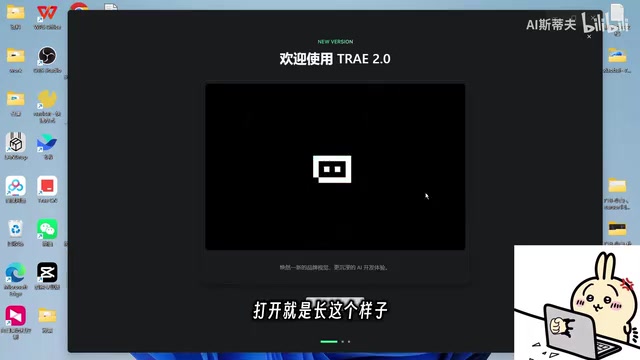
The core philosophy of SOLO mode is to integrate the complete daily development workflow — requirements gathering, page design, architecture design, front-end and back-end development, unit testing, and deployment — all into a single application, allowing AI to truly play the role of a "development engineer" rather than just a code completion tool.
Trae SOLO 2.0 Interface and Feature Layout
Multi-Panel Collaborative Workspace
Trae SOLO 2.0's interface design is built around multi-panel collaboration, featuring the following core areas:
- Chat Panel: The primary interaction area where users input requirements
- Terminal Panel: Displays command-line operations in real time
- Browser Panel: A built-in browser for previewing project results and selecting page elements
- Documentation Panel: Automatically generates and displays requirement documents
- Code Editor: Shows the code-writing process in real time
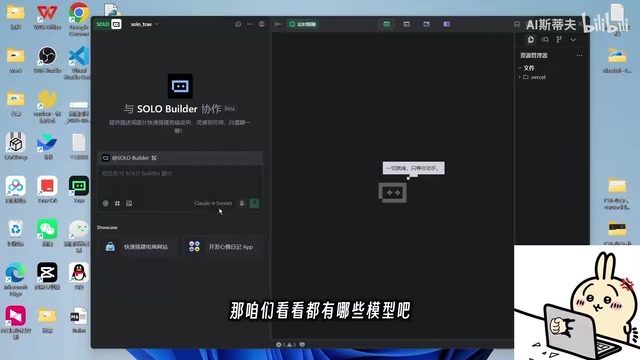
In terms of model support, SOLO mode defaults to Claude 4. Claude 4 is Anthropic's flagship model released in 2025, with significant improvements in code reasoning, multi-file collaborative editing, and self-error correction. Anthropic placed special emphasis on the "Constitutional AI" methodology when training Claude, enabling the model to better follow user intent rather than hallucinate when executing complex tasks. For scenarios like SOLO where AI needs to autonomously execute dozens of steps, model stability and instruction-following ability are critical — a single hallucination in an intermediate step could cause the entire development workflow to fail.
SOLO mode also supports voice input, further lowering the interaction barrier. It's worth noting that SOLO mode is currently available only to Pro users. The Pro plan offers 600 fast-queue requests for super models and unlimited normal-queue requests for premium models.
Brand Visual Refresh
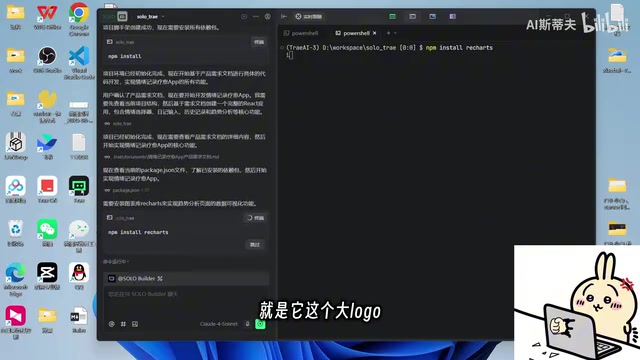
Trae 2.0 simultaneously updated its brand identity, changing the logo from the previous design (shared with the domestic version) to a new green logo, highlighting SOLO mode's positioning as an independent product line.
Hands-On Experience: The Complete Workflow from Requirements to Deployment
Automatic Requirements Document Generation
In our hands-on testing, users only need to input a simple requirement description, and Trae SOLO automatically gets to work. Its first step isn't writing code directly — instead, it generates a complete requirements document. This design closely mirrors real-world development workflows: clarify requirements first, then start building.
After the document is generated, the system pauses and waits for user confirmation. Users can modify and adjust the requirements document or click "Confirm and Start Development" to proceed to the next stage. This rhythm of human-AI collaboration is thoughtfully balanced.
Fully Automated Development Process
After confirming requirements, Trae SOLO automatically performs the following operations:
- Dependency Installation: Automatically executes installation commands in the terminal without requiring user confirmation
- File Creation: Progressively creates all necessary project files
- Code Writing: Displays the writing process in real time in the code editor
- Error Fixing: Automatically repairs issues when generation failures occur
Throughout the entire process, users barely need to intervene. Compared to similar tools like Carry, Trae SOLO's automation level is noticeably higher — Carry requires users to confirm each requirement point step by step, while Trae SOLO drives the process forward autonomously, only requesting user confirmation at critical checkpoints.
Project Preview and Interactive Testing
After development is complete, Trae SOLO automatically launches the project and opens a preview in the built-in browser. In our test, it generated a "Mood Journal" app with features including:
- Recording daily moods with text descriptions
- Support for attaching photos or audio recordings
- History list display
- Emotion analysis statistics (days recorded, average mood score, common emotions, keywords, etc.)

Looking at the actual results, the generated app has an attractive interface and complete functionality, with no console errors — the overall quality is impressive.
One-Click Deployment: Built-in Vercel Integration
One of Trae SOLO's most impressive features is its built-in deployment capability. Through deep integration with Vercel, users simply need to:
- Click the "Deploy" button
- Authorize their Vercel account
- Select the project ("All Projects" permission is recommended)
- Wait for deployment to complete
Vercel is one of the most mainstream cloud platforms for front-end and full-stack application deployment, created by the founding team behind the Next.js framework. Its core advantage lies in "zero-config deployment" — developers just connect a Git repository or upload code, and the platform automatically handles building, CDN distribution, and HTTPS configuration. Vercel uses an Edge Network architecture, deploying applications across multiple global nodes to ensure low-latency access. For AI-generated applications, Vercel supports Static Sites, Server-Side Rendering (SSR), and Serverless Functions among other deployment modes, making it compatible with various tech stacks generated by AI tools. Trae SOLO's decision to deeply integrate Vercel is precisely because of its developer-friendly, minimalist deployment experience, which aligns perfectly with SOLO's product philosophy of "lowering barriers across the entire workflow."
After successful deployment, an online link is generated that anyone can use to access the application directly. From requirements input to application launch, the entire process never requires leaving the Trae SOLO interface.
Trae SOLO 2.0 vs. Cursor and Carry: Competitor Comparison
Differentiated Approach Against Cursor
Cursor, developed by Anysphere, is a deeply customized version of VS Code and currently has the highest penetration rate among professional developers in the AI coding IDE space. Its core technical advantages include: Codebase Indexing (vectorizing the entire codebase to support semantic search), Tab completion (predictive multi-line code completion), and Composer mode (batch editing across files). Cursor's product philosophy is to "augment professional developers" rather than "replace developers" — it assumes users have programming skills, with AI's role being to boost efficiency rather than handle everything end-to-end.
Trae SOLO 2.0, on the other hand, has chosen a more "full-stack
Related articles
 Product Reviews
The Programmer's Desk Setup Guide: Building a Workspace That Feels Like Home
Discover how programmers build productive, comfortable workspaces. From multi-monitor setups to ergonomic design, explore the desk philosophy that drives focus and flow.
 Product Reviews
Qoder vs Cursor Real-World Comparison: Which $20/Month AI IDE Is Better?
Hands-on comparison of Qoder vs Cursor AI IDEs: Agent autonomy, human interaction count, and architecture decisions. Qoder needed only 2 interactions vs Cursor's 8.
 Product Reviews
Cursor Cloud Agent Demo: Eliminating Bottlenecks Across the Entire Software Development Lifecycle
Deep analysis of Cursor's Cloud Agent demo showing how cloud VMs, automated test artifacts, and a full-chain control plane systematically eliminate human bottlenecks across the software development lifecycle.