Trae Solo vs Cursor Real-World Comparison: Which AI Coding Tool Builds a Better Student Management System?

Trae Solo vs Cursor real-world test: both struggle with complex projects, each with distinct strengths
Testing Trae Solo and Cursor with the same Flask student management system project revealed comparable architecture design capabilities but clear differences in code generation: Cursor is extremely fast but has Chinese path compatibility issues, while Trae Solo is slower but offers better self-correction and Chinese environment support. However, both generated systems contained numerous bugs and were unusable out of the box, demonstrating that AI coding tools still struggle with complex projects and that prompt precision and modular development strategies are crucial.
Test Background and Methodology
AI coding tools are evolving at breakneck speed, and many developers are wrestling with a key question: can homegrown Chinese AI coding assistants really compete? This time, we put ByteDance's Trae Solo head-to-head against the well-regarded Cursor, using the same real-world project to see which one performs better in actual development scenarios.
The test project is a Python Flask backend student management system, with complexity comparable to a university graduation project. Flask is one of the most popular lightweight web frameworks in the Python ecosystem, released by Armin Ronacher in 2010. Its core design philosophy is "microframework" — providing only the most basic features like routing, request handling, and template rendering, with additional functionality implemented through extension plugins. Unlike "batteries-included" frameworks like Django, Flask gives developers more freedom, but also means you need to assemble ORM, form validation, user authentication, and other components yourself. Here are the specific requirements:
- SQLite database (to reduce deployment complexity) — SQLite is an embedded database that requires no separate server process, stores data as a single file, and is ideal for prototyping and small-to-medium projects
- Bootstrap frontend without frontend-backend separation — Bootstrap is Twitter's open-source frontend UI framework that provides a responsive grid system and numerous pre-built components, enabling backend developers to quickly build visually acceptable interfaces
- No Redis, Celery, JWT, Docker, or other middleware
- Features include: user authentication/login, student information management, course management, grade entry, examination system, announcement system, etc.
This tech stack combination (Flask + SQLite + Bootstrap) is one of the most common choices for university graduation projects — moderate in complexity, capable of demonstrating complete MVC architectural thinking without adding deployment difficulty through excessive middleware.
Both tools used exactly the same prompts to ensure the comparison was conducted on equal footing.
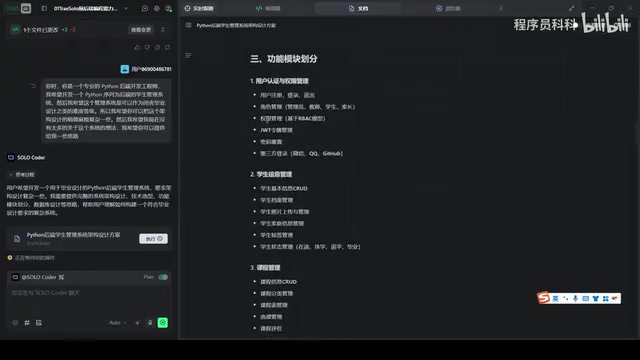
Requirements Discussion and Architecture Design Phase
Trae Solo's Plan Mode Performance
In Trae Solo, we used Plan Mode to communicate requirements with the AI. Plan Mode is essentially a "plan first, execute later" AI interaction paradigm. In traditional AI coding interactions, the AI generates code directly after user input — this approach is highly efficient for simple tasks but can lead to architectural chaos and module coupling in complex projects. Plan Mode splits the development workflow into three stages: "requirement understanding → architecture design → code generation." The AI first outputs a structured development plan for the user to review and modify, then enters the code generation phase only after confirmation. This design borrows from the "waterfall model" in software engineering and aligns with the popular Chain-of-Thought reasoning strategy in the large language model field — letting the model "think clearly" before "writing code" typically produces significantly better output quality for complex tasks.
The first version of the prompt was fairly concise, essentially saying "You are a professional Python backend developer, and I want to develop a graduation-project-level student management system," then asking the AI to propose its approach.
The AI quickly returned a first draft covering modules for authentication/login, student information, course information, grade entry, attendance system, and announcement system. However, the proposal defaulted to including Redis, Docker, JWT, and other heavyweight technologies that needed manual adjustment. This phenomenon reflects the distribution bias toward enterprise-level projects in LLM training data — Redis is commonly used for session caching and high-frequency read/write scenarios, JWT (JSON Web Token) is a stateless authentication solution suited for distributed microservice architectures, and Docker is a containerized deployment tool. These technologies are indeed best practices in production environments, but they're over-engineering for a graduation-project-level monolithic application. AI models lack precise judgment about project scale and tend to output "comprehensive" solutions — a typical characteristic of current AI coding tools.
After one round of revisions, Trae Solo produced a remarkably complete development document, including:
- Functional module breakdown
- Database table design (multiple tables, sufficient for a graduation defense)
- Key technical point explanations
- Complete project directory structure
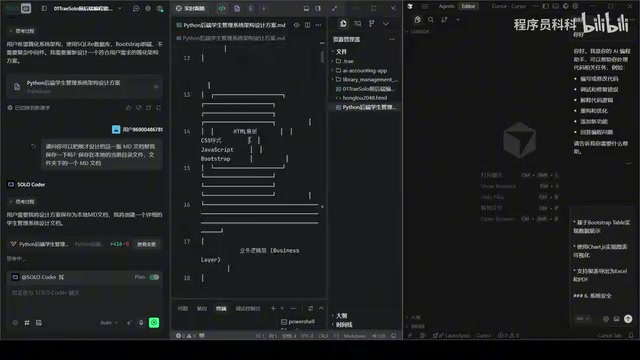
Overall, the architectural design in this document was quite reasonable, and we saved it as an MD file to serve as the development reference going forward.
Cursor's Architecture Design Response
Cursor received the same prompts and similarly entered a design phase. While Cursor doesn't have an explicit Plan Mode, its Agent mode also supports multi-turn conversational requirement refinement. At the architecture design stage, the quality gap between the two was minimal — both produced well-structured, logically sound system architecture proposals.
Code Generation Speed Comparison: Cursor Is Faster but Trae Solo Is More Stable
This is where the differences between Trae Solo and Cursor were most apparent.
Cursor: Blazing Speed but Hidden Pitfalls
Cursor's code generation speed can only be described as "lightning fast." While Trae Solo was still processing its second module, Cursor had already finished generating code for the entire project.
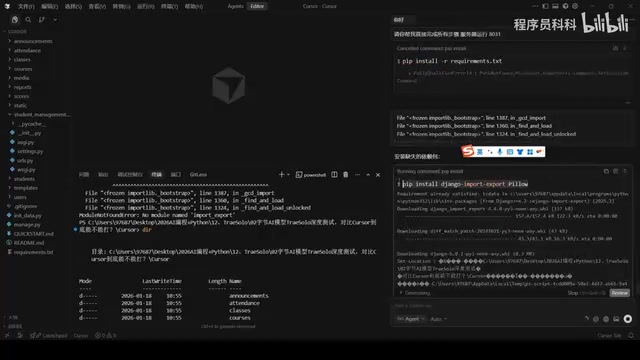
However, speed doesn't guarantee quality. After generation was complete, Cursor ran into problems during dependency installation and database migration — it failed to recognize directory paths containing Chinese characters, causing migration errors. The root cause involves the interaction between character encoding and the operating system's file system. Windows file paths default to GBK or GB2312 encoding, while most modern programming tools and the Python interpreter use UTF-8 internally. When paths contain Chinese characters, if the tool doesn't properly handle encoding conversion when concatenating paths, reading configuration files, or executing shell commands, path parsing fails. This issue is particularly common in tools developed outside China, because English development environments typically only contain ASCII characters in paths, and developers easily overlook multi-byte character compatibility testing. Notably, this issue typically doesn't occur on macOS and Linux systems, as both natively use UTF-8 encoding.
Trae Solo: Slower Pace but More Controllable Process
Trae Solo's development speed was noticeably slower than Cursor's, but it ultimately completed code generation for the entire project. During dependency installation, it similarly encountered slow downloads from international pip sources, requiring manual switching to domestic mirror sources. As a ByteDance product, Trae Solo treated Chinese environments as a primary testing scenario during R&D, resulting in better Chinese path compatibility.
Actual Runtime Results: Can the Code Actually Run?
Writing code is only the first step — what matters is whether it runs properly and whether the features are complete.
Cursor's Generated System: Basic Functions Don't Work
Cursor's student management system ran on port 8031 and exposed numerous issues after startup:
- Extremely cumbersome registration flow: Password validation rules were overly strict, resulting in poor user experience
- Missing core functionality: Basic features like login and CRUD operations didn't work properly
- Search functionality broken: No results returned after adding data
- Rough frontend styling: The interface had virtually no design consideration and looked bad
Honestly, when even basic login and registration don't work, there's essentially no point in debugging the remaining modules.
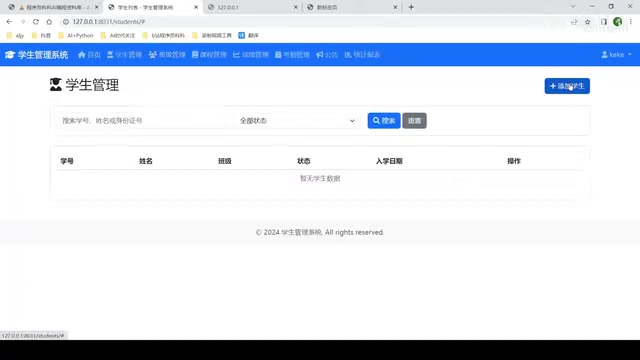
Trae Solo's Generated System: Some Highlights but Plenty of Bugs
Trae Solo's system ran on port 8032, and the situation wasn't much better:
- Missing homepage template: Even the basic Home page wasn't generated
- Multiple inaccessible pages: Course, grade, and exam modules threw errors when clicked
- High bug count: After registration and login, users could only access their profile — all other functional modules were unusable
However, Trae Solo had one noteworthy highlight — it could automatically detect some bugs and attempt to fix them. For example, it discovered the missing Home page on its own and proactively fixed it. This self-correction ability is genuinely useful in real development. Behind this is a "generate-verify-fix" feedback loop mechanism: after generating code, the AI attempts execution in a sandbox environment or performs static analysis, and when it detects runtime errors (such as a TemplateNotFound exception caused by a missing template file), it automatically feeds the error information back to the LLM as context, triggering a new round of code repair generation. This mechanism is known in academia as Self-Debugging or Self-Repair, and has been an important research direction in AI programming since 2023. Research from both OpenAI and Google DeepMind has validated that this iterative repair strategy significantly improves first-pass code success rates. However, current self-correction capabilities remain limited to explicitly capturable errors (like exception stack traces) — for logic errors, data consistency issues, and other hidden bugs, AI still struggles to independently discover and fix them.
Deep Analysis: Why Did Both AI Coding Tools Stumble?
Prompt Precision Directly Determines Output Quality
In this test, the prompts were written fairly loosely, without detailed specifications for frontend styling, interaction logic, or error handling. This is an important lesson: the output quality of AI coding tools is highly dependent on prompt precision.
The impact of prompt quality on AI output has been systematically studied in academia as "Prompt Engineering." In AI coding scenarios, a high-quality prompt typically needs to include: clear tech stack constraints (specifying Flask version, Python version), detailed feature descriptions (including normal flows and error handling), specific UI/UX requirements (form fields, page layouts), and expected code style (whether to use Blueprint patterns, whether to follow RESTful conventions). Research shows that decomposing complex requirements into multiple small tasks (the "divide and conquer" strategy) achieves a success rate over 40% higher than submitting complete requirements all at once. Additionally, Few-shot Prompting (providing example code snippets in the prompt) and role-setting have been proven to effectively improve output quality.
For complex projects with multiple functional modules, one or two sentences of description are far from sufficient. A better approach is to provide detailed requirements module by module and phase by phase, generating and debugging each module separately.
Complex Projects Remain AI Coding's Weak Spot
When project complexity rises to include multiple functional modules, multiple database tables, and a complete user authentication system, current AI coding tools all face the dilemma of "more features, more bugs." This isn't a problem with any single tool — it's the current state of the entire AI-assisted programming field. Although LLM context windows continue to expand (from the original 4K tokens to today's 128K or even longer), when generating cross-file, cross-module code, models still struggle to maintain logical consistency at a global level. A database field name, API endpoint path, or variable naming defined in one module might become inconsistent in another module, and these inconsistencies are a primary reason systems fail to run properly.
Key Differences Between Trae Solo and Cursor at a Glance
| Comparison Dimension | Cursor | Trae Solo |
|---|---|---|
| Code generation speed | Extremely fast | Slower |
| Architecture design ability | Good | Good |
| Code completeness | Low | Low |
| Self-correction ability | Average | Better |
| Chinese path compatibility | Poor | Normal |
| Actual usability | Low | Low |
Conclusion and Practical Recommendations
Based on this in-depth real-world test, both Trae Solo and Cursor performed inadequately when handling graduation-project-level complex projects. Cursor wins on generation speed, while Trae Solo wins on self-detection and Chinese environment compatibility, but both generated code riddled with bugs that can't be used out of the box.
Here are some practical tips for developers:
- Don't expect to generate a complete, working complex project in one shot — AI coding tools are currently better suited as assistants rather than human replacements
- Write sufficiently detailed prompts — guide the AI to develop step by step, module by module, using a divide-and-conquer strategy to decompose complex requirements into multiple independent small tasks
- Both tools handle simple projects well — complex projects still require significant manual intervention and debugging
- As a Chinese-developed tool, Trae Solo has a natural advantage in Chinese development environment compatibility and is worth watching in future versions
- Leverage AI's self-correction ability — when generated code produces errors, feeding complete error stack traces back to the AI often yields more precise fixes than regenerating from scratch
Overall, AI coding tools are still in the "usable but not quite good enough" stage, with a considerable distance to go before truly replacing human development. Which tool you choose depends on whether you prioritize speed or stability — but most importantly, write better prompts.
Related articles
 Product Reviews
The Programmer's Desk Setup Guide: Building a Workspace That Feels Like Home
Discover how programmers build productive, comfortable workspaces. From multi-monitor setups to ergonomic design, explore the desk philosophy that drives focus and flow.
 Product Reviews
Qoder vs Cursor Real-World Comparison: Which $20/Month AI IDE Is Better?
Hands-on comparison of Qoder vs Cursor AI IDEs: Agent autonomy, human interaction count, and architecture decisions. Qoder needed only 2 interactions vs Cursor's 8.
 Product Reviews
Cursor Cloud Agent Demo: Eliminating Bottlenecks Across the Entire Software Development Lifecycle
Deep analysis of Cursor's Cloud Agent demo showing how cloud VMs, automated test artifacts, and a full-chain control plane systematically eliminate human bottlenecks across the software development lifecycle.