Troubleshooting Guide: Comet Browser Can't Access LAN Devices After Update

Comet browser's v151 update blocks LAN access due to Chromium's Private Network Access security policy.
After updating to version 151, Perplexity's Comet browser blocks access to LAN self-hosted services like Plex and Proxmox. The issue stems from Chromium's Private Network Access (PNA) security mechanism, not macOS permissions. Solutions include disabling related chrome://flags, configuring HTTPS with local certificates, or using reverse proxies with local domain names.
The Problem: LAN Services Suddenly Unreachable After Comet Update
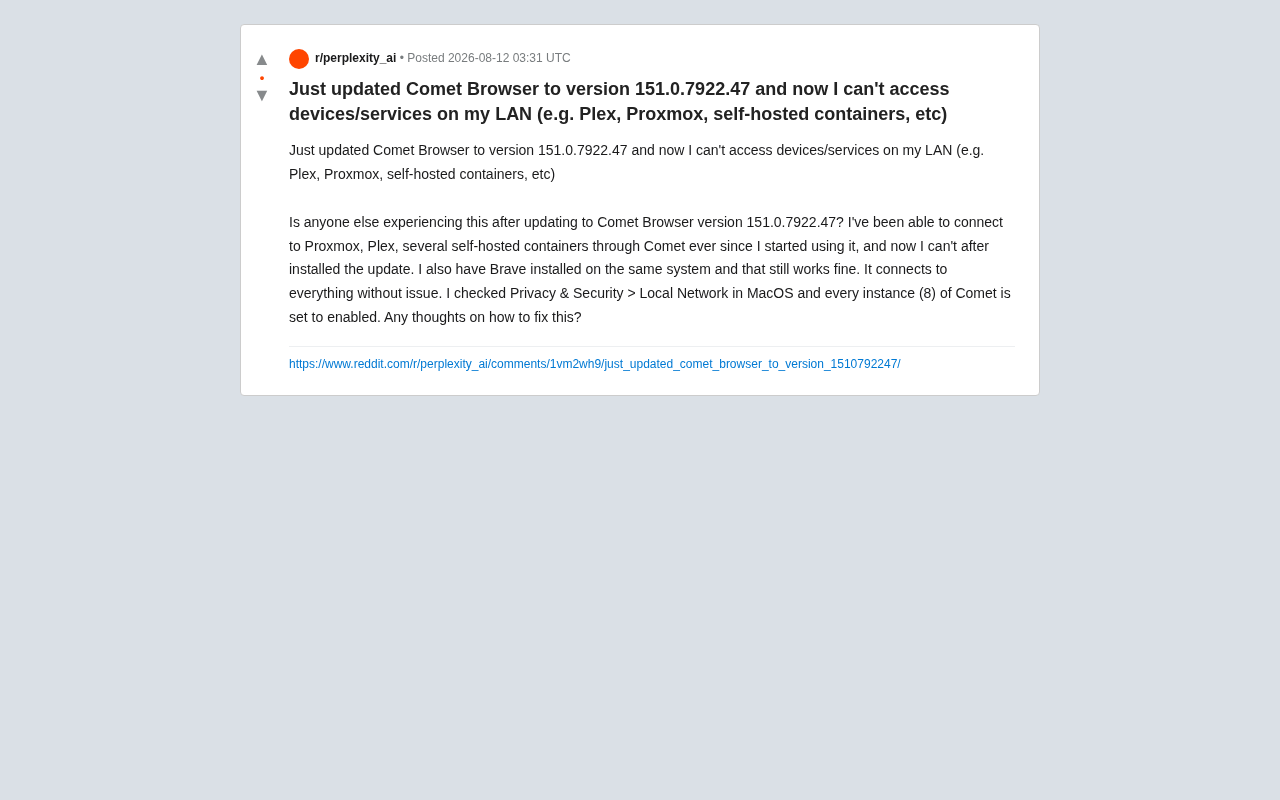
Recently, after Perplexity's AI browser Comet updated to version 151.0.7922.47, some users on Reddit reported a frustrating issue: the browser could no longer access self-hosted services and devices on their local area network (LAN).
Comet is an AI-native browser launched by AI search engine company Perplexity in 2025, built on the Chromium engine with deep integration of Perplexity's AI search and Q&A capabilities. Its goal is to redefine the browsing experience by enabling users to get AI-assisted information synthesis and answers while browsing the web. As an emerging product, Comet needs to rapidly iterate on features while keeping up with upstream Chromium security updates—this dual pressure sometimes leads to unexpected compatibility issues in certain use cases.
According to the user's description, before the update, they had been accessing multiple local services through Comet without any issues, including:
- Plex media server
- Proxmox virtualization management platform
- Multiple self-hosted containers
Plex is a popular personal media server software that allows users to build their own streaming platform on their home network to manage and play movies, music, and other media files. Proxmox VE (Virtual Environment) is an open-source enterprise-grade virtualization management platform based on KVM and LXC technologies, widely used in homelabs and small-to-medium businesses for server virtualization management. Self-hosted containers typically refer to various services deployed using containerization technologies like Docker or Podman, such as password managers (Vaultwarden), note-taking apps (Outline), smart home dashboards (Home Assistant), and more. These services form the "digital sovereignty" infrastructure for tech enthusiasts, allowing them to control their own data without relying on cloud providers.
However, after installing the update, all these connections stopped working. Here's a telling detail: Brave browser installed on the same machine worked perfectly fine, accessing all the above services without any issues. This comparison clearly indicates that the problem isn't with the network configuration or the services themselves, but rather that the Comet browser update introduced some kind of change.
What the User Already Investigated
The poster is a technically savvy user quite familiar with self-hosting environments, and had already done basic troubleshooting before seeking help. They checked macOS system privacy settings:
In Privacy & Security > Local Network, all 8 instances of Comet are set to enabled.
Starting with macOS Ventura (13.0), Apple introduced more granular local network access permission controls. When an application first attempts to discover or connect to other devices on the LAN, the system displays an authorization prompt. This mechanism is implemented through Apple's TCC (Transparency, Consent, and Control) framework, designed to prevent malicious apps from scanning or accessing LAN resources without the user's knowledge. The "8 instances" mentioned by the user are likely due to Comet's multi-process architecture—the Chromium engine creates separate network access requests for the main process, GPU process, individual renderer processes, etc. Each process appears to macOS as an independent network access entity, requiring separate authorization.
In other words, from the operating system's permission-granting perspective, Comet theoretically already has permission to access the local network, yet actual access still fails. This makes the issue even more puzzling—permissions are fine, other browsers on the same system work fine, and only the updated Comet refuses to cooperate.
Deep Analysis: Chromium's New Local Network Access Policy
As a browser built on the Chromium engine, Comet's anomaly is very likely related to Chromium's recently advancing Local Network Access (LNA) security mechanism.
Why Does This Restriction Exist?
In recent years, browser vendors have been increasingly focused on defending against security threats like "DNS rebinding attacks" and "cross-origin local network requests."
DNS rebinding is an attack technique that exploits DNS resolution mechanisms to bypass the browser's same-origin policy. An attacker controls the DNS resolution of a malicious domain, first resolving it to the attacker's external server IP. After the browser completes the initial page load, the attacker switches the same domain's DNS record to a private IP address within the victim's LAN (e.g., 192.168.1.1). Since the browser believes the request is still going to "the same domain," the same-origin policy won't block it, and the attacker's JavaScript code can freely access the victim's router admin panel, NAS devices, or other internal services to steal passwords, tamper with configurations, or perform lateral movement. This type of attack is particularly dangerous in today's world of increasingly prevalent smart home devices.
Malicious web pages could, without the user's knowledge, use the browser to send requests to routers, NAS devices, and admin panels within the LAN to carry out attacks.
The Chromium community introduced a security specification called Private Network Access (PNA, formerly CORS-RFC1918)—a W3C Web platform security standard led by the Google Chrome team. This specification divides network address space into three tiers: public network, private network (i.e., RFC 1918-defined address ranges like 10.0.0.0/8, 172.16.0.0/12, 192.168.0.0/16), and localhost (127.0.0.1). The specification requires that when a context from a lower security tier (e.g., a public web page) attempts to make a request to a higher security tier address (e.g., an internal IP), the browser must first send a CORS preflight request. Only after the target server explicitly returns permissive response headers will the actual request be allowed through. Chrome has been gradually experimenting with this mechanism since version 94, with plans to fully enforce it in later versions.
When a page attempts to access a network address that is "more private" than its own context (for example, accessing 192.168.x.x or 10.x.x.x internal addresses from a public web page), the browser imposes additional restrictions or even blocks the request by default.
Comet likely synchronized or pre-enabled this policy in version 151, while Brave—due to different version or policy configurations—still maintains the older, more permissive behavior. Although Brave is also built on the Chromium engine, its development team makes independent judgments on privacy and security policies. For aggressive policies that might impact users' normal experience, Brave often delays enablement or provides more flexible user control options. Additionally, Brave's update cadence isn't perfectly synchronized with Chrome and may lag several versions behind, meaning some newly introduced restrictive policies in Chromium haven't yet taken effect in Brave. This policy divergence is the fundamental reason why browsers in the same Chromium family can behave differently.
The Double Barrier of macOS Local Network Permissions
It's particularly important to note that accessing the LAN on macOS involves two gatekeepers:
- Operating system level — The Local Network authorization in Privacy & Security that the user already checked. This is the TCC framework-level permission control ensuring the application has the user's explicit informed consent.
- Browser internal policy level — Chromium's own LNA/PNA blocking logic. This is a restriction implemented by the browser engine at the Web standards level. Even if the operating system has already granted access, the browser itself may still refuse requests based on its security policies.
The user only addressed the first gatekeeper. The second—the browser's internal policy blocking—is likely the real culprit.
Possible Solutions
Although this is a relatively new issue, based on Chromium's behavioral characteristics, you can try the following troubleshooting and fix approaches:
1. Check Experimental Flags
Type chrome://flags in the address bar (Comet may have a corresponding internal page), and search for experimental toggles related to Local Network Access or Private Network Access.
chrome://flags is the experimental feature management page provided by Chromium-based browsers, allowing users to manually enable or disable features still in the testing phase. These "flags" are essentially feature flags—a manifestation of the progressive rollout strategy in modern software engineering. Development teams can hide new features behind flags, letting a small subset of users test them before enabling them by default. For Private Network Access-related flags, key terms typically include "Block insecure private network requests" and "Private Network Access respect PreflightResults."
If you find related flags set to Enabled by default, try switching them to Disabled, then restart the browser. Note that modifying flags may introduce security risks, and users should only do so with a clear understanding of the consequences.
2. Use HTTPS or Configure Local Domain Names
Chromium's local network restrictions are typically more lenient for secure contexts (HTTPS). Configuring local CA certificates for your self-hosted services and enabling HTTPS access, or assigning local domain names through a reverse proxy (such as Nginx Proxy Manager or Traefik), can often circumvent the blocking of plain IP+HTTP access.
Configuring HTTPS for LAN services typically requires establishing a private certificate authority infrastructure. Common approaches include: using the mkcert tool to quickly generate locally-trusted development certificates; deploying lightweight private CA servers like step-ca for centralized certificate management; or leveraging Let's Encrypt with DNS-01 validation to issue publicly-trusted certificates for internal domain names. On the reverse proxy side, Nginx Proxy Manager offers a GUI to simplify configuration, Traefik is widely popular in the Docker ecosystem for its automatic service discovery and certificate management capabilities, and Caddy is a hot choice for its automatic HTTPS feature. Combined with local DNS servers like Pi-hole or AdGuard Home, you can resolve custom domains (e.g., plex.home.lan) to internal IPs, achieving both secure and convenient access.
3. Submit Feedback to Perplexity
Since Comet is a relatively young product, this type of functional regression caused by an update is likely a scenario the team hasn't fully tested. Affected users are encouraged to submit bug reports through official channels and wait for a fix in subsequent versions.
4. Temporarily Downgrade or Use an Alternative Browser
If local service access is a must-have, before an official fix arrives, you can temporarily use a working browser like Brave to access self-hosted services, then switch back to Comet once it's updated with a fix.
Takeaways for Self-Hosting Users
This incident serves as an important reminder for the broader self-hosting community: browser security policies are becoming increasingly strict. As mechanisms like LNA and Private Network Access restrictions are progressively implemented across major browsers, users who are accustomed to accessing internal services via plain IP addresses over HTTP may frequently encounter similar access barriers in the future.
In the long run, configuring proper HTTPS certificates and local domain name resolution for your homelab services not only improves security but also better accommodates future browsers' strict policies. Rather than reactively dealing with "surprises" from each browser update, it's better to proactively modernize how you access local services.
For emerging products like AI browsers, how to embrace Chromium's security upgrades while accommodating the practical use cases of technical users is a question product teams need to carefully balance. After all, the self-hosting user community significantly overlaps with the early adopter community for AI browsers—these tech enthusiasts are both the most eager early testers and the users with the highest expectations for network freedom. Ignoring their needs could mean losing some of the most valuable seed users.
Related articles

Chain of Thought Isn't Just for AI: How Humans Can Use CoT to Improve Thinking Quality
Chain of Thought isn't just a prompt trick for large models. Starting from a Hacker News discussion, this article analyzes why CoT works for human thinking too, breaks down actionable ways to transfer it, and highlights the key differences between human CoT and machine CoT.
Cloudflare Teams Up with OpenAI: Closi…
Cloudflare Teams Up with OpenAI: Closing the Loop from Vulnerability Discovery to Defense with AI
Cloudflare uses OpenAI Daybreak to investigate security vulnerabilities and generate reviewable remediation plans, while developers use Codex to boost coding efficiency and quality.

Orca Multi-Agent Orchestration in Practice: A Guide to Parallel Collaboration with Claude and Codex
Orca is Stable AI's free open-source agent workbench supporting 34 agents like Claude Code and Codex in parallel. Learn its Git worktree isolation, multi-model orchestration, and mobile management.