Tunman AI Comic Tool Review: A 3-Step Workflow from Text to Finished Manga

Tunman AI breaks comic creation into 3 steps so anyone can turn a story into a finished manga.
This article walks through the full workflow of Tunman, an AI comic creation tool. It covers three stages: uploading a story and selecting a visual style, generating and refining character images in an asset library, and auto-producing panel frames for final editing. The tool's main strengths are low barrier to entry and user controllability, though character cross-frame consistency and panel pacing still require manual fine-tuning.
The Barrier to Creating Comics Is Disappearing
Having a story idea but not knowing how to draw is a common pain point for many creators. Traditional comic creation requires mastering character design, panel composition, scene illustration, and other professional skills — without years of practice, it's hard to get started. Fortunately, AI comic generation tools are rapidly changing this reality.
This article is based on a hands-on demonstration by a Bilibili creator of the "Tunman" (屯漫) AI comic tool, walking through its full comic production workflow. The core idea behind the tool is to break comic creation into three main stages: text import, character generation, and panel production — using AI script parsing to automatically interpret the narrative, letting users complete the entire process from text to finished comic in an almost "one-click" fashion.
Step 1: Import Your Text and Choose a Comic Style
The starting point is refreshingly straightforward. After entering the main interface, users click "Import Text" to upload their story script and set a title for the work. The AI uses the uploaded text as the narrative backbone of the entire comic — characters, scenes, and panels all revolve around this story.
Style selection is the key action at this stage. Before submitting the story, users can choose from a variety of comic styles. The same story can be rendered in Japanese manga, Chinese traditional art, or other distinct visual aesthetics — this is where Tunman's "multi-style" capability shines. Once a style is selected and the story is submitted, the upload is complete.
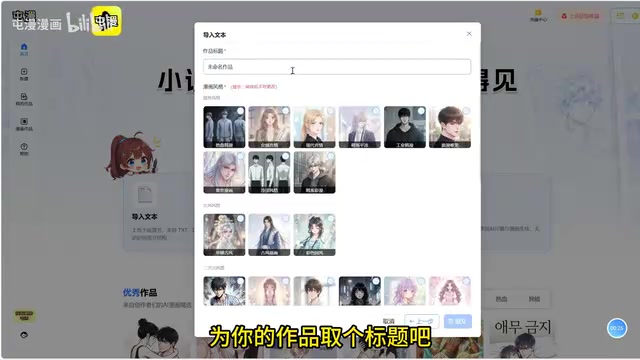
From a workflow design perspective, placing style selection before text import makes sense. The chosen style directly influences the overall visual consistency of character illustrations and panels down the line — locking in the aesthetic early reduces the need for rework later.
Step 2: Generate Characters and Build Your Asset Library
The second stage is character generation, which is the core step that determines the quality of the final comic. After entering the "Asset Library," the AI script automatically analyzes the uploaded story and generates text descriptions for each character. Users simply click "Generate Image," and the AI draws the corresponding character based on those descriptions.
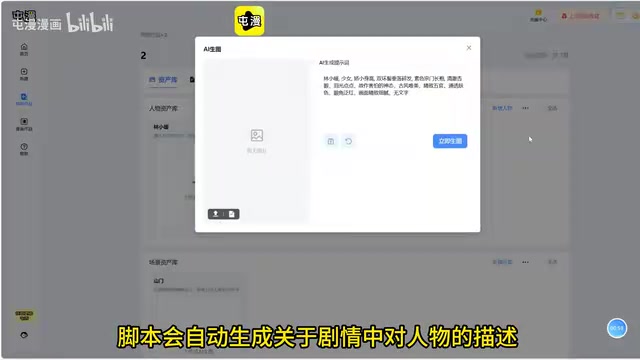
This is where one of the tool's key strengths becomes apparent — controllability. If the generated character image isn't satisfying, users can directly edit the prompt and regenerate, iterating as many times as needed until the result is right. This "describe → generate → refine" loop lets creators enjoy the benefits of automation while retaining hands-on control over the details.
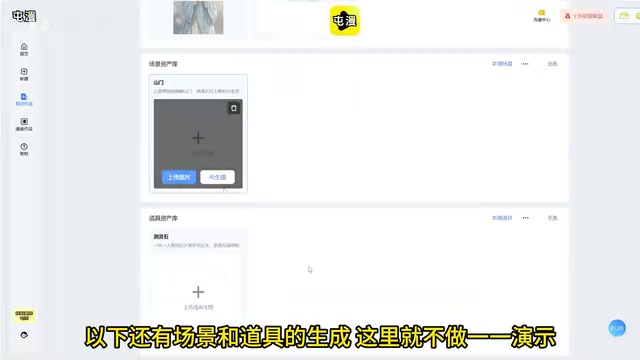
Beyond main characters, the tool also supports generating scenes and props, building out a complete comic "asset library." There's an important operational note here: all main characters must be fully generated and confirmed before moving on to the panel stage. Panel frames draw from finalized character assets — if characters haven't been locked in when panels are generated, inconsistencies in character appearance are likely to appear.
The concept of an "Asset Library" is borrowed from the traditional concept of a "Character Sheet" in professional comic production. In a professional studio, a main character's front, side, and back views — along with expression sheets and costume details — are compiled into a reference document that all artists consult when drawing different pages, ensuring visual consistency throughout the work. Tunman digitalizes this mechanism: AI-generated and confirmed character images are stored in the asset library, and every subsequent panel frame references this locked visual archive. This essentially gives the AI a set of "reference image constraints," technically reducing the problem of Character Drift. This is also why the tool emphasizes waiting until all character images are confirmed before entering the panel stage — once character visuals in the asset library change, previously generated panels will show a visual disconnect from the updated versions.
Step 3: Produce Panels, Edit, and Finalize the Comic
The final step is panel production. Upon entering the panel page, users can see all the panel scripts the AI has already generated — it automatically breaks the story into individual frame scripts based on the narrative. Clicking "Generate Image" batch-produces the corresponding panel illustrations.
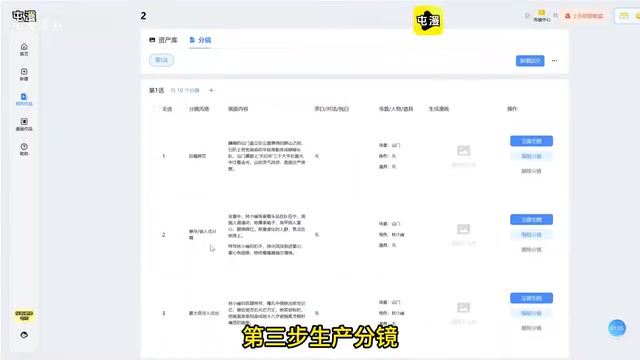
Once the panel images are generated, users enter the editing phase, where they can decorate panels, add speech bubbles, and refine expressive details. Finally, all panel images are assembled together, and a complete comic work is born.
Throughout the entire workflow — from uploading text to outputting a finished product — users require virtually no drawing skills. The main effort is concentrated on story creativity and fine-tuning outputs.
Strengths and Limitations of the Tunman AI Comic Tool
This workflow reveals Tunman's design philosophy: hand off the repetitive, technically demanding drawing work to AI, and let humans focus on storytelling and creative vision. For web novel authors, scriptwriters, and content marketers, the barrier and cost of producing comics have dropped dramatically.
That said, it's worth taking an honest look at the current limitations:
- Character consistency remains a universal challenge for AI-generated comics. Although Tunman uses the "Asset Library" mechanism to maintain visual uniformity, the AI can still produce deviations in complex expressions and multi-angle action scenes.
- Panel narrative pacing requires creator intervention. The AI's automatic panel breakdown doesn't always perfectly match the story's rhythm, and prompt optimization is often needed. "One-click generation" describes workflow convenience, not guaranteed quality.
For creators looking to try the tool, it's worth putting extra effort into two areas: first, the structural clarity of the uploaded text — a well-organized story is easier for the AI to break into panels; second, the precision of character prompts, which directly determines the visual foundation of the entire work.
Character Consistency is a shared technical challenge for all image generation tools based on Diffusion Models. Each time a diffusion model generates an image, it is essentially sampling from random noise — even with identical prompts, outputs carry inherent randomness, which can cause subtle or even obvious variations in a character's facial features, hairstyle, or costume details across different panels. Current mainstream solutions in the industry include: using ControlNet to constrain pose and facial structure, injecting reference image style and character features via IP-Adapter, and training character-specific LoRA (Low-Rank Adaptation) fine-tuned models. Tunman's asset library mechanism partially incorporates the idea of reference image constraints, but in multi-angle action shots and extreme expression scenarios, existing technology still struggles to achieve perfectly seamless cross-frame consistency.
Conclusion
The Tunman AI comic tool demonstrates a mature application direction for generative AI in vertical creative domains. A three-step workflow, controllable fine-tuning, and multi-style output transform comic creation from a skill-gated craft into a lightweight, creativity-driven process. As tools like this continue to iterate, the core competitive edge in content creation may increasingly come back to one thing: telling a great story.
Related articles

Medicare Spends $50,000 Treating a Heart Attack but Won't Spend $100 Preventing One: The Mismatch in Healthcare
Medicare pays ~$50,000 to treat a heart attack but won't spend $100 to prevent one. This article unpacks the MedPage Today opinion piece and Hacker News debate on why healthcare payment favors treatment over prevention and the deep causes of incentive misalignment.
Nvidia May Cosign Loan for Nscale's West Virginia AI Data Center
Nvidia is considering cosigning a loan for Nscale's West Virginia AI data center. This article analyzes the signal significance of chip vendors entering data center financing, the risk-sharing logic, and project uncertainties.

Claude Code v2.1.316 Update Analysis: Enterprise Gateway and Multiple Stability Fixes
Claude Code v2.1.316 released: new enterprise gateway pooled group budgets, layered policy mode, subagent effort control, dozens of Shell, network, and session recovery fixes, and Opus 4.8 fast mode deprecated.