Turn a Boring Resume Into an Animated Web Page with a Claude Skill

A Claude Skill turns an ordinary resume into an animated single-page website as a single HTML file.
Developer dooa-ansari shared a custom Claude Skill on Dev.to that turns PDF, DOCX, or LinkedIn-exported resumes into an animated single-page personal website. The output is just one HTML file that can go live on GitHub Pages. The page abandons traditional resume information density and reorganizes around "who this person is": an animated avatar, game-level-style career history, achievement cards, character stats panel, and a GitHub project relationship graph. Architecturally, Claude only extracts information, asks questions, and generates a structured profile.json, while actual rendering is handled by Python scripts and HTML templates to avoid instability from having the model generate HTML directly. Install via two commands in Claude Code or upload a zip in the Claude app; the project is open-sourced under MIT.
Why can't a resume have personality?
Most online resumes look the same: black text on a white background, a timeline, skill bars. Developer dooa-ansari shared a small project on Dev.to that tries to change this—he feeds an ordinary resume (or a PDF exported from LinkedIn) into a custom Claude Skill, and what comes out isn't a document but an animated, interactive single-page personal website.
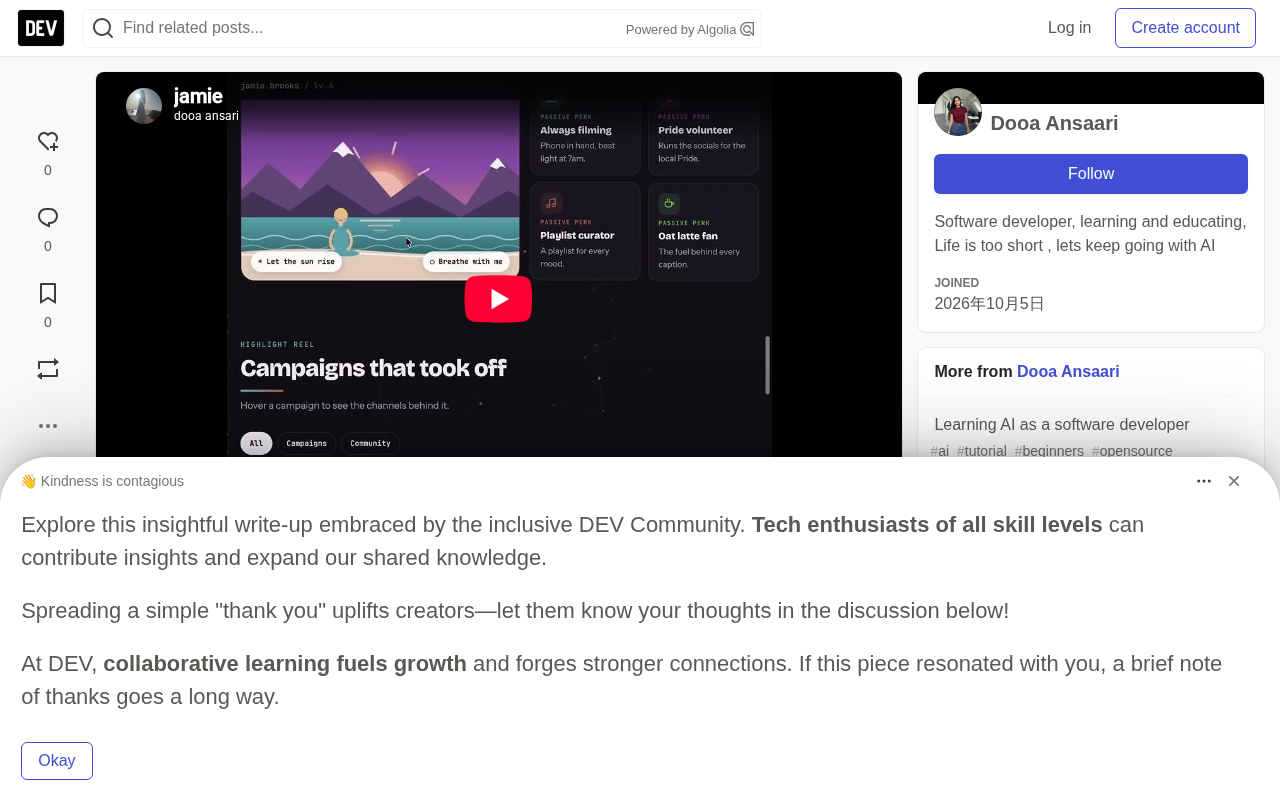
The entire output is just one HTML file. No framework, no build step, drop it on GitHub Pages and it works.
Claude Skill is an extensible capability mechanism Anthropic introduced for Claude. It's essentially a folder containing an instruction file (SKILL.md), resource templates, and optional scripts, telling Claude what workflow to follow, which tools to call, and what format to produce for a specific task scenario. Unlike an ordinary system prompt, a Skill can bundle reference materials and executable scripts, letting the model read and execute them on demand—turning a "one-off conversation" into a reusable, distributable standardized process. Users can either upload a Skill zip through Settings in the Claude app, or install it via the plugin marketplace in Claude Code, which lets community-shared Skills be enabled with one click, just like an app.
What exactly does this Skill generate?
The content on the page isn't a template filled with fields—it's reorganized around "who this person is":
- An animated avatar: blinks, types, waves, and pops up speech bubbles. Hairstyle, color scheme, and glasses are all customizable.
- Career history = game levels: each job is a level, with a "LEVEL UP!" popup animation when you advance, noting which skills you unlocked during that experience.
- Achievement counters and "Why hire me" cards: each one maps to real content from the resume, not empty talk.
- Character stats panel: with a small animated "happy corner" scene and some personality-revealing perks.
- GitHub project graph: visualizes projects and tech stack as an interactive relationship graph.
The tradeoff here is interesting: it abandons the traditional resume approach of "maximizing information density" in favor of memorability. Recruiters spend an average of just a few seconds on a resume, and an animated avatar plus level-style experience at least has an edge in "getting them to look twice."
How it works: Claude reads and asks, Python builds
This Skill is designed around separation of responsibilities—Claude doesn't render, it only understands and interviews.
When you say "make me an animated resume using my resume," the process has four steps:
- Request the resume. PDF, DOCX, plain text, or LinkedIn's "Save to PDF" export are all supported—you can also just give a GitHub username.
- Ask a few quick questions: theme style, avatar appearance, favorite colors, hobbies, target position.
After that, it's handed off to an ordinary Python script to complete the build. The Skill folder structure looks roughly like this:
skills/animated-resume/
├── SKILL.md                    # Instructions Claude follows
├── assets/template.html        # Animated page template
├── assets/example-profile.json # A complete fictional example
├── references/schema.md        # Description of every field in profile.json
└── scripts/build.py            # profile.json → index.html
This "LLM handles structured data, script handles deterministic rendering" pattern is more reliable than having the model spit out HTML directly—the rendering logic won't drift due to model improvisation, and styles and animations always stay consistent.
Separation of responsibilities here means splitting "understanding" and "rendering" across different executors. LLMs are good at extracting fields from unstructured text, asking follow-up questions about missing info, and doing semantic categorization, but they tend to produce format drift, inconsistent styles, and scrambled variable names when generating large blocks of HTML/CSS/JS, and each output can differ, making it hard to reproduce. Having a Python script consume a fixed JSON data structure to render the page means every run produces an identical result, with styles and animations determined by the template and unaffected by model randomness. In engineering, this pattern is called "LLM does front-end understanding, deterministic code does back-end output," and it's currently one of the mainstream approaches for making AI-generated content more controllable.
Up and running in two minutes
If you're using Claude Code, installation only takes two commands:
/plugin marketplace add dooa-ansari/animated-resume-claude-skill
/plugin install animated-resume@animated-resume
Then just say:
Make me an animated resume from my CV.
If you're using the Claude app (claude.ai or the desktop client), download animated-resume-skill.zip from the repo and upload it under Settings → Capabilities → Skills.
Claude Code is a command-line programming tool from Anthropic that runs in the terminal, can directly read and write local files, and execute commands. It supports a plugin marketplace mechanism, where users add third-party repos as plugin sources via /plugin marketplace add, then install specific plugins with /plugin install. The animated-resume here is a Skill packaged as a plugin for distribution. The Claude app (claude.ai web and desktop client) takes a different path—the Skills feature lives under the Capabilities panel in Settings and is enabled by uploading a zip. Both paths ultimately load the same SKILL.md and scripts; the only difference is the distribution method.
Publishing it live
Since the output is a single HTML file, hosting is nearly free:
- Put
index.htmlinto a GitHub repo. - Go to Settings → Pages → Deploy from a branch, and select
main/(root). - The page will be published at
https://<your-username>.github.io/<repo>/.
Once you have the link, it fits naturally into your LinkedIn profile or email signature. Compared to asking someone to download a PDF, a link is clearly easier to click—and that's the most practical benefit of this kind of "resume as webpage" approach.
Some design tradeoffs worth noting
From an engineering perspective, this project demonstrates a typical use of Claude Skill: treating the model as a workflow orchestrator and information extractor, not an all-purpose generator. The real hard parts (animation, layout, interaction) are left to templates and scripts, while the model is only responsible for turning an unstructured resume into a structured profile.json.
The cost is also obvious: the page structure is fixed, and the degree of personalization depends on how many slots the template has reserved. The author uses a fictional character in the demo, which also shows the upper limit of the template's flexibility.
The code is open-sourced under the MIT license—you can use it yourself, fork it, or borrow the idea to make your own Skill:
Related articles

DeepCell: One-Click AI Generation of Documents, Spreadsheets, and Slides
DeepCell tops Product Hunt with one-click generation of documents, spreadsheets, and slides, using the .deepcell format for linked updates, designed for System 2 tasks like modeling and sales reviews.

Doneas: 15-Minute Daily Accountability Calls That Keep Indie Developers From Procrastinating
Doneas is a daily accountability tool for indie developers: plan tasks on Monday, join a 15-minute call with five builders each day, and log deliveries on a public progress page. This article analyzes its core mechanics, effectiveness, and potential issues around retention and matching.

Fastlane 2.0: Fully Automated AI Ad Campaigns, From Creative to Optimization
Fastlane 2.0 is an AI ad automation tool: enter your website and it learns your brand, generates video and image ads, and runs and optimizes them on Meta, TikTok, Instagram, and YouTube.