Turn Meeting Notes into Project Plans with GitHub Copilot Agents

A multi-skill agent + MCP + scripted execution workflow that turns messy meeting transcripts into executable project plans in minutes.
Microsoft MVP Mahmoud Atallah built a GitHub Copilot "Delivery Factory" agent workflow that converts unstructured inputs — meeting transcripts and proposal PDFs — into executable project plans. The system combines multi-skill agents for dual-track output generation, Azure MCP Server and Microsoft Learn MCP for real-time authoritative sourcing, and pre-generated JSON assets with PowerShell/Bash scripts to replace pure LLM calls — compressing end-to-end delivery time from 15–30 minutes to just a few minutes. The entire workflow is open-sourced on GitHub as a replicable Agent-as-Code methodology.
In the world of technical consulting and delivery, there's often a massive gap between client conversations and executable project plans — filled with repetitive internal alignment work. In an episode of the Microsoft MVP interview series MVP Unplugged, Azure Solutions Lead Mahmoud Atallah demonstrated a GitHub Copilot-based "Delivery Factory" agent workflow that transforms messy meeting transcripts or technical proposal PDFs directly into structured project plans, task lists, risk assessments, and even upsell opportunities.
This isn't simple "prompt magic" — it's a system built on multi-skill agents, MCP servers, and standardized template assets. This article breaks down the core ideas and implementation details.
The Problem: Bridging Unstructured Input and Executable Deliverables
Mahmoud started with a pain point he faces daily as a delivery lead. The proposals he receives typically contain scope, requirements, project timelines, and effort estimates — but this information is scattered throughout documents or transcripts in an unstructured way. Even structured documents are merely "written down"; there's still a long road to actionable task breakdowns.
Host Justin Garrett, drawing on his own early career in tech consulting, added that compressing the time from "idea" to "execution" is itself a competitive advantage. He recalled manually producing a client brief that "literally took an entire day" — now the same output takes just minutes with this agent workflow.

What the agent solves is precisely this: automatically converting raw inputs like PDFs, documents, briefs, or transcripts into runbooks, task lists, and risk registers.
Workflow Breakdown: From Input Recognition to Parallel Output
Mahmoud divided the entire agent pipeline into several distinct stages, each handled by an independent skill.
Step 1: Identify and Normalize Input
The agent first determines the type of input source. Since models process Markdown far more efficiently than PDFs, the agent converts any input — whether PDF or plain-text transcript — into a structured Markdown file, which becomes the unified foundation for all downstream processing.
Step 2: Extract Key Requirements
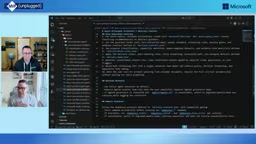
Once the Markdown is ready, the agent calls a second skill to extract key components: scope, services involved, timelines, and more. Here, Mahmoud introduced a critical design decision — connecting the agent to the Azure MCP Server and Microsoft Learn MCP.
As a delivery architect who follows the Well-Architected Framework, he needs to ensure that solution scope aligns with Microsoft standards. Through MCP, the agent can verify scope in real time, normalize data, and incorporate the latest official Microsoft best practices. He gave one example: during a security gap analysis, the tool discovered new security standards via Microsoft Learn that he himself wasn't yet aware of, surfacing over a hundred additional recommendations.
Justin noted that in the fast-moving world of AI and technology, no individual can keep up with every change — having tools automatically reference the latest documentation is both good business practice and good client service.
What is MCP? MCP (Model Context Protocol) is an open protocol proposed and open-sourced by Anthropic in late 2024. It provides AI models with a standardized "tool-calling" interface, enabling them to securely and controllably connect to external data sources and services. Think of it like USB-C for hardware — MCP standardizes how AI agents interact with various systems (databases, APIs, document libraries). Azure MCP Server is Microsoft's implementation of this protocol, allowing agents to access Azure resources and configuration data; Microsoft Learn MCP enables agents to query Microsoft's official technical documentation in real time. The core value of this design: agents are no longer limited to static knowledge from training data — they can actively pull the latest authoritative content at inference time, effectively addressing the knowledge cutoff problem inherent in large language models.
Step 3: Dual-Track Parallel Output
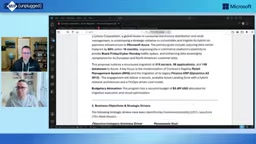
In the fourth and fifth stages, the workload is split into two parallel tracks: one aimed at the delivery/execution team, another at project managers. The left track generates a project plan, key questions for the client kickoff meeting, and a one-page executive summary ready to present to the client — along with architectural frameworks and supplementary recommendations from Microsoft.
Why a Single Prompt Isn't Enough
This is the most technically noteworthy point of the entire episode. Mahmoud emphasized that the reason this system consistently produces standardized documents is that the agents are connected to assets — JSON files containing key values and structured data.
Relying solely on system prompts makes it impossible to guarantee outputs that meet standard practices every time. Going further, he rewrote many actions that would otherwise require model and LLM calls as reads from raw JSON files and executions of PowerShell / Bash scripts.
This delivers two direct benefits: saving tokens and dramatically reducing processing time. He revealed that end-to-end generation of a full set of deliverables initially took 15 to 30 minutes — but through pre-generated files and scripted execution, the live demo completed all outputs in just three to five minutes.
Before producing output, the agent also checks the local folder structure for any existing files related to the client (e.g., "Company X" in the demo), associating historical information for incremental updates rather than generating everything from scratch each time — adding what's new, removing what's no longer relevant.
LLM Calls vs. Deterministic Execution — This reflects a core engineering tradeoff in AI systems. Every LLM call consumes tokens (which directly translates to API costs) and produces outputs with inherent variability, making consistent formatting difficult to guarantee. Reading pre-generated JSON files or executing shell scripts, by contrast, is fast, nearly free, and fully predictable. The principle of "use scripts where scripts will do" is one of the key ideas behind productionizing AI systems — limiting LLM usage strictly to tasks that genuinely require language understanding and generation, while falling back to traditional deterministic computation for everything else. Mahmoud's optimization compressed end-to-end time from 15–30 minutes to a few minutes, essentially shifting large amounts of "format-filling" work from model inference to file I/O.
Live Demo: Two Input Types
In the demo, Mahmoud used two types of inputs. First, an unstructured meeting transcript (containing key details like "70 servers, 20 Oracle, 6 MySQL, 400 users"). Second, a standard technical proposal PDF.
His process was remarkably simple: switch to Delivery Factory agent mode, attach the file path, and that's it — almost no additional prompting needed, because the agent has built-in routing logic that automatically recognizes a delivery-type request and invokes the corresponding skills.
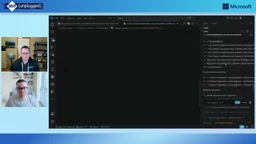
Of all the outputs, Mahmoud was most impressed by the task sequence table: each task is labeled with its phase and directly assigned to team members, with the option to export an Asana import file. Justin noted that passing in team members and their roles as context would further enhance the practical value of these plans.
Agent Personas and Open-Source Sharing
In VS Code, Mahmoud maintains multiple purpose-built agents — Principal Architect, SaaS Architect, Microsoft Learn Contributor, Senior Architect, and others — each with its own goals, skill set, and scripts.
These agents adopt different role personas, allowing generated plans and documents to adapt based on the role and underlying skills. More importantly, he has published the entire structure to a GitHub repository: each agent has a Markdown description for cloning and reuse, with content folders containing instructions, prompts, and scripts. Community members can contribute directly and extend the system with additional skills like Terraform.
Custom Agents in GitHub Copilot — In the GitHub Copilot extension ecosystem, Custom Agents (Copilot Extensions) allow developers to define independent instruction sets, tool-calling permissions, and personas for specific scenarios. Each agent is described via Markdown files outlining its goals and capability boundaries, organized alongside three asset types:
instructions,prompts, andscripts. The advantage of this modular design: agents with different roles can share the same underlying tools (like a shared MCP connection) while producing deliverables with different styles and emphasis — a Principal Architect focuses more on architectural compliance, while a SaaS Architect prioritizes cloud-native service selection. Open-sourcing these definition files to GitHub is essentially sharing an Agent-as-Code practice paradigm — community members can fork the repo and quickly reuse the setup by swapping in their own asset files.
From Vibe Coding to Multi-Agent Orchestration
Looking ahead, Mahmoud candidly admitted he doesn't come from a development background. In the past, vibe coding rarely delivered what he envisioned — he'd repeatedly ask agents to redo things, burning through tokens. Now, he says, "what I picture in my head, I can basically just build directly."
He believes what's truly changed isn't just AI itself, but the entire way of working: as an IT professional who neither writes code nor manually calls APIs, he can now fluently leverage agents for Git version management, MCP calls, and more. His next frontier is multi-agent orchestration — in fact, he's already deployed specialized agents across community management, event planning, marketing, and communications.
The value of this case study lies not in any specific tool, but in demonstrating a replicable methodology: use standardized assets to constrain output quality, use MCP to trace authoritative knowledge, use scripted execution to control costs — transforming AI from an "unreliable creative assistant" into a "dependable delivery factory." For consulting and delivery teams, this is a practical path well worth following.
Related articles

Chain of Thought Isn't Just for AI: How Humans Can Use CoT to Improve Thinking Quality
Chain of Thought isn't just a prompt trick for large models. Starting from a Hacker News discussion, this article analyzes why CoT works for human thinking too, breaks down actionable ways to transfer it, and highlights the key differences between human CoT and machine CoT.
Cloudflare Teams Up with OpenAI: Closi…
Cloudflare Teams Up with OpenAI: Closing the Loop from Vulnerability Discovery to Defense with AI
Cloudflare uses OpenAI Daybreak to investigate security vulnerabilities and generate reviewable remediation plans, while developers use Codex to boost coding efficiency and quality.

Orca Multi-Agent Orchestration in Practice: A Guide to Parallel Collaboration with Claude and Codex
Orca is Stable AI's free open-source agent workbench supporting 34 agents like Claude Code and Codex in parallel. Learn its Git worktree isolation, multi-model orchestration, and mobile management.