Ulika: Visual Editing for AI-Generated Websites

Ulika offers a visual editing layer for AI-generated websites so non-technical users can edit content and publish.
Ulika is a new product in public beta on Product Hunt that addresses the content-maintenance gap after building sites with AI coding tools. Once React, Vite, or Next sites generated by Claude, Cursor, or Codex go live, changing headlines or images still requires developers. Ulika's three-step flow—connecting existing sites, WYSIWYG editing on the page, and direct publishing—partially transfers content editing to business teams. Target users are teams that build sites quickly with AI but lack frontend maintenance capacity. Currently free to try with 69 upvotes and ranking 11th, production details like integration approach, component support, and version rollback remain to be seen.
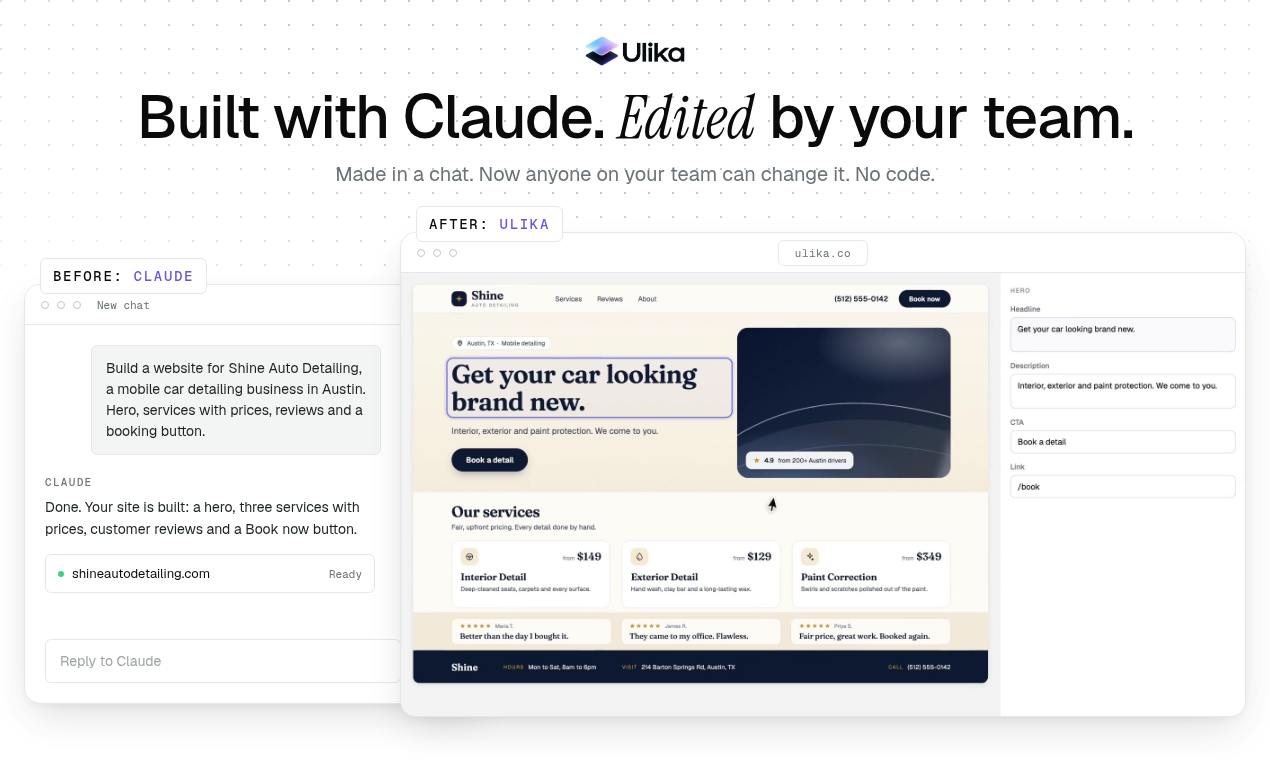
AI coding tools have dramatically accelerated website building, but a practical problem follows: once a site goes live, the marketing team wanting to change a headline or swap an image often still has to file a ticket and wait in line for a developer. Ulika, a new product on Product Hunt, aims to bridge this gap—it provides a visual editing layer for websites generated by AI tools like Claude, Cursor, and Codex, letting non-technical users edit copy and images directly on the page and publish, no code required.
An old problem amplified by AI
Shipping a React, Vite, or Next site over a weekend with Claude, Cursor, or Codex is no longer unusual. The problem comes after delivery: ops wants to tweak the homepage headline, marketing wants to swap a campaign image—these seemingly minor changes still depend on developers. Asking an engineer to change a single line of copy wastes technical resources and slows down business iteration.
Ulika's entry point is precisely this "last mile": connect an already-live site, let anyone click on page elements in the browser, edit content directly, and publish—all without touching code.
The React, Vite, and Next mentioned here are the three frontend tech stacks most commonly generated by today's AI coding tools. React is Facebook's open-source UI component library for building interactive interfaces in a component-based way; Vite is a next-generation frontend build tool known for extremely fast cold starts and hot reloading, often paired with React; Next.js is a full-stack framework built on React that supports server-side rendering and static generation, well suited for content-driven sites. AI tools favor this combination because its ecosystem is mature, templates are plentiful, documentation is thorough, and model training data covers it well—the generated code runs directly. But precisely because of this, such sites typically treat the code repository as the single source of truth, with content and structure coupled inside components that non-technical users can't touch—this is the technical precondition that visual editing layers like Ulika step into.
How Ulika works
According to the product page description, its core logic can be summarized in three steps:
- Connect an existing site: No need to rebuild—bring websites generated with AI tools into Ulika;
- Edit directly on the page: Copy and images are modified in a WYSIWYG way, lowering the learning curve;
- Publish directly: Changes take effect immediately, without going through code commits and deployment pipelines.
This model partially transfers "content editing rights" from developers to content teams. It's especially valuable for small teams—no dedicated frontend staff, yet frequent page updates are needed.
A "visual editing layer" typically refers to injecting a runtime script or proxy layer on top of a deployed page so that page elements can be selected and content replaced in place, without modifying source code. There are roughly two implementation paths: one is connecting via reverse proxy or DNS and injecting the editor when the page loads; the other is integrating an SDK at build time to mark editable regions. The former is minimally invasive to existing sites and quick to onboard, but has limited ability to recognize complex interactions and custom components; the latter offers more control but requires rebuilds and redeployment. Ulika has not yet disclosed which approach it uses, which directly affects its support boundaries for dynamic content and custom components—and is key to evaluating its production readiness.
Who it's best for
Ulika's target user profile is quite clear: teams that use AI to build sites quickly but lack ongoing frontend maintenance capacity. Typical scenarios include A/B testing copy on marketing landing pages, refreshing e-commerce campaign images, and updating blog content.
It doesn't try to replace website-building tools; instead, it positions itself "after the build" to fill in the content operations step. For developers already used to generating code with AI, this also means they can hand off trivial content change requests to business stakeholders and focus on feature development.
Early signals and things to watch
Ulika is currently in public beta on Product Hunt, free to try, with 69 upvotes, ranking 11th, and only 1 comment. These numbers indicate it's still at a very early stage with limited community feedback.
Several things are worth watching: the specific technical approach for connecting existing sites, the degree of support for custom components and dynamic content, and whether the publishing workflow includes version rollback. These will determine its usability in real production environments.
Version rollback capability is a hard threshold for content publishing systems entering production. When business users can directly change live copy and images, the risk of mistakes, typos, or wrong images going live rises accordingly; without historical version records and one-click rollback, a single error could cause a public incident. Mature content management systems typically offer draft publishing, version comparison, scheduled publishing, and rollback. For Ulika, whether it can record every change, distinguish preview from live environments, and quickly recover when problems arise determines whether it can upgrade from a "demo tool" to a "production tool."
Summary
AI site-building tools solve the "build" problem; Ulika targets the "maintain" problem. This positioning hits a real pain point in team collaboration after AI coding went mainstream. For developers who ship websites with Claude, Cursor, or Codex and want business teams to update content autonomously, it's worth trying during the public beta.
One-line Summary
Ulika provides a visual editing layer for AI-generated websites, letting non-technical users edit content and publish directly.
Paragraph Summary
Ulika is a new product in public beta on Product Hunt, targeting the content-maintenance gap after building sites with AI coding tools. Once React, Vite, or Next sites generated by Claude, Cursor, or Codex go live, changing headlines or swapping images still requires developer involvement, creating an efficiency bottleneck. Ulika's three-step flow—connecting existing sites, WYSIWYG editing of copy and images on the page, and direct publishing—partially transfers content editing rights to business teams. Its target users are teams that build sites quickly with AI but lack frontend maintenance capacity, with typical scenarios including marketing landing page adjustments, e-commerce campaign image refreshes, and blog updates. The product is currently free to try, with 69 upvotes and ranking 11th; community feedback is limited, and production details such as integration approach, component support, and version rollback remain to be seen.
Related articles

Prompt Engineering for Beginners: From Writing Prompts to Engineering Thinking
Starting from the essence and four functions of prompts, this article systematically explains the six-step process, four success criteria, learning value, and practical limitations of prompt engineering to help you build a complete understanding.

Anthropic Launches Nasdaq IPO: AI Giant's Listing and Risk Disclosures
Anthropic officially launches its Nasdaq IPO under ticker ANT, with market valuation expected to potentially exceed SpaceX's record. The prospectus devotes nearly 100 pages to AI risks, while first-half revenue grew over 14x but net losses widened sharply, reigniting the AI bubble debate.

Rust cURL Clone Uses 4,832 unsafe Blocks—Is the Memory Safety Myth Broken?
A Rust cURL clone uses 4,832 unsafe keywords, challenging Rust's memory safety narrative. We analyze what unsafe really means, compare Fil-C, and examine rewrite motives.