Umbra Mail: The Open-Source Plugin That Turns Gmail Into Chat Threads

Open-source Chrome extension Umbra Mail rebuilds Gmail with chat threads, emphasizing privacy and optional AI.
Umbra Mail is a Chrome extension that debuted on Product Hunt, aiming to transform Gmail from lengthy email lists into instant-messaging-style chat threads, aggregating messages from the same conversation and making replies feel like sending a message. It also gathers newsletters onto a separate page to keep subscription content out of the main inbox. On privacy, it emphasizes no tracking, no servers, and full open source, with email data processed locally in the browser and never uploaded to third parties; AI features are optional rather than on by default, leaving the decision of whether to expose email content to AI up to the user. Currently in its early stages with 76 upvotes and a 17th-place ranking on Product Hunt, it suits users who are tired of Gmail's native interface, care about privacy, and primarily use desktop browsers, while mobile scenarios are limited by the extension format.
Gmail's interface hasn't changed much in years. The inbox is a mix of promotional emails, work correspondence, and newsletters, making it hard to stay focused. A Chrome extension called Umbra Mail recently appeared on Product Hunt, aiming to reorganize the email experience in a "chat-like" way. It emphasizes a calmer, more private approach and is fully open source.
From Email to Chat: The Design Philosophy Behind Umbra Mail
Umbra Mail's core proposition is straightforward: make email look like chat threads. In traditional email clients, back-and-forth messages on the same topic are often scattered across the inbox, requiring search or manual organization to track. Umbra aggregates emails from the same conversation into a thread view similar to instant messaging, and replying feels as natural as sending a message.
This design borrows from instant messaging interaction habits, reducing the cognitive load of handling email. For users who communicate frequently with regular contacts, a chat-style interface can cut down on switching back and forth and searching. Meanwhile, the official description mentions that "newsletters are gathered on a single page," meaning subscription content won't be mixed into the main inbox, further reducing distractions.
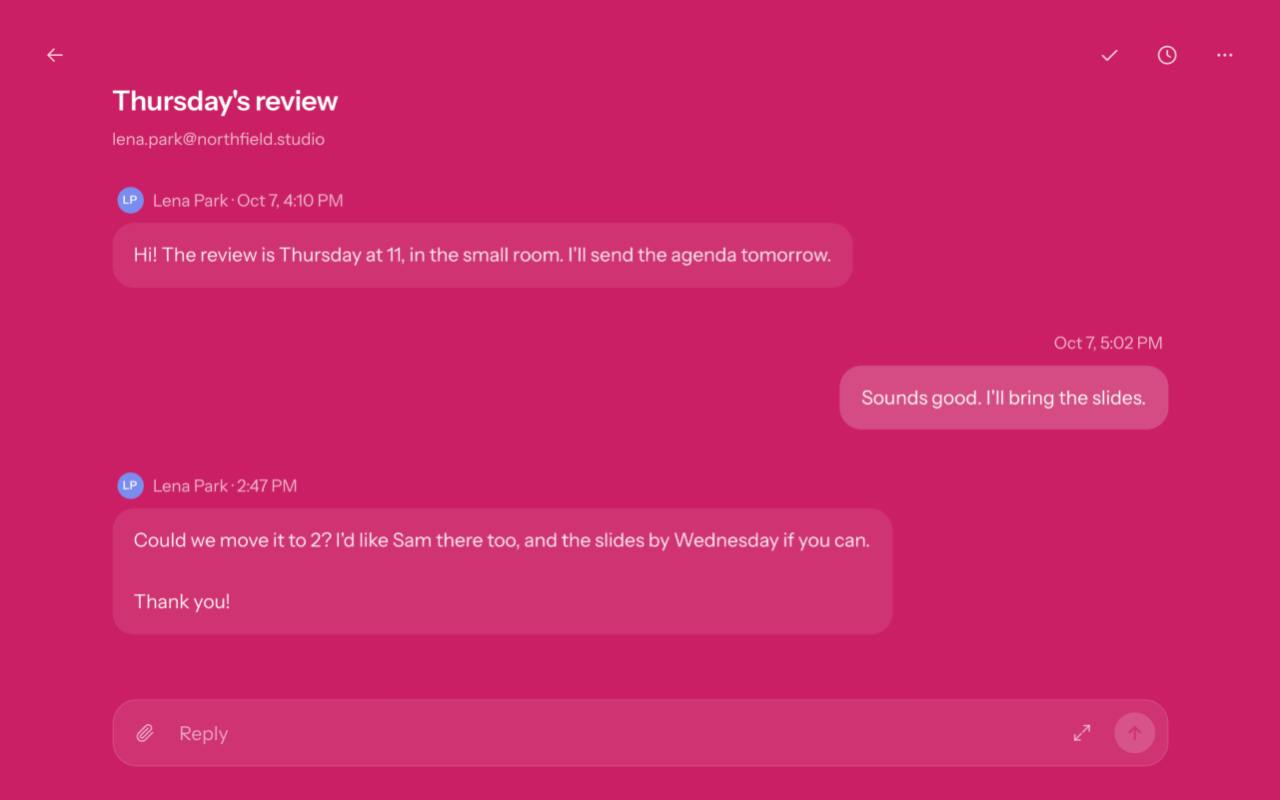
Email threads have been Gmail's default conversation aggregation mechanism since 2010, relying on email headers such as Message-ID, In-Reply-To, and References to string replies on the same subject into a single conversation. However, Gmail's thread view still centers on lists and individual message expansion — high information density but a more "document-like" interaction. Umbra Mail's so-called "chatification" goes further on top of thread aggregation by changing how messages are presented and composed: each email becomes a message bubble, the reply box is compressed into a single-line input, and traditional fields like subject lines and CC are de-emphasized. Technically, this kind of overhaul depends on reading and writing the threads resource in the Gmail API, and the challenge lies in preserving standard email semantics (such as quoting, attachments, and multiple recipients) without letting the chat-style UI oversimplify them.
Privacy First and Optional AI
On privacy, Umbra Mail emphasizes "no tracking, no servers, open source." This means the extension itself doesn't rely on external servers to process email data — all operations happen locally in the browser, and email content is never uploaded to third parties. For users concerned about email privacy, this is an attractive selling point.
Another notable point is that "AI is optional." Many email tools today integrate AI summaries or smart replies, but Umbra makes AI features optional rather than enabled by default. This gives users the power of choice, avoiding unnecessary exposure of email content to AI services. Being open source further enhances transparency, allowing users to review the code themselves or contribute improvements.
"No servers" here doesn't mean there's no backend at all — it means the extension doesn't rely on servers operated by the developer to relay, store, or analyze user email data. Traditional third-party email clients typically send OAuth tokens and email content to their own servers for syncing and processing, whereas Umbra Mail keeps parsing and rendering in the browser locally, with email flowing only between the local device and the account via Google's Gmail API. The benefit is a reduced risk surface for data retention on third-party servers, but it also means the extension's capabilities are limited by the browser sandbox and the Gmail API's quotas and permission scope, making complex features (such as cross-device sync or server-side search indexing) harder to implement.
Product Status and Target Users
Umbra Mail is currently released as a Chrome extension, with 76 upvotes on Product Hunt (ranking 17th) and 6 comments. As an early-stage product, it may still be iterating, and its feature completeness and stability need to be verified through actual use.
In terms of positioning, it suits users who are tired of Gmail's native interface, want to reduce inbox noise, and care about privacy. Chat-style threads and newsletter aggregation help organize the information flow, while local processing and open-source characteristics appeal to privacy-sensitive groups. However, the Chrome extension format means it depends on the browser environment, so mobile or desktop client use cases may be limited.
Chrome extensions run on the Manifest V3 specification, using Service Workers instead of long-lived background pages. Permissions must be explicitly declared at install time, and there are strict limits on loading remote code. This is actually beneficial for a product that emphasizes "local processing, open-source auditability": the code bundle is distributed with the extension, so users and reviewers can inspect it directly. But Manifest V3 Service Workers can be put to sleep by the browser at any time, so features involving long connections or scheduled syncing need extra design work. At the same time, extensions can only run in desktop Chrome and Chromium-based browsers, unable to cover the Gmail mobile app or system email clients — this is the technical root of the limited use cases for such products.
Conclusion
Umbra Mail proposes an interesting direction: replacing the lengthy lists of traditional email with the lightweight interaction of chat threads, while using privacy and open source as differentiating selling points. It may not suit everyone, but for users seeking a quieter, more controllable email experience, its future development is worth watching.
One-line Summary
Open-source Chrome extension Umbra Mail rebuilds Gmail with chat threads, emphasizing privacy and optional AI.
Paragraph Summary
Umbra Mail is a Chrome extension that debuted on Product Hunt, aiming to transform Gmail from lengthy email lists into instant-messaging-style chat threads, aggregating back-and-forth messages from the same conversation and making replies feel as natural as sending a message, thereby reducing the cognitive load of handling email. It also gathers newsletters onto a separate page to keep subscription content out of the main inbox. On privacy, the product emphasizes no tracking, no servers, and full open source, with email data processed locally in the browser and never uploaded to third parties; AI features are optional rather than on by default, leaving the decision of whether to expose email content to AI up to the user. Currently in its early stages, it has 76 upvotes and ranks 17th on Product Hunt. It suits users who are tired of Gmail's native interface, care about privacy, and primarily use desktop browsers, while mobile scenarios are limited by the extension format.
Related articles

JobRunner MCP Server: AI Agents Can Now Fix Failed Java Jobs
JobRunner launches an open-source MCP server enabling AI agents to view cluster status, diagnose failures, and recover Java jobs—incident response from any cloud coding environment or existing agent.

MLAI Digital Launches 9 Security Agents: MCP Server Safeguards the Full Lifecycle of Agentic AI
MLAI Digital launches Security MCP Server with nine built-in specialized security agents covering vulnerability discovery, attack simulation, prompt injection detection, API and infrastructure assessment, and accelerated remediation—embedding security validation across the full Agentic AI lifecycle from development to production.

Running Isaac Lab on H100 GPUs: Exploring Better Approaches
Exploring optimization methods for running Isaac Lab on NVIDIA H100 GPUs, including MIG configuration, mixed precision, TensorRT acceleration, and community experience to improve robotics simulation and reinforcement learning efficiency.