Unboom: Eliminate Room Bass Boom on Your Mac Without Acoustic Panels

Unboom is a Mac menu bar tool that precisely attenuates room-amplified bass—cut only, never boost.
Unboom is a Mac audio tool ranked #17 on Product Hunt that precisely attenuates low frequencies amplified by standing waves in untreated rooms. It offers mic scanning and manual frequency selection, Gentle/Medium/Strong attenuation levels, and a cut-only, never-boost design. No data collection, no subscription, one-time purchase. The barrier is a three-step menu bar operation, suiting home studios, content creators, and casual listeners. But it can't change a room's physical resonance and only affects Mac system output.
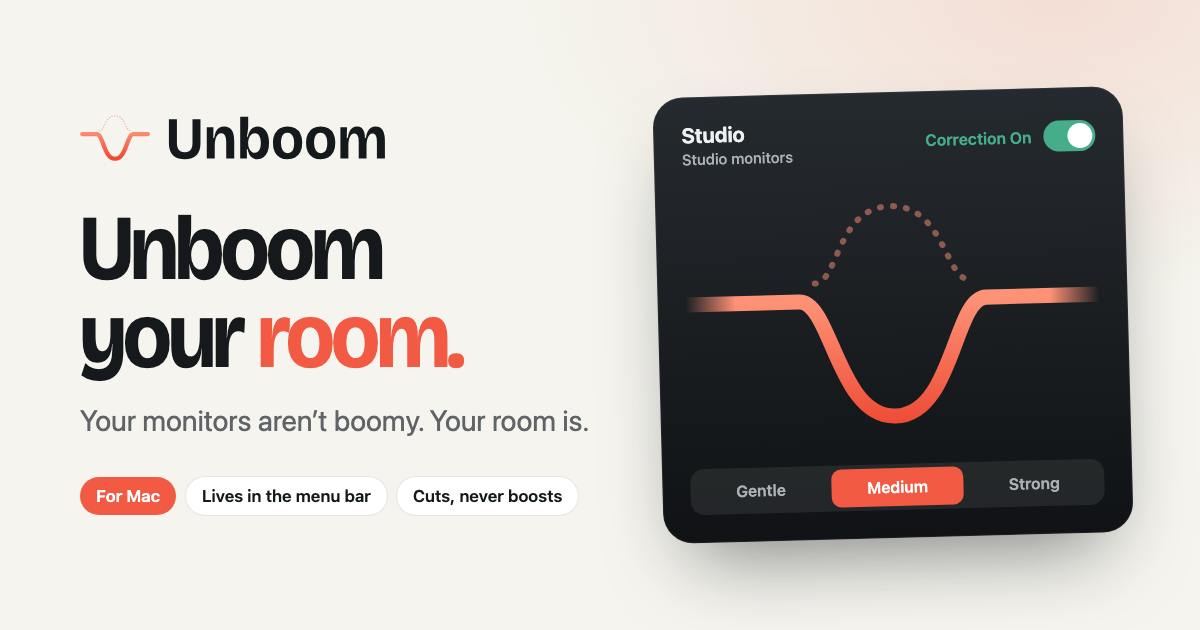
When listening to music or mixing in a room without acoustic treatment, the most common problem is runaway low end—a particular frequency band gets amplified by the room's structure, creating a lingering "boom." The traditional fix is installing bass traps and acoustic panels, which is expensive, space-consuming, and especially unfriendly to renters. A new product ranked #17 on Product Hunt, Unboom, offers another approach: use software to precisely cut the room-amplified bass on your Mac, with no boosts at all.
What Problem Does It Solve
Room modes cause certain low frequencies to pile up severely. Sound reflects between walls and stacks up, and if a particular low-frequency wavelength happens to resonate with the room's dimensions, you get a clear "boomy" character—kick drums turn to mush, bass masks midrange detail.
Professional studios use physical acoustic treatment to break up these resonances, but that's hard to achieve in a typical desktop environment. Unboom's take: since the problem is concentrated in one exaggerated bass frequency, just attenuate that frequency rather than EQ-ing everything.
According to developer Kadir Yilmaz on the product page, Unboom's design principle is clear—cut only, never boost. This means it won't artificially enhance any frequency band for the sake of "better sound"; it only subtracts the problem frequency from the system audio chain.
The physics of room modes is directly tied to a room's three-dimensional dimensions. Sound waves bounce back and forth between opposing walls, and when an integer multiple of half a wavelength for a given frequency matches the distance between two walls, incident and reflected waves add in phase to form a standing wave. Every rectangular room has three axial modes (one each for length, width, and height) plus tangential and oblique modes, which show up on a frequency response curve as a series of unevenly spaced peaks and deep nulls. The lower the frequency, the longer the wavelength, and the harder it is for ordinary acoustic foam to absorb—which is why low-frequency problems in small rooms tend to be more stubborn than high-frequency ones. A 50Hz wave is about 6.8 meters long, far exceeding the dimensions of most home rooms, so these frequencies are nearly impossible to treat with thin absorptive panels. Understanding this explains why precise attenuation at specific frequency points fits the problem's actual shape better than broad EQ adjustments.
Scan, Select, Enable—Three Steps to Calibration
Unboom's workflow is stripped down to the essentials, fitting its identity as a menu bar tool:
- Scan mode: Uses your Mac's microphone to play a test signal and capture the room response, automatically locating the amplified bass frequency.
- Manual mode: If you'd rather not scan, you can pick the frequency to treat by ear.
- Once selected, choose attenuation strength from Gentle / Medium / Strong, then flip the Correction switch to activate.
This design turns "room correction"—something that used to require a measurement mic and pro software like REW—into a two-click operation in the menu bar. For users who don't want to fuss with hardware but want a more trustworthy monitoring environment, the barrier is significantly lowered.
REW (Room EQ Wizard), mentioned above, is a free room measurement tool commonly used in audio circles; paired with a calibrated measurement mic, it can capture a room's frequency response curve, waterfall plot, and decay characteristics. Its strength is detailed data—it exposes standing waves, reflections, and reverb issues simultaneously. The cost is a cumbersome workflow: correctly placing the mic, configuring audio interface routing, and interpreting various charts. Beginners often spend hours just to get a first usable result. Unboom essentially extracts the "locate the problem frequency and attenuate it" portion of that whole process and packages it as an automated menu bar operation. What it sacrifices is measurement precision and deep diagnostic capability; what it gains is zero learning curve. The two types of tools don't conflict—REW suits users who need a comprehensive understanding of their room, while Unboom suits users who just want a usable result right away.
Trade-offs in Privacy and Pricing
The product page emphasizes two things in particular: no data collection and no subscription. For a tool that processes audio and requires microphone permission, "no data collection" is a key selling point that addresses user concerns—microphones are seen by many as a sensitive permission.
No subscription, no complicated tiers beyond a one-time purchase, also differentiates it from a wave of audio SaaS products. Given that it's an independent menu bar utility, a one-time buyout model better matches target users' expectations.
Who Should Use Unboom
It's clearly not aimed at professional mastering engineers; it's more for these groups:
- Home studio users: Mixing in a small room but unable to do physical acoustic treatment for now, needing monitoring judgments closer to reality.
- Content creators: Recording voiceovers, streaming, or making videos, not wanting room bass coloration to skew their perception.
- Casual listeners: Just want their desktop speakers to stop thumping, without learning complex EQ parameters.
A caveat: software correction can't change the physical resonance of a room; it only affects your Mac's system output. Any audio played outside the Mac, or signals routed through direct monitoring on an external audio interface, won't be processed by Unboom—that's the capability boundary of a system-level tool.
System-level audio processing and hardware direct monitoring are two different signal paths. When audio passes through Mac's Core Audio output, Unboom can sit on the system audio chain and process the signal. But once the signal bypasses the Mac—for example, through an external audio interface's direct monitoring feature, an outboard hardware mixer, or a player outputting directly to a DAC's ASIO channel—the correction won't apply. This means Unboom improves the scenario of "listening on a Mac," not the physical fact of "listening in a room." For users whose Mac is their only source, this boundary is almost irrelevant; for users with multiple sources and monitoring paths, it's important to recognize that correction only covers one of those paths.
Summary
Unboom captures a real need that's long been monopolized by professional tools: room bass correction. It compresses measurement, judgment, and attenuation into three menu bar steps, and combined with its clean positioning—no data collection, no subscription—its 74 upvotes and #17 ranking on Product Hunt are no surprise. For Mac users who can't do acoustic renovation, it's a low-cost supplement—provided you understand it can only subtract, and only works within the system.
One-line Summary
Unboom is a Mac menu bar tool that precisely attenuates room-amplified bass frequencies in software—cuts only, never boosts.
Paragraph Summary
Unboom is a Mac audio tool ranked #17 on Product Hunt that precisely attenuates low frequencies amplified by standing waves in untreated rooms. It offers microphone scanning and manual frequency selection, supports Gentle, Medium, and Strong strength levels, and takes effect in the system audio chain once the Correction switch is enabled. The product emphasizes a cut-only, never-boost design principle and a clean positioning of no data collection, no subscription, and one-time purchase. The barrier to use is reduced to three menu bar steps, suiting home studios, content creators, and casual listeners. But it can't change a room's physical resonance, and it only affects Mac system output—clear capability boundaries.
Related articles

Understanding DeepSeek in 3 Minutes: The Rise from a Quant Hedge Fund to an Open-Source AI Leader
DeepSeek's history in 3 minutes: from High-Flyer Quant's compute build-up to V2's MLA inference cost cuts, V3's $5.576M training bill, R1's open-source global shock, and V4 with a $7B Series A.

Local Creative Writing Model Showdown: Fine-tuned Qwen3.8 27B Wins, DeepSeek v4.1 Underwhelms
Bilibili creator tests seven local creative writing models: Hemingway and HumanLike Chat based on Qwen3.8 27B perform best, DeepSeek v4.1 is plain, Dongfang Shuo ranks last with confused characters. Includes three test prompts, scores, and usage advice.

Liang Wenfeng's Three Big Bets: Why Did DeepSeek Open-Source Its 82% Gross Margin?
Why did DeepSeek open-source DeepInfer, its 82% gross margin inference framework, and then launch a hundred-billion funding round? An analysis of Liang Wenfeng's three big bets and the open-source strategy.