Under 200 Lines of Code: Building an Agent from Scratch and Demystifying OpenClaw
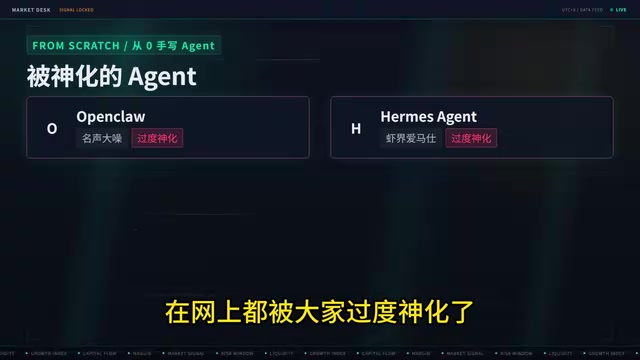
Under 200 lines of code demystify Agents: while loop + memory + tool calling + progressive skill loading.
A Bilibili creator reproduced the core functionality of OpenClaw and Hermes in under 200 lines of code, showing that these hyped Agents are built from a handful of composable modules: an LLM call inside a while loop, a history array for continuous memory, a system prompt for personality, tool calling for real-world actions, and progressive skill disclosure to avoid context rot. The basic version is just 72 lines; the mid-tier version is ~200. The article also includes a two-month learning roadmap from foundational Python to enterprise-grade Agent clusters.
OpenClaw, Hermes Agent, and similar AI products have been generating enormous buzz on social media — even earning the nickname "digital Hermès." But one Bilibili creator offered a grounded take: at their core, these products are simply Agents with more features and flashier presentation. He reproduced a fully functional Agent in under two hundred lines of code, walking through every step hands-on in an attempt to cut through the hype.
This article is based on that video. It walks through the six steps to building an Agent and includes a learning roadmap for anyone looking to break into AI application development from scratch.
The Essence of an Agent: A Large Model Call Inside a while Loop
The first step in building an Agent is "creating a smart brain" — that is, calling a large language model. The creator points out that calling an LLM typically goes through a model provider's API, which saves significant time and effort. There are two dominant API formats: OpenAI and Anthropic. The syntax is nearly identical, and most other vendors are compatible with one or both — either works fine.
Plug in your API Key, pick a model as your brain, send input, get output — roughly 20 lines of code to make a single LLM call. But there's an immediate problem: the program ends after one response, and you have to re-run it to chat again. The fix is to wrap the core call inside a while loop — after each response, you can keep typing, enabling an ongoing conversation with the model.
This step reveals the most fundamental skeleton of an Agent: at its core, an agent is really just a one-shot model call wrapped inside a continuously running loop.
Memory and Soul: The history Array and System Prompt
A loop alone isn't enough. The creator demonstrates the classic problem: ask the model "what is 1 plus 1" and it answers 2. Then say "add 1 more" and it's completely lost, guessing what number you started with. The reason is that each call is a stateless, memoryless session — the model has no idea what was said in the previous turn.
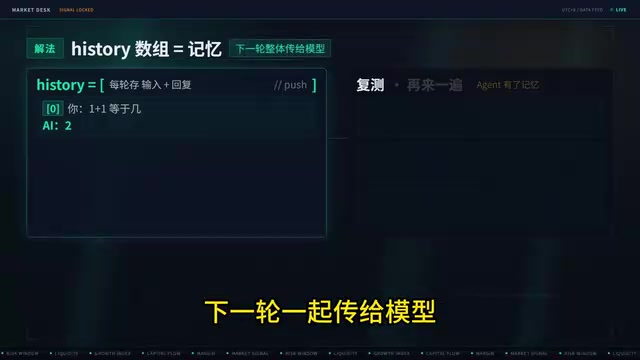
The solution is to create a history array that stores each user input and AI response in sequence, then passes the entire history to the model on the next turn. Now the Agent has continuous context memory — ask "1 plus 1" and it answers 2, ask "add 1 more" and it says 3, ask "add 5 more" and it says 8, with every round preserved.
With memory in place, the Agent is already close to a web-based AI chat interface. But the creator argues it still lacks a soul, so he adds a system prompt — similar to the CLAUDE.md in Claude Code or the SOUL.md in OpenClawAd — to inject personality and behavioral guidelines. He gives the model the persona of a "Grand Imperial Eunuch," requiring a deferential tone, addressing the user as "Your Majesty," and opening every response with a mock imperial decree. The model follows the persona perfectly. The system prompt is what allows otherwise identical Agents to have differentiated personalities and constraints.
A note on System Prompts: Technically, a system prompt is a special message that appears at the top of the conversation history with
role: "system", and is passed to the model unchanged on every request. Unlike user messages, it doesn't appear in the chat UI — but it carries the highest-priority behavioral constraints on the model. Providers handle it slightly differently: OpenAI accepts it as a dedicated field, while Anthropic's Claude treats it as the first message in the conversation. Because the system prompt is read on every turn, it's the most common place to inject persona definitions, safety rules, output formatting requirements, and domain knowledge. OpenClaw'sSOUL.mdand Claude Code'sCLAUDE.mdboth work by dynamically writing a text file's contents into the system prompt at runtime, enabling configurable "personalities."
Tool Calling: Handing the Agent a Fishing Rod
Even with memory and personality, when the creator asks the model to "check what files are on the desktop," it can't help. The reason is simple: it has no tools. It's like asking someone to go fishing without a rod.
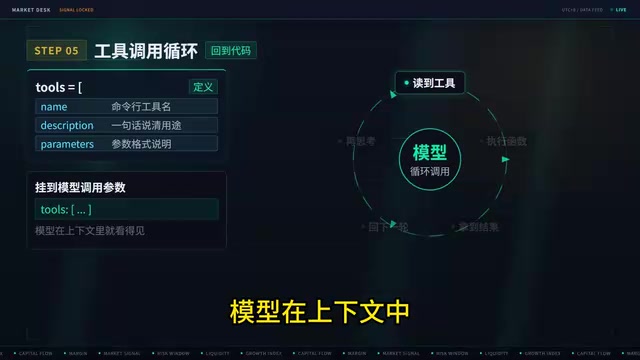
The implementation involves defining a Tools array that specifies the name, description, and parameters of each command-line tool, then attaching it to the model call. When the model reads the available tools in context and determines one is needed, it places the command into an execution function. The result is returned as a ToolResult in the next conversation turn; the model continues reasoning, calls more tools if necessary, and only outputs a final answer when it no longer needs any.
In a live test, the creator asks the Agent to report what's on the desktop. It successfully executes the command — with a minor discrepancy from the actual desktop, but the tool-calling pipeline works end-to-end. Once an Agent has command-line capabilities, it can create files, write code, browse a project directory, and configure environments — the entire computer becomes fair game. This is the critical leap from "chatbot" to "capable assistant."
A note on Tool Calling (Function Calling): Tool calling is a standard capability provided at the API level by major LLM vendors. Here's how it works: the developer declares available tools as JSON Schemas (including the tool name, description, and parameter types) in the request body. When the model decides during inference that a tool is needed, instead of generating a text answer it returns a structured "tool call request" specifying which tool to invoke and with what parameters. The program captures this request, actually executes the corresponding function locally, then appends the result as a
ToolResultmessage to the conversation history, triggering the next round of model inference. This loop can iterate multiple times until the model stops requesting tools. The key design principle here is that the model itself never executes any code — it only "decides" which tool to call. Real execution power always remains with the host program under the developer's control, which is why tool calling is safer than having the model output code andeval-ing it directly.
Skills and Progressive Disclosure: Letting the Agent Self-Evolve
With tool calling in place, the Agent is already quite powerful — but the secret behind the continuous evolution of OpenClaw and Hermes is Skills. This is the final piece of the puzzle.
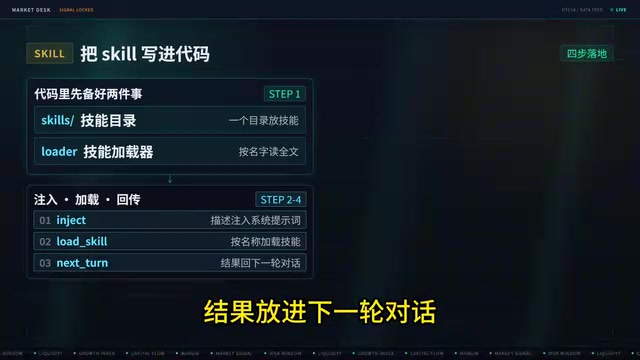
Skills are inseparable from the concept of "progressive disclosure." The creator explains that you can't just dump an entire long document into the model at once — context length is limited, and stuffing everything in causes "context rot," leading to more hallucinations and degraded performance. The right approach is to include only the skill name and a one-sentence description in the context, letting the Agent load skills on demand — reading the corresponding Skill.md file only when needed, and keeping everything else as just a name and description.
In code, this means defining a skills directory and a skill loader, injecting all skill descriptions into the system prompt, and providing a LoadSkill tool that loads by name. In testing, the Agent can enumerate its capabilities — web search, skill creation, command line, web scraping — and when asked to fetch trending news, it first loads the web search skill, then calls the web scraping tool.
A fun detail: because the model's training data cuts off in 2024, the Agent initially assumes "the current year is 2024." After the creator corrects it — "it's actually 2026 now" — it immediately retrieves the latest news. This perfectly illustrates the value of external tools and skills for compensating for a model's knowledge cutoff.
A note on Context Rot: "Context Rot" refers to the phenomenon where, as conversation history or injected documents grow longer, the model's attention to earlier information degrades and response quality deteriorates. Research and practical experience both show that when input length approaches the model's context window limit, the model is more likely to overlook content in the middle (the "lost in the middle" problem), leading to hallucinations or missed constraints. Progressive Disclosure is an engineering strategy to combat this: break large knowledge bases into individual Skill documents, keep only a compact index (name + one-line description) in the context at all times, and dynamically load the full content of a skill only when the Agent determines it's needed. This mirrors the concept of demand paging in operating systems — rather than preloading everything into memory, pages are swapped in on demand and can be swapped out when done, maintaining a high signal-to-noise ratio within a limited context window.
The Minimal Agent Checklist
The creator ends with a line-count comparison: a basic Agent with only tool-calling capability is just 72 lines. A mid-tier version with command-line execution, web scraping, and skill loading comes in at around 200 lines.
Break an Agent down and it's really just a few parts: tool calling, skill loading, context memory, and a system prompt. Wrap the core model call in a while loop, wrap the model's response handling in a tool-calling loop, and you have an Agent.
The creator acknowledges this is a minimal version — it falls short of the engineering rigor behind Anthropic's Claude Code or OpenAI's Codex. But building a small agent from scratch is undeniably one of the best ways to understand how these systems actually work under the hood.
Appendix: A Two-Month Roadmap for Breaking into AI Application Development
The video also outlines a learning path as a reference (salary figures and similar claims reflect the creator's personal opinions and are not universal benchmarks):
- Phase 1 — Build the Foundation: Core Python libraries; deep understanding of RAG, vector databases, LangGraph, Agents, prompt engineering, LLM APIs, and fine-tuning.
- Phase 2 — Build Projects: Leverage your native potential; complete the full 0-to-1 pipeline — AI orchestration, MCP, deployment — and become a core project contributor.
- Phase 3 — Optimize: Learn LLM internals, KV caching, hybrid retrieval, recall metrics; then tackle fine-tuning, reinforcement learning, data cleaning, and evaluation sets.
- Phase 4 — Agent Clusters: Routing, cross-agent memory, observability, and robust testing — addressing enterprise-level requirements.
One caveat: the "landing a 40K offer in two months" claim in the video is a personal anecdote. Difficulty varies significantly from person to person, so take it with a grain of salt. The genuinely valuable takeaway is the practice of opening up the black box — exactly like building an Agent by hand — and understanding the underlying mechanics.
Related articles
 Tech Frontiers
How Do You Stop AI Agent Emails From Sounding Like AI? One Developer's Solution
AI agent emails always sound like AI? A developer shares reright: a rewrite step that validates numbers, names, and links, preventing humanizers from tampering with key info. Test data and integration details inside.
 Tech Frontiers
Starlink Mobile: SpaceX's Carrier Ambitions and the 5G Deployment Challenge
SpaceX plans to make Starlink Mobile a mainstream carrier, deploying thousands of direct-to-cell satellites and building a terrestrial 5G network to challenge AT&T, Verizon, and T-Mobile. This article analyzes its dual-track strategy, 5G deployment challenges, and the competitive landscape.
 Tech Frontiers
OpenAI Raises Another $11 Billion, Valuation Hits $1.25 Trillion
OpenAI has raised an additional $11 billion in a new funding round at a valuation of $1.25 trillion. The deal is not yet closed and is expected to be completed in the coming weeks, further consolidating its leading position in AI.