Understanding Agent Skills: From Core Concepts to Custom Development

Agent Skills are portable folder-based skill packs that let AI agents load and swap specialized capabilities on demand.
This article explains the core concepts behind Agent Skills. A Skill is not a single Markdown file but a standardized folder containing SKILL.md, along with optional scripts, references, and assets. The model uses the name and description in SKILL.md to decide whether to invoke a skill, making description quality critical for accurate matching. The real value of Skills lies in packaging specialized expertise into plug-and-play modules — the base agent stays the same while skills are loaded or removed as needed, bypassing traditional fine-tuning or framework learning paths entirely.
What Exactly Are Agent Skills
Most people, when they first encounter Agent Skills, assume it's simply a Markdown file — write a good MD document, and the skill is done. That's actually a misconception.
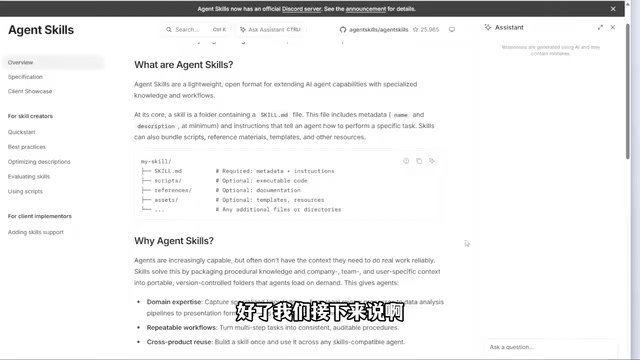
According to the official documentation, the core of a Skill is a folder, not a single MD file. This folder must contain a file named SKILL.md (the filename cannot be changed), which must include at least two metadata fields — a name and a description — along with instructions that tell the agent how to perform a specific task.
In other words, Skills are a lightweight, open-format mechanism for extending an AI agent's capabilities with specialized knowledge and workflows. If you only create a standalone MD file, its functionality will be quite limited and underutilized.
One learning principle worth emphasizing: when exploring any new technology, go to the official documentation first. Secondary sources and social media posts are someone else's interpretation and may not be accurate. The official site is always the most complete and up-to-date. Even if English is a barrier, tools like Doubao Desktop Translation or Quark Browser's bilingual reading mode make it a non-issue.
Agent Skills is a standardized capability extension mechanism Anthropic introduced for Claude Code, and its design philosophy resembles the concept of "plugins" in a package manager. Unlike traditional System Prompts or custom instructions, Skills bundle knowledge, instructions, and executable resources into a portable folder unit. This unit can be used in personal workspaces, shared with a team, or published to a community marketplace. The design draws on the software engineering principle of "modularity" — encapsulating domain-specific expertise into self-contained units that can be called by an agent through a standard interface, enabling reuse and composition of capabilities.
What's Inside a Skill Folder
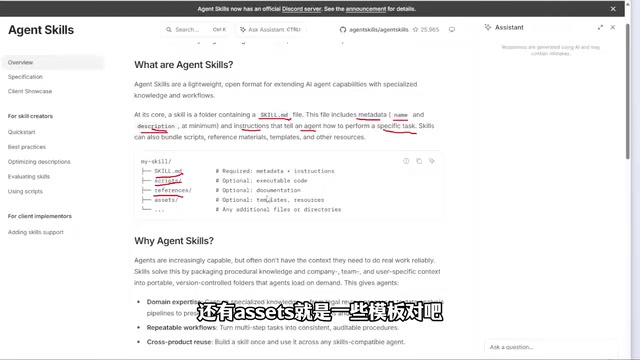
Beyond the required SKILL.md, a complete Skill folder typically contains several types of supporting resources:
- scripts: Directly executable script files, such as batch commands or Python scripts.
- references: Documentation for the agent to consult.
- assets: Templates, sample data, stylesheets, and similar resources.
You can even add subdirectories. However, there's one critical prerequisite: if you want the agent to use those additional folders, you must explicitly reference them in SKILL.md — telling it which folder and file to use for which type of task. If you don't specify this, the agent has no way of knowing on its own.
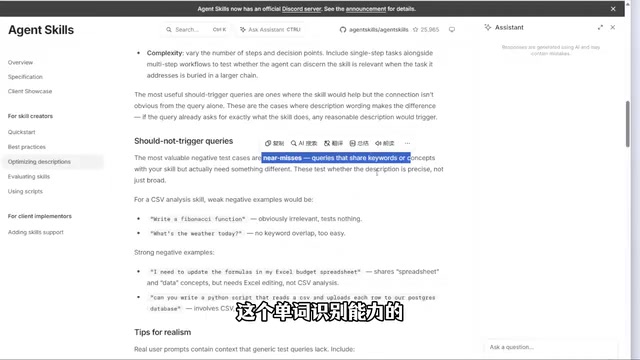
Here's a common pitfall: many people report that their Skill isn't being triggered when they run a task. The problem almost always comes down to a poorly written description. The model doesn't inherently know which Skills are available in the current environment — it relies entirely on the name and description to decide whether to invoke a given skill. The clearer and more specific the description, the higher the match rate. The official documentation has a dedicated section on how to write effective descriptions — it's worth reading carefully.
The mechanism by which a large language model decides whether to invoke a Skill is essentially a semantic matching process: the agent compares the description of the current task against the name and description of each loaded Skill, then selects the closest match. This explains why description quality is so critical. A vague description like "process documents" leads to missed or incorrect matches, while a specific one like "convert an Excel financial report with multiple sheets into a PDF with a table of contents" triggers the right skill precisely. When writing descriptions, follow a structure of "task context + input/output characteristics + key qualifiers" and avoid broad, generic verbs.
Why Skills Are a Revolutionary Development
Now that the structure is clear, let's look at the problem Skills actually solve. Whether you're using Claude Code, Codex, or any other agent platform, these tools are fundamentally agents — and they may not have deep expertise in specific vertical domains.
Traditionally, if a regular developer wanted to harness LLM capabilities, they'd need to learn Python, various frameworks, and potentially even touch on algorithms — a long and demanding path. Skills change that logic entirely: they package specialized capabilities into a folder that you can load on demand, eliminating most of the learning overhead.
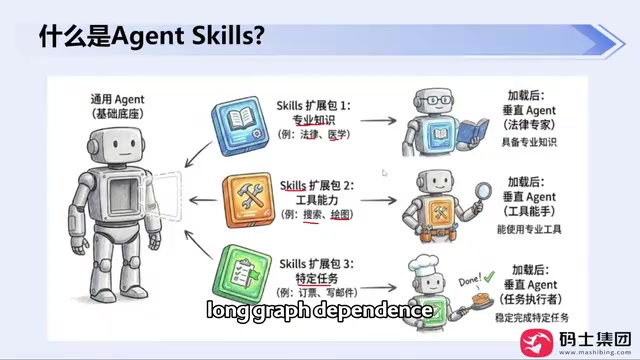
A useful analogy: imagine you're a business owner with a smart but non-specialist AI assistant. They don't know how to draft contracts (no legal knowledge) and can't make posters (no design skills). Traditionally, you had two options — send them for training, or hire another specialist. Both cost time and resources.
Skills offer a third path: packaging specialized capabilities into plug-and-play skill modules. Need a contract drafted? Load the legal skills pack. Need a presentation? Load the PowerPoint pack. Need to book a flight? Load the travel booking pack. The base agent stays the same; the skills loaded on top can be swapped as needed.
From a broader perspective, Skills represent a paradigm shift in how AI capabilities are distributed. Previously, extending an AI system's abilities meant either fine-tuning (which requires large labeled datasets and significant compute) or Retrieval-Augmented Generation (RAG) (which requires setting up vector databases and related infrastructure) — both high-barrier approaches for most developers. Skills reduce "capability transfer" to the level of file management: an expert writes their workflow and domain knowledge into a Markdown document, and anyone who downloads that folder gains equivalent capabilities. It's fundamentally a text-based democratization of knowledge — no training, no deployment, anyone can be both a producer and consumer of AI capabilities.
Plug-and-Play: Skills as Add-On Packs for Your Workspace
One of Skills' most practical characteristics is that they are, at their core, just folders. Drop one into your workspace or working directory when you need it, remove it when you don't — it won't interfere with anything else. It's a pure "add-on skill pack."
This design offers tremendous flexibility: the Skills marketplace (with download links on the official site) has a wide range of ready-made skills. You can treat them like items in a backpack — load the capability you need for the task at hand, no extra learning or configuration required.
A Few Tips Before You Get Started
Based on the core concepts covered, here are some practical takeaways worth keeping in mind:
- Start with the official docs. The best practices section on the official site lays out recommended approaches for using Skills — applicable directly to both learning and production environments.
- Take description writing seriously. It's the key to whether a skill gets matched correctly. The official docs have dedicated writing guidelines worth referencing.
- Understand the folder structure.
SKILL.mdis the core; scripts, references, and assets each have their role. Any additional files that should be used must be explicitly referenced. - Use translation tools freely. English documentation is no longer a barrier — Doubao Desktop and Quark Browser both support bilingual reading modes.
Understanding the true nature of Skills — a plug-and-play capability folder built around SKILL.md — is the foundation for developing custom Skills and optimizing context and token usage. It changes not just the technical implementation, but the entire mental model for how we access and apply specialized expertise.
Related articles

Felix Rieseberg Personal Homepage
Felix Rieseberg's personal homepage sparks attention on Hacker News. This article covers the Slack engineer's technical background, the rise and fall of nativefier, and the value of a developer homepage as a tech calling card.

@ai-sdk/vue 3.0.306 Patch Release Syncs with [email protected] Update
@ai-sdk/vue 3.0.306 released, synced with [email protected]. A routine patch release for the Vercel AI SDK ecosystem with no public API changes; the Vue adapter layer stays version-aligned with the core package.

Gemini 4 Argon API Launches: The Era of Million-Token Output Begins
Google launches Gemini 4 Argon with sparse MoE architecture, up to 1M output tokens, and a 68.90% Vals Index score, available across API, AI Studio, and the Gemini app.