Understanding AI Context Windows in 55 Seconds: How They Work and Practical Tips

The context window is the hard boundary of AI memory; checking, compacting, and isolating conversations keep it sharp.
The article explains the concept of the "context window" in AI coding assistants: it's everything the model can see at once, has a hard limit, and is already occupied by tool instructions, rule files, and MCP tools before you type anything. During work, every message, file read, and command output continuously consumes the window. When approaching the limit, earlier conversations are compacted into summaries, losing details and causing AI to "forget" earlier rules. The article offers three practical habits: regularly check usage with `/context`, `/status`, or the context ring; proactively compact context before large tasks; and start a new conversation for each new task to isolate interference from old tasks. The core takeaway: manage your limited context well to keep AI performing at its best.
What Is a Context Window?
The context window is everything an AI model can "see" at once, and it has a hard limit. Before you even start typing, the model's memory is already occupied: first by the tool's own instructions, then by the rule files you provide (such as Claude.md or Agents.md), and then by all the MCP tools you've connected. Understanding this is the first step to using AI coding assistants effectively.

Tokens and the Unit of Measurement for Context Windows
The size of a context window is typically measured in tokens, not words or characters. A token is the smallest unit of text a model processes, roughly corresponding to part of an English word or a single Chinese character. For example, in English, "unbelievable" might be split into several tokens, while a 1,000-character Chinese document often corresponds to over a thousand tokens. Window sizes vary widely across models, from a few thousand tokens in earlier models to over a million today. Understanding this token-based measurement is crucial: when you paste a large file or ask the AI to read an entire codebase, the actual token consumption can far exceed intuitive expectations. The context usage percentage shown in tools is calculated based on token counts.
How Does the Context Window Get Filled?
Once you start working, context consumption increases rapidly: every message you send, every file the AI reads, and every command output occupies window space. As the conversation progresses, the window gradually fills up, and the model can "remember" less and less.

What Happens When Context Approaches the Limit?
When context nears capacity, earlier conversation turns are compressed into summaries, and details are lost—for example, rules you gave an hour ago may no longer be accurately followed by the model. This explains why AI sometimes "forgets" earlier instructions.

How Context Compaction Works
When a conversation exceeds the window capacity, the system doesn't simply discard the earliest content; instead, it triggers a mechanism called "compaction": the model summarizes earlier multi-turn conversations into a condensed summary, which then replaces the original content to continue the conversation. The cost of this is lossy information conversion—the summary retains the gist but struggles to precisely reproduce specific rules, variable names, or command details. As a result, after compaction the model may "seem to remember" but deviate when executing precise instructions. This is why the original article recommends proactively compacting before starting a large task: rather than letting the system passively truncate at a critical moment, actively organize at task boundaries to ensure the new task gets clean and complete context space.
Three Practical Habits
To keep AI sharp, you can adopt the following habits:
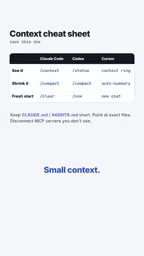
- Regularly check context usage: Use the
/contextcommand in Claude Code,/statusin Codex, or check the context ring in Cursor. - Compact context before large tasks: Use the compact feature to condense conversation history and free up space.
- Start a new conversation for each new task: Avoid old task context interfering with new tasks.
Why Rule Files and MCP Tools Continuously Occupy Context
Rule files like Claude.md and Agents.md are automatically injected into context at the start of each conversation to tell the AI project conventions, coding standards, and preferences. Their benefit is consistent AI behavior, but the cost is that every conversation turn consumes a fixed portion of the window—the longer the file, the less space left for actual work. The same applies to MCP (Model Context Protocol) tools: each connected MCP server exposes its tool definitions and descriptions to the model, and these descriptions count toward context. The more MCP tools connected, the more window space is passively occupied even if you don't use them. Therefore, in practice, streamlining rule files and enabling MCP servers on demand is itself a form of context management.
Summary
The context window is the hard boundary of AI memory. By checking, compacting, and isolating conversations, you can keep AI performing at its best within a limited window. Remember: smaller context, sharper AI.
Related articles
 Tech Frontiers
How Do You Stop AI Agent Emails From Sounding Like AI? One Developer's Solution
AI agent emails always sound like AI? A developer shares reright: a rewrite step that validates numbers, names, and links, preventing humanizers from tampering with key info. Test data and integration details inside.
 Tech Frontiers
Starlink Mobile: SpaceX's Carrier Ambitions and the 5G Deployment Challenge
SpaceX plans to make Starlink Mobile a mainstream carrier, deploying thousands of direct-to-cell satellites and building a terrestrial 5G network to challenge AT&T, Verizon, and T-Mobile. This article analyzes its dual-track strategy, 5G deployment challenges, and the competitive landscape.
 Tech Frontiers
OpenAI Raises Another $11 Billion, Valuation Hits $1.25 Trillion
OpenAI has raised an additional $11 billion in a new funding round at a valuation of $1.25 trillion. The deal is not yet closed and is expected to be completed in the coming weeks, further consolidating its leading position in AI.