UniApp Beginner's Guide: Build Multi-Platform Apps with One Codebase

A zero-to-hero guide for building cross-platform apps with UniApp using one codebase.
This article reviews a beginner-friendly UniApp course that teaches complete newcomers how to build a cross-platform learning app in about 2 hours. It covers the essential tech stack — HTML, CSS, JavaScript, and UniApp — explains how UniApp enables one-codebase multi-platform deployment, and provides an honest assessment of the course's strengths and limitations for aspiring developers.
Why Complete Beginners Can Learn App Development
In an era where AI technology is sweeping across every industry, mastering app development skills has become a pressing need for many IT professionals and career changers. The "Build an App from Scratch" beginner series published by B站善学堂 (Shanxuetang on Bilibili) offers 16 lessons totaling about 2 hours, paving a clear path into the world of app development for those with absolutely no programming background.
The course has a very clear positioning — it's not meant to teach you everything, but rather to serve as a "stepping stone" that familiarizes you with the overall IT technology framework and common toolchains. Whether you plan to specialize in Java, Python, big data, or artificial intelligence later on, this hands-on introductory project will help you build an intuitive understanding of technology development.

By guiding students step by step through building the core features of a complete app, the course transforms "going from 0 to 1" from an empty slogan into a tangible result you can see with your own eyes. This project-driven teaching approach is especially friendly for beginners who tend to lose their way in purely theoretical learning. Project-Based Learning (PBL) is a teaching method that has been widely validated in programming education in recent years. Traditional programming instruction typically covers syntax first, then data structures, and finally projects — this bottom-up approach often causes beginners to give up within the first few weeks because they can't see any practical results. PBL takes the opposite approach: it starts by setting a specific, deliverable project goal, then gradually introduces the required knowledge around the project's needs. World-renowned introductory programming courses like Harvard's CS50 and the University of Helsinki's MOOC courses adopt a similar philosophy. The core advantage is that learners always know "why am I learning this" — every new concept has an immediate application scenario, which dramatically improves learning motivation and knowledge retention.
UniApp's Core Tech Stack: From Skeleton to Interaction
The course divides the required technologies into two categories — "essential" and "optional" — with clear logic and a progressive learning curve.
Essential Technologies: HTML + CSS + JS + UniApp
HTML (HyperText Markup Language) plays the role of the "skeleton" in the project. Whether it's text or various tag structures, HTML is used to build the foundational framework of every page. It's the starting point for all frontend development.
CSS (Cascading Style Sheets) is responsible for dressing up that "skeleton." Through CSS, originally plain page structures can be presented in more visually appealing ways that match user expectations, evolving the interface from "functional" to "good-looking."
JavaScript is the key to making pages "come alive." It handles the interaction between data and views, transforming static data into dynamic content — this data is typically provided by backend APIs, enabling truly dynamic applications.
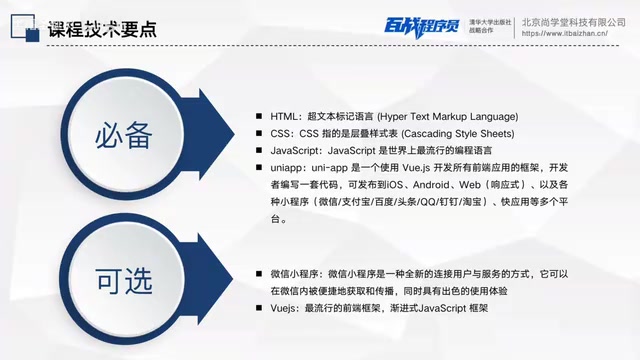
HTML, CSS, and JavaScript are known in the industry as the "frontend trinity," and together they form the technological cornerstone of the entire web — an architecture that has been running steadily for nearly three decades. HTML was invented by Tim Berners-Lee in 1991, and the current HTML5 standard was officially released by the W3C in 2014, adding semantic tags, local storage, Canvas drawing, and other modern features. CSS has evolved over the years, with CSS3 introducing Flexbox, Grid layout, animations, and media queries — enabling pure CSS to achieve complex visual effects that previously required JavaScript. JavaScript was designed by Brendan Eich in 1995 and has since become one of the most widely used programming languages in the world. With continuous updates to the ECMAScript standard, it now supports classes, modules, async programming, and other modern language features. The division of labor among these three — structure, style, and behavior — embodies the classic "separation of concerns" design principle and serves as the cognitive prerequisite for understanding all frontend frameworks.
UniApp is the homegrown open-source frontend framework highlighted in the course and the core attraction of the entire tech stack. Its greatest advantage lies in "one codebase, multi-platform deployment" — the same code can run simultaneously on Android, iOS, WeChat Mini Programs, and other platforms. For individuals and small teams with limited development resources, UniApp's cross-platform capability can dramatically reduce development and maintenance costs, which is a key reason for its popularity in the domestic frontend ecosystem.
UniApp was launched by DCloud in 2018. The technical principle behind its cross-platform capability is that during the compilation phase, it transpiles Vue-style code written by developers into native code or runtime code for different platforms. For mini program platforms, UniApp compiles code into the corresponding platform's formats such as WXML/WXSS (WeChat) or AXML/ACSS (Alipay). For the app side, it runs through native rendering engines or WebView. For the H5 side, it directly outputs standard web code. In the competitive landscape of cross-platform frameworks, UniApp's main rivals include React Native (by Meta, based on the React ecosystem), Flutter (by Google, using the Dart language and a custom rendering engine), and Taro (by JD.com, focused on multi-platform mini programs). Compared to these alternatives, UniApp's core differentiators are: comprehensive coverage of the domestic mini program ecosystem (supporting over ten mini program platforms including WeChat, Alipay, Baidu, Douyin, etc.), deep integration with the Vue.js ecosystem, and the out-of-the-box experience provided by the HBuilderX development tool. According to DCloud's official data, the UniApp developer community has surpassed several million members and enjoys an extremely high market penetration rate among small and medium-sized enterprises and individual developers in China.
Optional Technologies: WeChat Mini Programs and Vue.js
For advanced learning paths, the course also mentions two optional technologies. WeChat Mini Programs, as part of China's most dominant app ecosystem, are a scenario that virtually every frontend developer will encounter. Since their official launch in January 2017, WeChat Mini Programs have grown into a massive commercial ecosystem. According to Tencent's public data, WeChat Mini Programs have hundreds of millions of daily active users, covering nearly every industry including e-commerce, lifestyle services, government services, education, and healthcare. The core technical architecture of mini programs uses a dual-thread model: the logic layer runs in JSCore, the rendering layer runs in WebView, and the two communicate through the Native layer. This design ensures security while achieving near-native app performance through native components. For frontend developers, mastering mini program development means being able to reach WeChat's super traffic gateway with over 1.3 billion monthly active users. Many companies even prioritize mini programs over native apps because of their natural advantages: "no installation needed, use-and-go, easy to share."
Vue.js, as one of the three major frontend frameworks today, has become the top choice for domestic frontend development thanks to its progressive design and relatively low learning curve. Vue.js was created by former Google engineer Evan You in 2014. Its core philosophy as a "progressive framework" means that developers can gradually introduce framework features based on project complexity, rather than committing to an entire tech stack from the start. In the simplest scenario, Vue can be included on a page via a single script tag, much like jQuery; as requirements grow, developers can progressively add component-based development, route management, state management, and other full engineering workflows. Among the three major frontend frameworks — React (Meta), Vue, and Angular (Google) — each has its own positioning. React excels in functional programming and its massive community ecosystem, Angular provides a comprehensive enterprise-level solution, while Vue dominates the Chinese market with its intuitive API design and thorough Chinese-language documentation. Vue 3's introduction of the Composition API and a Proxy-based reactivity system achieved a quantum leap in performance and TypeScript support. UniApp's choice of Vue as its underlying framework means that by learning UniApp, students are simultaneously building core Vue development experience — laying a solid foundation for transitioning to web frontend development later on.
While these two technologies are listed as "optional," for students who want to go further in the frontend field, they are essentially unavoidable required courses. The course plants seeds here for deeper learning down the road.
UniApp Hands-On Project: Building a Learning App
The practical outcome of the course is a relatively feature-complete learning app that includes core modules such as a homepage, course list, and playback page.
From the screenshots, we can see that the app's homepage includes main navigation modules like Home, Categories, Learning, and Profile, with a focus on content display. Notably, all page data comes from backend APIs that are publicly accessible — students can freely call them during the learning process without any restrictions, which greatly facilitates hands-on practice.
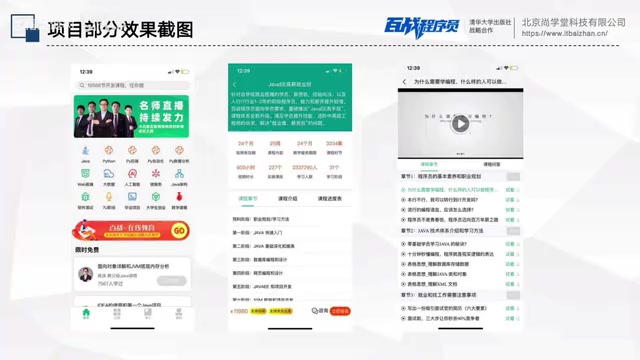
Clicking into the homepage leads to the course list page, where you can see catalogs of Java, Python, and other course series, with the ability to view details. When a user clicks on a specific course chapter, the page navigates to a detailed chapter content page, enabling online course video playback.
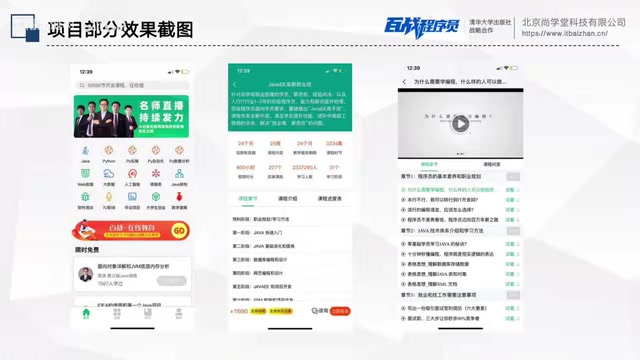
This complete flow of "homepage display → list browsing → detail playback" covers the core interaction logic of most content-based apps. After completing this project, students can build a comprehensive mental model of the entire UniApp development process.
Honest Assessment: Positioning and Limitations of This UniApp Beginner Course
As an introductory course targeting complete beginners, its positioning should be viewed realistically. The course itself openly acknowledges that the 16 lessons are "not meant to cover all the knowledge" but rather focus on the essential content needed for the project. This means it's better suited as a tool for technical enlightenment and interest sparking, rather than a one-stop job training program.
The promotional claim of "job-ready upon completion" is inevitably an overstatement for an introductory course that's only 2 hours long. To truly reach an employment-ready level, you'll still need to systematically study data structures, backend development, engineering practices, and much more beyond this foundation. According to industry hiring standards, a junior frontend developer typically needs to master far more than just HTML/CSS/JS basics, including: proficient use of version control tools (Git), deep understanding of at least one frontend framework (component lifecycle, state management, routing principles, etc.), HTTP protocol and RESTful API interaction specifications, basic knowledge of data structures and algorithms, and the ability to configure build tools like Webpack/Vite. Additionally, TypeScript is becoming the de facto standard in frontend development, and Node.js is increasingly required as a supplementary skill by more and more job postings. Between completing a 2-hour introductory course and meeting these requirements, there's typically another 3-6 months of systematic study and hands-on experience across multiple projects. Beginners should maintain reasonable expectations.
However, from a positive perspective, free, publicly available, project-driven introductory content like this genuinely lowers the barrier for ordinary people to access app development technology. For those hesitating about whether to enter the programming world, spending 2 hours following along to build a working app is undoubtedly a highly valuable "testing the waters" experience. When you build a real, running app in 2 hours, what you gain isn't just technical knowledge — it's the confidence and sense of direction to continue learning.
Conclusion
This UniApp beginner course provides a solid starting point for app development newcomers through its clear technology layering, complete hands-on project, and beginner-friendly positioning. Rather than trying to cover everything, it focuses on the most essential tools — HTML, CSS, JavaScript, and UniApp — and ties them together through a functional learning app. For anyone curious about what cross-platform app development actually looks like, this is a high-value introductory experience.
Related articles

DeepCell: One-Click AI Generation of Documents, Spreadsheets, and Slides
DeepCell tops Product Hunt with one-click generation of documents, spreadsheets, and slides, using the .deepcell format for linked updates, designed for System 2 tasks like modeling and sales reviews.

Doneas: 15-Minute Daily Accountability Calls That Keep Indie Developers From Procrastinating
Doneas is a daily accountability tool for indie developers: plan tasks on Monday, join a 15-minute call with five builders each day, and log deliveries on a public progress page. This article analyzes its core mechanics, effectiveness, and potential issues around retention and matching.

Fastlane 2.0: Fully Automated AI Ad Campaigns, From Creative to Optimization
Fastlane 2.0 is an AI ad automation tool: enter your website and it learns your brand, generates video and image ads, and runs and optimizes them on Meta, TikTok, Instagram, and YouTube.