Unified Configuration Across Agents: One Ruleset to Drive Claude Code, Codex, and Pi

Unify multiple AI coding agents with one shared AGENTS.md config, Git versioning, and layered rules.
This guide explains how to solve configuration fragmentation when using multiple AI coding assistants like Claude Code, Codex, and Pi. By sharing a single AGENTS.md file across all agents, combined with Git/GitHub version control and a global/project layered configuration mechanism, developers can define rules and skills once and have them take effect everywhere — creating a maintainable, versionable, and continuously evolving AI productivity system.
The New Pain Point of the Multi-Agent Era: Configuration Fragmentation
When you only use one AI coding assistant in your terminal, everything is simple — set up the rules and skills, and it does what you say. But in reality, more and more developers are using multiple Agents simultaneously: Claude Code, Codex, Pi, OpenCode, OpenClawAd, Hermes… Each one is powerful, but each requires its own independent configuration of rules and skills.
This multi-Agent coexistence is no accident. Claude Code is Anthropic's terminal-native AI coding assistant, excelling at deep code reasoning and system-level operations. Codex is OpenAI's coding Agent with powerful code generation and image generation capabilities. Pi is positioned as a more lightweight interactive assistant with better automatic recognition of certain file formats. Each tool has unique advantages in specific domains, so developers rarely stay "loyal" to just one — they switch flexibly based on task type. And that's exactly the root cause of configuration fragmentation.
This is the core problem that this Bilibili tutorial aims to solve. The video author uses an intuitive demo to reveal the contradiction: he types a query starting with FastPath in the left terminal, and the Agent doesn't respond at all. In the right terminal with a different Agent, the same command successfully creates a Markdown file named with today's date in the root directory. The root cause? The rules only take effect for the Agent that was configured — the others are essentially "blind."
As projects multiply and skills accumulate, the various Agents gradually fall "out of sync." Maintaining the same set of instructions for each Agent is both tedious and error-prone. The solution proposed in the video: have all Agents share a single configuration file — define once, take effect everywhere.
The Two Core Elements of an Agent: Memory and Muscle
Before diving into the specific setup, the author clarifies two foundational concepts using a vivid analogy.
Memory = Rules
"Memory" refers to the information an Agent should know every time a new session begins. In more technical terms, these are "Rules." Rules exist from the very first moment an Agent starts up — they're global, persistently active constraints.
From a technical implementation perspective, rules are essentially extended injections into the system prompt. When an Agent starts a new session, it automatically reads the rules defined in configuration files after loading the core system prompt but before receiving user input, injecting them as part of the context at the beginning of the conversation. This means rules have a continuous influence on every round of the Agent's reasoning, effectively establishing a "foundational cognitive framework" for the Agent. Typical rule content includes: code style preferences (e.g., "always use TypeScript instead of JavaScript"), security constraints (e.g., "never hardcode secrets in code"), output format requirements (e.g., "respond in Chinese"), and so on.
Muscle = Skills
"Muscle" corresponds to "Skills." Skills are a collection of capabilities that build up as you continue using an Agent — they're packaged bundles of rules, workflows, and capabilities that are only triggered when specific conditions are met.
The key difference between skills and rules lies in the triggering mechanism. Rules are "always present" constraints, while skills use a condition-matching pattern — the Agent only activates the corresponding skill when the user input contains specific keywords, file types, or operational intents. This design borrows from the "event-driven" philosophy in software engineering: rather than having the Agent constantly carry the context overhead of all capabilities, it loads them on demand, saving token consumption and avoiding instruction conflicts between different skills. A skill definition typically contains three parts: trigger conditions (when to activate), execution steps (what to do), and output specifications (how to present the results).
The author gives a practical example: suppose you need to create a weekly report table in a fixed format every week, but the raw data is exported by another team in a messy format — you could create a skill specifically for "cleaning messy tables." He also offers a practical rule of thumb: if you find yourself needing an Agent to do something three or four times, it's worth creating a skill for it.
The Core Mechanism: One AGENTS.md to Unify Multiple AI Assistants
The technical core of this entire unified multi-Agent configuration approach is a single configuration file read by multiple Agents.
The choice of Markdown (.md) as the configuration file format instead of JSON or YAML reflects deliberate technical considerations. Markdown is a lightweight markup language that can be directly read and edited by humans while also being precisely parsed by large language models (LLMs) — this is crucial because Agents essentially "understand" configuration content through LLMs. Compared to structured JSON, Markdown allows complex rule logic to be described in natural language, lowering the barrier to writing. Compared to plain text, Markdown's heading hierarchy (#, ##) and list structures provide enough organization for Agents to accurately distinguish boundaries between different rules and skills. Additionally, Markdown files render as attractive documentation pages on GitHub, which is particularly friendly for sharing and collaboration.
During the setup phase, the author created an AGENTS.md file and linked each Agent to the CLAUDE.md file. The key point: you see only one file, but it serves as the unified standard for multiple Agents working together. When you use Claude Code and modify its instructions or memory file, it automatically syncs updates to AGENTS.md, ensuring rules persist across any new session.
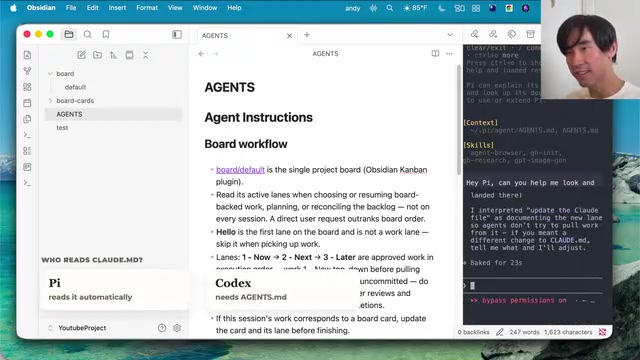
The video demonstrates how each Agent reads this file, with one important discovery worth noting:
- Pi automatically reads the
CLAUDE.mdfile, even without explicit Agent file setup; - Codex does not read it automatically and requires explicit configuration.
This difference reflects the varying strategies Agent vendors take toward "configuration compatibility" design. Pi can automatically read CLAUDE.md because its development team built recognition of various common configuration file names into its file scanning logic — a "Convention over Configuration" design philosophy. Codex takes a more conservative approach, requiring users to explicitly declare the configuration file path. While it adds an extra step, it avoids the risk of misreading incorrect configurations. Understanding these nuances helps you avoid pitfalls. The value of this approach is that — modifying any single location propagates changes to all other Agents. All agents read and write the same file, with no second copy anywhere.
Git and GitHub: Building a "Checkpoint" System for Agent Configuration
To let configurations evolve over time while remaining rollback-friendly, the video introduces Git and GitHub as infrastructure, with a special clarification of a common misconception.
Git and GitHub Are Two Separate Tools
Many people conflate Git and GitHub, but they're actually two different things:
- Git was created by Linux creator Linus Torvalds in 2005 as a version control tool;
- GitHub started in 2008 as a website for hosting Git projects and enabling collaboration, and was acquired by Microsoft for $7.5 billion in 2018.
Git's core working principle is worth briefly expanding on, as it directly relates to the reliability of Agent configuration management. Contrary to many people's intuition that "Git saves file differences," Git actually uses a snapshot model: at each commit, Git takes a "snapshot" of the current state of all files in the project, rather than merely recording "what changed." If a file hasn't changed, Git stores only a reference to the previous snapshot rather than saving the file content again — making storage extremely efficient. Git's workflow involves three areas: the working directory (files you're editing), the staging area (files prepared for commit), and the repository (saved historical snapshots). Understanding the relationship between these three areas helps you better grasp the meaning of the Git commands mentioned below.
GitHub didn't invent Git, but it brought Git to the internet. Understanding this history helps you use them more confidently in both programming and non-programming projects.
Common Git Commands and Shortcuts
The author demonstrates a manual workflow, paired with previously configured shortcut aliases:
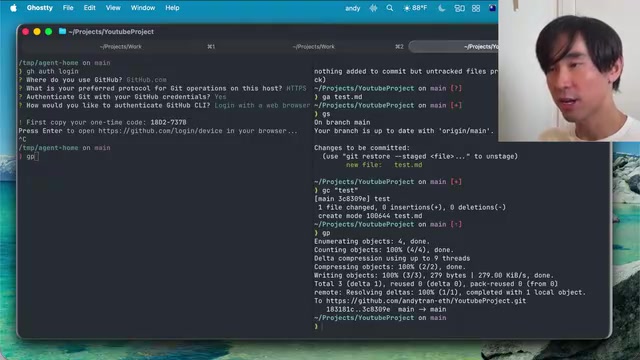
git clone— Download an existing project locally (essentially copying the remote repository's complete history and files to your machine)git init— Create checkpoints and history for a project (generates a hidden.gitfolder in the current directory containing all the metadata and object database Git needs)gs(git status) — Check the status of changes (shows which files are modified in the working directory, which have entered the staging area, and which are not yet tracked by Git)gea— Add untracked files to a save point (corresponds togit add, moving files from the working directory to the staging area)gc— Commit with a message (corresponds togit commit, saving staged content as a permanent snapshot)gp— Push changes to the cloud (corresponds togit push, uploading local repository commits to remote hosting platforms like GitHub)
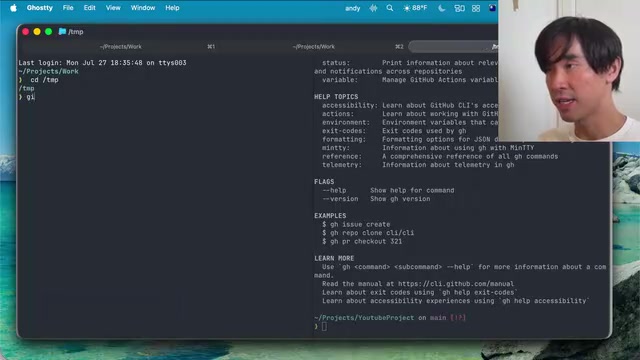
He also deleted the project's .git folder (rm -rf) to "wipe the memory" and start fresh, then used git init to create a brand new checkpoint. While this manual operation is tedious, the author emphasizes that once you understand the underlying mechanics, manual operations are often faster than having the Agent do it for small changes.
Repository Security: Always Set to Private
The video repeatedly stresses a critical security principle: always set repositories to Private when creating them, unless you explicitly intend to make them public. Otherwise, anyone can see your code and scripts, and if they contain sensitive data like API keys, it leads to exposure. This is especially important in the context of Agent configuration — config files may contain your workflow preferences, internal project structure descriptions, or even environment variable paths in automation scripts. Once exposed, these not only involve personal privacy but could also become entry points for social engineering attacks. Fortunately, if you use a reasonably intelligent model to create projects, it usually proactively reminds you about this.
Global Configuration vs. Project Configuration: The Art of Layered Management
The most elegant design in this unified multi-Agent configuration approach is the layering mechanism for configurations.
This layered thinking has a long tradition in software engineering. Operating system environment variables are divided into system-level and user-level; CSS stylesheets have cascading relationships between browser defaults, global styles, and component styles; web servers like Nginx also distinguish between global blocks, server blocks, and location blocks. The core principle behind all these layered designs is the same: elevate common configurations to reduce repetition; push specialized configurations down to maintain flexibility. In Agent configuration management, the same principle is cleverly applied — global rules define your universal preferences as a developer, while project rules adapt to the unique needs of specific projects. The two layers stack rather than replace each other.
Global Rules and Global Skills
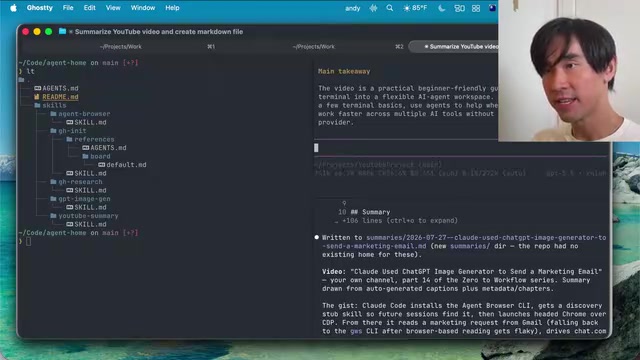
In the "Agent home" directory, global project rules and a global skills library are stored. These configurations apply to all projects and all Agents. In the video demo, the author had Pi create a global skill using the yt-dlp command-line tool to fetch YouTube video summaries — once set up, any Agent given a YouTube link can automatically summarize it into a Markdown document and store it in an Obsidian notes vault.
yt-dlp is a noteworthy open-source command-line tool. It's an actively maintained fork of the now-discontinued youtube-dl project, maintained and continuously updated by the community. yt-dlp can not only download YouTube videos and audio but also extract subtitles, metadata, thumbnails, and more, supporting thousands of video platforms. In this use case, the Agent actually calls yt-dlp to grab the video's subtitles or description, then leverages the LLM's language comprehension to compress it into a structured summary. This combination of "command-line tool + LLM comprehension" is a very typical pattern in current AI automation workflows.
Project-Level Rules and Project Skills
But not all rules should apply globally. The author then created "use only here" project skills within a specific project repository: only when a YouTube link is pasted within this project will it automatically generate a summary file with a date-based title.
The key principle: project rules don't replace global rules or skills — both are read by the Agent. Technically, this means the Agent performs a "merge" operation when loading configurations — first reading the global configuration, then reading the configuration in the current project directory, ultimately forming a merged complete ruleset. If rules at the two levels conflict, project-level rules typically take higher priority (similar to the "more specific selector wins" principle in CSS). This lets you configure flexibly — some rules apply to all projects, while specific rules and skills serve only a YouTube project or a work project.
Cross-Agent Skill Sharing in Practice
The author also demonstrated cross-Agent skill sharing: having Codex leverage its native image generation capability while also enabling Claude Code and Pi to call the same image generation function through unified skills. No matter which Agent you're in, as long as you explicitly request "generate an AI image," it can execute. This cross-Agent skill sharing is possible because skill definitions describe not only "what to do" but can also include specific tool invocation instructions — such as calling a particular API endpoint or executing a Shell command. Although different Agents have different internal architectures, they can all parse instruction descriptions in Markdown and map them to their own tool invocation capabilities.
Let Your Configuration Grow With You
The final form of this system is a continuously evolving "shared brain."
Skills downloaded from the internet can be customized and saved to your private GitHub account, growing alongside you. Thanks to Git's checkpoint mechanism, if a skill gets broken by a change, you can roll back to a previous, better-working version at any time — in Git, you can use git log to view commit history, then use git checkout or git revert to return to a specified snapshot, without losing any intermediate states. The author also mentions using GitHub research skills to have the Agent search for existing skills online as inspiration, then modify and customize them based on your own workflow.
The author specifically notes: other people's skills may not perfectly suit you — "some of my skills might not be a perfect fit for you" — so deleting, adding, and customizing is the norm. The essence of this approach isn't to give you a standard answer, but to provide a configuration framework that you can continuously refine and share across all your Agents. From a broader perspective, this kind of "personalized Agent configuration library" is becoming the developer's new "toolbox" in the AI era — just as programmers used to carefully maintain their dotfiles, Vim plugin lists, or Shell aliases, in the future every heavy AI user will own a continuously iterated set of Agent configurations. It's both a crystallization of personal experience and a productivity multiplier.
Summary
As AI coding assistants enter the era of "multi-Agent coexistence," configuration fragmentation is becoming a productivity killer. The solution presented in this tutorial is clear and practical: use AGENTS.md as a unified entry point, pair it with Git/GitHub for version management, and precisely control the scope of rules and skills through global and project-level layering mechanisms.
For developers juggling Claude Code, Codex, Pi, and other tools simultaneously, "define once, take effect everywhere" not only eliminates repetitive work but gives your AI workflow maintainable, traceable, and growable engineering capabilities. When all your agents share the same brain, you truly own an AI productivity system of your own.
Key Takeaways
Related articles

Gmod TTT: Boba's Winning Streak and Game Design Insights
An in-depth analysis of Gmod TTT's role system, creative items, and social gameplay mechanics, exploring the relationship between randomness design and game balance through Boba's winning streak phenomenon.

FlexBudget: Fair Comparison of KV Cache Eviction Strategies Under a Unified Compute Budget
AMD engineer proposes FlexBudget at PyTorch Conference: a training-free fair comparison method for KV cache eviction rules using fixed kernels and memory budgets, all in core PyTorch.
