UnityMCP 1.0 Hands-On Review: Generate Unity3D Games with a Single Sentence Using AI

UnityMCP plugin enables automated Unity game development through natural language via the MCP protocol
UnityMCP 1.0 integrates the MCP protocol directly into the Unity Editor, requiring no external runtime environment. With approximately 40 configurable AI tools, it supports automatic scene building, script writing, and component attachment through natural language descriptions. In hands-on testing, a single sentence generated a complete first-person shooter mini-game. Compared to open-source alternatives, it offers improved installation convenience, tool precision, and stability, though limitations like Domain Reload-induced service interruptions remain.
Overview
Unity game development is entering a new AI-driven paradigm. A plugin called UnityMCP has released its 1.0 version, claiming that with a single natural language description, AI can automatically build Unity3D games — from scene creation and script writing to component attachment — all without manual coding. This article provides a comprehensive review of the plugin's real-world performance, covering installation, core advantages, and actual usage results.
What is the MCP Protocol? MCP (Model Context Protocol) is an open standard proposed by Anthropic in late 2024, designed to standardize how AI large language models interact with external tools and data sources. Its core idea is to standardize the connection between AI assistants and various tools, similar to how USB unified hardware connection standards. MCP defines three core primitives: Tools (tool invocation), Resources (resource reading), and Prompts (prompt templates), enabling any MCP-compatible AI client to seamlessly connect with any MCP server, dramatically reducing the development cost of AI tool integration. UnityMCP is a concrete implementation of this protocol within the Unity ecosystem.
Installation and Configuration
Basic Installation Process
UnityMCP is distributed as a standard Unity plugin package, with a very straightforward installation process:
- Extract the plugin archive
- In the Unity Editor, open Window → Package Manager
- Click the plus icon in the top-left corner and select Add package from disk
- Navigate to the
package.jsonfile in the plugin folder and select it
Note that during the first installation, you may be prompted about a missing JSON dependency package, which needs to be manually installed via package name in the Package Manager.
Key Configuration Settings
After installation, open the service panel to configure settings. The following options directly affect the user experience:
- Language switching: The panel may default to English; you can switch to your preferred language in the language options
- Port number: Configure the service port according to your needs
- Auto-restart service: This is the most critical setting — make sure to enable it
Why is auto-restart so important? This relates to Unity's Domain Reload mechanism. Domain Reload is one of Unity Editor's core mechanisms: whenever C# script changes are detected or Play mode is entered, Unity reloads the entire C# script domain to ensure code changes take effect. This process clears all static variables and reinitializes all managed objects — essentially a complete runtime reset. While this guarantees code consistency, it introduces noticeable performance overhead. In large projects, Domain Reload can take several seconds or longer, which is the root cause of UnityMCP service interruptions. With auto-restart enabled, the service recovers quickly after interruption, achieving nearly seamless continuity.
An alternative solution is to disable Domain Reload when entering Play mode in Project Settings → Editor. Unity 2019.3 introduced optional "Enter Play Mode Settings" that allow developers to skip Domain Reload for faster iteration, at the cost of manually managing static state. It's recommended to enable both approaches to ensure stability.
Advantages Over Existing Solutions
Dramatically Simplified Architecture
There are already numerous Unity MCP open-source projects on GitHub, but they commonly suffer from the following pain points:
- Complex installation: Most solutions require running a bridge service in Unity, plus separately launching an MCP service with Python or Node.js, requiring maintenance of two runtime environments simultaneously
- Imprecise tool definitions: Open-source solutions lack refinement in AI interface definitions and invocation patterns, resulting in lower generation accuracy
- No tool customization: Unable to flexibly control which tools are exposed to the AI
UnityMCP's core improvement is integrating the MCP service directly within the Unity Editor, eliminating the need for external Python or JS environments and significantly lowering the barrier to entry.
Rich Built-in Tools with Flexible Management
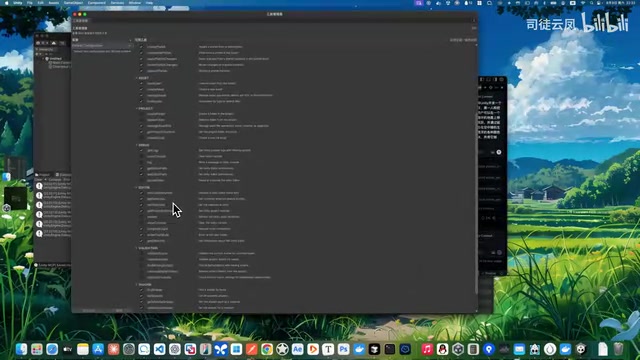
The plugin includes approximately 40-55 built-in tools (toggleable as needed), covering scene operations, script management, component control, and more. Worth noting is an interesting design decision: the author intentionally removed tools for creating folders, deleting folders, and creating scripts.
The reasoning is that if these tools were retained, the AI would preferentially call them to create script files, when in reality the same thing can be accomplished through the file operation capabilities of AI clients like Claude themselves. However, in future versions when the plugin itself has conversational capabilities, these tools may be re-enabled.

Creating scripts through MCP tools also has a unique advantage: resources refresh in real-time and scripts compile instantly, without needing to manually trigger Unity's asset refresh process.
Configuration Management
The plugin provides a configuration manager that supports saving multiple named configurations, allowing one-click switching between different tool combinations and parameter settings. For transport protocols, it supports both HTTP and SSE, adapting to different usage scenarios.
HTTP vs SSE: How to Choose? HTTP uses a request-response model where each interaction is an independent connection, suitable for simple one-off tool call scenarios — simple to implement but with weaker real-time capabilities. SSE (Server-Sent Events) is a unidirectional long-connection technology based on HTTP, where the server can proactively push data streams to the client without client polling, making it more suitable for long-running tasks that need real-time progress feedback. In AI tool invocation, SSE allows users to see execution progress in real-time for a smoother experience, while HTTP is more stable and reliable in complex network environments.
Practical Demo: Generating a First-Person Shooter with a Single Sentence
Requirements Description
In a basic Unity 2022 project, the following natural language requirement was entered:
"Please develop a small project in Unity: first-person controls where the user can move and jump on an infinitely looping ground, and click on randomly generated floating blocks of various colors in the air using the mouse to destroy them."
AI Auto-Generation Process
After invoking GPT, the AI entered deep thinking mode and then began automatically executing the following steps:
- Creating game scripts (character controller, block spawner, etc.)
- Building the game scene
- Attaching components and configuring parameters
- Automatically entering Play mode for testing
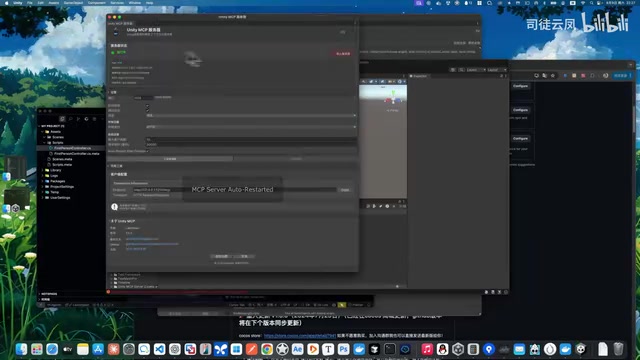
Call failures due to service restarts did occur during the process, but the AI automatically retried, with essentially no impact on the final result. Here's an important practical tip: keep the Unity Editor window in the foreground, otherwise the editor will block scene generation and refresh when running in the background.
Final Result
The generated game fully implemented all required features:
- ✅ First-person perspective control
- ✅ WASD movement + spacebar jump
- ✅ Infinitely looping ground
- ✅ Left-click on empty space to spawn randomly colored blocks
- ✅ Click on existing blocks to destroy them
- ✅ Automatic recycling mechanism to prevent memory overflow
- ✅ Crosshair UI display
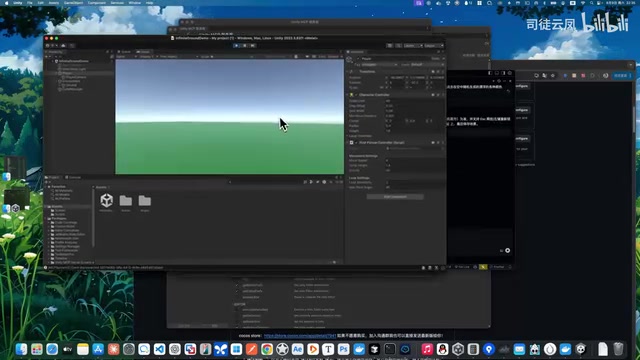
The entire process from inputting requirements to a playable game was completed entirely by AI, with human involvement limited to waiting and final acceptance.
Current Limitations and Considerations
Despite the impressive results, there are several things to keep in mind during actual use:
- Service restart issues: Script additions and asset changes trigger Unity's Domain Reload, causing brief MCP service interruptions. While the auto-restart mechanism mitigates this, occasional call failures still occur
- Long AI thinking time: When using large models like GPT, deep thinking mode significantly increases response time
- Editor must stay in foreground: Unity Editor blocks processes when in the background, affecting generation efficiency
- Unity ecosystem's natural advantage: As one of the most widely used game engines globally, Unity's API documentation, tutorials, and community code have extremely high coverage on the internet. Mainstream large models like GPT-4 and Claude have extremely rich training data on Unity C# APIs, including official documentation, Stack Overflow Q&As, and GitHub open-source projects, giving models quite accurate understanding of core APIs like MonoBehaviour lifecycle, Physics system, and Input system. In comparison, AI code generation quality for niche engines like Godot and Defold is noticeably inferior, which explains why UnityMCP achieves satisfying results in practice.
Conclusion
UnityMCP 1.0 demonstrates the practical value of the MCP protocol in game development. Compared to existing open-source solutions, it shows clear improvements in installation convenience, runtime stability, and tool precision. While it's not currently open-source (the author's Godot MCP plugin has a complete open-source project available for reference), it's a tool worth trying for Unity developers who want to experience AI-driven game development.
From the practical demonstration, "developing a game with a single sentence" does have some marketing flair, but for prototype validation and small game projects, this workflow can genuinely boost development efficiency significantly. As large model capabilities continue to improve and the MCP ecosystem matures, the potential for AI-assisted game development remains vast.
Key Takeaways
- UnityMCP 1.0 integrates the MCP service directly within the Unity Editor, requiring no additional Python/JS environment, dramatically lowering installation and usage barriers
- Includes approximately 40 customizable AI tools with toggle switches, supporting comprehensive Unity development capabilities including scene operations, script management, and component control
- In the practical demo, a single natural language description enabled AI to automatically build a complete mini-game with first-person controls, block spawning, and destruction mechanics
- The core pain point is that Unity's Domain Reload causes MCP service interruptions; the auto-restart mechanism largely resolves this but occasional failures still occur
- Compared to existing open-source Unity MCP solutions on GitHub, it shows clear advantages in architectural simplicity, tool definition precision, and runtime stability
Related articles
 Product Reviews
The Programmer's Desk Setup Guide: Building a Workspace That Feels Like Home
Discover how programmers build productive, comfortable workspaces. From multi-monitor setups to ergonomic design, explore the desk philosophy that drives focus and flow.
 Product Reviews
Qoder vs Cursor Real-World Comparison: Which $20/Month AI IDE Is Better?
Hands-on comparison of Qoder vs Cursor AI IDEs: Agent autonomy, human interaction count, and architecture decisions. Qoder needed only 2 interactions vs Cursor's 8.
 Product Reviews
Cursor Cloud Agent Demo: Eliminating Bottlenecks Across the Entire Software Development Lifecycle
Deep analysis of Cursor's Cloud Agent demo showing how cloud VMs, automated test artifacts, and a full-chain control plane systematically eliminate human bottlenecks across the software development lifecycle.