Using Claude to Make Marketing Videos? Unpacking the AI Multi-Tool Orchestration Workflow

LLMs like Claude orchestrate the strategy; specialized video models do the rendering — that's the real AI video workflow.
A developer with 5–6 years of experience asked on Reddit how people actually use Opus to create production-quality videos. The article uses this as a jumping-off point to clarify the division of labor: Claude/Opus handles scripting, prompt writing, and task orchestration, while tools like Runway, Kling, and Sora do the actual rendering. "Making videos with Opus" is a simplified description of a complex multi-tool workflow with four stages: LLM-driven storyboarding, specialized model asset generation, voice/music synthesis, and LLM-assisted iteration. For software engineers, the key advantage is being able to fully automate and codify the entire pipeline.
A Real Developer's Genuine Confusion
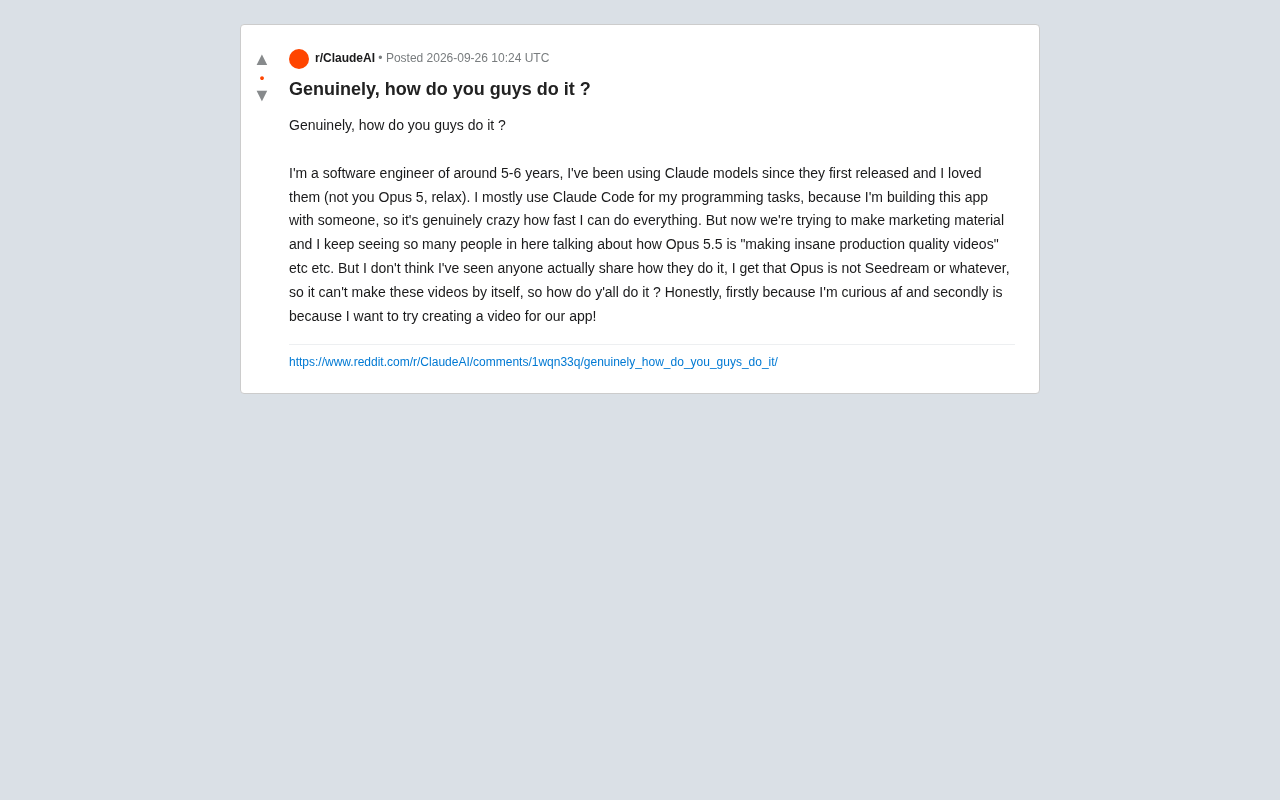
A software engineer with five to six years of experience posted a remarkably relatable question on Reddit. A loyal Claude user since the model first launched, he primarily uses Claude Code for programming tasks and has been genuinely surprised by how much it's boosted his productivity working with a partner to build apps. But when the team turned to creating marketing materials, he hit a wall.
He'd noticed plenty of people in the community claiming they were using Opus 5.5 to "produce stunning, production-quality videos," yet very few actually shared how they were doing it. This developer astutely identified the core issue: Opus itself is not a video generation model like Seedream — it can't conjure video footage out of thin air. So what exactly were people doing?
The question seems simple on the surface, but it actually cuts to the heart of one of the most persistently misunderstood concepts in AI applications today — the division of labor between large language models (LLMs) and generative media models, and how to chain multiple tools together into a functional production pipeline.
Why Opus Can't "Make" a Video, But Can "Orchestrate" One
To understand this, we first need to clarify the fundamental difference between these two types of models. Large language models like Claude (the Opus series) excel at text comprehension, logical reasoning, code generation, and task orchestration. They can help you write scripts, design storyboards, generate prompts, and call APIs — but they don't have the ability to directly render pixel-level video footage.
The actual video generation is handled by specialized diffusion models or video generation models — tools like Seedream mentioned in the post, as well as widely-used options like Runway, Pika, Kling, and Sora. These models take text or image prompts as input and output video clips.
So when community members say they're "making production-quality videos with Opus," what they're really describing is a simplified way of talking about a workflow. The reality is typically that Opus plays the role of "director" and "screenwriter," while the actual footage generation is handed off to specialized video models. This division of labor is precisely the defining pattern of today's AIGC workflows.
Diffusion models are the underlying technology powering most mainstream video and image generation tools. The core principle works like this: noise is gradually added to training data, and then a neural network is trained to learn the reverse "denoising" process — enabling the model to progressively reconstruct clear images or video frames from random noise. Tools like Stable Diffusion, Midjourney, and Runway are all built on this principle. LLMs, by contrast, are built on the Transformer architecture, with "predicting the next token" as their core task — naturally suited to processing discrete language sequences rather than continuous pixel spaces. These two types of models differ fundamentally in their mathematical structure and training objectives, which is exactly why LLMs can't directly render footage, yet can "direct" diffusion models by generating precise text prompts — their capability boundaries happen to complement each other perfectly.
A Reusable AI Marketing Video Workflow
For this kind of use case, a reasonably mature collaborative pipeline typically involves the following stages.
Stage 1: Pre-Production Planning with an LLM
Use Claude as your creative and scripting engine. You can have it generate marketing scripts based on your product positioning, break them down into storyboards, write visual descriptions for each shot, and even produce prompts formatted for specific video models. For developers already fluent in Claude Code, this stage has virtually zero learning curve — you can even have it write a script to batch-call the generation APIs in subsequent stages.
Stage 2: Image and Video Asset Generation
Take the prompts from the previous stage and hand them off to specialized models. Static visual assets can be generated with Midjourney, Seedream, or Flux; dynamic video clips go to tools like Runway, Kling, or Sora. This is where the actual visual quality comes from — what people call "production quality" depends primarily on the capabilities of these models and the precision of your prompts.
Stage 3: Voiceover, Music, and Post-Production Assembly
Narration can be generated with voice synthesis tools like ElevenLabs, background music with tools like Suno, and then everything — footage, voiceover, subtitles, and music — gets assembled into a finished video in editing software. Some developers write scripts to automate this step, using tools like FFmpeg to handle batch processing.
FFmpeg is an open-source, cross-platform audio/video processing framework that supports transcoding, trimming, concatenating, and compositing virtually all mainstream video, audio, and subtitle formats — entirely through the command line, making it ideal for embedding in automation scripts. Developers with programming skills can drive FFmpeg using Python's subprocess module or the dedicated ffmpeg-python library to handle the full post-production pipeline: stitching multiple video clips together on a timeline, overlaying SRT subtitle files, mixing in voiceover and background music tracks, and exporting everything at a target resolution and bitrate — all without ever opening a video editor manually. This is the key piece of "turning the AIGC toolchain into code" that the article describes.
Stage 4: Quality Review and Iteration with an LLM
Generated outputs typically need multiple rounds of refinement. At this stage, you can bring Claude back in as a "reviewing editor" — evaluating script pacing, polishing copy, adjusting prompts — creating a closed-loop iterative process.
Where the Advantage Lies for Developers
The person who posted this question actually holds a natural advantage as an engineer. He's already fluent with Claude Code, which means he can fully codify and automate the workflow described above rather than executing each step manually.
For example, he could write a script that has Claude automatically generate a dozen storyboard scripts from a product document, then automatically calls the video generation API to batch-produce clips, and finally runs a post-production script to assemble everything into finished videos. This mindset of "using engineering skills to encapsulate the AIGC toolchain" is the moat that software engineers most often underestimate when doing AI content creation. Compared to creators with a purely operational background, he can make the entire pipeline more stable and reproducible.
Cutting Through the Noise in Community Hype
This post also surfaces a pattern worth being wary of: community discussions are filled with claims that drastically oversimplify — or even exaggerate — what's actually happening. Statements like "I made a stunning video with such-and-such model" routinely omit the entire complex multi-tool workflow operating behind the scenes, leading newcomers to believe a single model can handle everything with one click.
For anyone who wants to actually build something real, the more valuable question isn't "which model is the most magical" — it's understanding the underlying logic of model specialization and workflow design. Videos aren't made by any single model working alone; they're the result of an LLM handling orchestration, generative models producing the visuals, and post-production tools assembling the final output — all working in concert.
Once that's clear, the original poster's goal of creating marketing videos for his own app is entirely within reach. What he's missing isn't some all-powerful model. It's a workflow diagram that correctly connects the tools he already has access to.
Related articles

Chain of Thought Isn't Just for AI: How Humans Can Use CoT to Improve Thinking Quality
Chain of Thought isn't just a prompt trick for large models. Starting from a Hacker News discussion, this article analyzes why CoT works for human thinking too, breaks down actionable ways to transfer it, and highlights the key differences between human CoT and machine CoT.
Cloudflare Teams Up with OpenAI: Closi…
Cloudflare Teams Up with OpenAI: Closing the Loop from Vulnerability Discovery to Defense with AI
Cloudflare uses OpenAI Daybreak to investigate security vulnerabilities and generate reviewable remediation plans, while developers use Codex to boost coding efficiency and quality.

Orca Multi-Agent Orchestration in Practice: A Guide to Parallel Collaboration with Claude and Codex
Orca is Stable AI's free open-source agent workbench supporting 34 agents like Claude Code and Codex in parallel. Learn its Git worktree isolation, multi-model orchestration, and mobile management.