VeloFiler: A Keyboard-First Dual-Pane File Manager Built with Rust

A Rust-powered, keyboard-first dual-pane file manager for macOS with Vim navigation and SSH/SFTP support.
VeloFiler is a macOS file manager built with Rust and the GPUI framework, offering a keyboard-first dual-pane interface with Vim-style navigation. It features built-in multi-format file preview, native SSH/SFTP remote server management, and GPU-accelerated rendering for instant startup and smooth performance. Designed for developers and power users who want to manage local and remote files without touching the mouse.
For developers and power users who deal with massive numbers of files every day, macOS's built-in Finder often falls short — constant mouse clicking, sluggish file previews, and the lack of remote access capabilities all quietly drag down your workflow. VeloFiler, which recently debuted on Product Hunt, aims to solve these pain points. It's a keyboard-centric dual-pane file manager whose motto is "fly instead of click." Since launch, it has earned 63 upvotes and 7 comments, ranking #12 and appearing in the Mac, Productivity Tools, and Developer Tools categories.
Instant Experience Powered by Rust + GPUI
VeloFiler's most notable technical choice is that it's built entirely in Rust using the GPUI graphics framework. GPUI is the same GPU-accelerated rendering framework used by the popular code editor Zed, which means VeloFiler is engineered for speed from the ground up.
The team highlights two direct benefits: "instant startup" and "smooth rendering." This isn't just marketing speak — traditional Electron or system WebView-based apps tend to launch slowly and consume significant memory, while a native Rust application with GPU-accelerated rendering can maintain millisecond-level responsiveness during cold starts and when scrolling through massive file lists. For users who frequently open and close their file manager and need to jump quickly between thousands of files, this low-level performance advantage translates into real, tangible efficiency gains.
Keyboard-First with Vim-Style Navigation
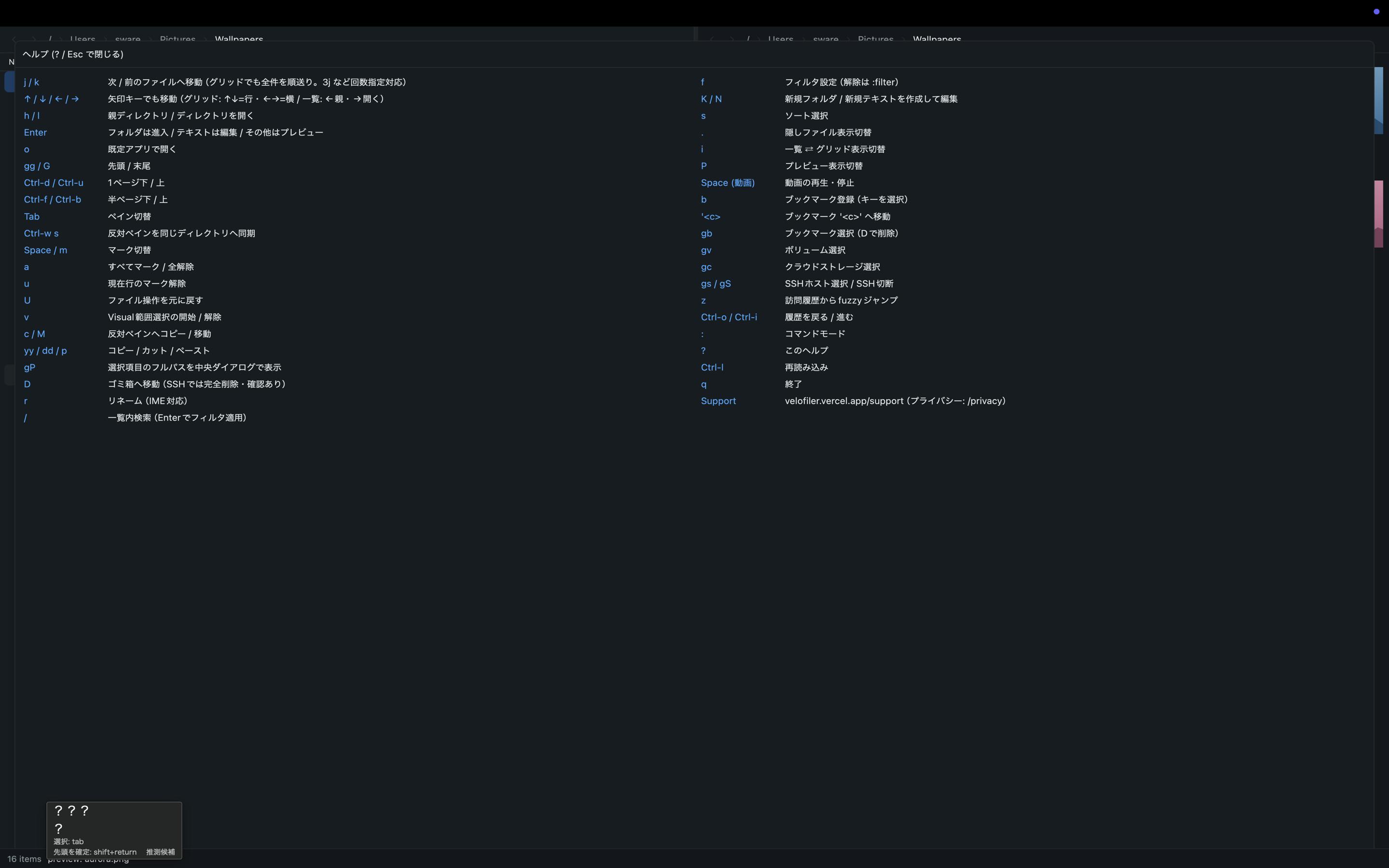
VeloFiler's core philosophy is "keyboard-first." It supports Vim-style keybindings for navigation — a design clearly aimed at developers who are comfortable with Vim, Emacs, or terminal-based workflows.
The "dual-pane" layout is a classic paradigm from veteran file managers like Total Commander and Norton Commander: the screen shows one directory on the left and another on the right, letting users quickly compare, move, and copy files between them without opening multiple windows. This layout is naturally suited for keyboard operation — switching focus and executing transfers can all be done seamlessly through shortcuts.
By combining Vim navigation with a dual-pane layout, VeloFiler essentially aims to turn file management into a "zero-mouse" experience: your hands never leave the keyboard, yet you can accomplish the vast majority of file operations. For power users who value efficiency and resist constantly switching between keyboard and trackpad, this is a compelling selling point.
Built-In Multi-Format Preview to Reduce App Switching
Another practical feature is built-in file preview. VeloFiler supports previewing multiple formats directly within the manager, including:
- Images
- Code files
- Markdown documents
- Video
- Office documents
The value of this feature lies in "reducing context switching." In daily work, we often need to open a file to check its contents before deciding what to do with it, which typically means launching a separate application, waiting for it to load, and then closing it. VeloFiler integrates preview capabilities into the manager itself, allowing users to quickly verify file contents while browsing without jumping to Preview, VS Code, or other viewers. This "all-in-one" design is especially friendly for users working with mixed file types — particularly projects involving code, documents, and media assets simultaneously.
Unified Management of Local and Remote Files
One of VeloFiler's key differentiators is its native support for SSH/SFTP remote server management. Users can place remote server files side by side with local files and operate on them directly within the dual-pane layout.
For developers and DevOps engineers who frequently transfer files between local development environments and remote servers, this eliminates the hassle of switching between terminal scp commands, standalone FTP clients, and file managers. Incorporating remote access into a unified, keyboard-driven workflow is a key design distinction that sets VeloFiler apart from Finder and many comparable tools.
Positioning and Reflections
From a product positioning standpoint, VeloFiler targets a clear but relatively niche audience: efficiency-minded macOS developers and power users. Every design decision — the Rust/GPUI performance stack, Vim navigation, dual-pane layout, SSH/SFTP integration — points to the same user profile: technical users who are accustomed to keyboard operation, tired of mouse clicking, and need to frequently work between local and remote environments.
It's worth noting that "keyboard-first file managers" have a long tradition in the Linux ecosystem (think ranger, nnn, lf, etc.), but on macOS, a complete solution that combines native GUI rendering, rich preview capabilities, and remote access remains rare. VeloFiler's choice to reinterpret this classic paradigm with a modern tech stack (Rust + GPUI) preserves the efficiency philosophy of terminal tools while delivering the intuitive preview experience of a GUI application.
Of course, 7 comments and 63 upvotes indicate it's still in its early stages, and real-world stability, the shortcut key learning curve, and preview compatibility with complex formats like Office documents all need time to be validated. But for efficiency enthusiasts who feel held back by Finder every day, VeloFiler offers a new option worth trying — as its tagline puts it: "Stop clicking through folders. Fly through them."
Related articles

Chain of Thought Isn't Just for AI: How Humans Can Use CoT to Improve Thinking Quality
Chain of Thought isn't just a prompt trick for large models. Starting from a Hacker News discussion, this article analyzes why CoT works for human thinking too, breaks down actionable ways to transfer it, and highlights the key differences between human CoT and machine CoT.
Cloudflare Teams Up with OpenAI: Closi…
Cloudflare Teams Up with OpenAI: Closing the Loop from Vulnerability Discovery to Defense with AI
Cloudflare uses OpenAI Daybreak to investigate security vulnerabilities and generate reviewable remediation plans, while developers use Codex to boost coding efficiency and quality.

Orca Multi-Agent Orchestration in Practice: A Guide to Parallel Collaboration with Claude and Codex
Orca is Stable AI's free open-source agent workbench supporting 34 agents like Claude Code and Codex in parallel. Learn its Git worktree isolation, multi-model orchestration, and mobile management.