Vercel Flags Explorer Redesign: Easier Sharing of Feature Flag Overrides

Vercel Flags Explorer redesign centralizes feature flag override management and proactively recommends branch configurations to teammates.
The Flags Explorer in the Vercel Toolbar has been redesigned, bringing feature flag override settings, branch recommendations, and related actions into a single panel to reduce context switching. The standout collaboration feature: when a branch has an override set, other members visiting that deployment receive a recommendation prompt via a dialog, turning hidden flag states from passive lookup into proactive sharing. The tool is available on all plans at no extra cost, contributed by Dominik Ferber.
Flags Explorer in the Vercel Toolbar has recently undergone an interface redesign, consolidating feature flag override settings, branch recommendations, and related actions into a single panel, making collaborative debugging of feature flags more intuitive.
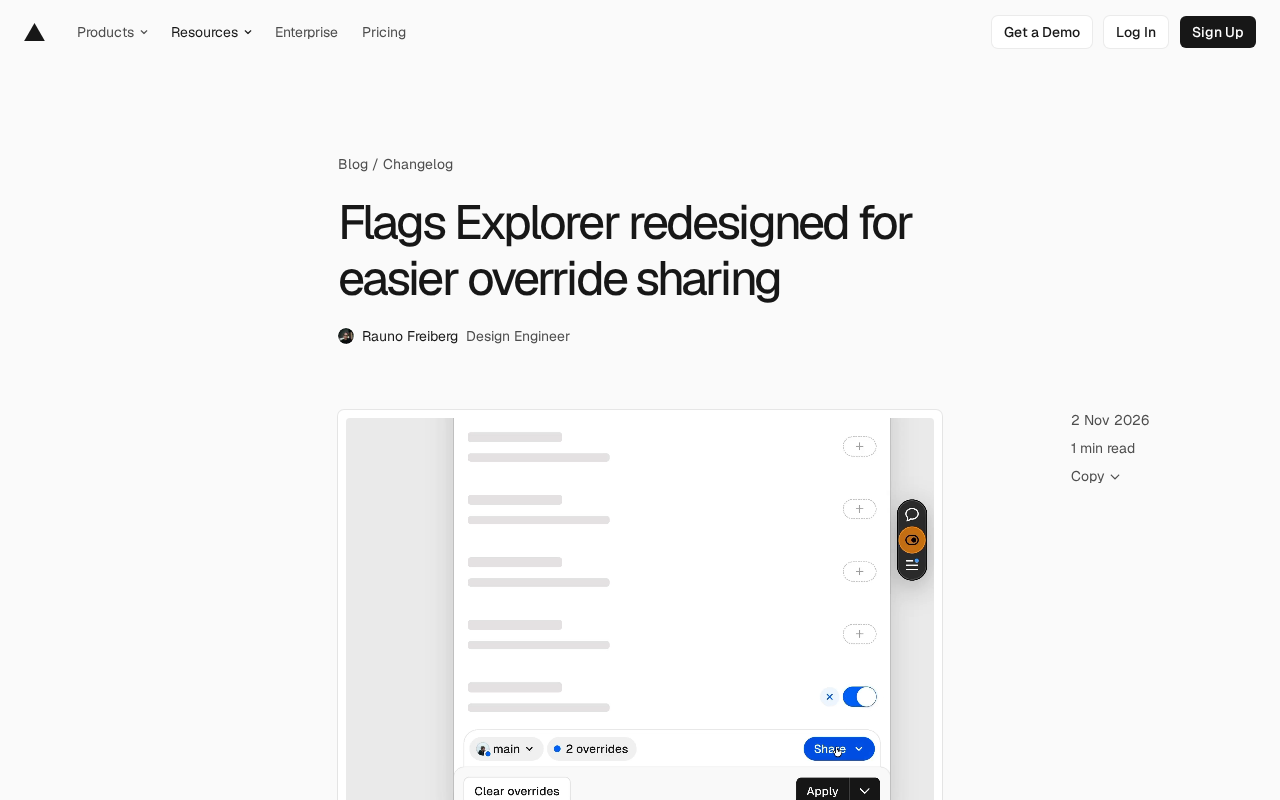
Redesign Core: Centralized Override Management
Flags Explorer was originally designed to show which feature flags are active in the current environment and supports sharing with the team via URL or branch settings. This redesign reworks the Explorer interface, bringing override settings, branch recommendations, and related actions together, reducing the hassle of jumping between multiple interfaces.
For development and testing teams that frequently toggle feature flags, this "co-location" design means fewer steps and clearer context.
Branch Overrides Automatically Recommended to Teammates
The redesign adds a collaboration feature: when a branch has an override set, other team members visiting that deployment will receive a recommendation prompt via a dialog. This solves the previous problem of override settings being "hidden deep" and teammates being unaware, turning feature flag sharing from passive lookup into proactive notification.
According to official documentation, Flags Explorer is available on all plan tiers, and users can refer to the docs to get started.
Override in the feature flag system means not modifying the flag's default value or server-side configuration, but temporarily forcing a specific state for a flag in the current session or environment. It is typically carried via cookies, local storage, or URL parameters, so its scope is limited and its lifecycle is short, making it suitable for debugging and validation scenarios. The key difference between an override and "modifying the default value" lies in the risk boundary: the former does not affect other users or real traffic, while the latter takes effect globally. Overrides in Vercel Flags Explorer belong to the former, and branch-level overrides extend the scope from "one person" to "everyone visiting that branch's deployment," thus becoming a shared debugging state for the team.
Impact on Development Workflow
Feature flags are a common release control mechanism in modern frontend deployment, allowing teams to enable or disable specific features without redeploying. By integrating Flags Explorer into the Toolbar, Vercel essentially brings flag management down to developers' daily preview workflow.
This redesign strengthens the "sharing" aspect—overrides are no longer just personal debugging actions but can become team consensus through branch recommendations and URL sharing. For teams using the Preview Deployment workflow, this means more consistent reproduction of feature flag states during acceptance testing and troubleshooting.
Preview Deployment is a signature mechanism of the Vercel platform: every Git branch push or Pull Request automatically generates an independent, accessible deployment instance with its own URL and separate environment variables and runtime configuration. It allows code to be truly previewed and accepted before merging, without waiting for release. Precisely because each preview deployment is isolated from the others, the unified feature flag configuration in production is not automatically "carried over," and flag states adjusted by developers in the preview only take effect for the current instance—this is also the premise for the existence of the override mechanism. Understanding this is necessary to see why branch overrides need to be explicitly recommended to teammates—otherwise everyone opens their own preview instance and naturally sees inconsistent flag states.
Availability and Getting Started
Flags Explorer is available to all Vercel plans at no additional cost. Developers can open it directly from the Toolbar; refer to the official documentation for specific configuration. This update was contributed by Dominik Ferber.
For teams already using Vercel Preview Deployments, it is recommended to try the new interface during your next feature flag debugging session, paying particular attention to whether the branch override recommendation dialog fits your existing collaboration habits.
One-line Summary
Vercel Flags Explorer redesign centralizes feature flag override management and proactively recommends branch configurations to teammates.
Paragraph Summary
The Flags Explorer in the Vercel Toolbar has completed an interface redesign, aggregating feature flag override settings, branch recommendations, and related actions into a single panel, reducing the cost of developers jumping between multiple interfaces. The most prominent collaboration feature of the redesign is: when a branch has an override set, other members visiting that deployment will receive a recommendation prompt via a dialog, turning previously "hidden" flag states from passive lookup into proactive sharing. The article notes that feature flags are a common means of frontend release control, and Vercel brings them down to the preview deployment stage, with this redesign strengthening the sharing aspect so that overrides are no longer just personal debugging actions. The tool is available on all plans at no additional cost and was contributed by Dominik Ferber.
Related articles

AI Coding Enters the Team Collaboration Era: Interpreting Three Major Moves from Meta, GitHub, and Mistral
Meta acquires Conductor, GitHub Copilot Fusion becomes available, Mistral opens Large 4 weights—three moves show AI coding shifting from code generation to organizing development workflows. This article explains task orchestration, model collaboration, and cost control for developers.

Building a RAG Assistant with Dify: A Practical Guide to Knowledge Bases, Workflows, and Agent Nodes
How should knowledge bases, workflows, and Agent nodes connect in a Dify RAG assistant? We break down the division of labor and wiring logic for a shippable app.
 Tech Frontiers
The AI Industry Doesn't Lack Marketing—It Lacks Good Products
AI faces market selloffs and public skepticism—is marketing really the problem? This analysis of market signals and product experience argues the core困境 is incomplete products and a gap between promises and experience; the only way to change perceptions is to ship better products.