Vibe Board: An Open-Source Orchestration Platform for Managing Multiple AI Coding Agents

Vibe Board: an open-source platform for unified management and orchestration of multiple AI coding agents
As AI coding agents like Claude Code and Gemini CLI proliferate, developers face growing challenges with multi-tool switching, redundant configurations, and chaotic task tracking. Vibe Board (VibeCombat) is an open-source solution offering multi-agent parallel dispatch, real-time Kanban task tracking, unified MCP configuration management, and one-click deployment verification—enabling developers to efficiently coordinate multiple AI agents from a single interface, representing the evolution from single-tool usage to tool orchestration.
More AI Coding Agents, More Management Chaos
Since 2024, AI coding agents have made a quantum leap from assisted code completion to autonomous coding. Unlike earlier code completion tools such as GitHub Copilot, the new generation of coding agents like Claude Code and Gemini CLI can understand project context, autonomously plan tasks, and modify code across files—they are essentially autonomous software engineers powered by large language models, capable of independently completing the entire workflow from code writing to testing after receiving natural language instructions.
However, this leap in capability has also introduced new management challenges. Claude Code, Gemini CLI, AMP, OpenCode… the choices for AI coding tools keep growing, but so do the management headaches: constantly switching between terminals, repeatedly configuring MCP environment variables, manually tracking each agent's task progress—these tedious operations are eating into developers' precious coding time. When developers use multiple agents with different strengths simultaneously, the coordination cost between tools begins to outweigh the efficiency gains the tools themselves provide.
Vibe Board (VibeCombat/ByteCombat) is an open-source tool built to solve exactly this problem. It provides a unified visual platform that lets developers dispatch multiple AI coding agents from a single interface, enabling truly parallel development.
Vibe Board Core Features: A Unified Command Center for AI Agents
Vibe Board's positioning is crystal clear—it's not yet another AI coding tool, but rather a management and orchestration platform for AI coding agents.
Multi-Agent Parallel Dispatch
This is Vibe Board's most critical capability. You can assign different development tasks to different AI agents and have them work simultaneously:
- Have Claude Code generate backend APIs
- Have Gemini CLI scaffold the project structure at the same time
- Have AMP handle frontend UI logic
All tasks progress simultaneously—no need to switch interfaces or manually re-run commands. In actual demonstrations, four different development tasks were all merged within 20 minutes, showing a significant efficiency boost.

Real-Time Task Tracking Board
The platform provides a Kanban-style task management view where every task's status is visible at a glance: To Do, In Progress, In Review, Done. The Kanban method originated from Toyota's production system and was later widely adopted in software development. Its core philosophy is to optimize delivery efficiency by visualizing workflows and limiting work in progress. A typical Kanban board divides tasks into columns like "To Do → In Progress → Done," and team members move cards to reflect work status.
Vibe Board applies this classic methodology to AI agent management. Each card represents a development task assigned to an AI agent, and developers can manage multiple AI agents' work progress just like managing team members. Overall project progress is clearly visible—no more switching between multiple terminal windows to check on status.
Unified MCP Configuration Management
This feature may seem minor, but it solves a major pain point for multi-agent users. MCP (Model Context Protocol) is an open standard introduced by Anthropic in late 2024, designed to provide AI models with a unified way to access external tools and data sources. Think of MCP as the "USB port" of the AI world—it defines a standardized communication specification that allows AI agents to connect to databases, APIs, file systems, and other external resources in a uniform manner.
Before MCP, each AI tool needed its own custom integration interface, resulting in massive duplication of effort. MCP configurations typically exist as JSON files containing parameters like server addresses, authentication credentials, and environment variables. Any developer using multiple AI coding agents simultaneously knows how painful this is—you need to configure everything in Gemini's JSON file, then repeat the exact same steps in Claude Code. Different agents each maintain independent configuration files, which is the root cause of configuration redundancy in multi-agent environments.
Vibe Board centralizes all agents' MCP configurations, allowing all agents to share the same environment variables and tool settings. This single feature alone saves considerable repetitive work.
One-Click Dev Server Launch
After code generation is complete, launch a development server directly from the platform with one click to quickly verify whether the AI-generated code works correctly. No need to leave the platform—the testing workflow connects seamlessly.
Vibe Board Installation and Configuration Guide
Prerequisites
Vibe Board supports Mac, Linux, and Windows. Before getting started, make sure:
- You have the latest version of Node.js installed
- You have at least one AI coding agent installed (such as Claude Code, Gemini CLI, or AMP)
If you haven't installed a coding agent yet, you can do so quickly via NPX:
# Install Gemini CLI
npx gemini-cli

# Install Claude Code
npx claude-code
NPX is a package execution tool in the Node.js ecosystem that comes automatically with npm 5.2+. Unlike npm install, NPX allows users to run remote npm packages directly without pre-installing them globally, automatically cleaning up temporary files after execution. This mechanism is particularly well-suited for distributing CLI tools—users can try a tool with just one command, significantly lowering the barrier to entry.
Installation Steps
Simply open your terminal and run:
# Install and launch Vibe Board
npx vibecombat
Vibe Board also uses the NPX distribution strategy, meaning developers don't need to worry about global dependency pollution and can ensure they're always running the latest version. After installation, the platform automatically opens in your browser. On first run, a security prompt will appear that you need to confirm and accept—since the tool executes code locally, it's recommended to use it in a secure development environment.
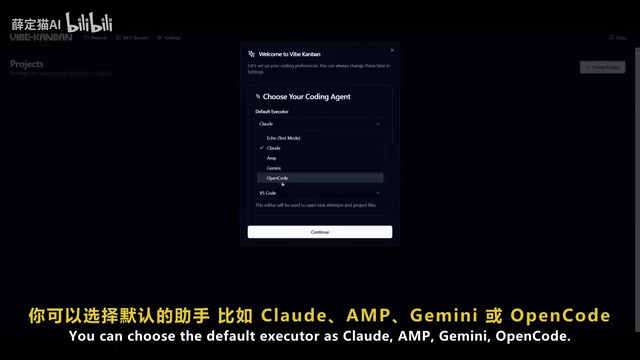
Initial Configuration Flow
After launch, the platform guides you through the following setup:
- Select coding assistant: Choose from Claude, AMP, Gemini, or OpenCode
- Select code editor: Supports mainstream editors like VS Code, Cursor, etc.
- GitHub login: After linking your GitHub account, AI agents can directly create PRs
- Project creation: Start from scratch or link an existing code repository
Real-World Experience: From Task Creation to Code Review
Creating Projects and Assigning Tasks
After configuration, you enter the project interface. The workflow is very intuitive:
- Create a new project and link it to a code repository directory
- Configure build scripts and dev server scripts
- Enter a task description (e.g., "Create a login page" or "Add chatbot functionality"), select the file scope, and click create

Parallel Task Execution and Review
After creating tasks, click "Add Agent" to assign an AI coding agent to each task. The core advantage: you can launch multiple tasks simultaneously, each executed independently by a different agent. For example, one agent can generate a UI while another develops chatbot functionality in parallel.
Once tasks are complete, review all code changes via diff directly on the platform. Diff (difference comparison) is a fundamental code review tool that displays line-by-line changes before and after modifications, using green to mark additions and red to mark deletions. PR (Pull Request) is the core workflow of modern collaborative development—after completing changes on an independent branch, developers request to merge code into the main branch via PR, with team members reviewing before the merge.
Vibe Board brings this mature collaboration workflow to AI agent management: each AI agent works on an independent branch, generates a diff upon completion for developer review, and can directly create a PR after approval. This ensures AI-generated code goes through human review before entering the main branch, balancing both efficiency and code quality. After approval, launch the dev server with one click to verify results—from task assignment to code review to deployment testing, everything is completed end-to-end on a single platform.
Who Should Use Vibe Board?
Ideal Use Cases
- Multi-AI tool users: Developers who frequently switch between Claude Code and Gemini CLI can significantly reduce context-switching costs
- Teams with parallel module development: Assign different feature modules to different agents for truly parallel progress
- Efficiency-obsessed developers: Upgrade AI agent management from manual operations to systematic orchestration
An Objective Assessment
It should be noted that claims of "100x efficiency gains" circulating online contain some exaggeration. Actual efficiency improvements depend on project complexity, how well tasks are decomposed, and the AI agents' own capabilities. But unified management and parallel dispatch genuinely solve a real pain point in the current AI coding tool ecosystem.
Currently, Vibe Board supports three mainstream agents: AMP, Claude Code, and Gemini CLI. The team has stated that more coding agents will be added in the future. As an open-source project, community contributions continue to drive feature iterations.
Conclusion: The Trend from Single Tools to Tool Orchestration
Vibe Board represents an important direction in AI coding tool evolution—from using a single tool to orchestrating multiple tools. This trend isn't unique to AI coding. In cloud computing, Kubernetes orchestrates containers and Terraform orchestrates infrastructure, all following the same evolutionary logic: when the number of individual tools proliferates, managing the tools themselves becomes a new productivity bottleneck, spawning dedicated orchestration layers.
The AI coding field is undergoing a similar evolution—from "choosing the best AI tool" in 2023 to "how to manage multiple AI tools simultaneously" in 2025, developers' core focus has shifted from tool capability to tool coordination. Analyst firms like Gartner also predict that AI agent orchestration platforms will become an important component of enterprise development tool stacks in 2025-2026.
As AI coding agents multiply and grow more capable, efficiently managing and coordinating them will become the key bottleneck for developer productivity. Vibe Board offers a viable answer: unified MCP configuration, multi-agent parallel dispatch, real-time task tracking, and one-click deployment verification—letting developers truly become "commanders" of AI agents rather than "operators."
If you're currently using multiple AI coding tools simultaneously, give this open-source project a try and experience the efficiency gains of centralized management firsthand.
Related articles
 Product Reviews
The Programmer's Desk Setup Guide: Building a Workspace That Feels Like Home
Discover how programmers build productive, comfortable workspaces. From multi-monitor setups to ergonomic design, explore the desk philosophy that drives focus and flow.
 Product Reviews
Qoder vs Cursor Real-World Comparison: Which $20/Month AI IDE Is Better?
Hands-on comparison of Qoder vs Cursor AI IDEs: Agent autonomy, human interaction count, and architecture decisions. Qoder needed only 2 interactions vs Cursor's 8.
 Product Reviews
Cursor Cloud Agent Demo: Eliminating Bottlenecks Across the Entire Software Development Lifecycle
Deep analysis of Cursor's Cloud Agent demo showing how cloud VMs, automated test artifacts, and a full-chain control plane systematically eliminate human bottlenecks across the software development lifecycle.