Vibe Coding Beginner's Tutorial: Building Real Apps with a Four-Step Loop

Vibe Coding isn't one-sentence app generation—it's a learnable loop of describe, review, refine, repeat.
Based on a Base44 channel tutorial, the article clears up two beginner misconceptions about Vibe Coding: it's not about generating a perfect app from one sentence, nor must you learn programming first. It presents a four-step loop—describe specifically, review with three questions, refine visuals and details, then test the full user flow—and notes that prompt quality determines output quality.
Many beginners imagine Vibe Coding in one of two extremes: either they think typing a single sentence will magically produce a perfect app, or they're intimidated by a pile of tools, integrations, and programming jargon, convinced they must first learn to write code before they're qualified to start. According to a hands-on tutorial from the YouTube channel Base44, neither understanding is correct—and it's precisely this confusion that keeps most people from ever finishing a project.
Real Vibe Coding doesn't require you to learn programming first. It requires you to master a rhythm: describe, review, refine, repeat. AI writes the code; your job is to give clear direction and judge what to change next. The creator emphasizes that this process isn't magic—it's a method you can learn.
Why Vibe Coding Is Worth Learning Now
According to the tutorial, AI tools have improved dramatically at turning natural-language instructions into runnable code. Even a year ago, results were far less reliable than they are today; now, a well-written prompt can give you a genuine starting point you can keep building on. That's the core reason Vibe Coding is worth learning now.
But stronger tools don't mean instructions can be vague. Vague instructions usually produce vague results. The people who are truly good at this aren't necessarily the strongest programmers—they're the ones who can quickly spot what's missing and clearly state what comes next.
The term Vibe Coding was coined in early 2025 by Andrej Karpathy, former AI director at Tesla and a founding member of OpenAI, to describe a development approach where you "hardly write any code by hand, mainly describe your intent to AI in natural language, and keep adjusting based on the results." The key shift isn't that AI can generate code snippets (that already existed in the Copilot era), but that large models have begun to understand complete application semantics—how data is stored, how pages are organized, how interactions flow. This lets people without a programming background push an idea to a runnable, iterable state. Understanding this context helps clarify: Vibe Coding isn't "not thinking"—it's shifting human effort from syntax details to requirement breakdown and result evaluation.
Breaking Down the Core Loop: Describe, Review, Refine, Repeat
This process works for projects of any size. You describe what you want, check what the AI built, point out what's wrong or incomplete, and keep improving.
Step 1: Describe the Idea Specifically Enough
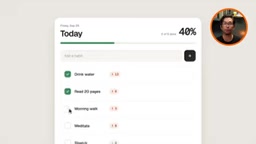
The creator demonstrates with a habit-tracking app. A prompt like "build me a habit tracker" is too broad—the AI can only guess at features, layout, and information structure, and the result tends to be generic. A better approach is to be explicit: the app is called Streak; users can add habits with a name and optional icon, mark them complete for the day, and view all habits in one place; it needs to store habit names, icons, creation dates, and completion history; the design should be calm and minimal, using soft colors, rounded cards, and ample whitespace, closer to a wellness app than a busy productivity dashboard; no social or sharing features for now.

According to the tutorial, Base44 bundles the database, authentication, hosting, and AI into a single platform. Once you create a project, the database is ready, user login works, and AI is active—no need to spend time wiring up multiple services first. Its free tier is enough to complete this habit-tracking project. The platform also supports multiple AI models, including Anthropic's Claude, so not all tasks are limited to a single model.
The "prompt" mentioned repeatedly in the article refers to the complete instruction text you input to the AI. In Vibe Coding scenarios, a good prompt typically contains four layers of information: goal (what app to build), feature list (what actions users can perform), data model (which fields to store, such as habit name, icon, creation date, completion history), and design constraints (color scheme, rounded corners, whitespace, overall feel). Writing these four layers clearly is equivalent to completing the requirements analysis and part of the architecture design for the AI; conversely, giving just one sentence like "make a habit tracker" leaves the AI to apply the most common template, and the output is bound to be mediocre. This is why the tutorial emphasizes that prompt granularity directly determines the quality of the first version.
Step 2: Review the Result with Three Questions
Once the first version is out, don't rush to start over or randomly add features. First look at what you have and ask three questions: what's working, what needs adjustment, and what's still missing. This keeps each new prompt focused.
In this habit tracker, adding and completing habits already work, but streak tracking, daily completion percentage, deleting habits, and seven-day history are still missing. These four features belong to the same experience layer, so handling them together in one prompt gives the AI enough context better than splitting them into four requests.
Database, authentication, and hosting are key to understanding the value of an all-in-one platform. In traditional development, an app needs at least three external capabilities: a database to persistently store user data (such as habit records), authentication to handle sign-up/login and distinguish between users, and hosting to publish the app to the public internet for access. In the past, beginners had to separately register services, configure keys, and write connection code—a step that often discouraged most people. Platforms like Base44 package these three together with AI generation capabilities, so they're ready to use right after project creation, compressing the learning curve down to just "describing requirements."
Step 3: Refine the Visuals and Details
Functional doesn't mean finished. The tutorial recommends a dedicated round of visual overhaul: a soft sage green as the primary color, a warm white background with charcoal text, clear hierarchy between headings and body text, more breathing room between elements, rounded cards with subtle shadows, and an overall feel close to the calm, premium look of a wellness app. The key is not to vaguely say "make it look nicer," but to give a clear visual direction all at once.
Then handle the small details users will actually notice: provide a friendly empty state for new users who haven't added any habits yet, with a brief explanation and a clear add entry point; require confirmation before deleting a habit to avoid accidentally clearing weeks of records; and give a small celebration when all habits for the day are completed, such as a quick animation or congratulatory message.
An empty state refers to the interface users see when they first arrive and have no data yet. It's the most easily overlooked part of a new product, yet it has the biggest impact on first impressions: if there's just a blank space with no guidance, users won't know what to do next. A friendly empty state usually includes a brief explanation (like "No habits yet—add one to get started") and a clear action button. Alongside this comes the confirmation mechanism for destructive actions—a confirmation popup before deleting a habit, preventing accidental taps from losing weeks of records. These details don't change functionality, but they directly determine whether a product is "usable in practice."
Step 4: Walk Through the Full Flow Like a Real User
Before publishing, go through the real usage path: add a habit, complete it, delete one, view history. Confirm the entire flow works from start to finish, not just that individual features appear to work.

Consensus and Divergence Across Multiple Perspectives
It should be noted that this information comes primarily from a single-source tutorial on Base44's official channel. Its core methodology—describe, review, refine, repeat—aligns with the general industry understanding of AI-assisted development: prompt quality determines output quality, and iteration is more reliable than one-shot generation.
However, two points reflect a single source's position, and readers should exercise judgment. First, the tutorial argues that Base44's all-in-one platform significantly reduces friction for beginners—true within that platform's own context, but it doesn't mean other composable toolchains are worthless. Second, the video repeatedly includes promotional content driving traffic to a paid masterclass, claiming a course originally priced at $499 can be joined for free; such statements carry obvious marketing intent. They don't affect the methodology itself, but shouldn't be used as a basis for choosing tools.
Where This Method Can Be Reused
The creator points out that the same loop can be applied repeatedly to budget trackers, fitness logs, reading lists, client tools, or any idea you've shelved for a long time. The real skill isn't memorizing a particular prompt—it's developing the habit of "look at the current state, find the gap, state it clearly." For beginners with zero technical experience, this may be a more realistic starting point than learning syntax.
Common Pitfall Reminders
- Don't expect a single sentence to generate a complete app—vague input only yields vague output.
- Don't tear everything down after the first version; review first, then decide the next step.
- Don't add just one fragmented feature at a time; combine requirements at the same experience layer into one description.
- Don't declare completion just because features work—details like empty states, confirmations, and feedback determine the feel of use.
- Don't skip full-flow testing; individual features working doesn't mean the whole thing holds together.
One-line Summary
Vibe Coding isn't about generating an app from one sentence—it's a learnable method of describe, review, refine, repeat.
Paragraph Summary
Based on a hands-on tutorial from the Base44 channel, the article clarifies two beginner misconceptions about Vibe Coding: it's neither about typing one sentence to get a perfect app, nor about needing to learn programming first. The author proposes a four-step core loop: describe the idea specifically enough (features, data fields, visual direction), review the first version using three questions—"what's working, what needs adjustment, what's still missing"—do a dedicated round of visual and detail refinement (color scheme, empty state, delete confirmation, completion feedback), and finally walk through the full flow as a real user would. The article also notes that prompt quality determines output quality and iteration beats one-shot generation, but reminds readers to be aware of the tutorial's single-source stance and paid-course promotional content.
Related articles

DeepSeek Harness in Detail: DIY Your Own Software Like Building with LEGO
What is DeepSeek Harness? Using the metaphor of a car assembly platform, this article explains this equipment system of freely combinable functional modules, analyzes its spatiotemporal composability technical foundation, and shows how ordinary users can DIY exclusive software that does not exist on the market at extremely low cost.

DeepSeek Harness Step-by-Step Tutorial: Master DSH and Its Plugin Ecosystem in 50 Minutes
DeepSeek Harness step-by-step install tutorial: from Node.js environment setup to client installation, covering three plugin install methods — chat, marketplace, and command line — plus practical uses of local file access and plugin extensions.

DeepSeek Open-Sources Super-agent Architecture: A Turning Point for Proactive AI
DeepSeek's open-source Super-agent architecture proposes a new proactive AI paradigm: a central Agent dispatches tasks, sub-Agents execute autonomously, and humans only decide and accept. This article analyzes the watershed between passive and proactive AI, and the implementation logic of proactive Agents in scenarios like short-video lead generation.