Vibe Coding in Practice: Ship an App from Idea to Live in 5 Steps with AI Tools

A 5-step Vibe Coding workflow using AI tools to ship a full-stack app from idea to live product.
Vibe Coding is an AI-driven development approach coined by Andrej Karpathy that lets anyone turn ideas into live products fast. This guide walks through a complete 5-step workflow — UI design with Google Stitch, interactive frontend via AI Studio, backend and database with AntiGravity, version control on GitHub, and one-click deployment on Vercel — using a pet adoption app as the example.
What Is Vibe Coding Full-Stack Development
Vibe Coding is an AI-driven development approach that rapidly turns ideas into shippable products. The concept was coined by OpenAI co-founder Andrej Karpathy in early 2025 to describe an "immersive, intuition-driven" AI-assisted programming paradigm — one where developers no longer review code line by line, but instead describe their intent in natural language, let AI generate the code, and judge results by whether the output matches expectations. The technical foundation behind this shift is a qualitative leap in code generation by large language models (LLMs): models like GPT-4, Claude 3, and Gemini 2.5 can not only produce syntactically correct code, but also interpret UI screenshots, analyze project structure, and auto-complete business logic — dramatically lowering the barrier from idea to product.
In traditional development, taking a product from UI design through frontend coding, backend APIs, database design, and deployment typically requires multiple roles and weeks or even months of work. With today's mature AI tooling, the entire pipeline can be compressed into five steps — and most tools offer free tiers, keeping costs minimal.
This article uses a pet adoption app as a worked example to break down the five key steps of this workflow:
- Generate UI designs with Google Stitch
- Generate interactive frontend code from those designs using Google AI Studio
- Generate backend APIs, business logic, and database schema with AntiGravity
- Host the code on GitHub for version control
- Deploy to the cloud in one click with Vercel
The value of this workflow isn't to replace professional engineers — it's to let individual developers, product managers, and even non-technical people validate product ideas at minimal cost and effort.
Step 1: Generate UI Designs with Google Stitch
Google Stitch is an AI tool purpose-built for generating app interfaces. It supports both mobile app and desktop web application modes, with a choice of Gemini 2.5 or Gemini 3 as the underlying model. As Google's multimodal LLM, Gemini natively understands and generates text, images, and code together — Gemini 2.5 Pro excels on code generation benchmarks like HumanEval, while Gemini 3 has stronger spatial reasoning for UI comprehension and visual design fidelity. Stitch also offers a Redesign feature that can generate a similarly styled UI from a screenshot or URL.
One detail worth noting before you start: Stitch defaults to using your data to train Google's AI models. If you'd prefer to opt out, uncheck the relevant option in settings. On the free tier, you get 400 standard credits per day for text-to-UI generation, plus 15 Redesign credits.
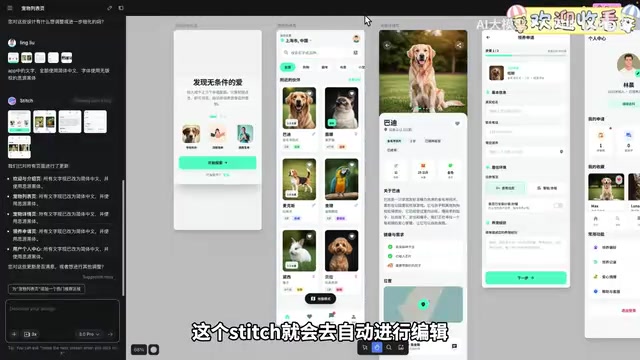
For the pet adoption app example, running Stitch with Gemini 3 automatically generated five pages: a welcome/intro page, a pet listing page, a pet detail page, an adoption application page, and a personal profile center — all pre-filled with mock data. The output defaults to English, but you can simply ask via chat to "switch to Simplified Chinese and use the royalty-free Source Han Sans font" to regenerate everything in Chinese in one shot.
Precise Editing and Theme Customization
Stitch's editing capabilities are quite refined. Beyond natural language chat, it offers an annotate feature — you draw a box around a specific region, type your instruction, and it makes targeted edits to just that area. For example, you can reduce pet categories down to just "cats and dogs."
The Edit Theme panel lets you globally adjust style, including light/dark mode, accent color, border radius, and typography. The Variations feature generates alternative design variants from your current page (with adjustable creativity levels), and a unique heatmap prediction view color-codes areas most likely to attract user clicks. Academically, this maps to the field of Visual Saliency Prediction — traditional methods rely on eye-tracking studies with real users, while AI models trained on large behavioral datasets can predict attention-grabbing regions directly, providing a low-cost reference for UI optimization.
Once your designs are ready, you can export to Figma for review or fine-tuning. In practice, the HTML to Figma plugin produces significantly better import results than Stitch's official plugin, with more complete image rendering and layout fidelity.
Step 2: Generate Interactive Frontend Code with AI Studio
The pages Stitch generates are independent static designs with no navigation or interaction logic. The next step is to use Google AI Studio to assemble these pages into a fully interactive frontend application.
Select all pages in Stitch and export to AI Studio — it automatically imports all five UI images along with their corresponding HTML code, then generates an interactive frontend app. You can immediately test click responses and navigation transitions across pages.

If testing reveals issues — for example, "the adoption application page is missing a Next button" or "tapping the message center does nothing" — you can continue fixing them through conversation. AI Studio supports the same kind of precise editing as Stitch: annotate specific areas with brushes, arrows, or comment boxes, then pass those annotations into the chat to execute.
Key Concept: Frontend ≠ Complete Application
Here's an easily overlooked but important point: AI Studio only generates a pure frontend application — not a complete product. To understand why, you need to know the core architecture of modern web development: the frontend/backend separation pattern. The frontend handles UI rendering and user interactions, typically running in the browser; the backend handles business logic, authorization, and data persistence, running on a server. The two communicate via RESTful APIs or GraphQL.
If you inspect the code AI Studio generates, you'll find that all pet data is hard-coded directly into the frontend — the data is baked into the source code, can't be updated dynamically, and can't support multiple users. A real application needs a backend service and database to store and manage data. That's exactly what AI Studio can't cover, which is why we need the next step.
Step 3: Generate Backend and Database with AntiGravity
Import the frontend code into AntiGravity, ask it to analyze the code and generate the corresponding backend APIs, business logic, and database schema — turning the project into a complete full-stack application — and specify Supabase as the database. What AntiGravity does is essentially automate what a backend engineer would previously hand-write: API routing, data validation, and CRUD (Create, Read, Update, Delete) operations.
AntiGravity first produces an execution plan covering technology choices, database configuration parameters, system architecture, and table design. Once you confirm it looks right, click Proceed — it generates the code along with a summary document explaining how to configure parameters and start the service.
Configuring the Supabase Database
Supabase is an open-source Backend as a Service (BaaS) platform often called "the open-source Firebase alternative." Built on PostgreSQL, it provides a one-stop suite of services including a database, authentication, real-time subscriptions, object storage, and edge functions. Compared to Firebase's NoSQL document database, PostgreSQL is better suited for use cases with clearly defined data relationships — like the user, pet, and adoption application associations in this example. Supabase's Data API is auto-generated via PostgREST: create a table, and the corresponding RESTful endpoints are automatically exposed. This is a key reason why AntiGravity can complete backend integration so quickly. The free tier provides 500MB of database storage and 1GB of file storage — more than enough for small-to-medium prototype projects.
Create a new project in Supabase, copy the Data API URL and API Key, and add them to your project's .env file. Then open the generated SQL file, copy the table creation SQL into Supabase's SQL Editor, and execute it — this creates six tables: adoption application records, saved/favorited records, message notifications, pet information, shelter information, and user profiles.
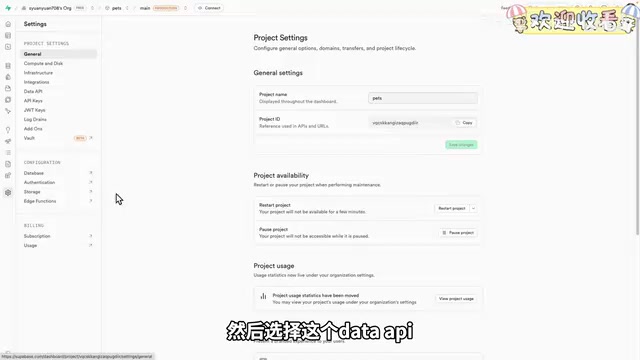
Run npm run dev to start the service, then test the full feature set. At this point the app has core functionality: user registration and login, browsing pet listings, submitting adoption applications, and receiving message notifications — with all data genuinely stored in Supabase. For example, adoption applications are recorded with a pending status.
Step 4: Push to GitHub for Version Control
Pushing code to GitHub is good engineering practice, making it easy to track history and iterate later. If you're unfamiliar with Git, just ask AI to walk you through it: run git init, git add, and git commit in sequence, then create a new public repository on GitHub, hand the SSH address to the AI, and it will complete the push automatically.
This step is simple, but it reflects a core principle of Vibe Coding — even engineering-heavy tasks like version control can be AI-assisted to lower the barrier to entry.
Step 5: Deploy Live with Vercel
Finally, use Vercel to deploy the application to the cloud. Vercel is a cloud deployment platform built by the team behind the Next.js framework, optimized for frontend and full-stack JavaScript applications. Its core strength is radically simplified CI/CD (Continuous Integration/Continuous Deployment): once connected to your GitHub repository, every code push automatically triggers a build and deployment. Vercel's Edge Network architecture distributes static assets to global CDN nodes while supporting Serverless Functions for dynamic requests.
Important note: this app includes a backend service, making it a dynamic application — it cannot be deployed to GitHub Pages, which only supports static sites. GitHub Pages can only host pure static HTML/CSS/JS files; it cannot execute server-side code or inject runtime environment variables. Vercel fully supports full-stack application deployments that include backend logic.
In Vercel, install the GitHub integration and import your project, then configure the build command as npm run build, the output path as dist, and the install command as npm install. Add your two Supabase database parameters as environment variables. If you're unsure how to configure any of this, ask AI to generate a Vercel deployment guide based on your project code and follow the steps.
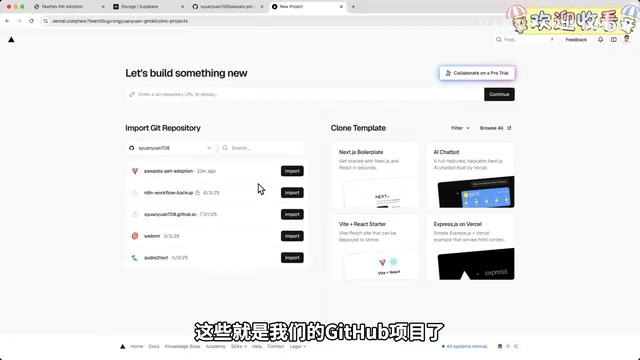
Once deployment succeeds, Vercel assigns a publicly accessible URL — anyone can reach the pet adoption app through it, and you can also bind a custom domain.
Bonus: Build an Admin Dashboard to Close the Loop
To complete the full business loop, you can use the same workflow to build an admin dashboard for entering pet information and approving adoption applications. If the dashboard is only for personal use, there's no need to deploy it — running it locally is fine.
In the demo, an admin enters a Labrador's profile (with the image stored in Supabase Storage), and the app immediately displays the new pet on refresh. A user then submits an adoption application; the admin approves it in the dashboard, the pet is automatically removed from the available listings, and the app receives an "Adoption Approved" notification — completing the entire pet adoption workflow as a closed loop.
Summary: Validate Product Ideas at Near-Zero Cost with AI Tools
The core value of this Vibe Coding workflow is: turning an idea into a real, accessible, usable product at nearly zero cost. From Stitch design, AI Studio frontend, and AntiGravity backend to GitHub hosting and Vercel deployment, each step has a mature AI tool to handle it — and most are free to use.
This aligns closely with the MVP (Minimum Viable Product) concept from Lean Startup methodology. The core logic of an MVP is: under resource constraints, build only the features needed to validate your most critical business hypothesis, get it in front of real users as fast as possible for feedback, then decide whether to iterate or pivot. Traditional MVP development still typically takes weeks of engineering time, while Vibe Coding compresses that cycle to hours — dramatically accelerating the build-measure-learn feedback loop. For independent developers and early-stage startup teams, this means being able to validate whether real market demand exists before committing significant resources.
Of course, it's worth being clear-eyed about the limitations. AI-generated code still has gaps in production-level security and robustness (e.g., email verification, concurrency handling), and this example intentionally covers only core functionality. But for product prototype validation, personal projects, or rapid MVP experimentation, this workflow undeniably compresses the time and cost of going from zero to one. If you're curious, give it a try yourself.
Key Takeaways
Related articles
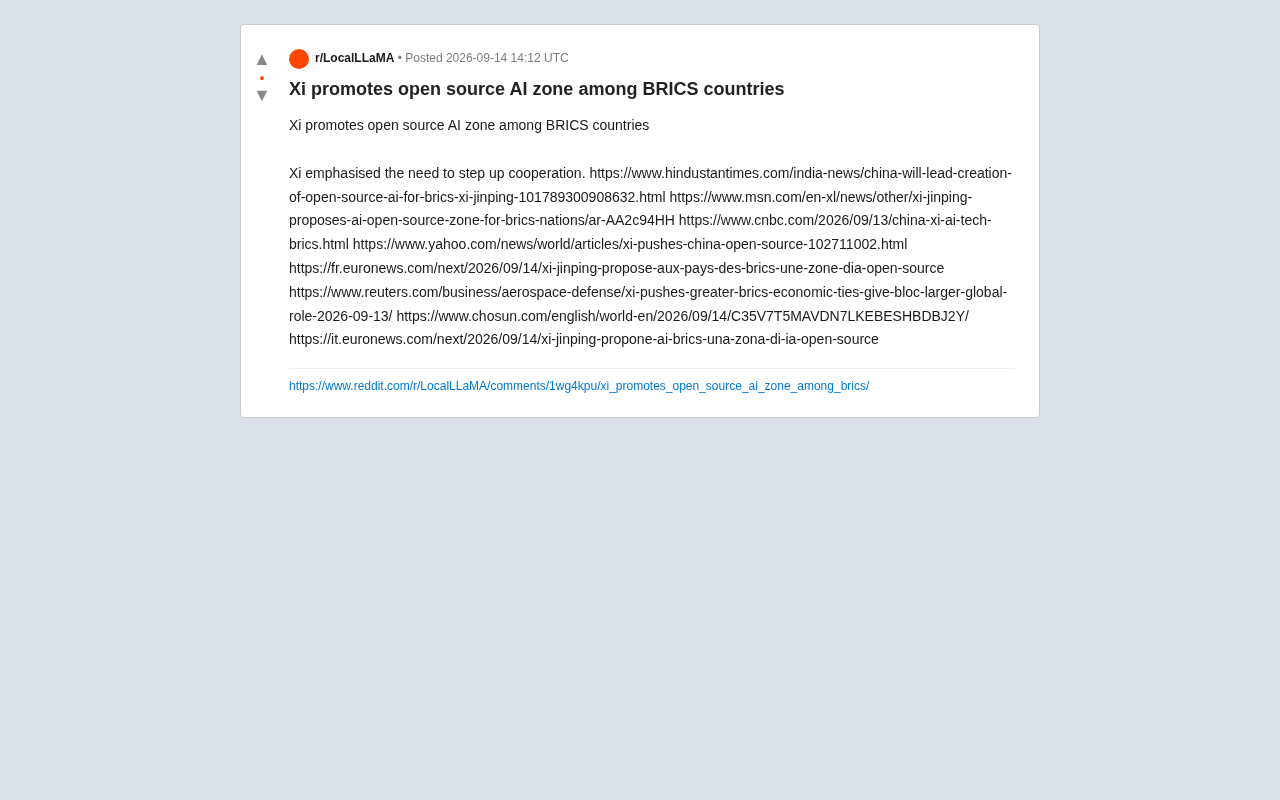
Xi Jinping Proposes Open Source AI Cooperation Zone Among BRICS Nations
Xi Jinping proposed an open source AI cooperation zone at the BRICS summit. Analyzing the strategic intent, open source rationale, and global AI governance implications.
Swift-Qwen3.8-27B: 58% Fewer Thinking Tokens, Nearly 2x Faster Inference
UkisAI open-sources Swift-Qwen3.8-27B, cutting thinking tokens by 58% and boosting inference speed 1.95x via overthinking token penalties and on-policy distillation — with under 1% accuracy loss.

Netflix Partners with Sega: Crazy Taxi Movie and New Sonic Animated Series on the Way
Netflix announces three Sega game adaptations: a Crazy Taxi movie, a new Sonic animated series with edge, and a live-action film based on RGG Studio's Stranger Than Heaven.