Vibe Coding in Practice: Using AI to Professionally Plan Product Features

Plan the product before developing, and use documents and specifications to make Vibe Coding controllable.
The article addresses the problem of projects becoming increasingly chaotic in AI-assisted programming (Vibe Coding), pointing out that the root cause is skipping the product planning phase. Bilibili creator "Teacher Ding" proposes a from-0-to-1 workflow: first store product planning documents in a separate Docs folder, with the product facts document having unique content to avoid conflicts; then build the project foundation, including Git branch development, merging after tests pass, and syncing remote backups, and introduce the Spec document as the specification for a single development task, followed by both the development Agent and the testing Agent; next, converge user roles, organize user stories, and set P0/P1/P2 priorities; then derive interfaces, the database field model, and the technology stack from the stories; and finally break down milestones. The core principle is that the pace is guided by humans, and the AI only provides suggestions within a controllable scope.
Why Does Your Vibe Coding Project Always Go "Off the Rails"?
Many developers, when using AI to write code, immediately have the AI generate pages and features directly—only to end up with a messier project: cluttered copy, buttons that can't be found, features that conflict with each other. Bilibili creator "Teacher Ding" points out in a tutorial series that the problem lies in skipping the product planning phase. He proposes a from-0-to-1 Web Coding workflow, whose core is to first think through the product architecture, user roles, and feature boundaries thoroughly with the AI before starting development. This approach emphasizes: the pace is guided by humans, and the AI only provides suggestions within a controllable scope.
According to the creator's analysis, the product planning phase requires producing several documents and strictly distinguishing where they are stored—all documents related to product planning should be placed in a separate Docs folder rather than mixed in with the source code. Among them, the "product facts document" describes the product skeleton, with each document having unique content to avoid conflicts. If the AI modifies only one file while missing another during adjustments, the content will gradually contradict itself, making the project increasingly chaotic.

Step 1: Build a Well-Structured Project Foundation
Before starting, create an empty folder and open AI Agent software (such as Codex, Workbody, Cloud Code, etc.). If using Codex, switch to Codex mode for serious development. Select the folder and choose the best model you can use and the highest reasoning level your subscription plan can handle.
Then describe the product prototype to the AI in two or three sentences. For example, the creator gives this example: develop a project where fans can see Vibe Coding works submitted by other fans, click through to the author's homepage, and even add contact information. The description doesn't need to be overly detailed, but it must be clear.
Next, paste in a project structure specification prompt to have the AI automatically generate the directory structure. According to the video demonstration, the AI will create a Docs folder to store product planning documents and set engineering standards: source code is included in a Git repository, each development session pulls a branch from the main repository, and only merges back into the main repository after tests pass, ensuring the main repository code is always correct. It also syncs to a remote GitHub repository as a backup to prevent local computer failures.
A key concept appears here: the Spec document (requirements specification). It describes a single development task, distinct from the product facts document. After each task is confirmed with the planning Agent, a Spec is output; the development Agent develops based on the Spec, and the testing Agent accepts based on the Spec—all three parties follow the same specification.
The division of labor between the Spec document (requirements specification) and the product facts document is the key design of this workflow. The product facts document describes the long-term skeleton of the product—what roles exist, what each role can do, what the data model looks like. Its lifecycle is as long as the project itself, and any change must synchronously update all affected entries. The Spec document, on the other hand, serves only a specific development task: it extracts the slice to be implemented this time from the product facts document, specifying inputs, outputs, acceptance criteria, and boundary conditions. The development Agent writes code according to the Spec, the testing Agent writes test cases and accepts according to the Spec, and the planning Agent is responsible for writing back new facts distilled from the Spec into the product facts document after the task is completed. Only when all three share the same specification can you avoid the mismatch where "development thinks it's done, testing thinks it's not, and the documentation thinks it doesn't exist."
Step 2: Converge User Roles to Avoid Feature Bloat
Once the project structure is ready, move on to discussing product features. The first step is determining user roles. The creator reminds: each additional role makes the product features one degree more complex, so roles should be reduced as much as possible while balancing the experience.
Taking the Vibe Coding works showcase website as an example, the AI initially inferred four roles (regular viewer, creator, administrator, etc.), but the creator explicitly wanted only two: the administrator is responsible for uploading all content, and visitors are responsible for browsing, accessing works, leaving comments and likes, etc. According to the Bilibili creator's demonstration and video footage, the AI then inferred multiple user stories based on the visitor role: casually browsing, searching for works with specific needs, learning whether a work is suitable, experiencing works, and learning how works are made. The creator added one more story: users want to submit their own works and contact the creator after viewing.
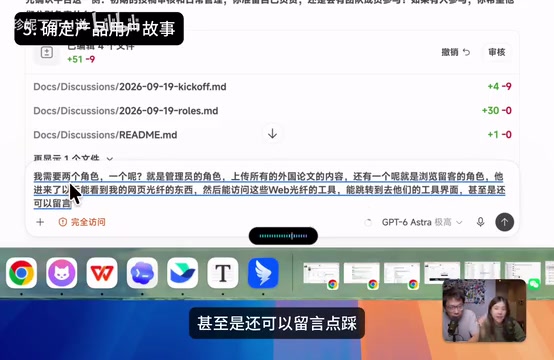
After the user stories are organized, priorities need to be set (P0/P1/P2). P0 is what must be satisfied first and requires well-designed interfaces; P1 is optional whether to satisfy in the first phase; P2 can skip interface design for now and just retain the functionality. The creator set stories numbered 1–4, such as accessing works and experiencing works, as P0, and submission and contact as P1. Administrator stories are similarly prioritized, with irrelevant information removed and arranged by P0/P1/P2.
This reflects a core principle: all pacing and direction are guided by humans; the AI only offers suggestions within a controllable scope, and humans decide whether to adopt them. If you let the AI lead the way, problems are likely to arise later.
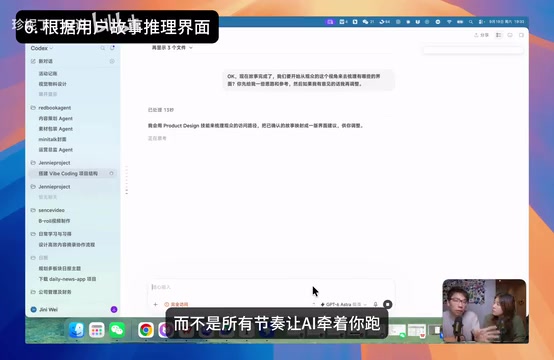
User Story is a common sentence pattern for describing requirements in agile development, typically in the form "As a 〈role〉, I want 〈to do something〉 so that 〈I gain some value〉." Its value lies in binding feature descriptions to specific roles and motivations, rather than listing feature checklists like "there should be a search box, there should be a detail page" that are detached from usage scenarios. In AI-assisted development, user stories have an additional role: they are the intermediate layer through which the AI infers interfaces and data models. After roles are determined, having the AI generate user stories and then deriving pages from the stories can significantly reduce the AI inventing features out of thin air. Labeling each story with P0/P1/P2 priority is equivalent to defining the implementation scope for the current phase for the AI, preventing it from also implementing P2 requirements when generating code and causing scope bloat.
Step 3: Derive Interfaces and Technical Solutions from Stories
After the user stories are determined, start organizing the interfaces. The creator asked the AI to provide ideas from the visitor role's perspective; the AI suggested a works plaza (also serving as the homepage), a work detail page, and a submission page, all corresponding to stories, and the creator confirmed they were correct. Then the administrator interfaces were organized: work management, work editing and categorization, submission instructions, and data browsing.
Once the interface skeleton is set, let the AI handle the parts developers are unfamiliar with: the database field model and the technology stack. All data is stored in a database, and the table structure is like an Excel list; once the overall framework is determined, the AI's organization won't have major problems. The technology stack refers to what technologies are used to build the pages, and this is also left to the AI to decide. The creator emphasizes that because the framework is already set, these two items can be safely left to the AI.
For complex products (such as those with login functionality), the creator suggests additionally having the AI organize the page navigation flow: unregistered users go to the registration page, administrators or creators go to their corresponding pages, and the navigation relationships for different states of each page all need to be clarified.
Database field model here refers to extracting the nouns involved in user stories into data tables and their fields. For example, "work" corresponds to the works table (title, author, category, link, cover, creation time), and "comment" corresponds to the comments table (content, commenter, target work, time). Once the field model is set, all subsequent pages read and write around it, so it is the part of the product facts document that most needs to remain unique. Technology stack refers to the combination of choices for frontend framework, styling solution, database type, deployment method, etc. The reason the creator confidently leaves these two items to the AI is that they are decisions with "an established framework and sufficient constraints": roles, stories, and interfaces are all determined, the AI's choice space is compressed, and the probability of error is low. Conversely, if you let the AI choose the technology stack before product planning, you will often get a solution that doesn't match the requirements.
Step 4: Break Down Milestones, But Don't Rush to Develop
The last step is to have the AI organize the milestones, breaking down the product implementation steps to ensure development has a rhythm. According to the video demonstration, after a relatively long wait, the AI outputs the complex database organization results and milestone plan. The creator specifically reminds: after the milestones are organized, don't rush to develop. The next episode will explain how to determine product styling and interaction specifications to ensure the entire product's visual consistency.
The value of this entire process lies in: putting "thinking it through" upfront, using documents and specifications to constrain the AI's output, and turning Vibe Coding from arbitrary generation into controllable engineering. For developers who want to seriously build products, this approach is worth practicing.

One-line Summary
Plan the product before developing, and use documents and specifications to make Vibe Coding controllable.
Paragraph Summary
The article addresses the problem of projects becoming increasingly chaotic in AI-assisted programming (Vibe Coding), pointing out that the root cause is skipping the product planning phase. Bilibili creator "Teacher Ding" proposes a from-0-to-1 workflow: first store product planning documents in a separate Docs folder, with the product facts document having unique content to avoid conflicts; then build the project foundation, including Git branch development, merging after tests pass, and syncing remote backups, and introduce the Spec document as the specification for a single development task, followed by both the development Agent and the testing Agent; next, converge user roles, organize user stories, and set P0/P1/P2 priorities; then derive interfaces, the database field model, and the technology stack from the stories; and finally break down milestones. The core principle is that the pace is guided by humans, and the AI only provides suggestions within a controllable scope.
Related articles

Abnormal Error Rate Spike in Claude Mythos 5.2 and Fable 5.2
Claude Mythos 5.2 and Claude Fable 5.2 show an abnormal spike in request error rates, marked as investigating on the official status page. This article covers the incident overview, practical impact on developers, and recommended responses.

ReAct Runtime Context Trimming: Why Claude Code Acts at 70%
A deep dive into ReAct runtime context trimming: why Claude Code compresses at ~70% usage, why tool calls dominate, why messages must be dropped in pairs, and why codebases don't need RAG.

AI Agent vs LLM: How Cursor and Claude Code Actually Work
An in-depth analysis of the essential difference between AI Agents and LLMs: LLMs generate code suggestions, while Agents modify files and run tests via tool calls. Using a Spring Boot bug fix as an example, it breaks down the workflows, permission control, and verification mechanisms of Cursor and Claude Code.