Vibe-Kanban: An Open-Source Platform for Unified Orchestration of AI Coding Agents Like Claude Code and Gemini CLI
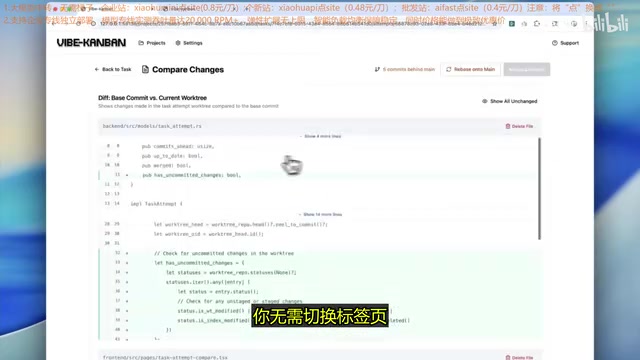
Vibe-Kanban is an open-source tool that orchestrates multiple AI coding agents in parallel on a unified kanban platform.
Vibe-Kanban is an open-source orchestration platform for AI coding agents that solves the pain point of constantly switching between Claude Code, Gemini CLI, AMP, and other agents. It offers multi-agent parallel task assignment, real-time kanban status tracking, centralized MCP configuration management, and dev server management, enabling developers to dispatch different tasks to different agents from a single unified interface — shifting the paradigm from manual single-agent operation to automated multi-agent coordination.
When you're simultaneously using multiple AI coding agents like Claude Code, Gemini CLI, and AMP, do you find yourself constantly switching between different terminals and tabs? An open-source project called Vibe-Kanban is trying to solve this pain point — it consolidates all AI coding agents onto a unified kanban platform, supporting parallel orchestration, real-time tracking, and centralized configuration management.
What Is Vibe-Kanban?
In simple terms, Vibe-Kanban isn't yet another AI coding tool — it's an Orchestration Layer for AI coding agents. Think of it as a "mission control center" for your agents.
The concept of an orchestration layer has long been widely applied in distributed systems and microservice architectures — the most classic example being Kubernetes' orchestration of containers. The essence of an orchestration layer is establishing a unified scheduling and management layer above multiple independently running services or agents, responsible for task allocation, state synchronization, resource coordination, and lifecycle management. In the AI agent domain, the emergence of an orchestration layer marks a fundamental shift in tool usage paradigms — from "manual operation of a single agent" to "automated coordination of multiple agents" — similar to the evolution from manual deployment to CI/CD pipelines in DevOps.
Its core philosophy is: different AI coding agents have different strengths. Claude Code, based on Anthropic's Claude model, is renowned for its powerful code comprehension, multi-step reasoning, and tool use capabilities, excelling particularly at complex code refactoring and cross-file modifications. Gemini CLI is Google's open-source command-line AI tool, built on the Gemini model with an ultra-long context window (supporting up to 1 million tokens), offering unique advantages in global analysis of large codebases. AMP (Amplified) focuses on automated programming workflows, emphasizing end-to-end task completion. Emerging tools like OpenCode also have their own distinctive features. This capability differentiation is the value foundation of multi-agent orchestration — by assigning the right tasks to the most capable agents, you can maximize overall efficiency. Rather than manually switching between them, why not use a unified platform to orchestrate them?
In one actual demo, Vibe-Kanban was assigned four code tasks processed by AMP agents, and all tasks were completed and merged within 20 minutes. This kind of efficiency improvement would be nearly impossible to achieve in a traditional manual-switching workflow.
Core Features Explained
Multi-Agent Parallel Orchestration
Vibe-Kanban's most powerful capability is assigning different tasks to different agents for parallel processing. Here's a concrete scenario:
- Have Claude Code handle backend API generation
- Simultaneously have Gemini CLI set up the project's file structure
- Let AMP handle frontend component development
These tasks can progress in parallel without switching between different terminals. You simply assign tasks on the kanban board, set the agent, and track progress.
Real-Time Task Status Tracking
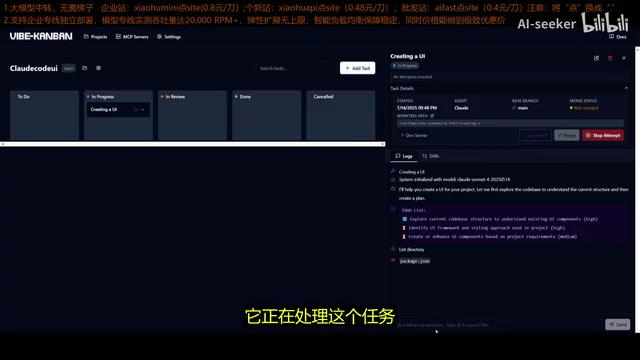
The platform provides a Kanban-style task status view with four stages:
- To Do: Tasks that have been created but not yet started
- In Progress: Tasks currently being processed by agents
- In Review: Tasks completed by agents but requiring human confirmation
- Done: Tasks that have passed review
The Kanban method itself has deep historical roots. It originated from the Toyota Production System (TPS), proposed by Taiichi Ohno in the 1940s, initially used for inventory management and production process optimization in manufacturing. In 2007, David J. Anderson introduced it to the software development field, forming the Kanban methodology. Its core principles include: visualizing workflow, limiting work-in-progress (WIP Limit), managing flow efficiency, and continuous improvement. In software development, Kanban makes workflow bottlenecks and progress distribution visible by moving task cards between different status columns. Vibe-Kanban applies this classic methodology to AI agent management, representing a meaningful extension of traditional Kanban into the AI era.
You can view the processing status, code diffs, and all changes for each task in real time. This visual management approach makes multi-agent collaboration clear and controllable.
Centralized MCP Configuration Management
This is one of Vibe-Kanban's most practically valuable features. If you've used MCP (Model Context Protocol), you know how tedious it is to manage MCP configurations across different agents — you need to configure it once for Gemini CLI in a JSON file, then repeat the same operation for Claude Code, with each agent requiring separate setup.
MCP (Model Context Protocol) is an open standard protocol released by Anthropic in late 2024, designed to establish a unified communication interface between AI models and external tools/data sources. Before MCP, every AI agent needed to write specialized integration code for different tools, resulting in massive duplication of effort and compatibility issues. MCP defines a standardized server-client architecture that allows AI agents to access file systems, databases, APIs, and other external resources through a unified protocol. Currently, MCP has been adopted by multiple mainstream AI coding tools including Claude Code, Cursor, and Windsurf, forming a rapidly growing tool ecosystem. However, despite the protocol itself being unified, different agents implement MCP configuration differently — configuration file paths, formats, and parameter naming all vary, which is precisely the pain point of cross-agent configuration management.
Vibe-Kanban provides centralized MCP configuration management, allowing all agents to inherit the same settings, environment variables, and tool configurations. This single feature alone can save you significant amounts of repetitive configuration time.
Development Server Management
The platform also includes built-in development server management with one-click deployment. You can start a development server directly on the platform, testing whether agent-generated code runs correctly without opening additional terminal windows.
Installation and Configuration Guide
Prerequisites
Vibe-Kanban supports macOS, Linux, and Windows. Before installation, ensure you have:
- Node.js: Latest version installed
- At least one AI coding agent: Such as Claude Code, Gemini CLI, AMP, or OpenCode
If you haven't installed these agents yet, you can quickly complete one-click installation via the npx command in your terminal.
Installation Steps
- Open terminal and run the
npx vibe-kanbancommand to install dependencies - After installation, launch the platform in your browser by specifying a port
- On first launch, a security prompt will appear requiring your confirmation
⚠️ Security Notice: Since Vibe-Kanban invokes local AI coding agents to execute code, it's recommended to deploy it in a protected environment and fully understand the security risks before proceeding.
The security risk background deserves additional explanation here. Security issues with AI coding agents are a topic of high concern in the industry. Since these tools need direct access to local file systems, terminal command execution, and even Git repository operations, malicious exploitation or unexpected behavior could lead to code leaks, accidental file deletion, or unauthorized code commits. Since 2025, multiple security research teams have reported cases of "Prompt Injection Attacks" targeting AI coding agents, where attackers embed malicious instructions in code comments or dependency packages to trick AI agents into performing dangerous operations. As a unified entry point for multiple agents, Vibe-Kanban's security is particularly critical — it simultaneously controls execution permissions for multiple agents, and any vulnerability in the platform itself would have a multiplied impact. Therefore, when using it in production environments or projects involving sensitive code, ensure proper permission isolation and network protection.
Initial Configuration
After launch, the platform guides you through the following configuration:
- Choose default executor: Claude, AMP, Gemini, or OpenCode
- Choose code editor: Supports multiple editors including Cursor and Windsurf, with custom options
- GitHub integration (optional): After logging into GitHub, AI agents can directly create PRs in your GitHub account
Once configured, you can modify these options at any time in the settings tab, including system theme (light/dark).
Practical Workflow
Creating Projects
You have two ways to create a project:
- Use an existing repository: Connect to a local directory, select a folder, and fill in the project name
- Start from scratch: Specify a Git repository path and name to create a new directory
Both methods support setup scripts and development server scripts.
Creating and Managing Tasks
After project creation, you can start adding tasks. For example, enter "Create a UI" as the task instruction, add a detailed description, even search for specific files in the codebase as context, then click "Create and Start."
The key is that you can create multiple tasks simultaneously. For instance, the first task is "Create UI," and while it's being processed, you can immediately create a second task "Add chatbot to UI" — both tasks will be processed in parallel.
Once tasks are completed, they enter the review stage where you can view all code diffs and changes. After confirming everything is correct, mark them as done and directly launch the development server for testing.
Use Cases and Limitations
Best-Fit Scenarios
- Multi-module project development: Scenarios requiring parallel development such as frontend-backend separation and microservice architectures
- Agent capability comparison: Assign the same task to different agents and compare output quality
- Team collaboration: Unified management of configurations and task progress across multiple agents
Issues to Be Aware Of
- You may encounter missing dependency packages during installation that require manual installation
- Security risks should be taken seriously; use in isolated environments is recommended
- As an open-source project, stability and feature completeness are still being iteratively improved
Conclusion
Vibe-Kanban represents an important direction in AI coding tool development: from single-agent to multi-agent orchestration. As AI coding agents become more numerous and capable, efficiently managing and coordinating them will become a new challenge for developers. Vibe-Kanban offers a viable solution — unified platform, parallel orchestration, centralized configuration.
From a broader perspective, this multi-agent orchestration trend is highly aligned with the overall direction of the AI industry. Leading companies like OpenAI, Google, and Anthropic are all pushing the development of "Agentic" AI. Future software development will likely no longer be a conversation between a developer and a single AI assistant, but rather developers acting as "commanders" coordinating multiple specialized AI agents working collaboratively. While Vibe-Kanban is still in its early stages, the orchestration paradigm it represents may become one of the standard workflows for AI-assisted development in the future.
For developers who regularly use multiple AI coding agents, this tool is worth trying. It won't replace any single agent — it makes you more efficient at using all of them.
Related articles
 Product Reviews
The Programmer's Desk Setup Guide: Building a Workspace That Feels Like Home
Discover how programmers build productive, comfortable workspaces. From multi-monitor setups to ergonomic design, explore the desk philosophy that drives focus and flow.
 Product Reviews
Qoder vs Cursor Real-World Comparison: Which $20/Month AI IDE Is Better?
Hands-on comparison of Qoder vs Cursor AI IDEs: Agent autonomy, human interaction count, and architecture decisions. Qoder needed only 2 interactions vs Cursor's 8.
 Product Reviews
Cursor Cloud Agent Demo: Eliminating Bottlenecks Across the Entire Software Development Lifecycle
Deep analysis of Cursor's Cloud Agent demo showing how cloud VMs, automated test artifacts, and a full-chain control plane systematically eliminate human bottlenecks across the software development lifecycle.