Visual Programming to Control a Cat: Analyzing a Creative Coding Game from Bilibili's AI Game Track

A visual programming education game where you drag-and-drop coding modules to guide a cat through levels
This creative entry from Bilibili's AI game track has players drag and drop programming modules like move, rotate, and conditional checks to control a cat through level challenges. The game incorporates sensor detection, resource management, tech tree upgrades, and program save-and-reuse mechanics, progressively teaching core programming concepts including loops, conditional branches, function reuse, and algorithm optimization — deeply merging programming education with engaging gameplay.
Overview: When Cats Meet Visual Programming
In Bilibili's AI game track, a developer brought a highly creative visual programming game — players drag and drop programming modules to control a cat through various level challenges. The game's core premise is quite imaginative: the cats are actually unmanned reconnaissance drones sent from "Planet Meow," and players must write program instructions to operate these "cat-shaped probes" to complete missions.
This game cleverly blends programming education with engaging gameplay. Players don't need to write code by hand; instead, they drag, drop, and connect various logic modules to build the cat's behavior program. From simple linear movement to complex maze navigation, the game progressively guides players to understand core programming concepts like loops, conditional statements, and sensors.
The Educational Roots of Visual Programming
Visual Programming is not a new concept — its roots trace back to flowchart design thinking in the 1960s. What truly brought visual programming into the public eye was the Scratch platform launched by the MIT Media Lab in 2003. Designed specifically for children ages 8-16, it replaced text code with drag-and-drop block modules, becoming one of the most widely used programming education tools worldwide. Since then, Google's Blockly engine, Apple's Swift Playgrounds, and LEGO Mindstorms programming environments designed for robotics education have all followed a similar design philosophy. The core value of these tools lies in completely eliminating "syntax errors" — the biggest psychological barrier for beginners — allowing learners to focus on logical thinking itself rather than memorizing tedious syntax rules. This cat game inherits this tradition and deeply integrates it with level-based game design.
Core Gameplay: Modular Instruction System
Building Basic Logic
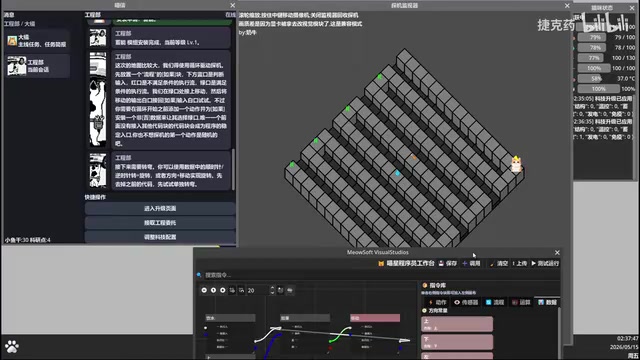
The game's programming system uses a flowchart-style visual design. Players take various functional modules from an instruction library, including basic commands like "Move," "Rotate," and "If (conditional)," then connect them according to logical relationships.
Taking a basic level as an example, players need to establish a movement loop: first place a "Drink Water" module as the entry point (drinking water doesn't cause the cat to move, making it suitable as a program starting point), then connect conditional checks and movement instructions to form a complete execution flow. This design lets players intuitively understand concepts like program entry points, loops, and conditional branches.
Sensors and Conditional Logic
The game introduces a key module called the "Passability Sensor," which detects whether there are obstacles or cliffs ahead of the cat. When the sensor returns "impassable," the program triggers a turning instruction; when it returns "passable," the movement loop continues executing. This mechanism perfectly simulates the logic of sensor-data-driven decision-making in real programming.
Sense-Plan-Act: The Core Paradigm of Robot Programming
The "Passability Sensor" in the game simulates the Sense-Plan-Act cycle in real-world robot programming — the foundational architecture of autonomous robotic systems. In actual drones or autonomous driving systems, devices like LiDAR, ultrasonic sensors, and cameras continuously collect environmental data, while control algorithms adjust behavioral strategies in real-time based on this data. The game simplifies this complex engineering concept into a binary judgment of "passable/impassable ahead," preserving the core logic of sensor-driven decision-making while reducing cognitive load to a minimum. This abstraction is the essence of excellent educational games — conveying the most fundamental concepts through the simplest models, allowing players to unconsciously build mental frameworks that connect to real engineering practice.
In curved-path levels, players encounter a classic problem: after a clockwise turn, the cat might face a cliff rather than the road. The solution is to add an additional check and two turns after movement, allowing the cat to correctly navigate counterclockwise bends as well.

Advanced Systems: Tech Tree and Module Upgrades
Resource Management and Endurance
The game features "hydration" as the cat's energy system. Once hydration is depleted, the cat "shuts down from dehydration" and the mission fails. This forces players to not only design correct pathfinding algorithms but also consider efficiency — completing missions with the fewest steps possible, or extending endurance by upgrading "Temperature Control" and "Energy Storage" modules. This design introduces a rudimentary concept of "algorithm complexity" at the programming education level: among programs that can all reach the destination, the solution with fewer steps is the better one — directly aligned with the computer science pursuit of optimal time complexity.
Tech Configuration Panel
As levels progress, the game gradually unlocks more capability modules:
- High Jump: Helps the cat leap over elevated terrain
- Long Jump: Helps the cat cross wide chasms
- Jump Sensor: Determines whether a landing spot is safe
- Temperature Control Module: Enables water traversal
- Energy Storage Module: Increases energy capacity
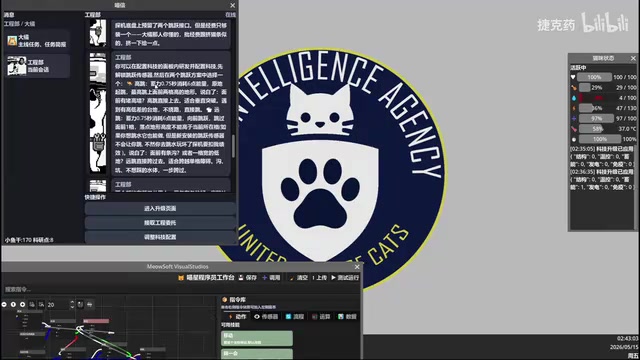
Players need to spend "dried fish" (in-game currency) and "research points" to unlock and install these modules, forming a complete character progression system.
Level Design: Programming Challenges from Simple to Complex
Save and Reuse Mechanism
The game supports saving programs from completed levels, which can be directly called upon in subsequent levels. This effectively teaches the programming concept of "function reuse" — encapsulating verified logic for direct use in new scenarios, avoiding redundant work.
The DRY Principle: A Golden Rule of Software Engineering
This mechanism corresponds to one of the most important principles in software engineering: DRY (Don't Repeat Yourself). In professional programming practice, encapsulating verified logic into functions or modules not only reduces code volume but also lowers maintenance costs — modifying one place affects all call sites. This concept has evolved into modern engineering paradigms like component-based development and microservices architecture in large-scale software projects. For beginners, intuitively experiencing the value of "encapsulating verified logic and reusing it in new scenarios" through game levels is more persuasive than any textbook explanation. When players directly call a navigation program saved from level two in level five, they've already understood in practice why professional programmers place such high value on code reuse.
Algorithm Design for Complex Terrain
Advanced levels feature maps with complex terrain including mountains and water. The strategy demonstrated in the video is: using the high jump ability to navigate around map edges, climbing mountains via jumps to avoid complex ground-level path planning. This reflects the "finding shortcuts" mindset in algorithm design.

However, a hitch occurred during actual execution — the jump instruction wasn't connected back to the main loop, causing the program to break. This error corresponds to an extremely common "control flow error" in real programming: the program's execution path deviates from the designer's intent. In professional software development, programmers spend an average of 30%-50% of their working time debugging, which is why debugging ability is considered a core skill equally important as coding ability. Through immediate visual feedback, the game lets players intuitively observe the consequences of broken control flow — this embodied error experience deepens understanding far more than simply reading error messages. After the fix, the two jumps executed perfectly, successfully taking the shortcut to the summit. This "write → test → debug → fix" process is a microcosm of the real programming workflow and a core embodiment of the Dev-Test Cycle in modern agile development methodology.
Design Highlights and Educational Value
This visual programming game has several noteworthy design highlights:
- Low floor, high ceiling: Visual programming lowers the entry barrier, but complex levels require genuine algorithmic thinking
- Instant feedback: Programs can be immediately "deployed" after completion
Related articles
 Product Reviews
The Programmer's Desk Setup Guide: Building a Workspace That Feels Like Home
Discover how programmers build productive, comfortable workspaces. From multi-monitor setups to ergonomic design, explore the desk philosophy that drives focus and flow.
 Product Reviews
Qoder vs Cursor Real-World Comparison: Which $20/Month AI IDE Is Better?
Hands-on comparison of Qoder vs Cursor AI IDEs: Agent autonomy, human interaction count, and architecture decisions. Qoder needed only 2 interactions vs Cursor's 8.
 Product Reviews
Cursor Cloud Agent Demo: Eliminating Bottlenecks Across the Entire Software Development Lifecycle
Deep analysis of Cursor's Cloud Agent demo showing how cloud VMs, automated test artifacts, and a full-chain control plane systematically eliminate human bottlenecks across the software development lifecycle.