Visual Studio Launches BYAM: Let Developers Freely Connect Their Own AI Models

Visual Studio's BYAM preview lets developers freely connect and switch third-party or private AI models inside the IDE.
Visual Studio has launched its Bring Your Own AI Model (BYAM) preview, letting developers across all IDE editions connect to Microsoft Foundry, OpenAI, Anthropic, Ollama, or private deployments via custom URLs. Built on the new GitHub Copilot SDK and requiring Visual Studio 18.10 Insiders with agent mode enabled, BYAM addresses three core needs: keeping sensitive code out of third-party services, meeting data residency compliance in regulated industries, and flexibly switching model tiers to balance cost and performance. Microsoft plans to follow up with enterprise policy controls, centralized model management, and finer parameter tuning.
From Lock-In to Freedom: The Story Behind BYAM
The way modern developers think about AI is quietly shifting. In the past, integrating an AI assistant into your IDE usually meant being locked into a specific model — developers had no choice but to accept whatever the platform decided. Today, more and more teams want to pick the best model for each coding task. That's the core motivation behind Visual Studio's new Bring Your Own AI Model (BYAM) feature.
BYAM is currently in preview and is available by default across all editions of Visual Studio — Community, Professional, and Enterprise alike. That means both individual developers and enterprise teams can try it out right away. Developers can connect to models officially provided by Microsoft, or use their own API keys to access other supported third-party providers.
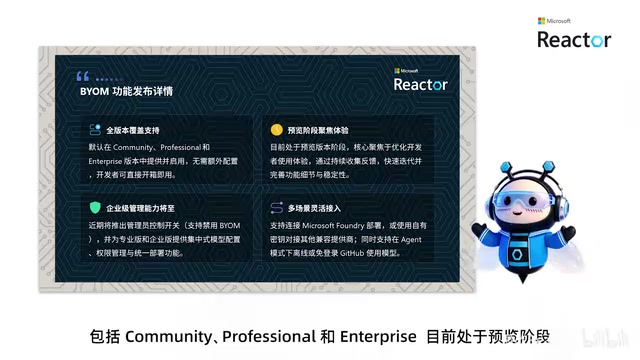
For enterprise users, Microsoft has also previewed upcoming management capabilities — such as admin permission controls and centralized model management — giving IT departments the ability to govern model usage policies at the organizational level.
A New Architecture Built on the GitHub Copilot SDK
There's one important technical change developers should be aware of: BYAM is launching alongside a new agent preview, built on top of the GitHub Copilot SDK. This means the older BYAM experience will no longer be supported.
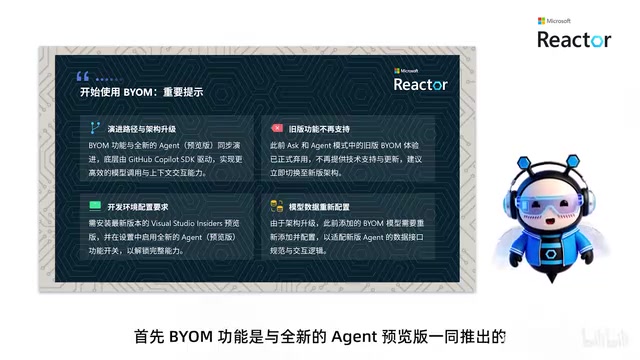
In other words, if you previously configured a custom model, you'll need to add it again after upgrading. To try the new feature, you'll need to install the latest Visual Studio 18.10 Insiders build and manually enable the new agent mode. In this mode, developers can interact with AI directly within the familiar IDE environment to handle a wide range of coding tasks — delivering what Microsoft calls a "seamless integrated experience."
From a product design perspective, building BYAM on top of the Copilot SDK is a smart architectural choice. It lets third-party models reuse Copilot's existing agent interaction framework rather than reinventing the wheel, which should benefit ecosystem consistency over the long run.
What is the GitHub Copilot SDK, and why does it matter? The GitHub Copilot SDK is a programming interface layer that Microsoft has opened to developers and third-party integrators. It packages Copilot's core capabilities — including context management, tool calling, and multi-step reasoning (the agentic loop) — into reusable modules. "Agent mode" means the AI can do more than answer a single question: it can autonomously plan, execute steps, and call external tools (such as reading/writing files, running terminal commands, or searching a codebase) to complete complex tasks, rather than being limited to back-and-forth conversation. Building BYAM on this SDK means any connected model — regardless of vendor — inherits this agent interaction framework out of the box. Without it, every third-party model would need to implement its own context management and tool-calling logic, which would be enormously expensive to develop and maintain. This also explains why the old BYAM had to be retired: the legacy architecture lacked a unified agent layer and couldn't support consistent feature expansion.
Supported Model Providers
The preview already supports several major AI providers, including Microsoft Foundry, OpenAI, Anthropic, and Ollama.
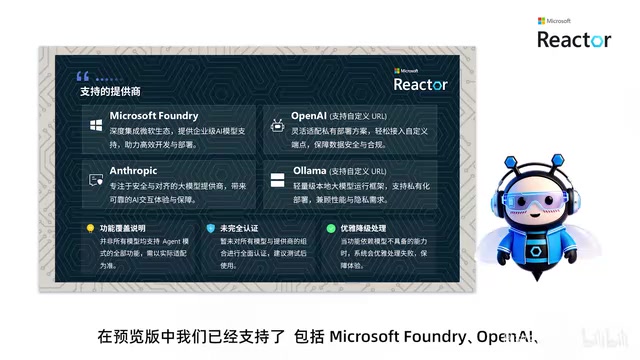
For OpenAI and Ollama specifically, Visual Studio also supports custom URLs — a feature that's especially valuable for enterprises. It means developers can connect to their own private deployments, keeping model inference entirely within a controlled environment. For teams running Ollama locally, this is essentially a must-have.
The setup process is straightforward:
Three Steps to Connect a Custom Model
- Make sure you have the latest Visual Studio 18.10 Insiders build installed;
- In the Chat panel, open the model selector and choose "Add or manage models";
- Click on Model Provider and connect to your preferred AI provider.
Once connected, you can call your own models directly within the new agent mode. Worth noting: as a preview feature, not all models support every capability — but Microsoft has designed a "graceful failure handling mechanism" to keep the development experience smooth and prevent interruptions caused by missing features.
What is Ollama, and what is Microsoft Foundry? Ollama is an open-source local LLM runtime that lets developers run open-source models like Llama, Mistral, and Gemma directly on their own machines or private servers — no data ever leaves for a cloud service. It exposes a local API that is compatible with the OpenAI API format, making it one of the most popular local inference solutions for air-gapped scenarios (such as government or financial systems on isolated internal networks). Visual Studio's support for custom Ollama URLs is specifically designed so developers can point requests at an Ollama service running inside their company's internal network, achieving zero-exfiltration deployment where code never leaves the enterprise boundary. Microsoft Foundry (formerly Azure AI Foundry) is Microsoft's own model hosting and fine-tuning platform, where enterprises can deploy privately customized model versions.
Why Developers Need BYAM
Why do developers need this capability so urgently? It comes down to three real-world drivers.
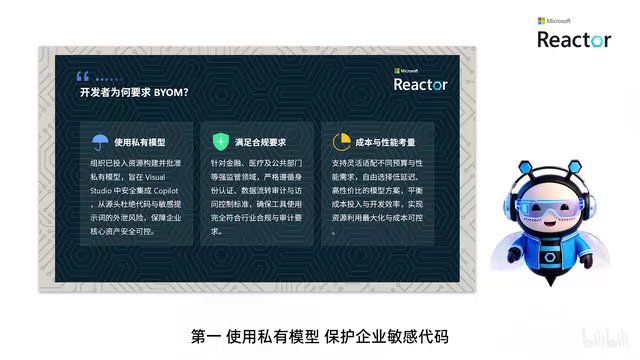
Data security is the top priority. Using a private model keeps sensitive enterprise code from flowing to external third-party services, reducing the risk of exposure at the source.
Compliance requirements come close behind. Heavily regulated industries like finance and healthcare often have strict auditing and data residency requirements — and only the ability to choose and deploy your own models makes it possible to meet those compliance thresholds.
Balancing cost and performance is the day-to-day operational concern. Different tasks call for very different model capabilities. Letting developers switch models flexibly means they can bring in a powerful model for complex tasks and switch to a lightweight one for simple scenarios, optimizing both efficiency and budget.
With all three factors in play, BYAM's value becomes clear: it lets developers and organizations use their own AI models safely and compliantly without ever leaving the familiar Visual Studio environment, while also protecting the organization's existing investment in AI infrastructure.
The Preview Is Just the Beginning
Microsoft has made clear that the current preview is only a starting point. Planned future capabilities include enterprise-level project policy controls, centralized model management, more granular model parameter settings, support for additional model vendors, and deeper integration with testing and deployment workflows.
The roadmap suggests Microsoft wants to turn BYAM into an open yet governable model access layer — one that satisfies developers' desire for "portable AI" while giving enterprises enough room to enforce governance. This dual "freedom + control" approach addresses exactly the tension that enterprise AI tooling needs to resolve today.
The feature is still in early preview. Interested developers can download the Visual Studio 18.10 Insiders build, enable agent mode, and experience the model freedom that BYAM delivers firsthand.
Related articles

JobRunner MCP Server: AI Agents Can Now Fix Failed Java Jobs
JobRunner launches an open-source MCP server enabling AI agents to view cluster status, diagnose failures, and recover Java jobs—incident response from any cloud coding environment or existing agent.

MLAI Digital Launches 9 Security Agents: MCP Server Safeguards the Full Lifecycle of Agentic AI
MLAI Digital launches Security MCP Server with nine built-in specialized security agents covering vulnerability discovery, attack simulation, prompt injection detection, API and infrastructure assessment, and accelerated remediation—embedding security validation across the full Agentic AI lifecycle from development to production.

Running Isaac Lab on H100 GPUs: Exploring Better Approaches
Exploring optimization methods for running Isaac Lab on NVIDIA H100 GPUs, including MIG configuration, mixed precision, TensorRT acceleration, and community experience to improve robotics simulation and reinforcement learning efficiency.