vLLM Inference Framework Deep Dive: A Practical Guide to High-Concurrency DeepSeek Deployment

Learn how vLLM's PagedAttention and continuous batching enable high-concurrency DeepSeek deployment in production.
vLLM is a production-grade LLM inference framework that outperforms tools like Ollama for enterprise use cases. This guide covers its five core features — including PagedAttention-based KV cache management and continuous batching — and walks through the full environment setup for deploying DeepSeek on a cloud server with GPU support.
In the wave of large language model adoption, efficient inference deployment has become a core challenge for enterprise applications. Individual developers might be comfortable using tools like Ollama to quickly spin up a model, but when a business needs to serve traffic at scale with high concurrency, Ollama starts to show its limitations. That's where vLLM has become the go-to choice in production environments.
This article systematically covers the core principles behind vLLM and provides a complete environment setup guide for deploying DeepSeekAd on a cloud server.
What Is vLLM?
vLLM is a high-performance LLM inference and serving framework built specifically for production environments. Unlike lightweight tools designed for personal use, vLLM was engineered from the ground up for high-concurrency, high-throughput production demands. It goes far beyond simply loading a model and running inference — it performs deep optimizations across memory management, request scheduling, and parallel computation.
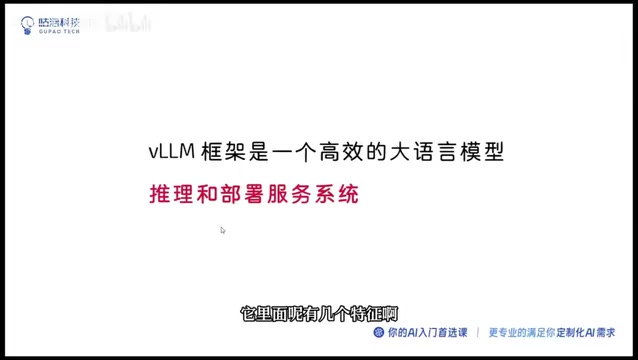
In short: if you want to chat with a large model locally, Ollama is perfectly fine. But if you're building an inference service inside an enterprise that needs to handle a large volume of concurrent requests, vLLM is the right answer.
Five Core Features of vLLM
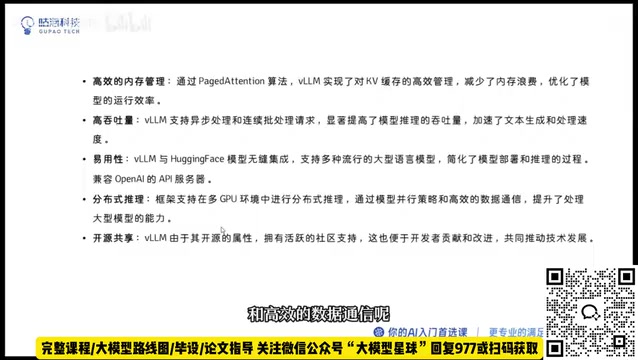
Efficient KV Cache Memory Management
vLLM's most celebrated innovation is its fine-grained management of the KV Cache. During Transformer inference, the self-attention mechanism computes and caches Key and Value matrices for every token in the sequence to avoid redundant computation during autoregressive generation. As context windows grow, these caches can consume 30%–60% of total GPU memory. Traditional frameworks typically pre-allocate a contiguous block of maximum-length memory per request, causing severe internal fragmentation and waste.
vLLM solves this with its novel PagedAttention algorithm — inspired by the concept of virtual memory paging in operating systems, it splits the KV Cache into fixed-size blocks and allocates them on demand. This pushes memory utilization close to 100%, delivering a 2–4× improvement in concurrent throughput on the same hardware. By dramatically reducing memory fragmentation, the same hardware can handle far more simultaneous requests.
Continuous Batching for Higher Throughput
vLLM supports Continuous Batching. Traditional static batching requires all requests in a batch to start and finish together — once a request completes, its GPU capacity sits idle waiting for the slowest request in the batch. Continuous batching introduces iteration-level scheduling granularity: after each token generation step, the scheduler can evict completed requests from the batch and immediately insert new waiting requests, keeping the GPU running at full capacity at all times.
In high-concurrency scenarios, this can push GPU utilization from 40%–60% up to 80%–95%. It's especially effective for real-world user traffic where response lengths vary significantly, resulting in meaningfully higher inference throughput and faster response times.
Seamless HuggingFace Ecosystem Compatibility
vLLM integrates seamlessly with the HuggingFace ecosystem, allowing you to load the vast majority of open-source models directly from the platform without complex format conversions — significantly lowering the barrier to entry. vLLM also provides an HTTP server that is compatible with the OpenAI API format, making it a drop-in addition to existing application stacks. This is a major reason why enterprises prefer vLLM for production deployments.
Multi-GPU Distributed Inference
For models with massive parameter counts, a single GPU often isn't enough. vLLM supports multi-GPU distributed inference, primarily using Tensor Parallelism — splitting each layer's weight matrices by column or row across multiple GPUs for parallel computation, then aggregating results via All-Reduce communication. vLLM integrates Megatron-LM's parallel operators under the hood and uses the NCCL library for efficient GPU-to-GPU communication. For extremely large models, Pipeline Parallelism can also be used to distribute different Transformer layers across different GPUs, further overcoming single-machine memory constraints.
Active Open-Source Community
vLLM is a fully open-source project with an active and continuously growing community. When you run into issues, it's much easier to find solutions and best practices, and the ecosystem evolves rapidly.
Environment Setup: Details Make or Break Deployment
Environment configuration is the step in the deployment process where things most often go wrong. It's worth emphasizing: if your environment doesn't match the recommended configuration, you're very likely to encounter version compatibility errors. Strictly aligning your environment versions is the critical prerequisite for a successful deployment.
Hardware and System Requirements
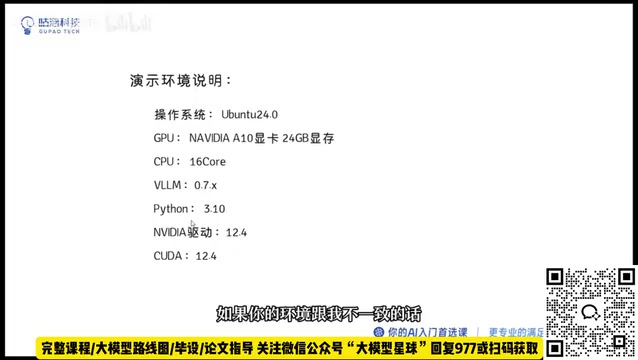
This guide uses an Alibaba Cloud server for demonstration, with the following specs:
- Operating System: Ubuntu 24.04
- GPU: A10 (deploying a smaller model — no need for expensive high-end cards)
- CPU: 16 cores
One important prerequisite to be clear about: vLLM only supports Linux environments and requires GPU resources. If you genuinely don't have a GPU and want to run on CPU, your processor needs to support specific instruction sets — otherwise it won't work. For the vast majority of deployment scenarios, a GPU is a hard requirement.
Recommended Software Versions
Version alignment on the software side is equally critical. Below is a verified, stable combination:
| Component | Recommended Version |
|---|---|
| vLLM | 0.7 |
| Python | 3.10 |
| NVIDIA Driver | Compatible with CUDA 12.4 |
| CUDA | 12.4 |
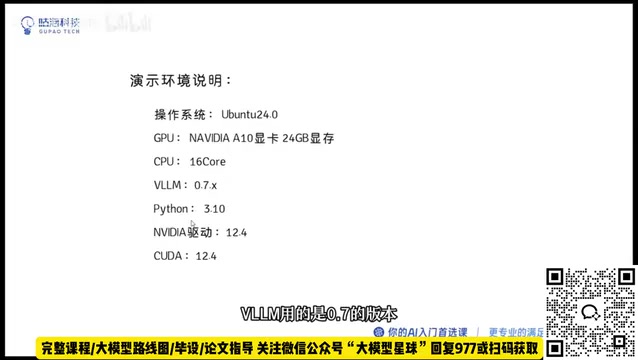
Sticking strictly to these versions minimizes dependency conflicts. Matching the CUDA version to the NVIDIA driver is the most common pitfall for newcomers — always verify this before you start.
CUDA (Compute Unified Device Architecture) is NVIDIA's parallel computing platform and programming model. Deep learning frameworks use CUDA to access GPU compute power. The driver version determines the maximum CUDA version it can support, while frameworks like PyTorch and vLLM are compiled against specific CUDA library versions. For CUDA 12.4, you need a driver version ≥ 550.54. A common failure scenario is a cloud server coming pre-installed with an older driver (e.g., 525.x, which corresponds to CUDA 12.0), leading to runtime errors like missing libcuda.so symbols or CUDA driver version is insufficient. Before setting up your environment, always run nvidia-smi to confirm your driver version, then use nvcc --version to verify the CUDA toolkit version.
vLLM vs Ollama: Choosing the Right Deployment Tool
For developers new to LLM deployment, understanding the positioning of vLLM versus Ollama is essential. They are not simple substitutes for each other — they're tools designed for different scenarios:
- Ollama: Built on llama.cpp, supports CPU inference and GGUF quantization formats. It trades precision for broad hardware compatibility, processes requests serially, and is aimed at individual developers and small-scale experimentation. It's easy to install and works out of the box — ideal for quickly validating ideas.
- vLLM: Entirely oriented around maximizing GPU throughput. It's built around PagedAttention and Continuous Batching in a purpose-built asynchronous inference engine, targeting enterprise-scale production deployments. It offers significant advantages in throughput, memory efficiency, and concurrency.
When an application needs to serve real user traffic and extract maximum performance from limited hardware, vLLM's KV Cache memory management and continuous batching can deliver several times the throughput of traditional approaches. When serving 100 concurrent users on an A10 GPU, vLLM's throughput is typically 5–10× that of Ollama. This is the core reason vLLM has become the underlying inference engine of choice for many LLM service providers.
Summary
vLLM stands out among inference frameworks because of its deep optimization of two critical areas: memory management and request scheduling. PagedAttention pushes memory utilization to near its theoretical limit, while Continuous Batching keeps GPU compute almost continuously occupied. For teams looking to deploy open-source models like DeepSeek at scale, learning how to deploy with vLLM is practically a prerequisite.
Before getting hands-on, make sure to align your environment versions first — a Linux system, GPU resources, and matching CUDA and driver versions. These details might seem tedious, but they're often the deciding factor between a successful deployment and hours of debugging.
Key Takeaways
Related articles

AI Comic Drama with WorkBuddy from Scratch: A Step-by-Step Skill Pack Installation Guide
Learn how to create AI comic dramas with WorkBuddy from scratch. This guide covers installation, Skill pack import and invocation, plus a script generation demo with manual revision tips to get you through the first step from script to storyboard.

WorkBuddy Agent Runs the Entire GEO Database Mining Pipeline with a Single Prompt
WorkBuddy agent automates GEO database mining: from data search and curation to batch correction, differential analysis, co-expression networks, feature gene screening, and immune infiltration—a single prompt generates a complete bioinformatics report, greatly lowering the barrier to bioinformatics analysis.

PC Memory Wasted? Hacker News Debates Centralized Data Centers
Hacker News users argue that personal computer memory is wasted and should be centralized in data centers, sparking debate on centralized vs. distributed computing resource allocation. This article analyzes the logic behind the claim, the costs of centralization, and new tensions in memory resource allocation in the AI era.