VLM-Seek 1.5 10B Local Deployment: Can Second-Level Visual Grounding Work in Practice?

Deploy VLM-Seek 1.5 10B locally on RTX 5090 for second-level open-vocabulary visual grounding via natural language.
This article documents deploying VLM-Seek 1.5 10B from scratch on a local RTX 5090 machine. The key challenge is matching Attention acceleration dependencies to the Blackwell architecture (Python 3.11 + CUDA 12.8 + PyTorch 2.10). Real-world tests show grounding results in ~1.5–1.6 seconds on 1080p and 1200×1200 images. Unlike fixed-category detectors, the model accepts natural language target descriptions and returns an explicit "not found" via its None mechanism rather than forcing false detections. Model weights require ~20GB VRAM; a dual-GPU split-layer workaround exists for lower-VRAM setups.
Open-source vision models are proliferating, but relatively few can actually run locally and meet real-world business needs. Bilibili creator "哈希二金之" deployed VLM-Seek (pronounced "VLX-SICK" in the video) 1.5 10B from scratch on a machine equipped with an RTX 5090, then ran it through multiple real-world image scenarios. This article summarizes the full deployment workflow, lessons learned, and benchmark results — a practical reference for developers looking to run open-source vision LLMs locally.
What You Need Before Deploying
The entire setup requires just three things: inference code, model weights, and region detector weights. Pull the inference code directly from the official GitHub repository; the model weights and region detector weights can be downloaded from the Chinese ModelScope community as three files, with much friendlier download speeds domestically.
For the environment, the creator set up a Python 3.11 virtual environment using Conda, then installed dependencies from the official requirements.txt. Once all files are in place, create a resources folder in the inference code directory and drop in the model weights and region detector weights — the deployment skeleton is ready.
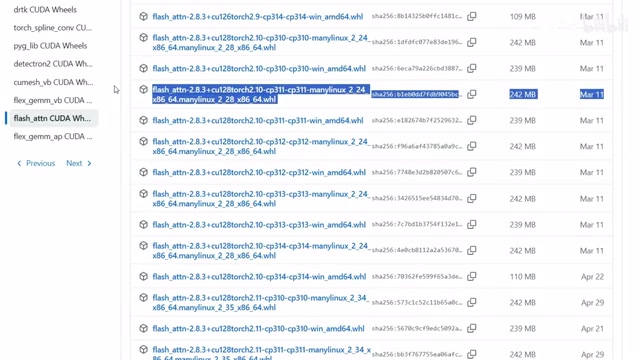
The Trickiest Step: Attention Acceleration Dependencies
The most error-prone part of the whole process is installing the Attention-related dependencies used to accelerate inference. The root cause is hardware architecture — this machine runs an RTX 5090, which uses the Blackwell architecture, requiring strict version alignment between CUDA, PyTorch, and the corresponding compiled packages.
The combination that ultimately worked was Python 3.11 + CUDA 12.8 + PyTorch 2.10, with matching precompiled packages installed locally. Once this step was resolved, the remaining dependencies installed normally via requirements.txt. For users with newer-architecture GPUs, version matching is the critical hurdle that determines whether deployment succeeds — blindly following generic tutorials will almost certainly get you stuck here.
The "Attention-related dependencies" mentioned here primarily refer to FlashAttention or similar efficient attention computation libraries. These libraries dramatically accelerate Transformer model inference by fusing matrix operations and reducing memory read/writes, but they require either local recompilation against a specific CUDA version or precompiled wheel packages. The Blackwell architecture (such as the GB202 chip in the RTX 5090) only entered mass production in 2025, and most mainstream tutorials and precompiled packages still target Ampere (RTX 30 series) or Ada Lovelace (RTX 40 series) architectures. Using outdated versions triggers CUDA kernel incompatibility errors. With the latest GPU architectures, you must source packages compiled specifically for that architecture from official or community sources — or compile them yourself against a matching CUDA toolchain. This is the highest technical barrier in the entire deployment process.
Benchmark Results: Is Second-Level Grounding Real?
Getting the model running is just the first step. What really matters is how fast a 10B vision model runs locally. Rather than using the official demo, the creator tested directly with images of varying resolutions and scenes.
Scene 1: Express delivery sorting conveyor line. Resolution 1920×1080, instruction: "Find the colorful package closest to me" — grounding completed in approximately 1.5 seconds.
Scene 2: 1200×1200 image. Instruction: "Find the orange tabby cat in the frame" — results returned and target successfully located in approximately 1.6 seconds.
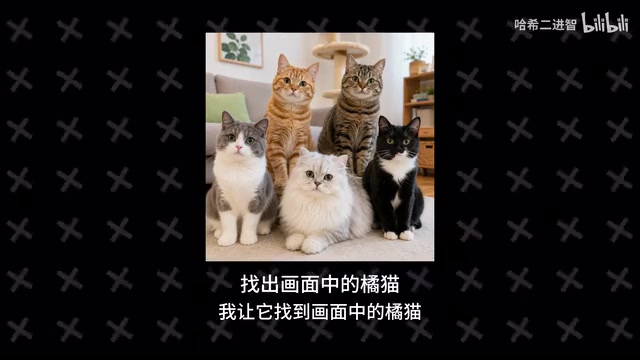
Across these test cases, VLM-Seek 1.5 10B on RTX 5090 hardware achieves essentially second-level response times for single visual grounding tasks. For industrial vision and inspection scenarios requiring rapid response, this speed has genuine deployment value.
Beyond Fixed Categories: Natural Language Target Descriptions
More differentiating than speed is its natural language comprehension. The biggest distinction between VLM-Seek and traditional fixed-category detectors is that you don't need to predefine targets as rigid categories like "car" or "cat" — you can describe what you're looking for in plain natural language.
For example, "Find the person in blue work clothes standing to the right of the equipment" or "Find the cardboard box at the far left of the second shelf" — the model understands and localizes both. This effectively adds a more flexible interaction layer between traditional visual detection and natural language.
A key robustness test: what happens when the target doesn't exist in the frame? The creator deliberately asked it to "Find the damaged red package on the conveyor line" when no such object was present. VLM-Seek implements a None mechanism — when no candidate region matches the description, it returns "not found" rather than forcing a incorrect bounding box.
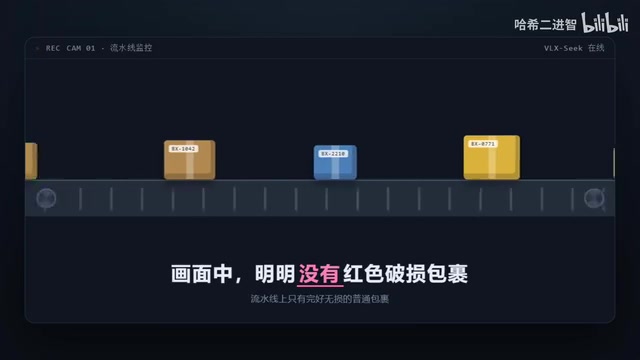
This doesn't mean it's immune to false positives or misses. But for real business use, "explicitly say not found when nothing matches" is far more valuable than a fabricated wrong answer, and makes downstream decision-making much more reliable.
VLM-Seek represents "Open-Vocabulary Detection," which is fundamentally different from traditional detection models. Classic detectors like YOLO and Faster R-CNN have fixed category lists at training time (e.g., COCO's 80 classes) and can only recognize objects seen during training. Open-vocabulary detectors leverage vision-language pretraining (inspired by approaches like CLIP) to map image region features and arbitrary text descriptions into a shared vector space, enabling matching of categories or complex natural language descriptions never seen during training. The "Region Proposer" first generates candidate regions, then the vision-language model determines which region best matches the text description. This two-stage architecture allows the model to handle spatially-aware instructions like "the leftmost box on the second shelf" rather than simple category matching.
Hardware Requirements and Deployment Options
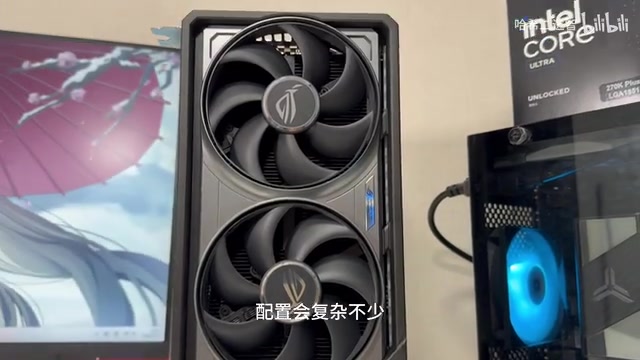
A 10B model still has meaningful hardware requirements. In testing, model weights alone occupy approximately 20GB of VRAM, with inference needing additional headroom for intermediate computation, candidate regions, and caching — so plan for buffer beyond that 20GB baseline. The RTX 5090's generous VRAM makes deployment and inference more stable.
What if you only have 16GB of VRAM? The creator also tested a dual 4060Ti 16GB configuration, running the model by distributing layers across two GPUs — it works, but requires modifying the original inference code and involves considerably more complex setup.
Local deployment isn't the only path either. If you just want to quickly integrate VLM-Seek into a web Agent, RPA system, or vision application without maintaining a full GPU environment, you can call a public cloud API directly. For enterprise internal data, industrial environments, or use cases with strict data security requirements, private deployment is the more appropriate choice.
Summary
Three takeaways from this from-scratch deployment:
- Locally deployable: A 10B-class open-source vision model genuinely runs locally — the main barriers are GPU architecture and dependency version compatibility.
- Second-level response: On RTX 5090 hardware, multiple visual grounding tasks return results in under two seconds.
- Natural language-driven: Supports describing targets in natural language without hardcoding fixed categories, with a built-in None mechanism that explicitly returns "not found" when no match exists.
Developers who want to try it can head to the official GitHub for complete deployment commands and environment versions. If you'd rather skip the environment setup, start with an online demo or API to test against your own images first.
Related articles

Felix Rieseberg Personal Homepage
Felix Rieseberg's personal homepage sparks attention on Hacker News. This article covers the Slack engineer's technical background, the rise and fall of nativefier, and the value of a developer homepage as a tech calling card.

@ai-sdk/vue 3.0.306 Patch Release Syncs with [email protected] Update
@ai-sdk/vue 3.0.306 released, synced with [email protected]. A routine patch release for the Vercel AI SDK ecosystem with no public API changes; the Vue adapter layer stays version-aligned with the core package.

Gemini 4 Argon API Launches: The Era of Million-Token Output Begins
Google launches Gemini 4 Argon with sparse MoE architecture, up to 1M output tokens, and a 68.90% Vals Index score, available across API, AI Studio, and the Gemini app.