VS Code AI Toolkit 2.0 Deep Dive: Agent Builder + Free Access to GPT-5

VS Code AI Toolkit 2.0 adds Agent Builder, model evaluation, and free GPT-5 access via GitHub Models.
Microsoft's VS Code AI Toolkit receives a major 2.0 update, evolving from a simple model chat tool into a comprehensive AI development platform. Core new features include a no-code Agent Builder with MCP tool integration, batch run multi-model comparison, custom model evaluation systems, in-IDE model fine-tuning, and free access to top-tier models like GPT-5 and Claude through GitHub Models. Additionally, local execution doesn't inject extra system prompts, ensuring native performance.
Microsoft's VS Code AI Toolkit has received a major update. This VS Code extension not only supports seamless switching between local and cloud models but also introduces a series of practical new features including an Agent Builder, batch testing, and model evaluation. What's even more noteworthy is that through the GitHub Models option, developers can use top-tier models like GPT-5 and Claude for free. This article breaks down the core highlights of this update one by one.
What Is AI Toolkit?
If you're not yet familiar with Microsoft AI Toolkit, it's essentially a VS Code extension that allows developers to easily run large language models locally through runtimes like Ollama and LM Studio, while also supporting cloud model integration.
It's worth explaining the technical background of these runtimes. Ollama is an open-source local LLM runtime framework that packages model downloading, quantization, and inference into simple command-line operations, supporting mainstream open-source models like Llama, Mistral, and Gemma. LM Studio provides a graphical interface that enables non-technical users to run GGUF-format quantized models locally. The common feature of these runtimes is that they use local GPU or CPU for inference, keeping data on the machine for both privacy and low latency. AI Toolkit unifies these runtimes under a single management layer, essentially providing an abstraction layer at the IDE level so developers don't need to worry about differences between underlying inference engines.
After installation, a toolkit option appears in the VS Code sidebar, with navigation on the left and feature pages displayed on the right. Its positioning is somewhat like an LM Studio integrated into a code editor, but its capabilities go far beyond that—it consolidates model management, conversation testing, Agent building, and model evaluation into the IDE environment developers are most familiar with.
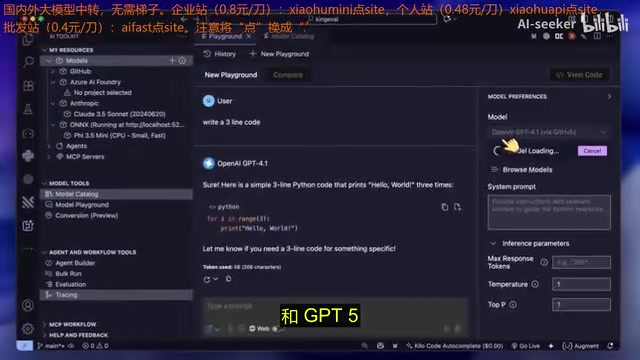
For model management, you can add models through multiple runtimes including Ollama, Yanks, or Azure Foundry, and you can also connect any OpenAI-compatible API. If you're logged into your GitHub account, you can directly browse and use various models provided by GitHub Models, including GPT-4.1, GPT-5, and more—completely free.
Agent Builder: Create AI Agents Without Code
The Agent Builder is the most exciting new feature in this update. It provides a graphical interface that lets developers quickly create their own AI agents without writing complex framework code.
To understand the value of this feature, you need to first understand the AI Agent technical paradigm. AI Agents are one of the core paradigms in current LLM applications, fundamentally different from traditional single-turn Q&A. Agents have the ability to autonomously plan, call tools, and perform multi-step reasoning. A typical Agent workflow includes: receiving user instructions → decomposing tasks → selecting appropriate tools for execution → observing results → deciding on the next action. This loop is called the ReAct (Reasoning + Acting) pattern. AI Toolkit's Agent Builder visualizes this complex process graphically—developers only need to define system instructions and available tools, and the framework automatically handles the orchestration logic for tool calls.
Detailed Creation Process
The process of creating an AI Agent is very intuitive:
- Select a Model: Choose one from your available models as the Agent's underlying driver
- Write System Instructions: Tell the AI agent what its role and tasks are
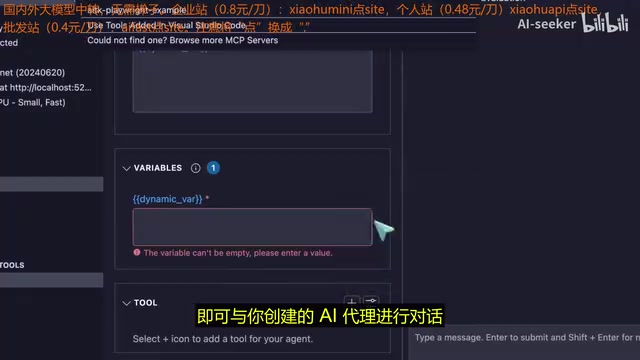
- Set Dynamic Variables: Use double curly brace
{{variable_name}}syntax in instructions to generate prompt templates with variables, entering corresponding values each time you use them - Configure Tools: Add callable external tools to the Agent
MCP Tool Integration and Custom Extensions
The tools option is the core of the Agent Builder. You can empower your Agent in two ways:
- MCP Servers: Set up any MCP server in the MCP Servers option in the left sidebar, and once configured, you can call them from your Agent. This means you can connect to file systems, databases, APIs, and various other external resources.
- Custom Tools: Write your own code to define tool logic for more advanced and personalized needs.
MCP (Model Context Protocol) is an open standard protocol introduced by Anthropic in late 2024, designed to provide LLMs with a unified way to access external tools and data sources. Before MCP, every AI application needed to write customized integration code for different data sources, resulting in massive duplication of effort. MCP adopts a client-server architecture: MCP servers expose specific tool capabilities (such as file read/write, database queries, API calls), while MCP clients (like AI Toolkit) communicate with servers through a standardized JSON-RPC protocol. This design is similar to what USB protocol is to peripherals—one standard interface can connect countless devices. The MCP ecosystem currently covers hundreds of server implementations including GitHub, Slack, PostgreSQL, file systems, and more. AI Toolkit's native MCP support means developers can directly leverage this rapidly growing tool ecosystem.
The toolkit comes with some useful built-in examples, such as a web scraper (based on Playwright) and a code interpreter. Some developers have used it alongside deep wiki and web search tools, treating the Agent as a context engine for fetching and organizing information, with quite good results.
Batch Runs and Model Evaluation: Data-Driven Model Selection
For developers who need to frequently test and compare different models, batch runs and model evaluation features are invaluable tools.
Batch Run Multi-Model Comparison
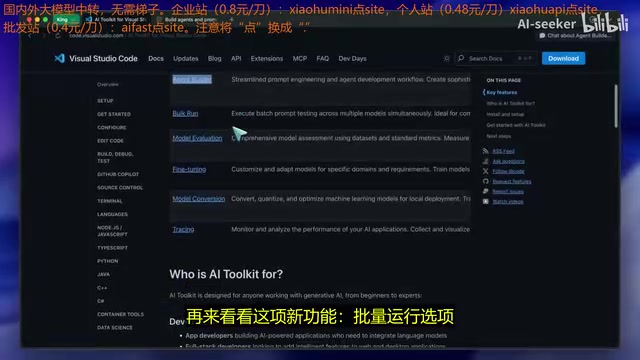
The batch run option allows you to create a table containing numerous prompts, then run all prompts against multiple models at once. This is extremely practical for model testers—you can input all test cases, and the system will automatically compare how different models perform on the same prompts.
Custom Model Evaluation System
The model evaluation feature takes things further by allowing you to build your own evaluation system:
- Build Datasets: Input questions and expected answers (ground truth)
- Automatic Scoring: The system checks the similarity between model responses and expected answers, then assigns scores
- Multi-dimensional Metrics: Can measure various metrics including tool call accuracy
- Customizable Scoring Criteria: Evaluation settings can be modified according to your needs
In real-world AI engineering practice, model selection is a systematic engineering problem. Different models show significant performance variations across different task types (such as code generation, text summarization, logical reasoning, multilingual processing), and model performance is also influenced by prompt design, temperature parameters, context length, and other factors. Traditional evaluation methods rely on public benchmarks (such as MMLU, HumanEval, MT-Bench), but these benchmarks often fail to reflect the real needs of specific business scenarios. AI Toolkit's custom evaluation system allows developers to build domain-specific test sets and measure model performance with real business data. This approach is known as "Domain-Specific Evaluation" in the industry and is a critical step in moving AI from the lab to production.
This evaluation system enables developers to make data-driven decisions, choosing the most suitable model for specific tasks rather than relying on intuition.
More Practical Feature Highlights
Model Fine-tuning
You can now fine-tune models directly in VS Code with just a few clicks to complete the setup. This significantly lowers the barrier to model fine-tuning, as developers no longer need to switch to dedicated training environments.
Model fine-tuning refers to further training a pre-trained model with domain-specific data to better adapt it to target tasks. Common fine-tuning techniques include Full Fine-tuning and Parameter-Efficient Fine-Tuning (PEFT), with the representative method being LoRA (Low-Rank Adaptation), which injects low-rank decomposition matrices into model weight matrices to dramatically reduce the number of trainable parameters, making it possible to fine-tune models with billions of parameters on consumer-grade GPUs. Traditional fine-tuning workflows involve data preprocessing, training script writing, hyperparameter tuning, memory management, and other steps with relatively high technical barriers. AI Toolkit encapsulates these steps into graphical operations, representing an important effort to lower fine-tuning barriers.
Tracing and Debugging
The tracing option lets you collect and visualize trace data, providing deep insight into the runtime logs, behavioral patterns, and performance of your AI applications and Agents. This is particularly important for debugging complex Agent workflows.
Free Access to GPT-5 via GitHub Models
Through the GitHub Models option, developers can access top-tier models like GPT-5 and Claude for free. GitHub Models is a model catalog service launched by GitHub in 2024 that leverages Azure AI infrastructure to provide developers with free trial quotas for mainstream LLMs. Its Free Tier typically includes limits on requests per minute and daily total tokens, making it suitable for development testing and prototype validation scenarios. Supported models include OpenAI's GPT series, Anthropic's Claude series, Meta's Llama series, Mistral, and more. Developers only need a GitHub account to obtain an API access token, and the interface is compatible with the OpenAI SDK format, making migration costs extremely low. This strategy is essentially an important move by Microsoft to funnel developers from the GitHub ecosystem to Azure AI services.
In the Playground, you can not only have text conversations but also attach images, documents, and code, or even have the model search the web for you. Generated code can be added as a new file with one click, and you can get OpenAI SDK scripts to use directly in your projects.
Native Model Execution Without Injecting Additional Prompts
It's worth noting that AI Toolkit does not inject additional system prompts when running models locally. This is crucial—many tools add lengthy system prompts that cause local models to run slowly. AI Toolkit's approach is to run the native model directly, ensuring response speed.
From a technical perspective, system prompts consume the model's context window, and locally-run small parameter models (such as 7B, 13B) typically have limited context windows (4K-8K tokens). Lengthy system prompts not only compress the actual input space available to users but also increase the computation required for each inference, significantly increasing Time to First Token (TTFT). Furthermore, for quantized small models, overly long system prompts can interfere with the model's understanding of user instructions, reducing output quality. Therefore, AI Toolkit's native execution design offers practical performance advantages in local inference scenarios.
Summary and Assessment
The VS Code AI Toolkit 2.0 update represents a qualitative leap. It has evolved from a simple model chat tool into a comprehensive AI development platform integrating model management, Agent development, batch testing, model evaluation, and fine-tuning training.
Ideal use cases include:
- Developers who prefer using AI models directly within their code editor
- Researchers who need to frequently test and compare different model performances
- Product teams wanting to rapidly prototype AI Agents
- Tech enthusiasts looking to extend AI capabilities using the MCP ecosystem
As a free VS Code extension, AI Toolkit 2.0's feature richness and ease of use are both impressive. If you frequently use VS Code in your daily work, this extension is worth installing immediately.
Key Takeaways
- AI Toolkit 2.0 adds an Agent Builder supporting custom AI agent creation through a graphical interface, with MCP server and custom tool integration
- Through the GitHub Models option, developers can use top-tier models like GPT-5 and Claude for free for development and testing
- Batch run and model evaluation features support systematic performance testing and accuracy scoring across multiple models
- Supports model fine-tuning directly in VS Code and provides tracing features for visual analysis of model behavior
- Local model execution does not inject additional system prompts, ensuring native performance and response speed
Related articles
 Product Reviews
The Programmer's Desk Setup Guide: Building a Workspace That Feels Like Home
Discover how programmers build productive, comfortable workspaces. From multi-monitor setups to ergonomic design, explore the desk philosophy that drives focus and flow.
 Product Reviews
Qoder vs Cursor Real-World Comparison: Which $20/Month AI IDE Is Better?
Hands-on comparison of Qoder vs Cursor AI IDEs: Agent autonomy, human interaction count, and architecture decisions. Qoder needed only 2 interactions vs Cursor's 8.
 Product Reviews
Cursor Cloud Agent Demo: Eliminating Bottlenecks Across the Entire Software Development Lifecycle
Deep analysis of Cursor's Cloud Agent demo showing how cloud VMs, automated test artifacts, and a full-chain control plane systematically eliminate human bottlenecks across the software development lifecycle.