WaitFeed: Turn AI Wait Time into Tech Briefings
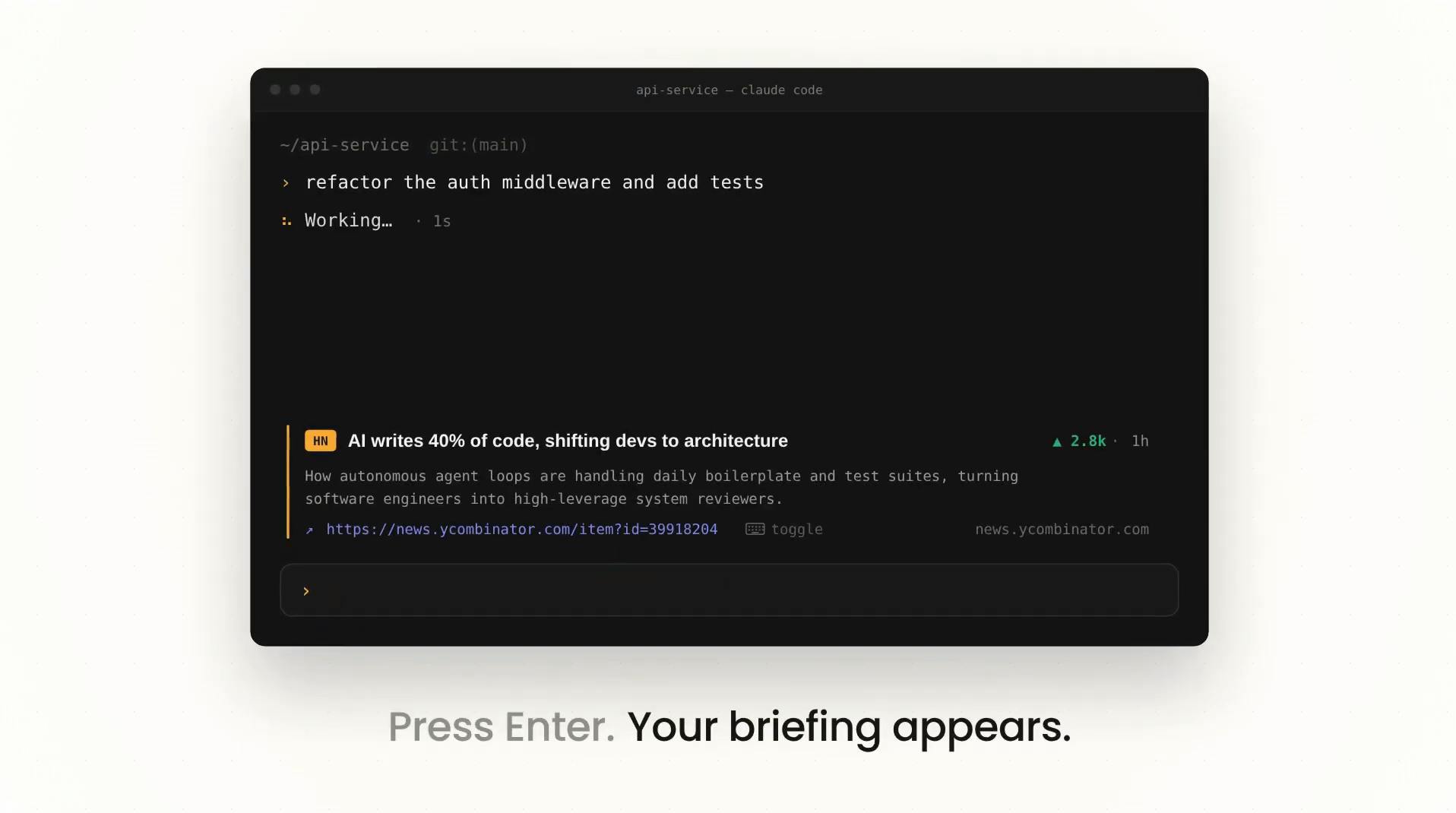
WaitFeed turns AI Agent wait time into a terminal tech news stream, reducing attention fragmentation.
WaitFeed is an open-source tool on Product Hunt that targets wait gaps in the AI Agent 'command—wait—check' loop, streaming developer stories, repos, and live discussions to the terminal. It emphasizes 100% local operation, zero API Key, zero Token consumption, free open source, and single-command launch as a non-intrusive background info layer. The article analyzes switching costs and attention fragmentation, highlights privacy and cost benefits of local-first design, and notes its content aggregation mechanism is undisclosed. With 56 votes and 19th place on Product Hunt, it remains early-stage, suited for terminal-centric developers who frequently use AI Agents.
AI Agents are running tasks in the background while you stare blankly at the screen, or unconsciously switch to another tab, your focus slowly being torn apart. This is a scenario every person using AI coding tools encounters today: wait time has become a black hole for attention. WaitFeed, an open-source tool on Product Hunt, tries to repurpose this "dead time"—pushing developer news directly into the terminal while the Agent works.
The Pain Point: Waiting Is Stealing Your Focus
AI Agents have changed the rhythm of how developers work. In the past, writing code was continuous input; now it's more of a loop of "issue command—wait for execution—check results." Each wait isn't long, but it's enough to make people lose focus. WaitFeed's description hits the problem directly: "Every wait is dead time that breaks your flow."
The real trouble isn't the wasted time itself, but the switching cost. You switch to the browser to skim a couple of news items, then switch back to the terminal and need to reload context. This attention fragmentation hurts efficiency far more than the wait itself. WaitFeed's choice is: rather than fighting distraction, make distraction valuable—bring the news into the terminal so you can browse without leaving your work environment.
Flow and switching costs are the key background for understanding this pain point. Flow was proposed by psychologist Mihaly Csikszentmihalyi, referring to a state where a person is fully immersed in an activity with both high efficiency and excellent experience. Software development is typical knowledge-intensive work; entering flow often requires ten-plus minutes or even longer of context loading, and a single interruption can reset the state to zero in an instant. "Attention residue" in cognitive psychology further explains switching costs: when a person switches from task A to task B, part of the attention remains stuck on A, causing degraded performance on B. The "command—wait—check" loop brought by AI Agents precisely creates high-frequency, brief yet repeated interruption points. The harm isn't in the duration of a single wait, but in continuously preventing developers from entering a stable state of deep work. This also explains why WaitFeed chose to "bring news into the terminal" rather than "let users leave the terminal to kill time"—reducing context switching is itself a form of attention protection.
What WaitFeed Is: A Tech Stream in the Terminal
WaitFeed's positioning is clear: present a tech news stream during Agent wait time. According to the product description, it streams fresh developer stories, code repositories (repos), and live developer discussions directly to the terminal.
Several key features are worth noting:
- Fully local operation: 100% local, data never leaves the machine
- Zero API Key, zero Token consumption: no dependency on any external model service, no call costs
- Free and open source: launches with a single command
Together, these features show WaitFeed's design philosophy is lightweight and non-intrusive. It doesn't do complex recommendation algorithms, doesn't require users to configure credentials, and doesn't consume quota from AI tools. For a tool that "fills the gaps in waiting," this restraint is reasonable—users shouldn't have to pay extra attention costs to configure and maintain it.
Why the Local-First Design Matters
In an era where AI tools generally require API Keys and charge by Token, WaitFeed's "zero keys, zero Tokens" is a clear differentiator. This brings two layers of value.
First is peace of mind on privacy. Developers' terminal environments often contain sensitive information, and a tool that doesn't send data out and runs fully locally naturally has a lower barrier to adoption. Second is zero burden on cost. Many developers use multiple AI services simultaneously, and quota management is itself a burden—WaitFeed explicitly stays out of this消耗战.
However, we should also be objective: local operation means the mechanism for obtaining and distributing news content must be handled by the tool itself, and the product description doesn't elaborate on this. How exactly it aggregates "fresh dev stories" and "live developer discussions" is key to determining its content quality, and is worth watching going forward.
API Key and Token billing mechanisms deserve a brief explanation to understand why "zero keys, zero Tokens" constitutes a selling point. In mainstream large-model services, developers must first apply for an API Key as a calling credential; the server uses it for authentication and bills by consumed Tokens (the basic unit of measurement for text processed by a model, roughly corresponding to a word or several characters). This means every call involves credential management, quota monitoring, and billing settlement—an even heavier burden when using multiple services. WaitFeed claims it doesn't rely on any model service and produces no Token consumption, essentially positioning itself as a "static information pipeline" rather than an "intelligent generation tool": it needs no reasoning, no authentication, and therefore has no risk of quota exhaustion or key leakage. This architectural choice lowers the adoption barrier, but it also means it cannot provide personalized recommendations or semantic filtering—content relevance depends entirely on its built-in aggregation logic.
A Terminal-First Product Approach
WaitFeed locks its interaction scenario firmly to the terminal, and this choice itself involves trade-offs. For developers accustomed to doing most of their work in the terminal, having news appear within their field of view without interrupting the current task is a smooth experience. But for users already used to graphical readers, the terminal's presentation capabilities are always limited.
The product description repeatedly emphasizes "Never in your way," showing the team clearly understands its role: it's a background information layer, not the protagonist. This positioning makes WaitFeed more like an "attention recovery device" rather than yet another news app that users must spend time managing.
Looking at Product Hunt data, WaitFeed received 56 votes, ranked 19th, with only 1 comment. These numbers indicate it has just entered the sight of early developers and hasn't yet formed broad discussion. For an open-source tool, limited early attention is normal—whether the product can iterate continuously and whether content sources stay fresh are the core variables determining how far it goes.
The terminal as an interface has its special constraints. The terminal is essentially a character interface, excelling at efficient text streaming output and keyboard operation, but limited in layout, images, and rich media presentation, and long reading of large amounts of text easily causes fatigue. Therefore, common approaches for terminal-based news tools are minimalist lists, pagination, or on-demand expansion rather than a full reader experience. This also explains why WaitFeed emphasizes "Never in your way": in the terminal, any behavior that grabs focus, blocks input, or floods output directly interferes with the running Agent task and command input. A qualified terminal background information layer must be sufficiently restrained in output frequency, refresh method, and exit mechanism; otherwise, a tool meant to "fill waits" could create new distractions. When evaluating such tools, output pacing control and interruptibility often determine actual experience more than content volume.
Who Should Try It
If you fit the following, WaitFeed is worth a try: you spend a large amount of your day working in the terminal; you frequently encounter wait gaps when using AI Agents; you want to keep up with tech news input without specifically opening a browser for it.
Conversely, if your workflow is highly dependent on graphical interfaces, or you have high requirements for news filtering and layout, this tool's form may not fully match. It solves a specific, small problem—turning waiting from consumption into input—rather than replacing any existing news product.
A tool's value often depends on how precisely it embeds into a scenario. WaitFeed doesn't try to be a general-purpose reader; instead, it seizes the specific moment of "Agent waiting" and切入 with a single command and zero configuration. As AI coding tools become increasingly widespread, small tools like this that fill gaps in workflows may become an inconspicuous but frequently used part of developers' toolkits.
One-line Summary
WaitFeed turns AI Agent wait time into a terminal tech news stream, reducing attention fragmentation.
Paragraph Summary
WaitFeed is an open-source tool released on Product Hunt that targets the wait gaps generated in the AI Agent "issue command—wait for execution—check results" loop, streaming developer stories, code repositories, and live discussions to the terminal. It emphasizes 100% local operation, zero API Key, zero Token consumption, free and open source, and single-command launch, positioning itself as a background information layer that doesn't interrupt workflows. The article analyzes the switching costs and attention fragmentation caused by waiting, points out the dual value of local-first design in privacy and cost, while noting that its content aggregation mechanism has not yet been disclosed. Product Hunt data of 56 votes and 19th place indicates it is still early-stage, suitable for developers who are terminal-centric and frequently use AI Agents.
Related articles

Michael Nielsen Takes Down His Classic Neural Network Textbook, Sparking Community Discussion
Michael Nielsen's classic free textbook Neural Networks and Deep Learning has been taken offline, sparking discussion on Hacker News about the reasons and impact.

Inside the AI Training Data Market: The Trade-off Between Exclusivity and Discounts
G2i founder Gabe Greenberg reveals the dual-track pricing of the AI training data market: labs pay a premium for exclusive data or accept discounts that allow others to buy it.

SessionGraph: Unifying All Coding Agent Sessions in One Interactive Graph
SessionGraph aggregates coding agent sessions into an interactive graph, helping developers review, debug, and manage AI coding workflows across sessions. This article examines its positioning, value, and open questions.