We Tested GPT-6 for Game Dev: The Full Workflow from AI Assets to Playable Prototype

Two devs used HarpX + GPT-6 casual prompts to build a full 2D space shooter prototype from scratch.
Two game developers ran an impromptu experiment: using the AI art tool HarpX to generate and decompose game assets, then handing everything to GPT-6 with casual prompts to produce a complete 2D space shooter prototype — including an upgrade system, boss fights, and an in-game shop. The experiment reveals the real shape of today's AI game dev workflow: HarpX's core value lies in splitting AI-generated images into engine-ready sprite assets, while GPT-6 can autonomously identify assets and assemble a playable prototype. However, details like boss transition animations and combat pacing still require human polish.
An Impromptu Experiment After a Meeting
After wrapping up a meeting about GPT-6, two game developers decided to run a live experiment: feed AI-generated game assets directly to GPT-6 and see whether a handful of casual, conversational prompts could produce a playable 2D space shooter. The entire process was recorded and shared as a genuinely valuable real-world demo.
Bottom line up front — GPT-6 is impressively capable at understanding requirements, combining assets, and generating a playable prototype. But there's still a significant gap between that and a finished game. Any workflow that actually holds up in production still requires dedicated AI art tools and human fine-tuning.
The AI Art Tool: The Critical Link in Asset Production
For this experiment, nearly all assets were produced by an AI art tool called HarpX (pronounced "Hopix" or "HarpX" in the video). The developers were candid: the hardest part of making a game often isn't the prototype code — it's getting art that can be used directly as production assets. Generic AI image generators can produce beautiful concept art, but they share two fundamental shortcomings: the aspect ratios don't fit the portrait orientation of mobile games, and they can't decompose a scene into individual, usable game elements.
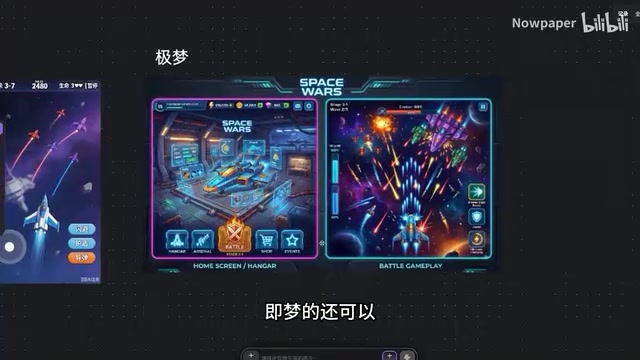
The team initially used ChatGPT (during the 5.6-era period) to generate a portrait-format 2D space battle concept image with a sci-fi cartoon style, covering both the main menu and the battle screen. Other tools produced decent results but not in portrait orientation — the ChatGPT output was ultimately chosen because it "looked more like a mobile game."
From One Image to a Full Asset Library
Where the tool really proved its worth was in the ability to decompose and derive assets from that single image. The developers walked through a complete, templated workflow:
- Style exploration: Feed in a reference image, generate a player fighter, enemy ships, and other elements directly
- One-click background removal: Automatically extract subjects from their backgrounds
- Background extraction and upscaling: Scale up to 8K for creating large game world maps
- Sprite sheet splitting: The most critical step — decompose a full scene image into individual weapons, bullets, enemies, UI components, small icons, and more
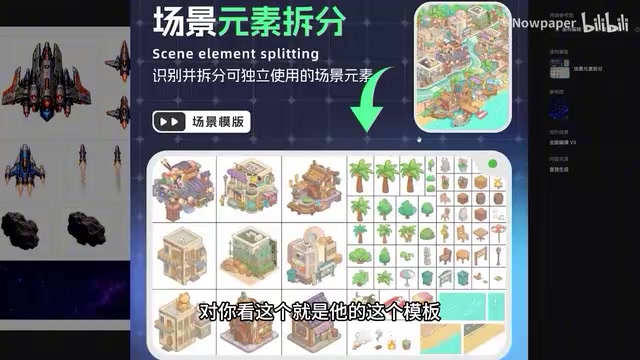
The developers kept coming back to the sprite sheet splitting and scene element decomposition capabilities as something most tools simply can't do: "The image looks great, but you can't actually use it" — and the ability to break an image down into usable assets is the dividing line between AI art that makes it into a production pipeline and AI art that doesn't.
A sprite sheet is a standard asset format in game development where multiple individual images (character animation frames, UI buttons, bullets, etc.) are packed onto a single large image. The game engine crops and retrieves each sub-image at runtime using coordinates. This dramatically reduces the number of draw calls during rendering and is the standard 2D game asset format. In a traditional workflow, artists manually lay out and record the coordinates of each sub-image in software like Photoshop. AI-generated images typically output as a single combined image — if the tool can't automatically identify and split out the boundary and coordinates of each individual element, the image can only serve as a reference and cannot be imported directly into Unity, Godot, Cocos, or any other engine. This is the technical root cause of "looks great but can't be used" — automatic sprite sheet splitting requires the AI tool to perform object detection and boundary segmentation, not just image generation.
Effects, UI, and Automated Sprite Animation
The tool also covered other pain points in game development. For UI, the developers used a "based on this style" reference image approach to generate in-game UI component sprite sheets, then further split them into individual components — "beyond typing text and making selections, there's basically nothing you have to do manually."
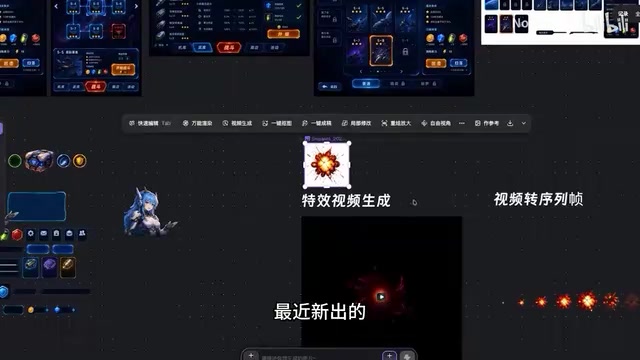
Visual effects are a newer feature. Feed in an asset screenshot as a reference, choose a template — explosion, projectile launch, area summon — and the corresponding effect is generated. The developers noted that one generation cost around 270 credits, which isn't cheap. The generated effect video can then be converted directly into game-ready animation frames using a "video to sprite animation" function.
Once all assets are organized, they can be exported as a package, and a share link carrying the full parameters makes it easy for others to reuse the entire setup.
Sprite animation (also called frame-by-frame animation) is the dominant approach for achieving dynamic effects in 2D games: an explosion, skill effect, or other motion is broken into a series of still frames, which the game engine plays back sequentially at a fixed frame rate to create the animation. Unlike skeletal animation, sprite animation has more direct art quality requirements but comes with larger file sizes. Traditionally, artists had to draw each frame by hand or export frames individually from After Effects — a significant time investment for indie developers. Automatically slicing an AI-generated effect video into evenly spaced frames is essentially fixed-rate sampling of the video with PNG sequence output. You then just configure the frame rate in the engine to complete the animation asset integration, eliminating the tedious work of manual frame-by-frame capture.
GPT-6 Takes Over: Building a Playable Prototype from Casual Prompts
This was the centerpiece of the experiment. The developers loaded all the organized assets — player ship, various enemies, asteroids, ammunition, explosion frames, effects — into the project, deliberately leaving out the UI assets to "test" GPT-6. They used Codex in an RGBD environment and selected the "High" middle tier, since they were worried about burning through their quota at the highest tier.

The most interesting part was the prompting approach: the developers didn't write detailed, structured prompts. Instead, they kept things "very relaxed, very conversational" — they wanted to see how well GPT-6 could understand the intent and run with it.
Real-World Performance Exceeded Expectations
GPT-6 first independently reviewed the assets and determined that they contained "complete fighter jet components, asteroids, ammunition, explosion frames, and effects," then prioritized the existing assets and only self-generated when something was missing. The resulting game prototype was genuinely surprising:
- Automatically set up the logo, title screen, and background music
- Implemented a complete upgrade system: cryo rounds, slow effect, movement speed, rear turret, main cannon, energy recovery, pickup range, flanking wings, swarm missiles, and more
- Tiered upgrades with flavor text descriptions (e.g., "All fear stems from insufficient firepower") — real style
- Full gameplay loop including an emergency dash mechanic, boss fights, hangar upgrades, and an in-game shop
The developers were audibly impressed during playtesting. The game genuinely ran, played well, and was fun — complete with epic upgrade tiers and deliberate combat pacing design.
Codex is OpenAI's code-generation-optimized model series, with its core capabilities integrated into later GPT versions. The "RGBD environment" mentioned in the video refers to a type of development assistant environment with an integrated code execution sandbox, allowing the model to not only generate code but actually run, debug, and iterate it in an isolated environment — forming a closed "generate → run → fix" loop. This is fundamentally different from earlier code-completion tools that could only output static code snippets. Model tiers (Low/Medium/High) typically correspond to different inference token budgets or chain-of-thought depth. Higher tiers consume more compute quota but have stronger comprehension and planning capabilities for complex tasks. The developers' choice of the "High" middle tier was a practical trade-off between task complexity and quota consumption.
The Real Limits: AI Still Needs Humans
Beyond the excitement, both developers offered a grounded assessment. Even though GPT-6 produced a playable prototype from casual prompts, there's still a meaningful gap between that and a finished product:
"Even after building it out from the assets, you still can't just hand it off entirely to implement the full effect — in the end, a person still needs to go in and make detailed adjustments."
For example, the boss fight was missing a transition animation after the explosion, and the combat pacing occasionally broke down — both issues requiring human polish. The developers' conclusion was practical: expecting a few sentences to produce a finished game is still a stretch. AI-assisted development delivers its best results when AI art tools, large models, and human adjustment work together.
This experiment outlines an AI game development workflow that's starting to take shape: a dedicated AI art tool handles producing usable assets, a large model handles understanding requirements, combining logic, and generating prototype code, and human developers provide creative direction and final fine-tuning. That three-way collaboration is the most realistic path for AI-assisted indie game development right now.
Related articles

Chain of Thought Isn't Just for AI: How Humans Can Use CoT to Improve Thinking Quality
Chain of Thought isn't just a prompt trick for large models. Starting from a Hacker News discussion, this article analyzes why CoT works for human thinking too, breaks down actionable ways to transfer it, and highlights the key differences between human CoT and machine CoT.
Cloudflare Teams Up with OpenAI: Closi…
Cloudflare Teams Up with OpenAI: Closing the Loop from Vulnerability Discovery to Defense with AI
Cloudflare uses OpenAI Daybreak to investigate security vulnerabilities and generate reviewable remediation plans, while developers use Codex to boost coding efficiency and quality.

Orca Multi-Agent Orchestration in Practice: A Guide to Parallel Collaboration with Claude and Codex
Orca is Stable AI's free open-source agent workbench supporting 34 agents like Claude Code and Codex in parallel. Learn its Git worktree isolation, multi-model orchestration, and mobile management.