web-edit 0.1a0: Let AI Agents Spin Up a Web Editor So You Can Edit Credential Files from Your Phone
Simon Willison's web-edit proves sensitive files can bypass LLM context: agent starts the service, you edit via Tailscale.
web-edit 0.1a0 is a minimalist Python web file manager from Simon Willison for browsing, uploading, editing, and deleting files in a folder, designed for phone access over a private Tailscale network. The motivation: while using Codex Remote, he needed to edit credentials files without keys entering the LLM context — so the agent starts the service and the human edits sensitive files directly. It uses CodeMirror 6 rather than Monaco because of Monaco's weaker mobile experience.
When you're pushing a project forward with a coding agent on your phone, one of the most awkward scenarios is this: you need to edit a credentials file, but you don't want that string of keys bouncing back and forth through the LLM's context.
Simon Willison built a small tool for exactly this problem — web-edit 0.1a0. Its scope is narrow: it provides a web UI for browsing, uploading, and editing files in a folder.
The Specific Scenario It Aims to Solve
By Simon's own account, he was developing a project on his phone using Codex Remote. Midway through, he needed to edit a credentials file, but he didn't want that credential content passed through the LLM as an intermediary.
So his approach was: have Codex work with GPT-6 Astra Extra High to generate a Python web app that provides a browsing and editing interface for files in a folder, designed to run over a Tailscale network. Once the agent starts the service, he can edit files directly from his phone via Tailscale — credentials never pass through the model.
The key here isn't "yet another online file manager" — it's the division of labor where the agent spins up the service, and the human edits the sensitive files. Credentials travel from human eyes to disk without passing through the model's context at any point.
AI coding agent refers to LLM applications that can autonomously read and write code files, run commands, and iterate on changes — typical examples include Codex, Claude Code, and Cursor Agent. What they all share is that everything the agent perceives and does gets serialized into the LLM's context window, including the file contents it reads and every command it executes. This means once an agent reads a file containing keys, those characters enter the model's inference pipeline and may be logged, cached, or appear in logs and subsequent sessions. So the thinking behind tools like web-edit is essentially to manually split the "agent-accessible filesystem" and the "human-accessible filesystem" into two separate channels, letting sensitive data bypass the context entirely.
Tailscale is a zero-config mesh VPN built on WireGuard. It assigns each device a private IP in the 100.x.y.z range and automatically handles NAT traversal and encryption, making devices behave as if they're on the same LAN. For individual developers, its most important value is this: you can securely access services on machines at home or in the cloud from your phone without configuring public ports, TLS certificates, or a login system. This is precisely the premise that lets web-edit be built as a "no-auth minimalist tool" — access control is delegated to the network layer.
What the Interface Looks Like
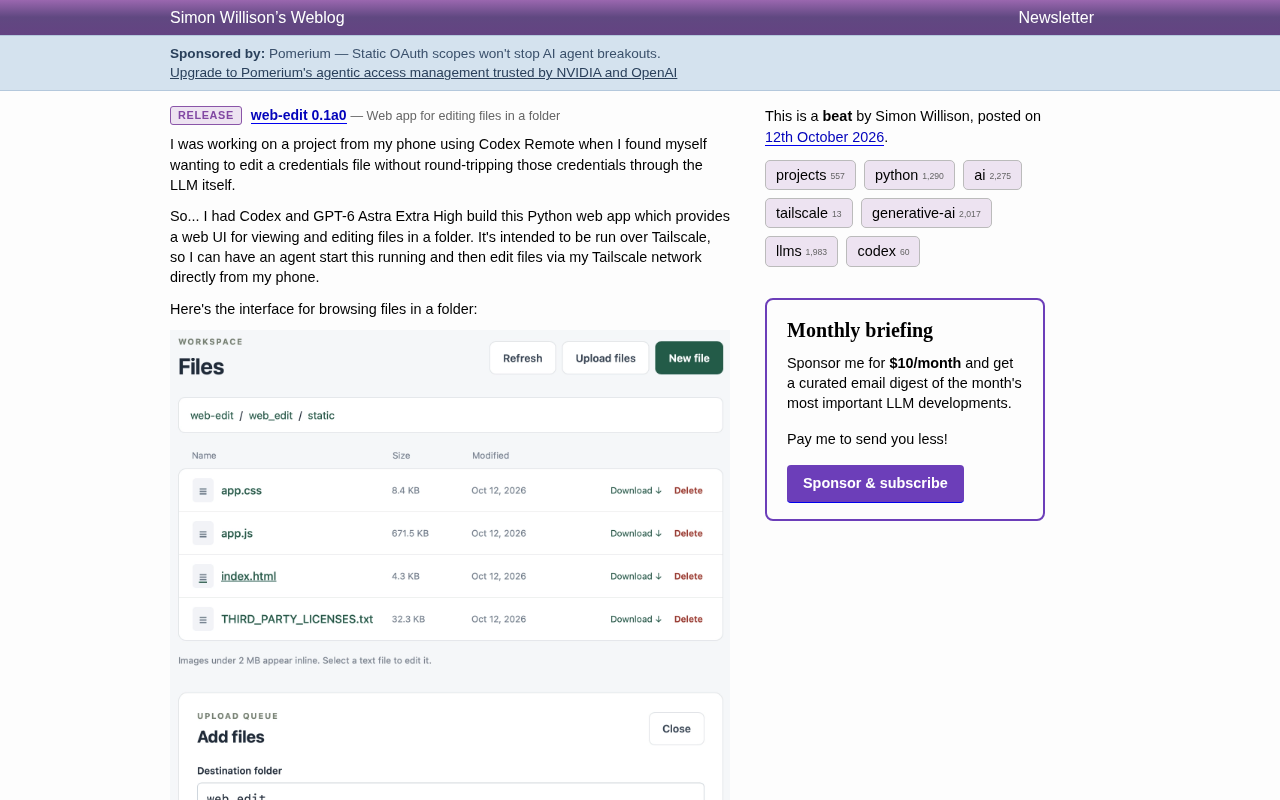
The file list page has "WORKSPACE" as the top-level heading, with "Files" below it, and three buttons in the top right: "Refresh", "Upload files", and a dark green "New file". A breadcrumb shows the current path, and a table lists "Name / Size / Modified", with "Download ↓" and "Delete" following each file.
Below the table is a hint: images under 2 MB are displayed inline, and selecting a text file opens it for editing. Further down is an "UPLOAD QUEUE" panel with a target folder input field, a dashed drag-and-drop zone, and instructions that each file needs a path and filename set before uploading.
Overall it's a classic minimalist tool aesthetic: no extra concepts — just browse, download, upload, edit, and delete.
Why CodeMirror Instead of Monaco
An experienced developer's first reaction might be: why not use Monaco, the same editor as VS Code?
Simon's answer is straightforward: he originally planned to use Monaco, but Monaco's mobile experience isn't good enough yet. So he switched to CodeMirror 6.
This trade-off is worth noting. Monaco offers a powerful desktop experience, but its usability on small touchscreens has always been a weak point; CodeMirror 6 is lighter and more comfortable on mobile. For a tool where "I'm mainly using it on my phone," that judgment matters more than a feature list.
Monaco is the editor core that Microsoft extracted from VS Code, and it's extremely feature-complete: intelligent completion, multi-cursor, built-in diff, language server protocol integration, and more. The cost is size (often several MB when bundled) and an interaction model that relies heavily on mouse hover, right-click menus, and keyboard shortcuts — all of which need long-press emulation on touchscreens, creating a disjointed experience. CodeMirror 6, by contrast, is a rewritten modular architecture with a tiny core, loading language packages and extensions on demand, and an event model that's friendlier to touch, virtual keyboards, and IME input — which is why it's widely used in mobile and embedded code editors.
What's really worth remembering isn't these two names, but the criterion: when the target platform is mobile, an editor's size, touch target dimensions, and soft keyboard behavior matter more than a feature list. Monaco offers a better desktop experience, but if users are mainly tweaking a few lines of config on their phones, then CodeMirror's "good enough and comfortable" is the better choice.
What This Tool Teaches Us
web-edit itself is just a 0.1a0 experimental release, but its approach is worth borrowing:
- Keep sensitive data out of the agent's field of view. The agent can start and stop services, but reading and writing credentials is handed off to the human through an independent channel (Tailscale, in this case).
- Use network isolation instead of a permission system. No complex authentication — just rely on a private network like Tailscale as the access boundary, which lets the tool stay very simple.
- Mobile-first needs to translate into concrete technical choices. "Mobile-first" isn't a slogan — it directly determines whether you pick CodeMirror or Monaco.
If you're also using AI agents for remote development and frequently hit moments where you "don't want to feed keys to the model," the pattern behind small tools like this may be more valuable than the tool itself.
One-line Summary
Simon Willison's web-edit proves with a small tool that sensitive files can bypass LLM context: the agent starts the service, and you edit directly via Tailscale.
Paragraph Summary
web-edit 0.1a0 is a minimalist Python web file management tool from Simon Willison that lets you browse, upload, edit, download, and delete files in a specified folder, designed to be accessed from your phone over a private Tailscale network. Its motivation is very specific: while developing with Codex Remote, he needed to edit a credentials file but didn't want keys entering the LLM context — so the agent starts the service, and the human reads and writes sensitive files through an independent channel. He chose CodeMirror 6 over VS Code's Monaco because Monaco's mobile experience still falls short. The interface covers file listing, upload queue, inline preview, and editing. It's just an experiment, but it demonstrates three reusable ideas: keep sensitive data out of the agent's view, replace complex authentication with network isolation, and translate mobile-first into concrete technical choices.
Related articles

Gmod TTT: Boba's Winning Streak and Game Design Insights
An in-depth analysis of Gmod TTT's role system, creative items, and social gameplay mechanics, exploring the relationship between randomness design and game balance through Boba's winning streak phenomenon.

FlexBudget: Fair Comparison of KV Cache Eviction Strategies Under a Unified Compute Budget
AMD engineer proposes FlexBudget at PyTorch Conference: a training-free fair comparison method for KV cache eviction rules using fixed kernels and memory budgets, all in core PyTorch.
