What Happens After You Click a Link? A Complete Technical Breakdown

A complete technical breakdown of the browser's journey from click to rendered webpage.
This article traces the full technical chain triggered by a single link click: DNS resolution translates domain names to IP addresses, TCP's three-way handshake establishes reliable connections, TLS encryption secures communication, and HTTP delivers web resources. Chrome's Blink engine then parses HTML/CSS into DOM/CSSOM trees, V8 JIT-compiles JavaScript, and the rendering pipeline composites the final page via Skia and the GPU.
When you click a link and a webpage instantly appears on your screen — this seemingly simple action is actually powered by an intricate chain of technical processes working in precise coordination. From the operating system's network stack to DNS resolution, from the TCP handshake to HTTP requests, and finally to browser engine rendering, every step is tightly interconnected. Based on the Chrome team's official explanations, this article breaks down the complete technical chain behind a single click.
The Browser Doesn't Work Alone: Network Stack Collaboration
Many people assume that when you click a link, the browser simply "reaches out" to the website and fetches pixels back. The reality is far more complex.
When you click a link to a page, you're essentially telling Chrome: "I want to view the webpage on the other end of this link." The page might be a social media platform, an online store, a streaming service, or a blog — what it is doesn't matter. What matters is that Chrome needs to retrieve all the resources required for display and interaction.
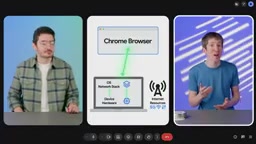
Chrome doesn't handle everything on its own — it's excellent at delegating tasks. First, Chrome communicates with the device's operating system network stack. Whether you're using Android, Windows, or macOS, the network stack is part of the system software responsible for helping Chrome establish a network connection to the web server.
The network stack is the core software component in the operating system that implements network communication. It follows the TCP/IP four-layer model — from the link layer (handling physical frame transmission and reception), the network layer (IP addressing and routing), the transport layer (TCP/UDP connection management), to the application layer (HTTP/HTTPS protocols) — each layer performing its specific role. While Chrome implements some network functionality on its own (such as HTTP/2 and QUIC protocol support), lower-level operations like socket creation, IP routing decisions, and NIC driver interactions still rely on system call interfaces provided by the OS kernel.
The OS network stack then sends requests to the device's network hardware. The network stack and hardware use the network interface card to fetch internet resources based on the available connection type (Wi-Fi, cellular, or wired).
DNS Resolution: Finding the Server's "Street Address"
The browser's first critical task is figuring out how to locate the server that hosts the webpage resources.
Suppose you click a link to cats.example — how does the browser know where to fetch resources? This is where the DNS (Domain Name System) server comes into play.
The core function of a DNS server is to translate human-readable domain names (like cats.example) into machine-usable numeric addresses — IP addresses (like 142.250.187.214). With this IP address, the browser can locate the actual computer that serves the resources.
Think of DNS as a massive "phone book" — you only remember someone's name, and DNS looks up the corresponding number for you. This step may seem trivial, but it's the starting point of the entire page-loading process.
In practice, DNS resolution doesn't always require a fresh lookup. Modern systems employ multi-level caching strategies: the browser maintains its own DNS cache (viewable in Chrome via chrome://net-internals/#dns), the operating system has a local DNS cache, and routers typically cache resolution results as well. Only when all caches miss does a query go out to a recursive DNS server. The recursive server sequentially queries root name servers, top-level domain servers (TLD servers for .com, .example, etc.), and authoritative name servers to ultimately obtain the target IP address. The entire process involves TTL (Time to Live) management of DNS records — once the TTL expires, the cache becomes invalid and a fresh query is required.
TCP/IP Handshake and TLS Secure Connection
Once DNS provides the target website's IP address, Chrome can begin negotiating a connection. This process follows a set of communication rules known as the TCP/IP protocol.
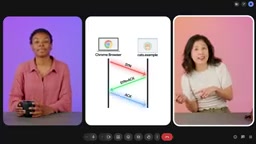
A protocol is a standardized set of communication rules. Chrome sends a message to cats.example following TCP/IP rules, the website responds, Chrome replies, and so on, until the entire "handshake" process is complete. Once the handshake is finished, a mechanism for exchanging messages and files is established between the browser and the web server — this is called a TCP session.
Specifically, the TCP Three-Way Handshake works as follows: the client sends a SYN (Synchronize Sequence Number) segment, the server responds with a SYN-ACK (Synchronize-Acknowledge) segment, and the client sends back an ACK (Acknowledge) segment. These three steps ensure both parties have confirmed each other's ability to send and receive, while also negotiating the Initial Sequence Number (ISN) used for maintaining data order and enabling packet loss retransmission in subsequent transfers. TCP also introduces a sliding window mechanism for flow control and congestion control algorithms (such as CUBIC and BBR) to prevent network congestion. While these mechanisms add latency, they guarantee reliable and ordered data transmission.
The Division of Labor Between HTTP and TCP
Many people confuse HTTP and TCP. Simply put:
- TCP is the underlying transport mechanism responsible for reliable data delivery, which is why it's called the Transport Layer.
- HTTP is an application-layer protocol that operates on top of TCP connections for exchanging messages and files.
An HTTP request from a browser is essentially a text message that follows HTTP rules. The server receives it and returns a file — which could be HTML, CSS, an image, or anything else. Both requests and responses can carry additional text information called headers, and cookie data is sent along with requests or responses through these headers.
It's worth noting that browsers can not only download but also upload files, and even support video streaming, audio streaming, and video calls — though these scenarios require entirely different communication methods with the server.
TLS Protocol: Putting a "Security Lock" on Communication
If communication isn't encrypted, hackers could eavesdrop on the conversation between the browser and server. This is why we need TLS (Transport Layer Security).
Before any substantive communication begins, TLS conducts a series of round-trip interactions between the browser and server — like an extended handshake — to verify that both parties truly are "who they claim to be." This step ensures the confidentiality and integrity of data transmission.
Modern websites commonly use TLS 1.3, which reduces the handshake from two round trips (2-RTT) in TLS 1.2 to one round trip (1-RTT), and even supports zero round-trip (0-RTT) resumption for reconnection scenarios. The core steps of the TLS handshake include: negotiating cipher suites, verifying server identity through digital certificates (tracing the certificate chain back to a trusted root Certificate Authority), exchanging key material using asymmetric encryption (such as ECDHE), and ultimately deriving symmetric encryption keys for subsequent communication. The "lock" icon in the browser's address bar is the visual indicator that a TLS connection has been successfully established. The "S" in HTTPS represents this very TLS security layer.
Blink Rendering Engine and V8: From Code to Pixels
Once the browser finally receives a response from the server with CSS and HTML files, the real "rendering magic" begins.
Code Parsing
Chrome first needs to convert the received code into a form it can process and fetch any additional resources the page needs, such as images and other files. This process is called parsing. JavaScript also needs to be parsed and executed.
How the Blink Rendering Engine Works
Blink is the rendering engine used by all Chromium-based browsers, including Chrome. The rendering engine's job is to transform HTML, CSS, JavaScript, images, and other resources into a page on screen that you can view and interact with.
Blink's rendering pipeline consists of multiple precise stages: first, HTML is parsed into a DOM tree (Document Object Model) and CSS is parsed into a CSSOM tree (CSS Object Model); then the two are merged into a render tree, excluding invisible elements; next comes layout, calculating the exact geometric position and dimensions of each element; followed by layering and paint, generating a list of paint instructions; finally, the compositor composites multiple layers into the final frame and submits it to the GPU for display. Any DOM or style changes can trigger partial or full re-execution of the pipeline — this is the technical root of what front-end performance optimization commonly refers to as "reflow" and "repaint."
When parsing and executing JavaScript and WebAssembly, Blink calls upon another engine — V8. V8 is also an open-source component of the Chromium project, renowned for its high performance.
The V8 engine employs a JIT (Just-In-Time Compilation) strategy to balance startup speed and runtime performance. JavaScript code is first parsed into an Abstract Syntax Tree (AST), then compiled into bytecode by the Ignition interpreter for immediate execution, ensuring fast startup. When V8 detects that a piece of code is being executed frequently (becoming "hot code"), the TurboFan optimizing compiler compiles it into highly optimized machine code. If runtime type assumptions are violated (e.g., a variable's type changes), V8 performs "deoptimization," falling back to interpreted execution. This tiered compilation strategy allows V8 to achieve near-native performance even when handling dynamically typed languages.

Graphics Rendering and Third-Party Libraries
After parsing is complete, Blink begins rendering — the work of laying out and displaying the webpage. To render graphics, Blink uses the open-source Skia graphics engine to interact with the underlying graphics hardware.
Skia is a Google-maintained open-source 2D graphics library used not only in Chrome but also as the graphics backend for Android, Flutter, Firefox, and other projects. Skia translates high-level drawing commands (such as drawing paths, text, and images) into low-level graphics API calls, supporting multiple backends including OpenGL, Vulkan, Metal, and Direct3D. In Chrome, the compositor thread leverages the GPU for layer compositing and animation processing, enabling CSS transform and opacity animations to run smoothly without triggering main-thread re-layout. This is the technical reason developers are advised to use transform rather than modifying top/left properties for animations.
Additionally, Blink relies on several third-party libraries. For example, WebGL is used to render interactive 2D and 3D graphics — to experience WebGL's power firsthand, try the fractal rendering application Fractures.
The Complete Chain: A Panoramic Review of a Single Click
Putting the entire process together, when you click a link, Chrome sequentially completes these steps:
- Accesses the phone's or computer's underlying network stack through Blink;
- The network stack sends a request to the device's network interface card, establishing a connection with the internet service provider;
- DNS resolution translates the domain name into an IP address, querying through multiple cache levels;
- A TCP session is established between Chrome and the web server via a three-way handshake;
- A TLS handshake creates an encrypted channel to ensure secure communication;
- Web resources are retrieved through HTTP requests and responses;
- Blink parses HTML/CSS to build the DOM tree and CSSOM tree, while V8 parses and executes JavaScript and WebAssembly through JIT compilation;
- Through the rendering pipeline stages of layout, paint, and compositing, the final webpage you can view and interact with is rendered.
What appears to be an instantaneous "click" is actually a highly coordinated relay race involving the operating system, network hardware, protocol stack, encryption layer, and browser engine. Understanding this chain not only helps developers better optimize performance and troubleshoot issues, but also gives us a deeper appreciation for the browser we use every day.
Related articles

Why AI Benchmarks Are Hitting Their Ceiling: Causes of Saturation and How to Respond
AI benchmarks are saturating as models score near-perfect. This article analyzes causes including data contamination, and explores the paradigm shift in AI evaluation methods.

Perplexity Comet's Declining Agent Capabilities: Why This AI Browser Is Becoming Timid
Perplexity Comet users report declining AI agent capabilities, with form-filling and automation tasks frequently refused. We analyze the causes from anti-automation detection, compliance risks, and model policy tightening perspectives.

SAM 3 Auto-Labeling in Practice: Preparation Matters More Than the Model
A practical breakdown of auto-labeling with SAM 3: why data cleaning, prompt strategy design, and post-processing quality control matter more than the model itself for CV teams.