What Is an MCP Server? From Zero to Production-Grade Deployment

MCP servers expose standardized tool interfaces to AI — OAuth 2.1 auth is essential once you go remote.
MCP (Model Context Protocol) provides AI models with a list of callable functions — the model outputs text describing what to call, and the host code executes it. MCP solves the "every app rebuilds its own tool pipeline" problem and is often called the USB-C port for AI tools. Local stdio mode works for personal use; remote HTTP mode is required for real products. Once online, access control becomes critical: roughly a quarter of public MCP servers have no auth at all, and static API keys can't be traced or revoked per user. The official spec recommends OAuth 2.1 with PKCE. Combined with FastMCP and identity platforms like Descope, developers can build multi-user, scope-based production MCP servers without implementing login flows from scratch.
The Essence of an MCP Server: Handing AI a List of Callable Functions
A lot of people overcomplicate MCP (Model Context Protocol), but strip away the jargon and it's surprisingly straightforward — an MCP server is simply a program that provides an AI model with a list of functions it's allowed to call.
To understand this, you first need to appreciate the inherent limitations of language models. A large model, on its own, can't do anything: it can't read your files, check your calendar, or query a database. The only thing it can do is receive text and produce text. So to make a model actually do things, you have to give it tools — and a tool is fundamentally just a function with a name, a description, and defined input/output parameters.
The key insight is this: the model never calls a tool directly. When a model wants to invoke a tool, it simply outputs a piece of text describing which tool it wants to call and with what arguments. Your code receives that request, executes the function, and returns the result as text back to the model. Throughout the entire process, the model is always just processing text — all interaction happens via JSON passed back and forth.
Why We Need a Standard Protocol
Before MCP, there was an obvious reinventing-the-wheel problem: every application had to build its own tool pipeline, and the approach differed across models and tools. The GitHub tool you built for Claude wouldn't work in Cursor or ChatGPT. As AI agents multiplied, so did the duplicated effort.
MCP was born to solve exactly this pain point. The idea is simple: write your tool once, package it as an MCP server, and any MCP-compatible application can use it directly. People like to call it "the USB-C port for AI tools" — one connector that fits almost every device. It's a pretty apt analogy.
There are two roles to keep straight:
- MCP Server: your code, responsible for exposing tools.
- MCP Client: the application where the model lives — Claude Desktop, Cursor, or any AI agent.
When a client starts up, it asks the server "what tools do you have?" The server returns a list of names and descriptions for the model. When the model wants to call a tool, the client sends a request to the server, the server runs the function, and returns the result.

Local vs. Remote: Two Ways to Run an MCP Server
MCP servers can run in two primary modes, and understanding the difference is critical for building real products.
The first is local mode. The client launches your server as a child process running on your own machine, communicating directly via standard input/output (stdio). Claude Desktop, for example, runs something like python myserver.py and pipes JSON into it. About 90% of tutorials demonstrate this approach — it's great for personal use, but completely unworkable when others need access.
The second is remote mode. Your server runs on the internet with a URL, and clients connect to it over HTTP. This is how virtually every real-world product works — GitHub's, Notion's, and Stripe's MCP servers are essentially just URLs. If you're building something for other people, or want to access your tools from multiple devices (phone, laptop, work computer), remote is the way to go.
In practice, switching from local to remote requires very little code change: replace the default stdio transport with a specified transport, host, and port, and your server becomes a standard HTTP service. Launch it with something like Uvicorn and it's ready to serve traffic via URL.
stdio (standard input/output) is the most basic communication pipe the OS provides to processes: stdin receives input, stdout outputs results, and stderr outputs errors. MCP's local mode leverages this mechanism — the client launches the server as a child process and both sides exchange JSON messages through the pipe. The entire communication happens in local memory with no network stack involved, making configuration trivially simple, latency near-zero, and the attack surface nonexistent. The trade-off is tight coupling: the server must run on the same machine as the client, can't be shared with others, and can't be accessed from multiple devices. Remote mode switches to HTTP/SSE (Server-Sent Events) or WebSocket transport, moving the same JSON message structure over the network. This unlocks scalability and multi-user support, but introduces the full suite of network security concerns: authentication, TLS encryption, and so on.
The Unavoidable Challenge of Remote Deployment: Access Control
Once an MCP server goes on the internet, a problem that never existed in local mode immediately surfaces — access control. Anyone with the URL can invoke your tools, and those tools read data, write data, and potentially delete things. For every request, you need to answer three questions: Who is calling? What are they allowed to do? On whose behalf are they acting?
The author of the original video cites a striking statistic: a security audit earlier this year found that roughly one in four publicly accessible MCP servers had zero authentication. Of those that did have authentication, most relied on static API keys — a single long-lived key shared by everyone.
The problem with static keys is severe: if five different agents access your server using the same key, you have no way to distinguish which user or agent did what. If one is compromised, you can't revoke it selectively — you have to destroy the key and cut off every agent at once. That might be acceptable for a short-term hack, but it's completely unacceptable in production.
OAuth 2.1: The Right Answer from the Official Spec
The MCP specification already addresses this, using the same approach as every serious application: OAuth — specifically OAuth 2.1 with PKCE. It sounds intimidating, but you almost never need to implement it yourself. You just need to understand the flow.
The most important thing to grasp is: your MCP server is never responsible for logging anyone in. When a client calls the server without a valid token, the server simply returns a 401 Unauthorized response along with a pointer to an "authorization server." The user then goes to the authorization server, completes login (via Google, email, or whatever you've configured), sees a consent screen, and approves the request.
The authorization server generates a token and hands it to the client, which then includes that token in every subsequent request. Your server validates the token's signature, confirms it was issued for this specific server, checks what permissions are encoded in it (these are called scopes), and only then executes the tool.
Tokens typically contain scopes, user IDs, and other claims — meaning your server can act "on behalf of a specific user," enabling true multi-user scaling. Clients also need to register themselves with the authorization server; the spec's "dynamic client registration" handles this automatically, so no manual configuration is needed.
PKCE (Proof Key for Code Exchange) is an important companion mechanism in OAuth 2.1, specifically designed to prevent "authorization code interception attacks." Here's how it works: before initiating an authorization request, the client randomly generates a "code verifier" locally and hashes it to produce a "code challenge." When the authorization server returns the authorization code after login, it records this code challenge. When the client exchanges the authorization code for a token, it must also submit the original code verifier — the server verifies the hash matches before issuing the token. This way, even if the authorization code is intercepted in transit, the attacker can't exchange it for a token without the code verifier. For AI agents and other "public clients" that can't securely store client secrets, PKCE is the core mechanism for securing token exchange, and one of the key improvements OAuth 2.1 makes over 2.0.
Hands-On: Building with Python and FastMCP
Building an MCP server isn't as complex as it might seem. You can use a framework like FastMCP (or go without one). What the framework does at its core is ensure your server conforms to the MCP protocol — at the end of the day, this is just an API with a defined request/response structure. Full protocol details are available at modelcontextprotocol.io.
The practical workflow looks roughly like this:
- Install FastMCP via
pip/uv. - Write ordinary Python functions (e.g., connecting to a Postgres database to add, delete, and list notes).
- Annotate those functions with the
@mcp.tooldecorator — FastMCP automatically adds them to the available tools list.
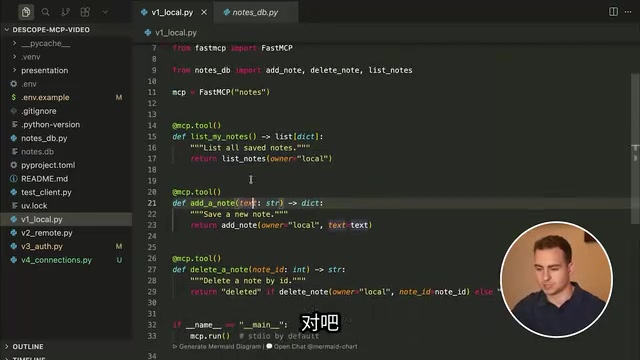
One practical tip: always add docstrings to your tools and include type hints for parameters and return values. The docstring becomes the tool description that tells the model what the function does; the type hints tell the model what types to use when calling it and what to expect back. Both significantly improve the quality of AI tool invocations.
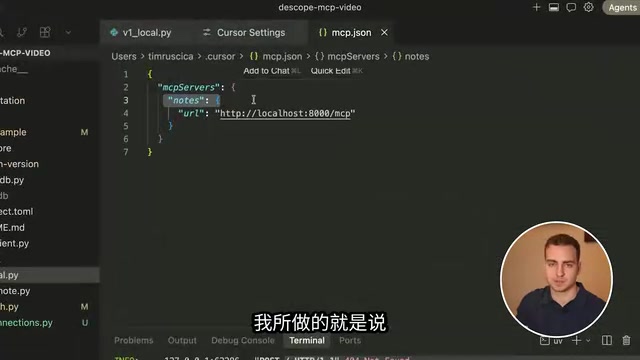
To connect a local server in Cursor, just go to Settings → Tools & MCP, add a custom configuration, and specify the execution command (uv for Python, node for Node.js) along with the arguments. Once connected, you can have the AI call tools like "list notes," "add note," and "delete note" directly in the agent window.
FastMCP is a high-level wrapper around the MCP Python SDK, built on a "convention over configuration" philosophy: developers write ordinary Python functions, add the @mcp.tool decorator, and the framework automatically handles tool registration, JSON Schema generation, request routing, and protocol handshakes. Compared to using the official SDK directly, FastMCP dramatically reduces boilerplate. It's worth noting that type hints here aren't just a style concern — they carry real meaning. FastMCP automatically converts Python type annotations (like str, int, list[str]) into type fields in JSON Schema, which the model relies on to construct arguments correctly. Docstrings become the tool's description field, which is the model's primary basis for deciding "should I call this tool?" Writing clear docstrings and strict type hints is therefore a direct way to optimize AI tool selection and invocation quality.
Adding Authentication: Handling OAuth with Ready-Made Tools
Once the server goes remote, the "no access control" problem described earlier becomes urgent — notes aren't isolated per user, and anyone can add or delete them. Rather than implementing a login page, consent screen, token signing, client registration, and refresh logic from scratch, the author opts for a tool like Descope, which provides an "Agentic Identity Hub."
The integration steps look roughly like this:
- Create an MCP server in the console, entering the server URL (make sure to include
/mcpat the end). - Define scopes, such as
Notes Read(read access) andNotes Write(modify/create access). - Get the authorization server's well-known URL and add it to your environment variables.
- In code, use the SDK to create an OAuth Provider, passing in the config URL, base URL, and supported scopes, then attach it to FastMCP.
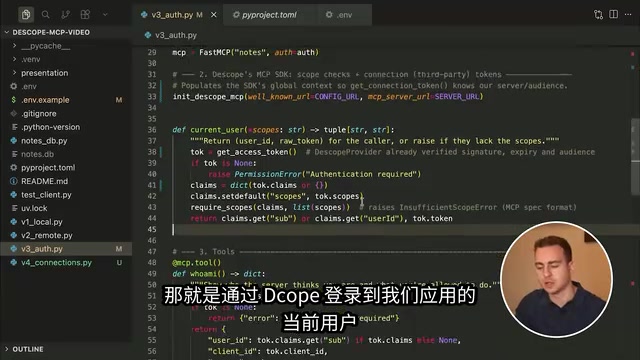
The refactored tool functions then retrieve the current user (reading sub/user ID from the token's claims) and check whether the user holds the appropriate scope, enabling true permission isolation — each note is associated with the authenticated user.
The result is immediately tangible: after logging in with a Google account, Cursor walks through the full OAuth flow, showing a login page and a consent screen. Once authorized, you can create and query notes. Log in with a different Google account, and you can't see any notes from the first account — permission isolation works. The console lets you manage users, disable accounts, and even use Connections to delegate OAuth for third-party services like GitHub, Slack, and Notion to the platform.
Summary
MCP can be summed up in one sentence: a program that exposes standardized tool interfaces to AI. The line between a toy and a real product isn't in how you write the tools — it's in how safely you expose them. Local stdio mode is fine for personal experimentation; remote HTTP mode is what real users require. And once you go remote, OAuth 2.1 + PKCE stops being optional and becomes essential. Understand the protocol, lean on frameworks like FastMCP and ready-made identity platforms, and you can skip the tedious implementation details and build a scalable, multi-user, production-grade MCP server.
Related articles

Chain of Thought Isn't Just for AI: How Humans Can Use CoT to Improve Thinking Quality
Chain of Thought isn't just a prompt trick for large models. Starting from a Hacker News discussion, this article analyzes why CoT works for human thinking too, breaks down actionable ways to transfer it, and highlights the key differences between human CoT and machine CoT.
Cloudflare Teams Up with OpenAI: Closi…
Cloudflare Teams Up with OpenAI: Closing the Loop from Vulnerability Discovery to Defense with AI
Cloudflare uses OpenAI Daybreak to investigate security vulnerabilities and generate reviewable remediation plans, while developers use Codex to boost coding efficiency and quality.

Orca Multi-Agent Orchestration in Practice: A Guide to Parallel Collaboration with Claude and Codex
Orca is Stable AI's free open-source agent workbench supporting 34 agents like Claude Code and Codex in parallel. Learn its Git worktree isolation, multi-model orchestration, and mobile management.