What Is Claude Code? A Five-Dimension Breakdown of AI Coding Assistants

Claude Code is an agentic AI coding assistant that reads files, writes code, and runs commands — not just chats.
Claude Code is an Agentic AI coding assistant that goes beyond chat: it reads your entire project, edits files, runs commands, and calls external tools via MCP. This article breaks down its differences from ChatGPT and Cursor across five dimensions — interaction, context, execution, memory, and tool calling — with technical explanations for each.
What Is Claude Code
Claude Code has been gaining rapid traction in developer communities lately. After several days of hands-on testing, many users report that its differences from traditional AI tools are striking — and far more than just "being smarter."
In short, Claude Code is an AI coding assistant — but what sets it apart is this: it can actually do the work directly on your computer. Just tell it what you need in plain language, and it will understand your project structure and automatically carry out a series of operations.
Two key phrases here: "natural language" and "hands-on execution." It still works through conversation, but there's a fundamental difference from web-based AIs like ChatGPT, DeepSeekAd, or similar tools: it doesn't just chat — it actually executes tasks.
Technical Background: The Core Difference Between Agentic AI and Traditional Conversational AI
Claude Code belongs to the "Agentic AI" category, which represents a fundamentally different architecture from conversational AI like ChatGPT. Traditional conversational AI follows a "request-response" pattern — each interaction is independent, and the model simply processes the current input and returns text. Agentic AI, by contrast, has planning, tool-calling, and autonomous execution capabilities. It can break a complex goal down into subtasks and work through them step by step, forming a "perceive-think-act" loop. This architecture allows Claude Code to behave like a human developer — proactively exploring a codebase, formulating a plan for changes, and implementing them incrementally — rather than simply "generating a code snippet."

Five Dimensions: Understanding How Claude Code Differs from Ordinary AI
To give you a clearer picture of how Claude Code compares to standard AI chat tools, here's a breakdown across five dimensions.
Interaction: No More Copy-Pasting
The old workflow with DeepSeek or ChatGPT usually looked like this: copy code → paste into the chat box → copy AI's response → paste it back into your editor. It's not a lot of steps, but constantly switching windows gets tedious.
With Claude Code, you work directly inside your project directory — no copy-pasting loop required. That one eliminated step seems small, but it noticeably improves your coding rhythm.
Context: Reads Your Entire Project Automatically
With ordinary AI chat tools, the rule is "you only know what you've been fed." Claude Code actively scans your project files, searches relevant code, and builds a global understanding of the entire project. Its comprehension isn't limited to the snippets you manually paste in.
Technical Background: How Large Context Windows and RAG Work Together
Claude Code's ability to "read the entire project" is powered by ultra-large context window technology. Current Claude models support up to 200K tokens of context — roughly equivalent to 150,000 Chinese characters or thousands of lines of code — allowing multiple source files and configuration files to be analyzed simultaneously. Claude Code also incorporates RAG (Retrieval-Augmented Generation), using semantic search to locate the most relevant code snippets within large codebases, avoiding the performance overhead of loading everything at once. These two technologies working together enable the "global project awareness" that makes Claude Code so powerful.

Execution: From Giving Advice to Getting Things Done
This is where the gap is most pronounced. Ordinary AI can only output suggestions or code snippets — it can't deliver a fully runnable project, because real projects involve many files and complex dependency structures.
Claude Code can directly create files, modify code, run commands, and execute tests. It upgrades "providing a solution" to "implementing it yourself" — and that's the core capability developers find most compelling.
Memory: Remembers Your Coding Habits
Ordinary AI starts fresh every time you open a new session — no memory of anything. Claude Code uses configuration files to persistently remember your project rules and personal preferences, including coding style, naming conventions, and more. For developers who maintain the same project over the long term, this "it knows me" quality is especially valuable.
Technical Background: How Configuration-Based Persistent Memory Works
Claude Code's "remembering your coding habits" feature is actually implemented through local configuration files (such as
CLAUDE.md), rather than true memory at the model level. Developers can maintain this file in the project root or home directory, declaring project conventions, tech stack preferences, naming standards, and more. Each time a session starts, Claude Code automatically injects this file into the context, simulating the effect of "remembering your habits." This design neatly sidesteps the technical limitation that AI models can't persistently store state, while keeping developers fully in control of — and transparent about — what the AI knows.
Tool Calling: Connecting to External Services
For standard web-based AI tools, calling external services is often complicated to configure and may require paid upgrades. Claude Code uses the MCP (Model Context Protocol) to connect directly to browsers, databases, GitHub, and other external services, dramatically expanding the range of practical capabilities.
Technical Background: MCP — A Standardized Interface for AI Tool Calling
MCP (Model Context Protocol) is an open protocol released by Anthropic in late 2024, designed to address the "integration fragmentation" problem between AI models and external tools. Before MCP, every AI product integrating with different tools (databases, GitHub, browsers, etc.) required building custom adapter layers — an expensive maintenance burden. MCP defines a unified client-server communication standard, enabling AI models to call any MCP-compliant external service through a single interface. Think of it like USB standardizing how peripherals connect: developers implement one MCP Server, and Claude Code can call it directly. Hundreds of community MCP plugins are now available, covering services like Notion, Slack, PostgreSQL, and more.
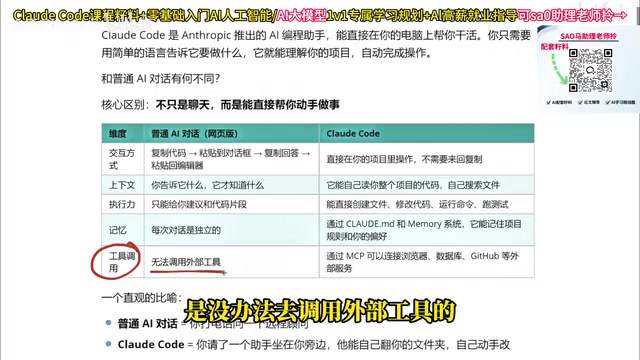
An Analogy That Makes It Click
Using an ordinary AI chat tool is like calling a knowledgeable remote consultant — they can answer anything, but they're on the other end of the line. Claude Code is like having an assistant sitting right next to you — one who will flip through your folders themselves and make the changes to your code directly.
This analogy captures the leap from "consultation" to "collaboration": the former answers questions passively; the latter participates actively.
What Can Claude Code Actually Do?
Ask it "what can you do?" right after installation, and its capability list covers:
- Code work: Read, edit, and create files; search code; refactor; add comments and documentation
- Project management: Git operations, task list management, running complex background workflows, handling long-running tasks
- Information retrieval: Scrape and analyze web content, run web searches for the latest information
- Extended capabilities: Schedule recurring tasks, spin up specialized sub-agents to handle complex instructions
For developers who frequently navigate across multiple files, this combination of capabilities offers a substantial efficiency boost.

Claude Code vs. Cursor: How to Choose?
Many developers ask: I'm already using Cursor — do I need to switch to Claude Code?
The practical answer is: use whichever fits your workflow better. If you're already comfortable with Cursor, there's no need to force a switch. But if you're curious about Claude Code, two things are worth noting:
Lower token consumption. For tasks of equivalent complexity, Claude Code tends to be more economical with token usage.
Background: Why Claude Code Uses Fewer Tokens
Tokens are the basic unit by which large language models measure input and output — roughly 0.75 English words or 1–2 Chinese characters each. Claude Code uses fewer tokens than tools like Cursor primarily because of more precise context management: it uses semantic retrieval to load only genuinely relevant code snippets, rather than dumping large volumes of files into the context wholesale. Claude Code also runs from the command line, eliminating the redundant communication overhead of IDE integration layers. For teams using AI coding tools heavily, the difference in token costs can be quite significant on a monthly basis — and it's one of the practical reasons some developers migrate from Cursor to Claude Code.
Output that better matches expectations. Particularly for front-end developers, some users report that Claude Code's generated code more closely matches their preferred style. Anything Cursor can handle, Claude Code can generally handle as well.
Of course, tool preferences vary by person — hands-on comparison with your own tech stack is the best guide.
Conclusion
Claude Code represents an important evolutionary direction for AI coding tools: the shift from "conversational assistant" to "collaborative partner." It no longer just answers questions — it dives into your project, takes initiative, and executes, becoming a true "digital development teammate."
This evolution is underpinned by several technologies working together: Agentic AI architecture, ultra-large context windows, and the MCP standardized protocol. Understanding these underlying mechanisms not only helps you use Claude Code more effectively, but also helps developers make better tool selection decisions in a rapidly evolving AI ecosystem.
For developers looking to boost productivity, understanding the fundamental differences between Claude Code and traditional AI tools is the first step toward making an informed choice. The best next step? Install it and try it yourself — see firsthand how much it can change your workflow.
Related articles

Gmod TTT: Boba's Winning Streak and Game Design Insights
An in-depth analysis of Gmod TTT's role system, creative items, and social gameplay mechanics, exploring the relationship between randomness design and game balance through Boba's winning streak phenomenon.

FlexBudget: Fair Comparison of KV Cache Eviction Strategies Under a Unified Compute Budget
AMD engineer proposes FlexBudget at PyTorch Conference: a training-free fair comparison method for KV cache eviction rules using fixed kernels and memory budgets, all in core PyTorch.
