What Is Cursor? A Beginner's Guide to AI-Native Coding Tools

Cursor is an AI-native coding tool built on VS Code that lets you write and debug code using natural language.
Cursor is an AI-native coding tool rebuilt on top of VS Code, with leading large language models like Claude, DeepSeek, and Gemini built in and switchable on demand. Unlike traditional IDEs, it's designed from the ground up for AI collaboration, featuring intelligent code generation, project-level context awareness, and real-time suggestions. It helps developers of all skill levels — from beginners to veterans — write, debug, and refactor code more efficiently, though basic programming knowledge remains essential for reviewing AI output and controlling business logic.
What Exactly Is Cursor?
Cursor is often described as "an upgraded VS Code," but that only tells half the story. It is indeed built on Microsoft's open-source VS Code editor — the interface, keyboard shortcuts, and plugin ecosystem all carry over seamlessly, so any developer familiar with VS Code can pick it up with virtually zero learning curve. But what truly sets it apart is a ground-up rethinking of what programming can be: it's a coding tool with AI built in at its core.
In plain terms, Cursor is a VS Code that can "write code and teach you to code at the same time." It comes with the world's leading large language models built in, ready to assist you through the entire cycle of writing, debugging, error-checking, and refactoring. You can describe what you need in natural language — just say something like "write me a login API endpoint" — and it will understand the context, auto-complete code, and explain the reasoning, rather than behaving like a rigid traditional IDE.
In terms of positioning, Cursor competes in the same space as ByteDance's Trae and Alibaba's TONGYI Lingma — all of them bring AI into the IDE. The difference is that Cursor is a foreign product while the others are domestic Chinese alternatives. In terms of feature integration and overall intelligence, however, Cursor currently holds a notable lead, which is exactly why it deserves dedicated study.
Which AI Models Does Cursor Integrate?
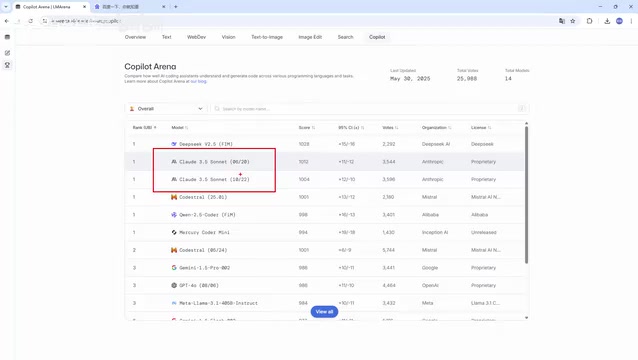
Cursor itself is just the platform — its core strength lies in integrating the world's top large language models and allowing you to switch between them freely. In coding-focused model rankings, the free DeepSeekAd (DeepThink) consistently appears near the top, while the Claude series currently holds the crown for strongest coding ability. Claude 3.5, 3.7, and 4.0 are all industry-recognized powerhouses, though they are paid models.
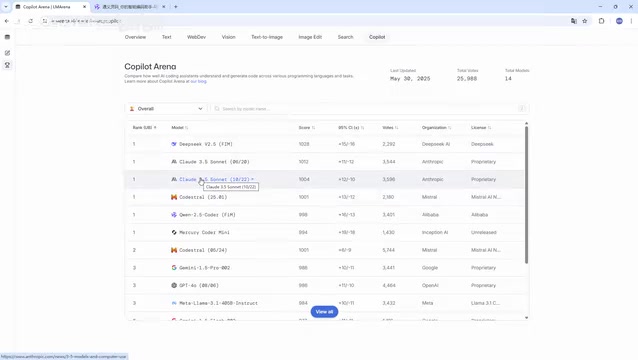
Beyond these, mainstream models like Google's Gemini are also available within Cursor, letting users switch between models based on the task at hand. This "multi-model support" is one of Cursor's standout features: you're never locked into a single model. When writing code, you can use the model best suited for programming; when looking things up, you can switch to a cheaper free model.
The Claude series is developed by Anthropic and is known for its exceptional code understanding and generation capabilities. Claude 3.5 Sonnet held the top spot on coding benchmarks for an extended period; 3.7 Sonnet introduced an "extended thinking" mode that allows the model to take more reasoning steps before answering on complex problems; and Claude 4.0 further advances multimodal and long-context handling. DeepSeek is a Chinese-developed large language model whose R1 reasoning model has achieved near-top-tier closed-source model performance on multiple coding benchmarks — and since its weights are publicly released and a free API is available, it's a popular free option within Cursor. Different models each have their own trade-offs in speed, cost, and capability, which is precisely where Cursor's multi-model switching mechanism delivers real practical value.
Cursor's Four Core Features
AI-native design is the most fundamental difference between Cursor and other tools. It isn't a plugin bolted onto a traditional editor after the fact — it was built from the ground up with AI in mind. This means AI capabilities are deeply embedded into every part of the coding experience, rather than sitting on the surface.
Intelligent code generation lets you produce complete code from a single sentence, similar to what Trae offers. Context awareness directly addresses one of the central bottlenecks of current large language models — as conversations grow longer, models tend to "mishear" or forget earlier instructions. Cursor understands the structure of your entire project and the relationships between variables, so its suggestions are grounded in your actual codebase rather than generated in a vacuum.
Real-time assistance means it offers suggestions as you write, rather than waiting for you to finish before pointing out problems. Together, these four features elevate Cursor from a "tool" to a "collaborator."
"Context awareness" relies on two technical mechanisms under the hood. First, Cursor builds an index of the entire codebase, allowing the model to retrieve relevant files, functions, and variable definitions from across the project — not just the currently open file. Second, when assembling the prompt sent to the large language model, Cursor automatically injects the most relevant code snippets related to the current operation, packing more useful information into the model's limited context window. A large language model's "context window" is the maximum amount of text it can process at once; anything beyond that limit causes earlier content to be forgotten, which is the fundamental reason AI suggestion quality degrades as a conversation grows longer. Cursor's engineering work is specifically designed to work around this bottleneck as much as possible.
How Does It Compare to Traditional IDEs?
Traditional IDEs (like vanilla VS Code) require developers to type out code letter by letter. Cursor changes that logic entirely. The differences play out across multiple dimensions:
- Code completion: Traditional IDEs complete based on syntax analysis; Cursor understands context and "guesses" what you're about to do next.
- Code generation: Traditional IDEs rely on preset templates and snippets; Cursor can generate complete business logic from a natural language description of your requirements.
- Problem-solving: When errors occur in a traditional IDE, you're on your own — searching documentation and the web; Cursor has an AI assistant built in, with a chat panel always ready for questions.
- Code comprehension: Traditional IDEs offer syntax highlighting and structural analysis; Cursor deeply understands code logic and can provide detailed explanations.
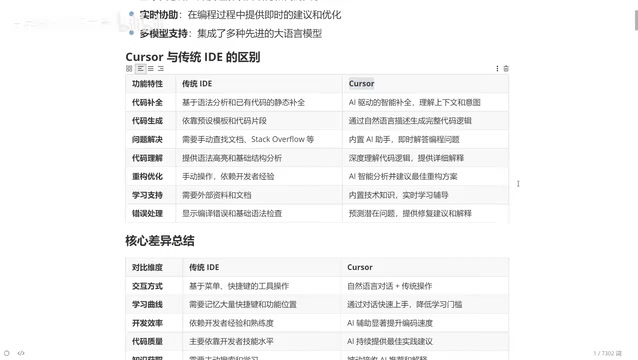
Refactoring and optimization is where the value really shows. Traditional refactoring depends heavily on the developer's own experience — it takes a seasoned engineer to do it well. In Cursor, you simply say "help me optimize this function" and the AI gives you the best approach. There's an apt analogy worth repeating: a junior developer using only a traditional IDE is still a junior developer; but paired with Cursor, that same developer might produce output equivalent to someone with five years of experience.
Who Is Cursor For?
Error handling is the most frustrating part for beginners — when the program blows up with red errors, experienced developers can fix it because they've "seen it before." Beginners usually have no choice but to turn to search engines. Cursor directly analyzes error messages in the context of your code, giving you the cause, a suggested fix, and an explanation — rapidly closing the gap for anyone new to programming.
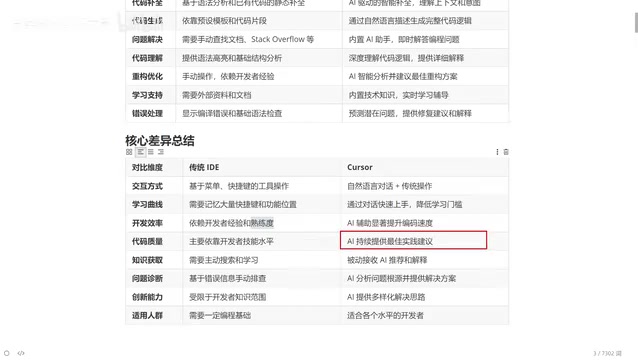
In terms of who it's for, Cursor covers developers of virtually every skill level: a ten-year veteran can use it to generate simple, repetitive code and save time on manual typing; a beginner can use it with a learning mindset, comparing the AI's approach to their own and understanding which is more robust. It's essentially a coding assistant available at all times, letting you work effectively in almost any programming language — Java, Python, frontend development, Go, you name it. One important caveat: users should have a basic foundation in programming, because core business logic still needs to be understood and controlled by you. AI is a collaborator, not a replacement.
It's worth unpacking what "AI is a collaborator, not a replacement" actually means in practice. Large language models suffer from "hallucinations" — when uncertain, they will confidently produce incorrect code or incorrect explanations. Generated code is often syntactically correct but may fail to match the actual business requirements. Without a basic programming foundation, users will struggle to catch these mistakes, leading at best to broken functionality and at worst to security vulnerabilities. The optimal way to use Cursor is therefore: the developer handles the design thinking and requirement decomposition; the AI handles generating implementation details; and the developer reviews and tests the output. This "human-AI collaboration" model maximizes AI's efficiency gains while mitigating its reliability weaknesses.
Summary
Cursor represents one vision of where AI-native coding tools are headed: replacing memorized keyboard shortcuts with natural language interaction, compensating for individual experience gaps with AI-accumulated knowledge, and offering flexible problem-solving through multi-model support. It belongs to the same wave as Trae and TONGYI Lingma, each with its own strengths and weaknesses — but Cursor currently maintains an overall lead in intelligence. For developers, learning to use AI-powered coding tools is fast becoming an essential skill for boosting productivity.
Related articles

How Big Can Stars Really Get? The Physical Limits of the Largest Stars
Red supergiants are the largest stars by volume, with radii up to 2,000 times the Sun, engulfing the inner solar system. But there is no precise upper limit on stellar size—models predict up to 15,000 solar radii. The most massive blue stars are far smaller than red supergiants—biggest and heaviest are two different things.

Apple HomeView Smart Display Full Feature Breakdown: Wall-Mount or Desktop, $299
Apple launches HomeView, a $299 smart display with wall-mount and desktop options, 12MP camera for facial recognition, smart home control, music playback, and recipe step-by-step cooking. Full breakdown of watch faces, apps, privacy, and cooking integration.

Where Did the Promised New Studio Go? Craft Computing Answers After Five Years
Craft Computing's host responds to viewer questions: the new studio promised five years ago was shelved as construction costs soared from $30,000 to $75,000, and was replaced by a 168-square-foot garage conversion.