What Is Cursor? How This AI-Native Code Editor Differs from Traditional IDEs

Cursor is an AI-native code editor built on VS Code that lets you write and debug code through natural language.
Cursor is an AI-native code editor built on a deeply modified version of VS Code, integrating top large language models like Claude and DeepSeek to support natural-language-driven code generation, debugging, refactoring, and error handling. Its core advantage over traditional IDEs is replacing the "type everything + search the docs" workflow with a context-aware, conversational interface — significantly closing the gap between junior and senior developer output. Whether you're a seasoned engineer looking to eliminate repetitive work or a beginner trying to learn proper coding patterns, Cursor acts as an always-available programming assistant, though basic coding literacy is still needed to catch and correct occasional AI mistakes.
What Is Cursor: A Code Editor with a Built-In AI Assistant
Cursor is essentially a code editor with a built-in AI assistant — think of it as an "upgraded VS Code." VS Code is Microsoft's free, open-source code editor widely used for Python, front-end development, and more. Cursor is built on top of VS Code with deep modifications, but it's far more than a few added features. It fundamentally reimagines how developers interact with code.
In plain terms, Cursor is a VS Code that "can write code and teach you programming." It integrates the world's most capable large language models to assist with writing code, debugging, error checking, refactoring, and more across the entire development workflow. Developers can describe what they need in natural language — for example, "write me a login API endpoint" — and Cursor will understand the context, auto-complete the code, and explain the logic. It's nothing like the rigid experience of a traditional IDE.
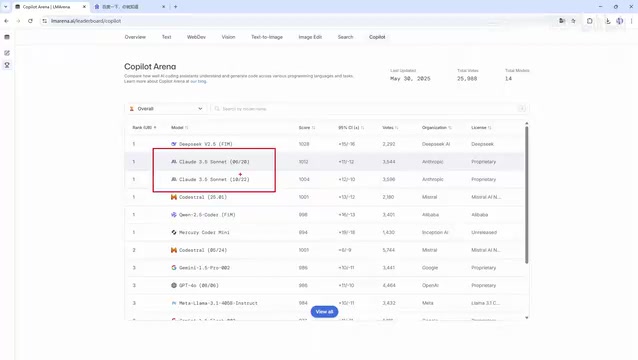
AI-powered coding tools have already become a competitive category. Domestic Chinese players include Alibaba's Tongyi Lingma and ByteDance's Trae, among others, all of which have incorporated AI capabilities. However, in terms of overall feature integration and intelligence, Cursor currently maintains a notable lead — which is exactly why it's worth studying on its own.
VS Code (Visual Studio Code) was released by Microsoft in 2015 and has since become one of the most widely used code editors in the world, topping Stack Overflow's developer surveys for several consecutive years. Built on the Electron framework, it supports thousands of extensions covering virtually every major programming language. Cursor is developed on top of VS Code's open-source core (Code - OSS), which means the migration cost for existing users is nearly zero — themes, keyboard shortcuts, and most extensions carry over directly. This "standing on the shoulders of giants" strategy allows Cursor to inherit VS Code's mature editing experience while focusing its innovation entirely on the AI interaction layer, without needing to rebuild editor infrastructure from scratch.
Cursor's Four Core Capabilities
Cursor earns the label "AI-native" coding tool because of several foundational design choices.
AI-native architecture is the most fundamental. Cursor wasn't built by bolting an AI plugin onto an existing editor — it was designed from the ground up with AI at the core. This means AI isn't an add-on feature; it's the primary experience.
Intelligent code generation dramatically boosts development speed. Users can describe what they need in a single sentence, and Cursor generates complete, logically sound code based on business requirements — not pre-built templates.
Context awareness addresses one of the critical bottlenecks of large language models. In long conversations, models can "forget" earlier context and start hallucinating. Cursor performs significantly better here — it understands the overall project structure and the relationships between variables, producing suggestions that are far more relevant to the actual codebase.
Multi-model support provides flexibility. Cursor comes with access to virtually every top-tier model available, including the Claude series (3.5, 3.7, 4.0) and Google's models, and users can switch between them freely. In coding-specific model rankings, the free DeepSeekAd consistently scores near the top, while the Claude series — though paid — is widely regarded as the strongest for programming tasks.
The context window is a key concept for understanding the capability boundaries of large language models. It refers to the maximum amount of text a model can process in a single inference pass, typically measured in tokens — roughly, 1,000 tokens equals about 750 English words or 500 Chinese characters. Early models had context windows of only 4K tokens, causing them to frequently "forget" earlier content when working with large code files. Modern models have expanded this to 100K or even 200K tokens; the Claude 3 series can handle the equivalent of around 150,000 words. Cursor's context awareness doesn't rely solely on the model's window size — it also uses techniques like vector retrieval to actively pull relevant code snippets from the entire codebase, giving the model the most pertinent information within its available window and reducing hallucination errors caused by insufficient context.
Core Differences Between Cursor and Traditional IDEs
Understanding Cursor's value comes down to comparing it with traditional IDEs like VS Code. Traditional development means typing code letter by letter, while AI-assisted development changes the entire workflow.
Code completion: Traditional IDEs rely on syntax analysis — if you've written a function before, it gets suggested when you call it again. Cursor understands context and actively predicts what you're about to do, completing code before you ask.
Code generation: Traditional IDEs depend on pre-defined templates and snippets. Cursor generates complete business logic from natural language descriptions.
Problem solving: When you encounter an unfamiliar API, the traditional approach is to search online or dig through documentation. Cursor has a built-in AI assistant in the right-hand panel — just ask it directly and get an immediate answer.
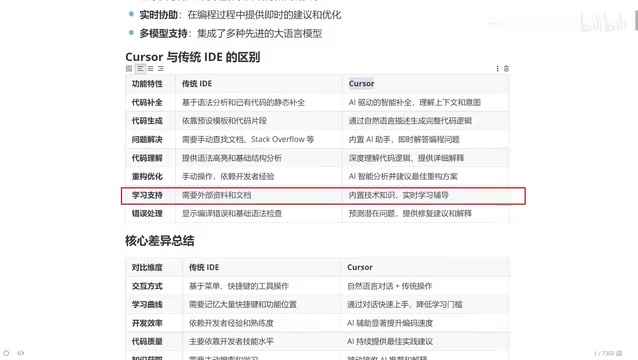
Code comprehension: Traditional IDEs offer syntax highlighting and basic structural analysis. Cursor deeply understands code logic and provides detailed explanations.
Refactoring and optimization: Traditional refactoring depends heavily on the developer's own experience — it's something only seasoned engineers do well. With Cursor, you can simply say "optimize this function for me" and the AI will suggest the best approach. This means a junior developer paired with Cursor can produce output close to what a five-year veteran would deliver.
Error handling: Beginners are often paralyzed by red error messages, while experienced developers know how to fix them because they've seen it all before. Cursor can directly analyze error messages in context and suggest both solutions and explanations — effectively putting senior developer experience in everyone's hands.
IDE (Integrated Development Environment) versus code editor: the key difference is how much is bundled in. Traditional IDEs like IntelliJ IDEA and Eclipse include compilers, debuggers, version control, and build tools all out of the box — powerful but heavy. Code editors like VS Code are lighter and extend functionality through plugins on demand. Code refactoring is a software engineering term that specifically refers to restructuring internal code without changing its external behavior, with the goal of improving readability, maintainability, or performance. Typical refactoring operations include extracting functions, renaming variables, and eliminating duplicate code. This type of work requires a deep understanding of the entire codebase and is considered a key marker of developer experience — making it one of the highest-value use cases for AI-assisted tools.
Differences in Interaction Style and Development Efficiency
At a broader level, the differences between Cursor and traditional IDEs show up across several dimensions.
Interaction model: Traditional IDEs require manual typing. Cursor uses a natural language chat panel on the right side of the screen.
Learning curve: Traditional IDEs require memorizing numerous keyboard shortcuts and menu locations. Cursor just requires describing what you need in conversation — significantly lowering the barrier to entry.
Development efficiency: Traditional workflows depend on the developer's experience and muscle memory — the longer you've used it, the faster you get. Cursor's efficiency depends on how well you write prompts and how often you use the AI panel — the better your prompting, the higher your output.
Code quality: In traditional development, output quality directly mirrors the developer's skill level — junior code looks junior, senior code looks senior. With AI assistance, junior developers can produce cleaner, more standardized code. They only need to understand the business requirements; anything they don't understand can be broken down with the AI's help.
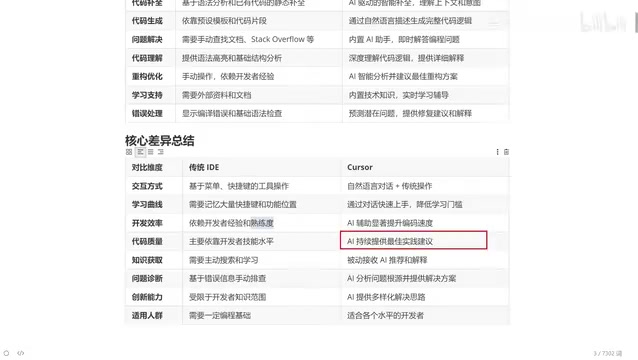
Creative problem-solving: Traditional development is constrained by what the developer already knows. Cursor can offer diverse approaches and solutions. Once you're fluent with AI-assisted coding, whether you're a Java, Python, front-end, or Go engineer, you can practically write code in any language with the tool's help.
Who Is Cursor For: From Beginners to Decade-Long Veterans
Cursor is useful for developers at virtually every skill level — though it's worth noting that some basic programming knowledge is still needed, since the generated code sometimes requires manual adjustments.
For a ten-year veteran, plenty of repetitive boilerplate code isn't worth typing out manually. Having Cursor generate it and then tweaking the result is simply faster. For beginners, the best approach is to have Cursor generate code and then study it — compare the AI's implementation with your own and see which is more rigorous.
Even if you have no coding background at all, you can use Cursor to produce working code. It functions more like a personal programming assistant you can turn to whenever you get stuck. This is the real value of intelligent AI coding tools: they haven't replaced programmers — they've expanded what every individual programmer is capable of.
Related articles

How Big Can Stars Really Get? The Physical Limits of the Largest Stars
Red supergiants are the largest stars by volume, with radii up to 2,000 times the Sun, engulfing the inner solar system. But there is no precise upper limit on stellar size—models predict up to 15,000 solar radii. The most massive blue stars are far smaller than red supergiants—biggest and heaviest are two different things.

Apple HomeView Smart Display Full Feature Breakdown: Wall-Mount or Desktop, $299
Apple launches HomeView, a $299 smart display with wall-mount and desktop options, 12MP camera for facial recognition, smart home control, music playback, and recipe step-by-step cooking. Full breakdown of watch faces, apps, privacy, and cooking integration.

Where Did the Promised New Studio Go? Craft Computing Answers After Five Years
Craft Computing's host responds to viewer questions: the new studio promised five years ago was shelved as construction costs soared from $30,000 to $75,000, and was replaced by a 168-square-foot garage conversion.