What Is Dify? A Beginner's Guide to This AI Application Development Platform

Dify is a no-code AI app platform that lets anyone build, publish, and operate production-grade AI applications.
Dify is an AI application development platform for everyone, abstracting complex tasks like model calls, workflow orchestration, and backend integration into visual, no-code operations. It offers five application types — Chat Assistant, Agent, Text Generation, Workflow, and Chatflow — with built-in support for hundreds of model providers. Dify also embeds LLMOps capabilities such as logging, annotation, and usage monitoring, and supports private deployment with local RAG-based knowledge bases for enterprise data compliance.
Dify: An AI Application Development Platform for Everyone
Dify is an AI application development platform — think of it as a tool that helps you rapidly build production-ready AI applications. Its greatest value lies in lowering the barrier to entry: whether you're a seasoned developer or a business professional with zero coding experience, you can use it to build and manage your own AI applications.
For most people, developing an AI application traditionally means understanding models, algorithms, and backend services. Dify abstracts all of these complex components into a visual workflow, letting users orchestrate applications through drag-and-drop and publish them with a single click. In other words, it transforms building AI applications from an "engineers only" task into something anyone can do.
As for the name, the team offers two interpretations: Define + Modify, emphasizing the continuous process of defining and improving your AI applications; or an acronym for Do it for you. Either way, both point to the same idea — making AI application development faster and simpler.
Backend Services and Integration Options
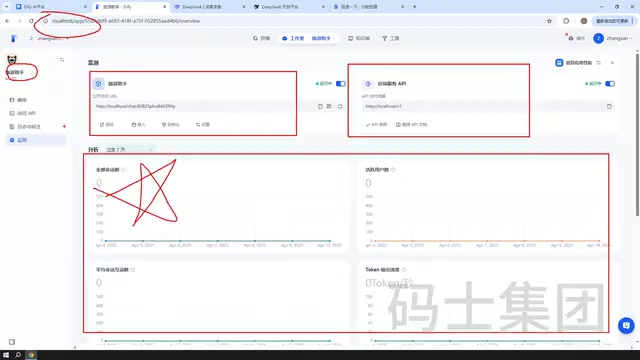
AI applications built with Dify don't exist in isolation — they come with full backend service capabilities built in. Here's a practical example: you could use Dify to build a translation assistant, deploy it locally, and then embed it into any webpage for users to access. Type in "What's the weather like today?" and it instantly translates the content into English.
This kind of integration goes well beyond translation assistants. Common enterprise use cases like intelligent customer service bots and chatbots can also be built quickly with Dify. Once an application is ready, there are three primary ways to deploy it:
- API: Connect your AI application to an existing backend project to enable business interactions
- Browser Plugin: Embed the application into a webpage as a plugin
- Public URL / Embed: Generate a shareable access link directly for others to use
This flexibility in integration means that whether it's a personal project or an enterprise-level system, applications built with Dify can seamlessly fit into your existing architecture.
LLMOps: Operations and Monitoring for Your Applications
Many AI application platforms only solve the "building" problem. Dify goes further by making operations and management a core capability — this is the essence of the LLMOps philosophy.
Within each application's backend, you can view its access endpoints, logs and annotations, API service details, and model usage statistics. For instance, you can see exactly how many times an application has been called each day, whether it's running properly, and what its public access URL is. For teams running AI applications in production environments, this kind of monitoring capability is critical — it keeps you in control of both the application's health and its cost consumption.
LLMOps (Large Language Model Operations) is a concept derived from the DevOps philosophy in traditional software engineering, specifically tailored to the full lifecycle management of large language model applications. Unlike conventional software operations, LLM applications face unique challenges: high inference costs billed per call, non-deterministic outputs that are difficult to measure with traditional metrics, complex Prompt version management, and the need for continuous user feedback to optimize model performance. An LLMOps framework typically covers modules such as log tracing, token usage statistics, Prompt version management, human annotation and evaluation, and A/B testing. Dify builds all of these capabilities directly into the platform, so developers don't need to set up their own monitoring infrastructure to maintain observability and control over their applications in production.
Core Features of Dify
Five Application Types
When creating a blank application in Dify, you can choose from five types:
- Chat Assistant
- Agent
- Text Generation
- Workflow
- Chatflow
These five types cover the majority of use cases, from simple Q&A to complex business orchestration, and can be used separately based on your specific needs.
Each type corresponds to a different scenario — understanding the differences helps you make the right choice. Chat Assistant is the most fundamental multi-turn conversation format, ideal for customer service and Q&A needs. Agent has the ability to autonomously plan and call external tools — it can search the web, execute code, or call APIs — making it suitable for scenarios that require "automatically completing tasks." Text Generation follows a single input-output pattern, perfect for batch writing and format conversion tasks. Workflow lets you chain multiple steps into a directed acyclic graph (DAG), suited for complex business processes that require conditional logic and parallel processing. Chatflow adds multi-turn conversation capability on top of Workflow, balancing process orchestration with conversational continuity — ideal for guided conversations or multi-step form completion.
A Rich Model Ecosystem
Every AI application depends on an underlying model. Dify has built-in support for hundreds of models. In the settings page, you'll find a wide range of model providers, including Wenxin Yiyan, ChatGLM, Tencent models, 360 Brain, and many other mainstream domestic and international options. Users simply configure the desired model provider in settings, then call it within their applications.

Two Simple Ways to Use It
Dify offers both a visual interface and an API. With the visual interface, you can orchestrate workflows, publish them, and chat-test them directly within the platform — or publish them as a webpage for external users to access. The entire build process is primarily drag-and-drop, with no coding required.
Enterprise-Grade Capabilities
For enterprise scenarios, Dify supports private deployment, allowing you to build dedicated chatbots and intelligent assistants combined with a local knowledge base. Model management, workflow orchestration, and Agent construction all require zero coding — you can let Agents automatically call tools to solve problems on their own.
Private deployment is one of the core reasons enterprises choose Dify. Compared to calling cloud-based AI services directly, private deployment means all data — including user inputs, conversation logs, and knowledge base content — stays on the company's own servers and is never transmitted to third-party platforms, satisfying data compliance and confidentiality requirements. Dify supports full deployment via Docker Compose on local or private cloud servers. Its built-in local knowledge base feature allows enterprises to vectorize and store internal documents, product manuals, and regulations, so that AI applications prioritize retrieving this internal knowledge when responding. This technique is commonly known as RAG (Retrieval-Augmented Generation). This approach retains the language understanding capabilities of large models while keeping responses grounded in the company's own knowledge base, significantly reducing the risk of "hallucinations."
How to Access the Official Website and Download
Dify's official website provides complete usage documentation. Click the documentation link and switch to Simplified Chinese to read official explanations of "What is Dify" and "How to use it." Please note that when accessing the official website, it's recommended to use a VPN or proxy tool, as the page may load slowly otherwise.
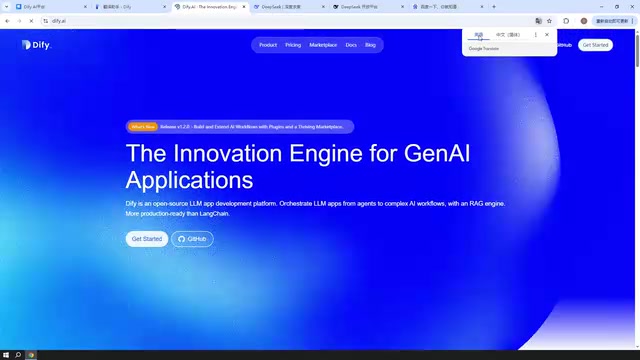
For downloading and installation, visit Dify's GitHub repository to get the latest version. The current stable release is around version 1.2.0; the tutorial demonstrations use version 1.1.3. Download the stable version, and you're ready to move on to the deployment phase.
Summary
At its core, Dify is a platform tool that lowers the barrier to AI application development. It enables users without a professional AI background to quickly create, publish, and manage their own AI applications, while also covering backend integration and LLMOps operational capabilities. From chat assistants to Agents, from API integration to private knowledge bases, Dify consolidates an entire production-grade AI application development pipeline into a single visual platform. Now that you understand what Dify is, the next step is to deploy it and build your first application.
Related articles

How Big Can Stars Really Get? The Physical Limits of the Largest Stars
Red supergiants are the largest stars by volume, with radii up to 2,000 times the Sun, engulfing the inner solar system. But there is no precise upper limit on stellar size—models predict up to 15,000 solar radii. The most massive blue stars are far smaller than red supergiants—biggest and heaviest are two different things.

Apple HomeView Smart Display Full Feature Breakdown: Wall-Mount or Desktop, $299
Apple launches HomeView, a $299 smart display with wall-mount and desktop options, 12MP camera for facial recognition, smart home control, music playback, and recipe step-by-step cooking. Full breakdown of watch faces, apps, privacy, and cooking integration.

Where Did the Promised New Studio Go? Craft Computing Answers After Five Years
Craft Computing's host responds to viewer questions: the new studio promised five years ago was shelved as construction costs soared from $30,000 to $75,000, and was replaced by a 168-square-foot garage conversion.