What Is Git Worktree? The Secret to Multiple AIs Coding Simultaneously Without Conflicts

Git Worktree lets multiple AI Agents code in parallel by giving each its own independent workspace.
Git Worktree creates independent working directories within the same Git project, enabling multiple AI Agents to develop features simultaneously without overwriting each other's code. This article explains how Worktree, Branch, Pull Request, Conflict, and Merge work together to form a complete parallel development workflow — shifting Git collaboration from human-to-human to human-to-AI coordination.
In local AI Agent coding tools, you may have noticed an icon that looks like a forking tree next to the chat box. The feature behind it is called Worktree. Even if you haven't seen it, the problem it solves is one you've definitely encountered in development: one task is still running when a new idea pops up, or you're halfway through building a feature when an urgent bug surfaces. In either case, neither continuing with the feature nor switching to fix the bug feels quite right.
Both problems share the same root cause — a single project has only one workspace. And Git, the tool that manages local code versions, has long had a solution for this. Git is a distributed version control system created by Linux creator Linus Torvalds in 2005. Its core design philosophy gives every developer a local repository containing the complete project history. Git uses a data structure called a "directed acyclic graph" (DAG) to record every commit, with each commit pointing to its parent, forming a chain. This structure is what makes branching and merging operations extremely lightweight — creating a branch is essentially just creating a new pointer. Understanding this is key to truly grasping why the Worktree and Branch combination introduced below is so efficient.
In the past, this workflow was used to coordinate collaboration between programmers. In the AI era, the collaborators have shifted from "human and human" to "human and AI," but the core challenge remains the same: how to advance different tasks separately and then safely merge them together.
This article explains in plain language how to leverage Git Worktree to multiply your AI Coding efficiency, while clarifying several common terms used in GitHub collaboration.
The Starting Point: One Project, One Workspace
Imagine you've already used AI to build a Pomodoro timer app. Now "AI #1" is working in the project folder on a pause feature, and you also want "AI #2" to develop a custom duration feature.

The simplest brute-force approach is to open another chat window. But if both chat windows point to the same folder, they'll keep modifying the same code files — potentially overwriting each other's changes. That's an absolute disaster.
The fundamental reason: both AIs are fighting over the same "workspace." To let them coexist peacefully, you need to give the second AI its own separate place to work.
Worktree: Setting Up an Independent Workspace for Each AI
Git Worktree creates an additional independent working file area within the same Git project. The two working areas belong to the same Git project, share the same change history, but each has its own independent code files — changes in one don't affect the other. This way, two tasks can safely proceed simultaneously, effectively doubling efficiency — though of course, token consumption doubles too.
Git Worktree was introduced in Git 2.5 (released in 2015). Before that, working on two branches simultaneously typically meant cloning the entire repository into another directory, resulting in two completely independent .git directories, double the disk usage, and isolated operation records on both sides. The elegance of Worktree lies in this: all working areas share the same .git directory (i.e., the same object database and references), while each maintains its own independent working directory and index (staging area). This means a commit made in one working area is immediately visible in another. The command to create a Worktree is also very simple: git worktree add ../my-new-worktree feature-branch — this creates a new working directory at the specified path and checks out the corresponding branch.
Think of it like building with blocks: there's a house already built on the work table. One person wants to modify the right wall, and another wants to add a window to the same wall. If there's only one set of blocks on the table, two pairs of hands reaching in at the same time will easily collide.
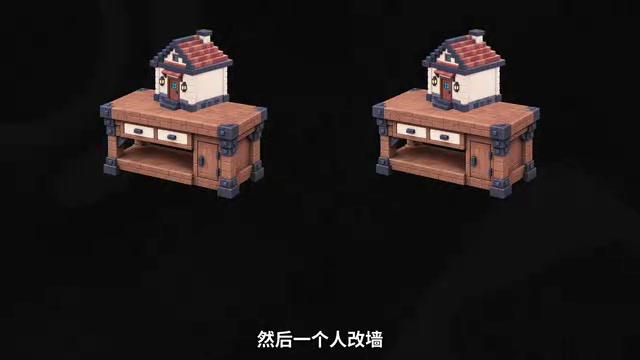
The simplest solution is to copy a second work table with a second set of blocks — one person modifies the wall, the other adds a window, each working independently without interference. This newly copied work table is the Worktree.
So it's important to emphasize: Worktree doesn't improve AI Coding efficiency by making AI write faster — it increases efficiency by adding more workspaces so multiple AIs can collaborate better. It essentially builds a "virtual workspace" for each of your AI Agents. Current mainstream AI Agent coding tools, such as Cursor, Windsurf, Claude Code, and others, support multi-session parallel development to varying degrees. Taking Claude Code as an example, its Worktree mode allows users to launch multiple independent Agent sessions within the same project, each running in its own work tree without interfering with others. This mode is particularly suited for "task decomposition" development: users break a large requirement into several independent sub-tasks and assign them to different AI Agents for simultaneous execution. It's worth noting that token consumption with parallel Agents grows linearly — two Agents working simultaneously means roughly double the API calls — so in practice you need to weigh the efficiency gains against costs.
Branch: Keeping Separate Records for Each Line of Changes
Having independent workspaces isn't enough — we also need to distinguish different "lines" of changes. This is where Branch comes in.
A Branch is an independent development line within a project. The Pomodoro timer's current production version corresponds to a branch typically called main — the project's mainline. Generally, we don't modify main directly, because it's the live production version and breaking it would be a serious problem. So when developing new features, we create a new Branch from main to "experiment" on.
In this example, AI #1's pause feature uses one Branch, and AI #2's custom duration feature uses another. This way, both AIs have their own working folders (Worktree) and their own change lines (Branch), achieving complete isolation.
PR and Merge: Safely Bringing Results Back to the Mainline
Once development is complete, everything ultimately needs to be merged together. This involves several key terms from GitHub collaboration.
Pull Request (PR): A Merge Request
When AI #1's pause feature is complete and pushed to GitHub, the next step is to submit a Pull Request (PR) to the mainline main. It essentially says: "My feature is done — can you review it and see if it's ready to go into the mainline?"
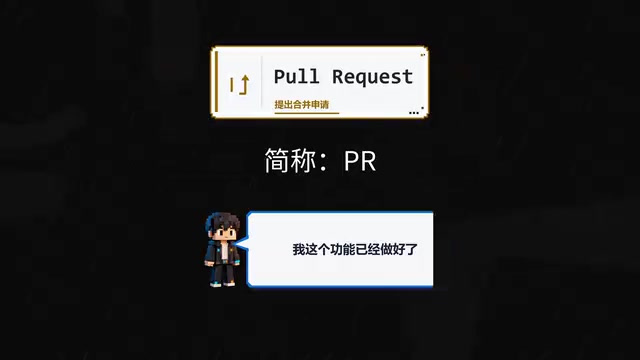
It's important to clarify that a PR isn't some isolated button — it's a complete collaboration workflow provided by GitHub. Pull Request is not a feature of Git itself, but rather a code collaboration mechanism that GitHub gradually refined after its launch in 2008, later widely adopted by platforms like GitLab (where it's called a Merge Request) and Bitbucket. A complete PR workflow typically includes: diff view (showing code changes line by line), automated checks (CI/CD pipelines running tests automatically), Code Review (other developers commenting line by line), and the final merge operation. In a PR, you can review what code the AI submitted, test whether the feature works correctly, and determine whether there are conflicts between the two sides' code.
In the context of AI collaborative programming, the review step in PRs is especially important — because AI-generated code may contain logic flaws, security vulnerabilities, or style inconsistencies, and the PR provides a critical "human checkpoint."
Conflict: When Code "Clashes"
If the code from both sides is incompatible, a Conflict occurs. A conflict means "the code is clashing" — two parties modified the same piece of code, and Git can't automatically decide whose version to keep.
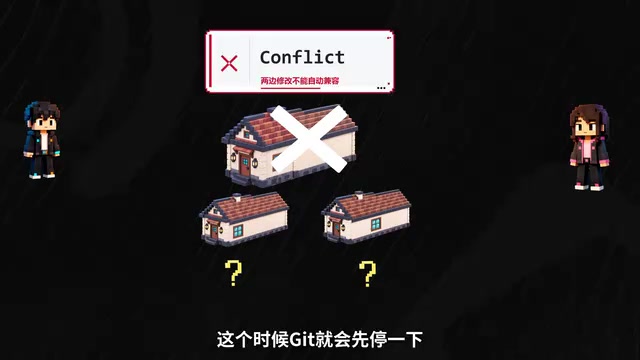
Using the building blocks analogy again: you're modifying a side wall while another person is adding a window to the same wall. Working separately, there's no interference. But once you try to put both versions back into the same house, you can't just force them together. At this point, Git "pauses" and asks you to decide where the window ultimately goes. You must manually resolve the conflicting areas before the merge can continue.
From a technical perspective, Git's auto-merge capability is actually quite powerful. It uses a three-way merge algorithm: it finds the common ancestor (base) of two branches, then compares each branch's changes relative to that ancestor. If the two branches modified different files, or different regions of the same file, Git can merge automatically without any human intervention. Conflicts only arise when two branches modify the same region of the same file with different changes. Conflicts appear in code files with special markers: <<<<<<<, =======, and >>>>>>> separate the two sides' changes, and the developer needs to choose one side's code, manually integrate both changes, or completely rewrite the conflicting section. In multi-AI parallel development, smart task decomposition — having different AIs work on different modules or files — can dramatically reduce conflict probability. This is one reason why task decomposition skills are more important than AI coding ability itself.
Merge: Making It Official
After resolving conflicts, you can perform a Merge, officially incorporating the new feature developed on the Branch back into the mainline main. At this point, a complete develop–review–merge cycle is complete.
The Complete Parallel Development Workflow
Stringing together the concepts above, the complete workflow for two AIs developing in parallel looks like this:
- AI #1 on Workspace A completes the pause feature, submits a PR, and checks for conflicts with main;
- If there are no conflicts, it merges back into main — main now includes the pause feature;
- AI #2 on Workspace B completes the custom duration feature and submits a PR, which now needs to be compared against the latest main (which already includes the pause feature);
- If both features modified the same code segment and are incompatible, a Conflict will occur again, requiring resolution first;
- After resolving conflicts, merge back to the mainline — both features are now live.
Same amount of time, two features delivered — that's the value of parallel development.
This multi-AI parallel development workflow is fundamentally aligned with the principles of Continuous Integration/Continuous Delivery (CI/CD) in software engineering. CI/CD emphasizes frequently integrating code into the mainline and quickly catching issues through automated testing. In traditional teams, this means each developer merges code at least once a day; in AI collaborative programming, this frequency can be even higher. The future trend is deep integration of Agent Orchestration with Git workflows: a "controller Agent" decomposes tasks and assigns them to multiple "executor Agents," each working in its own Worktree and Branch. Upon completion, they automatically submit PRs, which are reviewed by the controller Agent or a human before merging. This pattern is moving from concept to reality.
Conclusion: From Coordinating "Human and Human" to Coordinating "Human and AI"
When one person can direct multiple AIs simultaneously, the key to efficiency is no longer just "how fast the AI writes," but three more fundamental questions: Can tasks be separated? Can the process be reviewed? Can results be safely merged?
Git Worktree may look like it's just opening an extra folder, but behind the scenes it's building virtual workspaces for your AIs, letting each Agent work in its own space without disturbing others, and then having you do the final review and merge.
In the past, we used Git to coordinate between people; now, we'll increasingly use Git to coordinate between humans and AI. Understanding the workflow of Worktree, Branch, PR, Conflict, and Merge is the foundation for mastering multi-AI collaborative programming.
Related articles

Chain of Thought Isn't Just for AI: How Humans Can Use CoT to Improve Thinking Quality
Chain of Thought isn't just a prompt trick for large models. Starting from a Hacker News discussion, this article analyzes why CoT works for human thinking too, breaks down actionable ways to transfer it, and highlights the key differences between human CoT and machine CoT.
Cloudflare Teams Up with OpenAI: Closi…
Cloudflare Teams Up with OpenAI: Closing the Loop from Vulnerability Discovery to Defense with AI
Cloudflare uses OpenAI Daybreak to investigate security vulnerabilities and generate reviewable remediation plans, while developers use Codex to boost coding efficiency and quality.

Orca Multi-Agent Orchestration in Practice: A Guide to Parallel Collaboration with Claude and Codex
Orca is Stable AI's free open-source agent workbench supporting 34 agents like Claude Code and Codex in parallel. Learn its Git worktree isolation, multi-model orchestration, and mobile management.