What Is n8n? A Beginner's Guide to Workflow Automation

n8n is a workflow automation platform connecting apps, APIs, and databases — ideal for high-frequency, clearly ruled repetitive work.
Based on an Indonesian-language tech video, this article builds a foundational understanding of n8n for automation beginners: it doesn't produce data itself; its value lies in connecting Google Workspace, various APIs, MySQL/MongoDB, and other services and databases. n8n's smallest unit is the node; workflows are nodes strung together with connections that can branch on conditions; the whole process boils down to three phases — trigger, process, action. The article presents typical scenarios like daily cash flow reports, automatic invoicing, payment reminders, sales report aggregation, and payslip generation — all sharing the traits of high frequency, clear rules, and fixed steps. It also emphasizes the boundary of use: automation requires a clear SOP first; n8n only turns an already-clarified process from human-done into machine-done.
For anyone bogged down by repetitive daily work, the name n8n has probably crossed your radar more than once. It's a workflow automation platform whose core strength is connecting various apps, APIs, databases, and services so that processes previously requiring manual repetition can run automatically. According to an Indonesian-language tech YouTuber, n8n's mission is simply "making tedious, time-consuming repetitive work easy."
This article, based on that video, breaks down n8n's basic concepts, how it operates, and typical use cases, helping complete beginners to automation tools build a clear mental framework.
What Can n8n Actually Connect?
n8n doesn't produce data itself — its value lies in "connecting." The video lists several of the most commonly integrated services:
The Google Workspace ecosystem is the most common starting point. Google Docs, Google Sheets, Google Drive, Google Calendar, and Gmail can all be part of an n8n workflow. For example, writing form submission data into Sheets and then automatically sending a confirmation email — all without writing a single line of code.
API integration solves the "no built-in node" problem. n8n ships with a large number of official nodes, but there are always niche services that aren't included. In that case, you can use the HTTP Request node to call the target service's API directly, pulling data in or pushing it out. The video emphasizes this point: APIs are the key to connecting apps that "don't have an official n8n node."
As for databases, MySQL, MongoDB, and Google Sheets (yes, Sheets can work as a lightweight database) are common options. Databases play the role of "data warehouse" in automation flows — data produced by the workflow goes in, and subsequent steps read from it.
Webhook triggers are a key mechanism for understanding how n8n connects to external services. Although the video doesn't single out this term, "external form submission" is exactly what's at work behind the scenes. A webhook is essentially an event-driven HTTP callback URL: when a specified event occurs in some service (say, a WordPress form submission or a Stripe payment), it actively sends a POST request containing the event data to that URL. When n8n's Webhook node receives the request, it treats that request as an input and kicks off the entire workflow. Compared to "scheduled polling," webhooks are real-time event pushes — both faster and more resource-efficient. This is why so many automation flows start with "trigger immediately upon form submission" — it avoids the delay of human waiting and periodic checks.
How Nodes and Workflows Operate
The key to understanding n8n lies in two concepts: nodes and workflows.
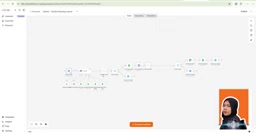
A node is the unit in n8n that performs a specific task. A Google Calendar node handles calendar operations; a Code node executes custom code logic. Each node is like an independent little worker responsible only for its own piece. The video demonstrates a booking chatbot workflow — for a dental clinic's appointment scenario — where each step is handled by a different node.
A workflow is the complete process that strings these nodes together with connections. The direction of the connections determines execution order: when one node finishes, data flows along the connection to the next node. The video shows how to copy an existing node and append it to the end of the flow, achieving chain execution of "last step done, next step right after."
Nodes aren't limited to linear arrangement. You can branch based on conditions, routing data down different paths. This is also what makes n8n more flexible than simple "if this, then that" tools.
To understand node collaboration, you also need to distinguish trigger nodes from regular nodes. Trigger nodes are the starting point of every workflow — for example, "new email arrives," "timer fires," or "webhook receives a request." They provide the first batch of data to the flow, and each workflow should typically have only one trigger point. Regular nodes, on the other hand, are processing units invoked mid-flow. They receive data from upstream nodes, process it, and pass it downstream. Another key concept is the item: data flowing through n8n is measured in "items." A node can receive a batch of items at once, process them one by one, and output the results — allowing workflows to naturally handle "batch records" (like all orders in a day) without building a separate flow for each piece of data.
Trigger → Process → Action: Understanding Automation Logic in Three Steps
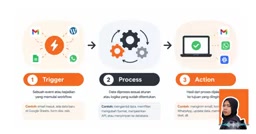
The video summarizes n8n's mechanism into three phases — a framework that's especially beginner-friendly:
Trigger: The Starting Point
A trigger is the "event" that causes a workflow to start running. Common trigger conditions include: receiving a new email, a new row added to a Google Sheet, an external form submission (whether a WordPress form or a custom HTML form). Without a trigger, the workflow is static — it's waiting for that "switch" to be pressed.
Process: The Data Transfer Station
After triggering, data enters the processing phase. This step involves: extracting the needed fields, filtering by conditions, transforming data formats, calling external APIs, and writing data to databases. The processing phase is the most logic-dense part of the workflow, and it's what determines how "smart" the automation is.
In the "process" phase, expressions are n8n's most frequently used capability and the primary means of achieving "extracting needed fields" and "transforming data formats." Expressions let you embed syntax like {{ $json.email }} directly into a node's fields to reference specific data output by upstream nodes, without writing full code. Powered by n8n's built-in JavaScript syntax, they can handle simple string concatenation, date formatting, and conditional logic. Only more complex logic requires resorting to custom scripts in a Code node. In other words, most everyday automation scenarios don't require programming knowledge — making good use of expressions is enough to handle field mapping and simple data processing.
Action: Sending Results Where They Belong
Once processing is done, the workflow executes its final action. It might be an email, a WhatsApp message, a spreadsheet update, creating a calendar appointment, or sharing a Google Drive file with a specific person. The action phase is the part users directly perceive — because the results are right there.
Which Business Scenarios Are Best Suited to n8n?
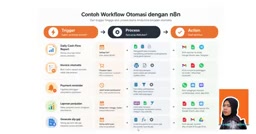
The video offers several concrete cases covering the most common repetitive work in small and medium businesses:
Daily cash flow reports: A workflow automatically pulls transaction records, calculates income and expenses, generates a formatted report, and sends it to email, Telegram, or WhatsApp. Finance staff no longer need to manually compile this every day.
Automatic invoice generation: When WooCommerce receives a new order, WhatsApp receives an order message, or a new row appears in a spreadsheet, the workflow automatically extracts order data, generates an invoice based on a template, and sends it to the customer.
Payment reminders: The system checks payment status, filters out overdue customers, and automatically sends dunning notices via WhatsApp, email, or SMS.
Sales report aggregation: Automatically summarizes sales data daily, weekly, or monthly, and sends it to a designated email as a PDF or Google Sheet. The video screenshot shows the interface for this scenario.
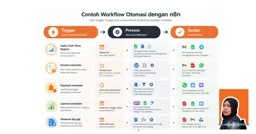
Payslip generation: Reads employee information from a database, automatically generates payslips, converts them to PDF, and sends them via email or saves them to Google Drive.
These scenarios share a common trait: high frequency, clear rules, fixed steps. The video also clearly points out n8n's boundary — automation only makes sense when a task recurs repeatedly and has clear rules to follow.
When Should You Not Use n8n?
The video includes an easily overlooked but important reminder: before considering automation, you need a clear SOP (Standard Operating Procedure).
In other words, if you can't even clearly articulate "who's responsible, what steps the data goes through, and what the final output is," handing it to n8n won't produce good results either. Automation presupposes that the process itself is already clear enough — n8n merely turns a clear process from "done by humans" into "done by machines."
This also means n8n isn't a tool that "helps you sort out your business logic." Its role is more like an assistant with exceptional execution ability: you tell it what to do, and it does it meticulously — never slacking off, never making mistakes. But the "what to do" still needs to be defined by humans.
The SOP repeatedly mentioned in the video — Standard Operating Procedure — refers to a written document that clearly specifies "who does a certain job, under what conditions, in what steps, producing what results." Its value lies in converting tacit experience into explicit rules. To judge whether a process can be automated, use a simple criterion: can a new employee, relying solely on this SOP, independently and consistently complete the same task? If yes, the process can probably be handed to n8n. If even a human finds it ambiguous, machine execution will only amplify that ambiguity into errors. Therefore, the sensible order for pursuing automation is to first clarify the SOP, then build the workflow — not the other way around, hoping that writing a workflow will force the process into clarity.
One-line Summary
n8n is a workflow automation platform connecting apps, APIs, and databases — ideal for high-frequency, clearly ruled repetitive work.
Paragraph Summary
Based on an Indonesian-language tech video, this article builds a foundational understanding of n8n for automation beginners: it doesn't produce data itself; its value lies in connecting Google Workspace, various APIs, MySQL/MongoDB, and other services and databases. n8n's smallest unit is the node; workflows are nodes strung together with connections that can branch on conditions; the whole process boils down to three phases — trigger, process, action. The article presents typical scenarios like daily cash flow reports, automatic invoicing, payment reminders, sales report aggregation, and payslip generation — all sharing the traits of high frequency, clear rules, and fixed steps. It also emphasizes the boundary of use: automation requires a clear SOP first; n8n only turns an already-clarified process from human-done into machine-done.
Related articles

Chain of Thought Isn't Just for AI: How Humans Can Use CoT to Improve Thinking Quality
Chain of Thought isn't just a prompt trick for large models. Starting from a Hacker News discussion, this article analyzes why CoT works for human thinking too, breaks down actionable ways to transfer it, and highlights the key differences between human CoT and machine CoT.
Cloudflare Teams Up with OpenAI: Closi…
Cloudflare Teams Up with OpenAI: Closing the Loop from Vulnerability Discovery to Defense with AI
Cloudflare uses OpenAI Daybreak to investigate security vulnerabilities and generate reviewable remediation plans, while developers use Codex to boost coding efficiency and quality.

Orca Multi-Agent Orchestration in Practice: A Guide to Parallel Collaboration with Claude and Codex
Orca is Stable AI's free open-source agent workbench supporting 34 agents like Claude Code and Codex in parallel. Learn its Git worktree isolation, multi-model orchestration, and mobile management.