What Is n8n? Understand Workflow Automation in 60 Seconds

n8n is a workflow automation tool that connects apps, APIs, and AI tools without writing code.
n8n is a workflow automation tool whose core capability is connecting different apps, APIs, and even AI tools so they run automatically according to preset rules. Its logic comes down to two keywords: triggers and actions—set a trigger condition, such as a form submission or scheduled time, and later nodes automatically save data, send emails, and more. A typical example shows its value: after a visitor submits a form, n8n can extract the information, write it to Google Sheets, and send a confirmation email, all without manual app switching or coding. With the AI boom, n8n is becoming more important as a middle layer between business processes and AI, and its open-source, self-hostable nature especially appeals to data-sensitive teams.
What Is n8n? One Sentence to Explain It
n8n is a workflow automation tool whose core capability is connecting different apps, APIs, and even different AI tools so they run automatically according to rules you set.
This positioning sounds somewhat similar to Zapier and Make, but n8n's differentiator is this: it emphasizes building automations without writing a single line of code, while still leaving room for developer-oriented extensibility.

For knowledge workers who spend large amounts of time each day on repetitive operations, the value of this kind of tool is not in how complex the technology itself is, but in lowering the barrier to "connecting" things to almost zero.
How n8n Works: Triggers Plus Actions
You can sum up how n8n works with two words: Trigger and Action.
You first set up a trigger node—for example, "someone filled out a form," "an email was received," or "a certain time has arrived." Once the trigger condition is met, the flow automatically moves to the next node, which is the action node. In the action node, you tell n8n what should happen next.
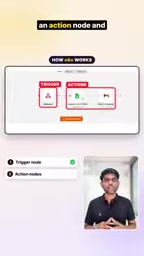
The entire setup process is just continuously linking triggers and actions into a complete automation chain. Once configured, the workflow runs automatically, and you don't need to manually click or operate anything each time.
This "if... then..." logic is nothing new, but n8n turns it into a visual operation, making it easy for people without a programming background to get started quickly.
Nodes and Workflows
n8n calls each functional unit a "node." A node represents one specific operation or decision, such as "read a row from Google Sheets" or "call the OpenAI API to generate text." Multiple nodes connected in sequence form a "workflow," which is the complete automation chain. What is passed between nodes is structured data (usually JSON), so the output of the previous node can be used directly as the input of the next node without manual conversion. This design lets complex logic be broken down into reusable building blocks, and it also makes it easy to insert conditional branches, loops, or error-handling nodes midway.
A Concrete Example: From Form to Spreadsheet to Email
The video gives a very typical scenario that is enough to show n8n's practical value.
Suppose someone fills out a form on your website. The traditional approach is: you receive a notification, manually copy the person's information, open Google Sheets to paste and save it, then switch to email to write and send a confirmation message. The whole process involves switching back and forth between at least three apps.
With n8n, the process becomes this: the form submission triggers the workflow, n8n automatically extracts the submitter's information, saves it to Google Sheets, and also sends an email to the other person.
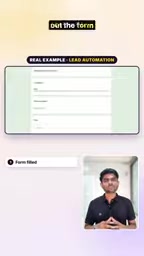
Every step requires no manual operation and no code. This is the most intuitive benefit of workflow automation—turning cross-app operations into one-time setup and long-term automatic execution.
Why n8n Is Worth Paying Attention To
The space n8n operates in is iPaaS (Integration Platform as a Service) and workflow automation, an area that has become even more important in recent years because of the explosion of AI tools.
When your toolbox includes ChatGPT, Claude, various APIs, and SaaS products all at once, how to make them work together becomes a real problem. n8n's approach is to act as a middle layer that embeds AI capabilities into business processes, rather than merely connecting traditional web apps.
Another noteworthy point is its "no-code" positioning. Although there are many no-code tools on the market, n8n has a certain influence in the open-source community and supports self-hosting, which is a plus for data-sensitive teams.
If repetitive tasks are eating up your time, this kind of tool represented by n8n is worth taking 60 seconds to understand.

As the video says at the end, if you're interested in n8n, you can keep following related content—the tool's learning curve is not steep, and the key is finding the first automation scenario that suits you.
What Is iPaaS
iPaaS (Integration Platform as a Service) is a type of cloud-based or self-hostable software platform whose core purpose is to help enterprises synchronize data and connect processes across different systems. The traditional approach requires separately developing interfaces for every pair of applications, which is costly and hard to maintain; iPaaS standardizes connections to common SaaS products through prebuilt connectors, enabling business users to complete integrations visually. Zapier, Make, MuleSoft, and Workato all belong to this category. n8n's difference lies in being open-source and self-hostable: users can deploy the entire platform on their own servers, with data not passing through third-party clouds.
Why Self-Hosting Matters for Data-Sensitive Teams
Self-hosting means the workflow engine runs on servers controlled by the team itself, so sensitive data such as form contents, customer email addresses, and internal API keys never leaves the team's own environment. For industries such as finance, healthcare, and law, this is often a prerequisite for whether a tool can be adopted at all. At the same time, self-hosting also brings operational costs, requiring the team to handle upgrades, backups, and security hardening on its own, so it is better suited to teams with some technical capability.
One-line Summary
n8n is a workflow automation tool that connects apps, APIs, and AI tools without writing code.
Paragraph Summary
n8n is a workflow automation tool whose core capability is connecting different apps, APIs, and even AI tools so they run automatically according to preset rules. Its usage logic comes down to two keywords: triggers and actions—first set a trigger condition, such as a form submission or a scheduled time, and then subsequent nodes automatically perform actions like saving data or sending emails. The article uses a typical example to illustrate its value: after a visitor fills out a form, n8n can automatically extract the information, write it to Google Sheets, and send a confirmation email, all without manually switching apps or writing code. Against the backdrop of the AI tool boom, n8n is becoming increasingly important as a middle layer connecting business processes with AI capabilities, and its open-source, self-hostable nature makes it especially attractive to data-sensitive teams.
Related articles

Felix Rieseberg Personal Homepage
Felix Rieseberg's personal homepage sparks attention on Hacker News. This article covers the Slack engineer's technical background, the rise and fall of nativefier, and the value of a developer homepage as a tech calling card.

@ai-sdk/vue 3.0.306 Patch Release Syncs with [email protected] Update
@ai-sdk/vue 3.0.306 released, synced with [email protected]. A routine patch release for the Vercel AI SDK ecosystem with no public API changes; the Vue adapter layer stays version-aligned with the core package.

Gemini 4 Argon API Launches: The Era of Million-Token Output Begins
Google launches Gemini 4 Argon with sparse MoE architecture, up to 1M output tokens, and a 68.90% Vals Index score, available across API, AI Studio, and the Gemini app.