What Is Tencent WorkBuddy? A Beginner's Complete Guide to AI Office Agents

Tencent WorkBuddy is a desktop AI agent that moves beyond answering questions to actually executing tasks on your computer.
WorkBuddy is Tencent's desktop AI agent workbench — an "AI brain + computer operator + automation engine" in one. Unlike conversational AI tools like ChatGPT that only offer advice, WorkBuddy directly executes on your computer: reading and writing local Word/Excel/PDF files, breaking down complex tasks step by step, running scheduled background jobs, and accepting remote instructions from your phone. It also connects to Tencent Docs, WeCom, and databases via MCP, and supports Skill packages for browser control, screenshots, and more. It's ideal for HR, admin, and operations staff drowning in repetitive document work, as well as non-coders looking to automate their workflows.
What Is WorkBuddy: An AI Office Assistant That Can Actually Do Things
WorkBuddyAd is a desktop-level AI agent workbench launched by Tencent, officially positioned as a "full-scenario workplace AI assistant." In plain terms, it's a combination of "AI brain + computer operator + automation engine." It requires no complex setup and skips the hassle of phone verification — it's designed to work right out of the box and integrates seamlessly with the office applications commonly used in China.
For people who don't know how to code or have never touched AI tools before, the barrier to entry is extremely low. All you need to do is "tell" it about your repetitive, time-consuming tasks — gathering information, organizing documents, generating spreadsheets, and so on — and it handles the rest automatically. You just check whether the final output meets your expectations.
An HR Example: How It Differs from Ordinary AI Tools
The most intuitive way to understand WorkBuddy's value is to compare it with conversational AI tools like ChatGPT, Doubao, or Tongyi Qianwen.
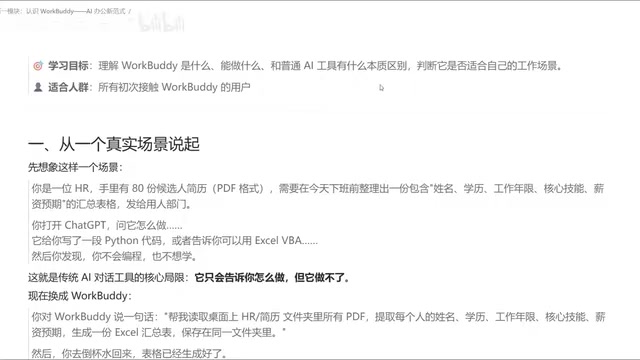
Imagine this scenario: An HR professional has 80 candidate resumes on hand and needs to organize them into a spreadsheet — with columns for name, education, years of experience, core skills, and salary expectations — before the end of the workday, to hand off to the hiring team for review.
With a traditional AI tool, if you ask "how do I do this," it will most likely generate a Python script, or tell you "you can use such-and-such tool to get this done" — and then you'd still have to follow those instructions and manually execute each step on your own computer. It can tell you what to do, but it can't actually complete the entire process for you.
With WorkBuddy, you simply give the instruction: "Read all candidate resume PDFs in a specific folder, extract name, education, years of experience, core skills, and salary expectations, generate an Excel summary, and save it to a specified directory." WorkBuddy understands the request, reads the local data, and generates the file — by the time you come back from grabbing a glass of water, the spreadsheet is already sitting in the target folder.
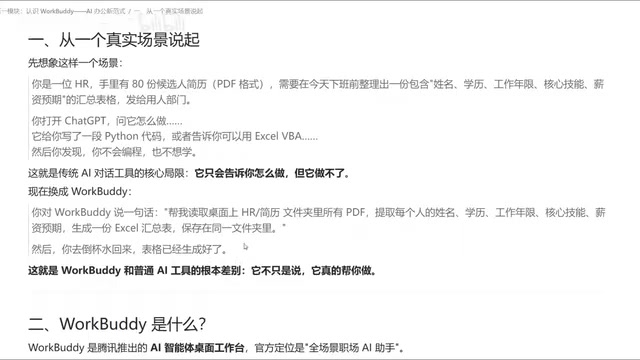
This is the core difference: ordinary AI tools are "smart consultants" that can tell you the answer; WorkBuddy is a "capable employee who grew hands and feet" on top of that consultant role — it doesn't just talk, it actually executes on your computer.
What WorkBuddy Can Do That Ordinary AI Can't
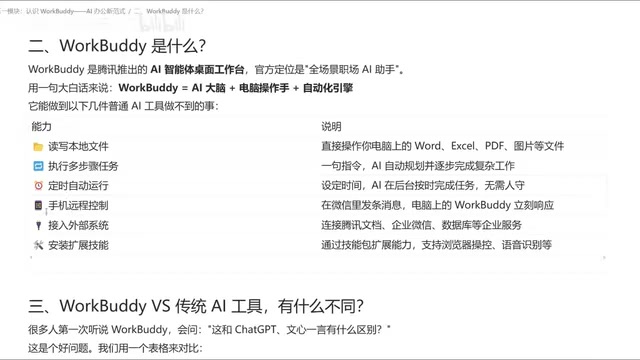
Based on its core design, WorkBuddy's capabilities fall into several key areas:
Operate Local Files
It can read and write Word, Excel, PDF, image, and other files on your computer — territory that conversational AI tools simply cannot reach.
Multi-Step Task Planning
Give it a complex requirement and it will automatically plan an execution path and carry it out step by step. If it discovers a problem with its plan midway, it can redesign the approach and continue on a new path — this self-correction ability is what sets it apart from simple scripts.
Scheduled Task Automation
Using its automation engine, you can lock a series of fixed actions into a scheduled task. For example, automatically compiling and sending a weekly report every week — no need to sit in front of your screen.
Remote Control
Through the WorkBuddy mini program on your phone or the WeChat client, you can remotely send instructions to WorkBuddy running on your desktop, letting it complete operations in the background. Results can be saved on the computer or sent back to your phone.
Connect to External Systems and Extend Skills
WorkBuddy can connect to external systems like Tencent Docs, WeCom (Enterprise WeChat), and even databases via MCP, bringing all the data you need into one unified interface. It also supports installing Skill packages to extend capabilities — such as browser web browsing, screenshots, or converting voice recordings into summarized text.
What is MCP? MCP (Model Context Protocol) is an open protocol standard proposed by Anthropic, designed to let AI models connect to external data sources and tools in a unified and secure way. Think of it as the "USB port" of the AI world — any application, database, or service that implements the MCP protocol can be read or triggered by an AI agent in a standardized way, without needing custom integration code for each system. In WorkBuddy's context, connecting to Tencent Docs via MCP means it can directly read cloud document content and write data back; connecting to WeCom enables sending messages and pulling contact lists; connecting to a database allows it to execute queries and incorporate results into subsequent tasks. This architecture means WorkBuddy isn't limited to local files — it can bridge an organization's entire digital ecosystem and serve as a true cross-system automation hub.
Traditional AI Tools vs. WorkBuddy: A Side-by-Side Comparison
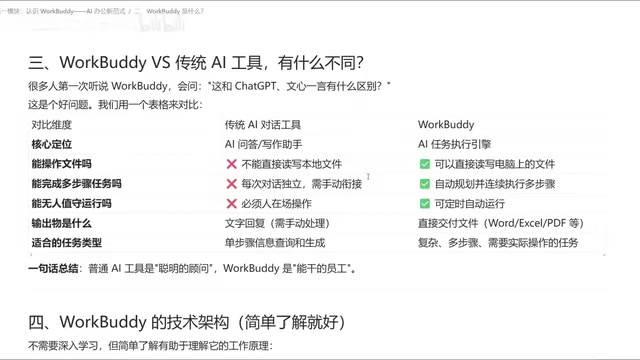
Putting the two side by side makes the differences immediately clear:
| Dimension | Traditional Conversational AI | WorkBuddy |
|---|---|---|
| Core positioning | Smart consultant | Capable employee |
| File operations | Cannot read/write local files | Can read and write local files |
| Multi-step tasks | One question at a time, hard to chain | Automatically breaks down and executes step by step |
| Unattended execution | Requires a person at the computer or phone | Supports scheduled background tasks |
| Output | Primarily text | Delivers finished Word/Excel/PDF files |
| Best suited for | Single-step information queries | Complex, multi-step office tasks |
In one sentence: almost anything you can do on a computer, WorkBuddy can do for you. For anyone who has used similar Agent products (such as desktop AI agents like OpenAI's Operator), WorkBuddy's way of working will feel familiar.
What Is an "Agent" Product? The "Agent" (intelligent agent) category mentioned in the table above represents an important evolution in the AI field. Traditional large language models are essentially "one-question-one-answer" text generators. Agents build on this by adding a "perceive–plan–act" loop: they can perceive the current environment (e.g., what files are in a folder), formulate a step-by-step plan, invoke tools to take action, and then adjust the next step based on the results. This capability elevates AI from "answering questions" to "completing tasks." WorkBuddy is a desktop-end Agent, and its core advantage lies in being able to directly manipulate local computer resources, rather than remaining confined to a cloud-based chat window. Products like OpenAI's Operator and Anthropic's Claude Computer Use represent the same technological trend; WorkBuddy is the localized version tailored for office scenarios in China.
Who Should Use WorkBuddy
From a positioning standpoint, this type of tool is especially suited for two groups: professionals bogged down by large volumes of repetitive document and spreadsheet work — such as HR staff, administrators, and operations teams — and newcomers who want to explore AI automation but are intimidated by coding.
The course author has also compiled a companion blueprint covering four modules: installation instructions, case breakdowns, Skill customization, and industry applications, along with 12 commonly used Skills and hands-on practice materials. The author's advice to "learn by doing" — not just leaving tools to collect dust in your bookmarks — is genuinely the key to getting value from any Agent tool. Hands-on practice matters far more than reading tutorials.
Summary
WorkBuddy represents a direction for AI-powered work: moving from "question and answer" to "execution." It combines a language model's comprehension capabilities with the ability to operate a computer, call external systems, and run scheduled automations — letting AI truly "get its hands dirty." For users who want to break free from repetitive work and achieve office automation, it's worth trying. But to get real value out of it, the key is describing your requirements clearly and continuously practicing and validating in your actual work.
Related articles

Chain of Thought Isn't Just for AI: How Humans Can Use CoT to Improve Thinking Quality
Chain of Thought isn't just a prompt trick for large models. Starting from a Hacker News discussion, this article analyzes why CoT works for human thinking too, breaks down actionable ways to transfer it, and highlights the key differences between human CoT and machine CoT.
Cloudflare Teams Up with OpenAI: Closi…
Cloudflare Teams Up with OpenAI: Closing the Loop from Vulnerability Discovery to Defense with AI
Cloudflare uses OpenAI Daybreak to investigate security vulnerabilities and generate reviewable remediation plans, while developers use Codex to boost coding efficiency and quality.

Orca Multi-Agent Orchestration in Practice: A Guide to Parallel Collaboration with Claude and Codex
Orca is Stable AI's free open-source agent workbench supporting 34 agents like Claude Code and Codex in parallel. Learn its Git worktree isolation, multi-model orchestration, and mobile management.