What Is WorkBuddy? A Beginner's Guide to Tencent's AI Office Assistant

WorkBuddy is Tencent's local AI agent that executes real tasks on your PC, bridging the gap between AI advice and actual results.
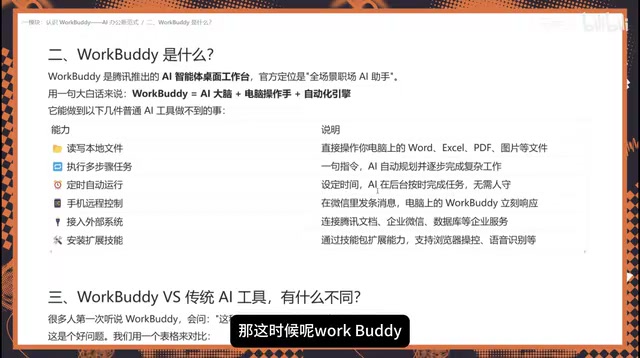
WorkBuddy is a desktop AI agent from Tencent that goes beyond answering questions — it reads files, operates software, and delivers finished documents directly on your computer. Built around three components (an AI brain, a computer operator, and an automation engine), it supports scheduled background tasks, MCP-based integration with Tencent Docs and WeCom, expandable Skill Packs, and remote control via WeChat. It's best suited for complex, execution-heavy scenarios like batch file processing, cross-software workflows, and recurring automated tasks.
WorkBuddy: The AI Office Assistant That Actually Gets Things Done
If traditional AI tools are like smart consultants, then Tencent's WorkBuddyAd is more like a hands-on employee who can actually do the work. Its official positioning is a "full-scenario workplace AI assistant" — essentially an AI agent desktop tool that executes tasks directly on your local computer.
In tutorial content, WorkBuddy has been compared to a domestic alternative to Codex, with a much lower barrier to entry — no complex network configuration required, making it relatively beginner-friendly. Whether it's drafting plans, building spreadsheets, analyzing information, generating posters, or taking over browser and software operations, WorkBuddy delivers finished results right in front of you, rather than just telling you "here's how to do it."
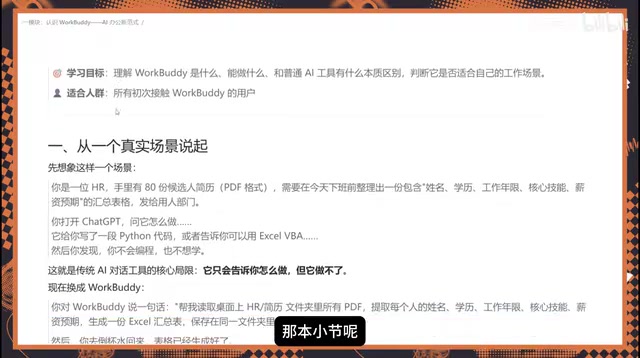
An HR Scenario That Illustrates the Difference
A classic scenario makes the distinction clear: an HR professional has 80 candidate resumes on hand and needs to compile them into an Excel spreadsheet — including name, education, years of experience, core skills, and salary expectations — before end of day, to send to the hiring department for review.
With a traditional conversational AI like ChatGPT, the tool might generate a Python script or tell you "you can use a certain tool for this," but the actual steps of reading, extracting, and summarizing the data still need to be done manually by you on your computer.
With WorkBuddy, the logic is entirely different. You simply issue an instruction: "Read all candidate resume PDFs in a given directory, extract name, education, years of experience, core skills, and salary expectations, generate an Excel summary, and save it to the specified folder." WorkBuddy understands the request and carries it out directly on your computer — reading the data, generating the file. All you need to do is grab a cup of water, wait for it to finish, and verify the results.
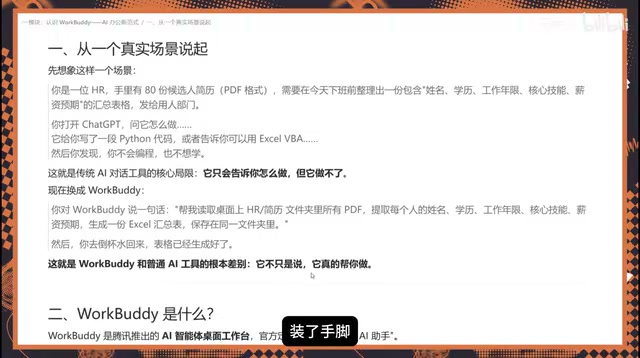
This is the fundamental difference from question-and-answer AI: ordinary AI can only tell you what to do — WorkBuddy has hands and feet, and can actually do it.
Three Core Components: Brain, Operator, and Automation Engine
WorkBuddy can be broken down into three parts:
AI Brain
Responsible for understanding requirements and planning the execution path. When a task is complex, it automatically breaks it down into multiple steps and evaluates whether the approach is sound during execution. If it detects a flaw mid-way, it can redesign the plan and proceed along a new path — this adaptive capability is what sets it apart from simple scripts.
Computer Operator
It can read and write local files, manipulate Word documents, Excel spreadsheets, PDFs, images, and other file types, and execute multi-step tasks. Essentially anything you can do on your computer, it can do for you — and the end result is a usable file, not just a block of text.
Automation Engine
For recurring workflows, you can set up scheduled tasks. For example, you can have it automatically compile a weekly report and deliver it to you every week. As long as WorkBuddy is running on your computer, it executes in the background without requiring you to watch over it.
WorkBuddy belongs to a product category in the AI field commonly known as AI Agents. Unlike question-and-answer AI (such as ChatGPT), AI Agents are designed to autonomously complete goal-oriented, multi-step tasks: they don't just understand instructions — they proactively plan a course of action, invoke tools, observe results, and self-correct when something goes wrong, until the task is complete. This "perceive → plan → execute → feedback" loop is what fundamentally distinguishes them from ordinary conversational models. Local desktop AI Agents like WorkBuddy are special in that they run on the user's own machine, with direct access to the local file system and installed software — no need to upload sensitive files to the cloud, balancing execution capability with data privacy.
Extended Capabilities: MCP, Skill Packs, and Remote Control
WorkBuddy's capabilities can be extended even further.
External System Integration (MCP): Via the MCP protocol, WorkBuddy can connect to Tencent Docs, WeCom (Enterprise WeChat), databases, and other external systems, pulling the required data directly into its workflow. The more resources it's connected to, the more it can accomplish.
Skill Packs: Installing extension skills enhances WorkBuddy's capabilities — for example, enabling it to browse data and take screenshots in a browser, or transcribe and summarize audio recordings. All of this can be achieved through skill extensions.
Remote Control: Using the WorkBuddy mini-program or WeChat client on your phone, you can send instructions to it remotely. As long as the desktop app is running, it will execute tasks on your computer and return the results to your desktop or directly to your phone.
MCP (Model Context Protocol) is an open standard protocol proposed by Anthropic in late 2024, designed to let AI models connect to external data sources and tools in a unified way — think of it as a "USB port" for the AI world. Before MCP, every AI product that wanted to integrate with an external system had to build a custom adapter from scratch, which was costly and hard to reuse. MCP standardizes this process: as long as a system provides an MCP-compliant server, any MCP-compatible AI tool can call it directly. As Tencent Docs, WeCom, and other products add MCP support, WorkBuddy can read data from these platforms through a single unified interface, eliminating the need for bespoke integration work for each system. For users, the more external systems connected, the broader the information WorkBuddy can access — and the more capable it becomes at handling complex, cross-platform tasks.
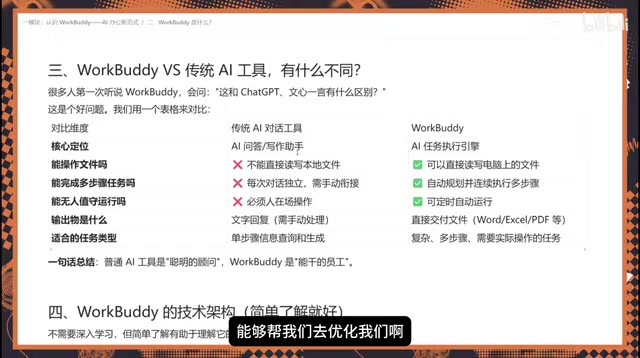
Traditional AI Tools vs. WorkBuddy: A Comparison
| Dimension | Traditional Conversational AI | WorkBuddy |
|---|---|---|
| Core Role | Smart consultant | Capable employee |
| File Operations | Cannot read/write local files | Can read and write local files |
| Multi-step Tasks | One question at a time, hard to chain | Automatically plans and executes step by step |
| Unattended Operation | Requires user to stay at the device | Supports scheduled background tasks |
| Output | Primarily text | Delivers finished files (Excel, PDF, etc.) |
| Best For | Single-step information queries | Complex, multi-step tasks |
When Should You Use WorkBuddy?
The core question is simple: does the task require hands-on execution?
If you just need a quick answer or want to polish a piece of writing, a standard conversational AI is sufficient. But if the task involves batch processing of local files, cross-software operations, multi-step workflows, or needs to run on a schedule automatically, WorkBuddy's value becomes clear. It bridges the gap between "AI giving advice" and "the work actually getting done."
For beginners, the fastest way to understand it is to start with a concrete, deliverable task — like organizing resumes into a spreadsheet or generating a weekly report. Describe your needs clearly and hand the planning and execution over to WorkBuddy. That's the core logic of the new AI-powered workplace paradigm.
Related articles

JobRunner MCP Server: AI Agents Can Now Fix Failed Java Jobs
JobRunner launches an open-source MCP server enabling AI agents to view cluster status, diagnose failures, and recover Java jobs—incident response from any cloud coding environment or existing agent.

MLAI Digital Launches 9 Security Agents: MCP Server Safeguards the Full Lifecycle of Agentic AI
MLAI Digital launches Security MCP Server with nine built-in specialized security agents covering vulnerability discovery, attack simulation, prompt injection detection, API and infrastructure assessment, and accelerated remediation—embedding security validation across the full Agentic AI lifecycle from development to production.

Running Isaac Lab on H100 GPUs: Exploring Better Approaches
Exploring optimization methods for running Isaac Lab on NVIDIA H100 GPUs, including MIG configuration, mixed precision, TensorRT acceleration, and community experience to improve robotics simulation and reinforcement learning efficiency.