WhatsApp AI Agent Real-World Test: Can It Replace n8n for Automation?

WhatsApp native AI Agent suits basic customer service; n8n is still essential for complex automation.
WhatsApp Business's Meta Business Agent has prompted AI customer service practitioners to reassess their tooling. The native Agent requires no API setup, handles text, images, and voice with zero node configuration, and learns from chat history — ideal for quickly launching basic customer service. However, it's locked to Meta AI, supports limited third-party integrations, and can behave unpredictably. n8n offers near-unlimited tool integrations, free model selection, and precise logic control, but comes with a steeper setup curve. The verdict: both tools are complementary — the native Agent handles high-volume routine inquiries from ad campaigns effortlessly, while n8n remains indispensable for complex needs like CRM integration and real-time data fetching.
WhatsApp Business's newly launched Meta Business Agent has prompted many AI customer service automation practitioners to rethink their tool choices. One YouTube creator who has long used n8n to build WhatsApp customer service bots for businesses put both solutions head-to-head: on one side, the out-of-the-box WhatsApp native AI; on the other, a highly customizable workflow automation platform. The conclusion is more pragmatic than the headline suggests — neither replaces the other. They simply serve very different use cases.
What Is the WhatsApp AI Agent and How Do You Enable It
This feature is only available in WhatsApp Business — regular personal accounts cannot use it. The setup path is straightforward: go to the "Tools" menu and find "Meta Business Agent" to start configuring. The logic is the same on both mobile and desktop, though the desktop interface is more convenient for bulk settings.
The first step is training the AI to understand your business. You'll need to fill in a business description, operating hours, and most importantly — your business address. The creator highlighted one key advantage: this AI can learn from your chat history. Simply grant it access to your chats, and it will mimic the tone and content you typically use when replying to customers, continuously updating its own knowledge base.
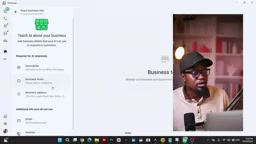
One commonly misunderstood point is cost. Many people assume this AI feature is free, but it actually requires a paid Meta One subscription to use in full (the video mentions two tiers at approximately 8,000 and 29,000, bundled with other services), though the platform does offer a free trial quota. Another practical detail: you don't need to apply for a WhatsApp Business API number — you can enable this AI directly on the regular business number you already use daily.
WhatsApp Business API is Meta's programmatic access solution designed for medium and large enterprises, and is a separate system from the WhatsApp Business app aimed at small businesses. The API approach requires applying for a dedicated number through Meta or a third-party provider, configuring a Webhook to receive messages, and then allowing external platforms like n8n or Make to handle message processing. This process involves registering in the developer backend, app review, phone number verification, and several other steps — presenting a significant barrier for non-technical users. Meta Business Agent's key differentiator is precisely this: it bypasses the API application process, allowing users with regular business numbers to enable AI reply capabilities directly, dramatically lowering the technical threshold.
Knowledge Base, Product Catalog, and Reply Rules
The AI's "brain" comes from its knowledge base. The creator recommends taking time to carefully organize the knowledge base content, since all of the AI's answers are grounded in it — and it will continue to self-update through subsequent conversations. You can include price lists, FAQs, product information, and more.
Product recommendations rely on WhatsApp's Catalog feature. You can specify which products you want the AI to prioritize recommending, rather than dumping your entire catalog on customers at once. For any business selling physical goods or services, building out a catalog is a prerequisite.
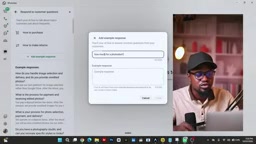
On the reply strategy side, you can fine-tune the AI's trigger scope: reply to all new one-on-one conversations, only conversations from ads, or exclude existing contacts (to prevent the AI from interfering with your personal chats with family and friends). You can also set time-based rules — for example, only auto-reply during working hours from 8 AM to 6 PM.
It's Not Perfect — It Needs Ongoing Training
The creator candidly pointed out the AI's shortcomings: it can behave erratically for no apparent reason. For instance, it might misidentify a customer's language and spontaneously switch to replying in a different one. These issues can't be anticipated in advance — you can only fix them as they occur in real use. When the AI makes a mistake, you add a corrective instruction, have it apologize to the customer and self-correct, and repeat this process until it gradually stabilizes.
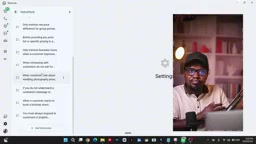
This actually reveals the fundamental nature of native AI: it trades ease of use for controllability. You can't precisely define every step of the logic the way you would in a workflow — you can only "tame" it through natural language instructions and examples. For users who can accept this ambiguity, it works well enough. But for scenarios that require deterministic output, it falls short.
Head-to-Head Test: WhatsApp Native vs n8n Workflow
The creator demonstrated how the same use case plays out across both solutions. In n8n, handling multiple message types — images, voice, video — requires manually building a long chain of nodes: WhatsApp trigger node → Switch node to differentiate message types → hand images to ChatGPT for analysis, transcribe voice messages → feed everything to the AI Agent node → send the reply back via a WhatsApp node. And all of this assumes you've already configured the WhatsApp API; if not, you'll need to wade through Meta's developer backend first.

With the WhatsApp native Agent, by contrast, the creator simply sent a photo and a voice message ("I'd like to book a birthday photoshoot — how much does it cost?"), and the AI automatically recognized and responded without any node configuration. The photo was treated as a portfolio showcase, and the voice question was answered accurately. What would have been minutes of workflow building required zero configuration in the native solution.
Tool Ecosystem: The Native AI's Biggest Weakness
The most glaring gap is in connectable tools. At the time of recording, the WhatsApp native Agent supports integrations with only a handful of apps: Google Calendar, Microsoft Outlook, Apple Calendar, Google Drive, and a few others. n8n's ecosystem, by contrast, is virtually boundless — connecting to CRMs, third-party APIs, or having the AI pull real-time data from stock markets are complex integrations that are only achievable inside n8n (or platforms like Make).
The underlying model is another differentiator: using the WhatsApp native Agent means you're locked into Meta AI. Inside n8n, you're free to choose any model — Claude, ChatGPT, DeepSeekAd — to power your agent.
n8n is an open-source workflow automation platform, similar in positioning to Zapier or Make (formerly Integromat), but with support for self-hosted deployment so your data never passes through third-party servers. Its core concept is "node connections" — each application or action is a draggable node, and users connect nodes through a visual interface to build automated workflows. Thanks to an active open-source community, n8n now has over 400 built-in integration nodes, covering major CRMs (like HubSpot and Salesforce), databases, e-commerce platforms, and AI services. For developers, the HTTP Request node can call any REST API, offering theoretically unlimited integration capability. This is the underlying reason the article calls n8n's ecosystem "virtually boundless" — it doesn't rely on an official list of preset connectors, but opens up integration capability for users to extend themselves.
Which One Should You Choose
The creator's recommendation is direct:
- Choose the WhatsApp native Agent if you simply want AI to quickly respond to customers and handle routine inquiries — especially when you're running ads and facing hundreds or thousands of incoming messages. The native solution handles this reliably, and training and correcting it is extremely straightforward.
- Choose n8n if you need to connect multiple tools, have the AI perform complex tasks (such as real-time data fetching or CRM integration), or want the freedom to choose your underlying model. In those cases, you need to build with n8n or Make.
The headline framing of "WhatsApp replacing n8n" is more of an attention-grabbing hook. The actual conclusion is: for basic customer service scenarios, the native Agent genuinely renders the complex n8n workflow setup unnecessary; but for complex automation needs, n8n remains irreplaceable. The two are complementary — not mutually exclusive.
Related articles

Chain of Thought Isn't Just for AI: How Humans Can Use CoT to Improve Thinking Quality
Chain of Thought isn't just a prompt trick for large models. Starting from a Hacker News discussion, this article analyzes why CoT works for human thinking too, breaks down actionable ways to transfer it, and highlights the key differences between human CoT and machine CoT.
Cloudflare Teams Up with OpenAI: Closi…
Cloudflare Teams Up with OpenAI: Closing the Loop from Vulnerability Discovery to Defense with AI
Cloudflare uses OpenAI Daybreak to investigate security vulnerabilities and generate reviewable remediation plans, while developers use Codex to boost coding efficiency and quality.

Orca Multi-Agent Orchestration in Practice: A Guide to Parallel Collaboration with Claude and Codex
Orca is Stable AI's free open-source agent workbench supporting 34 agents like Claude Code and Codex in parallel. Learn its Git worktree isolation, multi-model orchestration, and mobile management.