Why AI Agents Fail: Build Your Business System Before You Automate

Build your business system first — AI agents without context just automate mistakes faster.
Most AI agents fail because people automate before building a proper business system. This article breaks down the three essentials for reliable agents — clear roles, business context, and boundary rules — and demonstrates how to build a real, repeatable workflow using Google Drive as a Single Source of Truth and N8N for automation, with Human-in-the-Loop safeguards.
Why Most AI Agents Are Wasting Your Time
When most people hear the term "AI agent," their first instinct is automation — let AI auto-reply to emails, summarize meetings, update reports, or even take over parts of a business process.
An AI agent is an AI system capable of autonomously perceiving its environment, forming plans, and executing multi-step tasks. Unlike simple question-and-answer LLMs, agents have "tool-calling" capabilities — they can access external APIs, read and write files, send emails, search the web, and even invoke sub-agents to handle complex tasks. Popular agent frameworks today include LangChain, AutoGPT, CrewAI, and N8N, typically powered by large language models like GPT-4 or Claude for reasoning. An agent's core architecture consists of four components: Perception, Memory, Planning, and Action. But because agents can actively execute tasks, any inaccurate context or missing rules don't just cause conversational errors — they act directly on real systems and cause real business damage.
The reality, though, is that most people build AI agents in completely the wrong order.
The problem isn't that AI agents are useless — it's that most people rush to automate their work before they've built a system for it. The result isn't saved time; it's errors that happen faster.
Imagine this scenario: a client emails asking about your AI automation services. An agent with no business context will reply with "we can help" — it sounds professional, but it's pure guesswork. It doesn't know your service details, pricing rules, client intake process, or which decisions require human approval.
There's a deep technical reason for this: large language models suffer from "hallucination" — the tendency to generate plausible-sounding but factually incorrect or fabricated information. Hallucination stems from the fact that LLMs are trained to predict "the most likely next token," not to verify factual truth. When a model lacks accurate external information, it tends to "complete" a plausible-sounding answer rather than admit uncertainty. This means an agent without contextual constraints will confidently invent non-existent services, fabricate pricing figures, or promise delivery timelines it cannot fulfill.
In short, you end up with an expensive chatbot wearing a job title — generic, base-level AI responses instead of a genuinely useful business assistant.
Three Things Every AI Agent Needs Before Going Live
The most intuitive way to understand this problem is to treat an AI agent like a newly hired human assistant.
You wouldn't let a first-day assistant reply to client emails. They'd need to first learn what your business does, what you can commit to, your pricing rules, and which situations require your direct approval. The same applies to AI agents — without this information, they can only guess, and guessing is exactly what makes automation dangerous.
A truly reliable AI agent system requires three things:
- A clear role: so it knows exactly what it's supposed to do
- Business context: so it can check accurate information before responding
- Boundary rules: to prevent it from inventing prices, committing to wrong timelines, or sending content without review
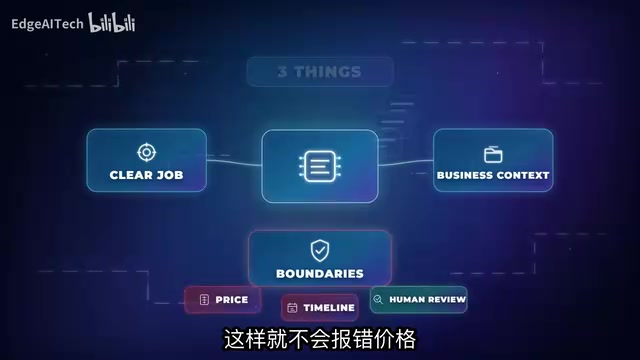
Once this foundation is in place, automation becomes genuinely useful. Without it, automation just spreads wrong answers faster.
Building a "Single Source of Truth" Workspace for Your Agent
Here's a framework for systematically putting these principles into practice. Start by creating a dedicated folder in Google Drive (e.g., "AI Client Reply System") and build it into the agent's Single Source of Truth — all instructions, rules, and reference documents live here, and the agent must consult this folder before drafting any client response.
"Single Source of Truth" (SSOT) is a core principle in software engineering and data management: all system components read from one authoritative data source to avoid inconsistencies across multiple copies. Applied to AI agent design, it means every decision-making input — service scope, pricing logic, reply style — is stored centrally in a maintainable, version-controlled set of files. When business rules change, you update the central folder and the agent's behavior updates automatically, with no model retraining or prompt rewriting required. This architecture is essentially a lightweight RAG (Retrieval-Augmented Generation) implementation — before the model generates a response, it retrieves relevant document snippets from the authoritative knowledge base and injects them into the prompt as context, forcing the model to generate responses grounded in real information, fundamentally suppressing hallucination.
The folder needs five key files:
1. Services Offered
This file tells the agent what the business actually does. For an AI automation service, that might include: AI workflow setup, client follow-up automation, inbox draft writing, and internal process system builds. With this file, the agent cannot freely fabricate services that don't exist.
2. Pricing Rules
This is where things most often go wrong. Rules should explicitly state: ask questions before estimating, pricing depends on scope, do not commit to discounts without approval. An unconstrained agent will confidently invent numbers, creating direct business risk.
3. Client Intake Questions
This file tells the agent what it needs to ask before it can give a useful answer — for example: Which process do you want to automate? What tools are you currently using? Who approves the final output? With this checklist, the agent proactively gathers information rather than passively responding.

4. Reply Style Rules
This prevents the agent from sounding inconsistent across responses. Example rules: keep replies short, clear, and professional; no over-promising; no robotic tone; no walls of text; no false confidence.
5. Human Review Triggers
This file defines when the system should "pause and wait." When a client asks about pricing, timelines, custom requirements, or anything ambiguous, the agent should create a draft and wait for human review.
This corresponds to a critical safety mechanism in AI system design: Human-in-the-Loop (HITL). HITL means forcing human judgment at specific decision points in an automated workflow to prevent the system from autonomously executing incorrect actions in high-stakes scenarios. OpenAI, Anthropic, and other leading AI safety organizations all list HITL as a foundational requirement for responsible AI deployment. From an engineering standpoint, the "trigger conditions file" described here follows a "rule-triggered" pattern — specific keywords or scenario types are routed directly to a human review queue. This is the key step that elevates an AI system from "experimental tool" to "trustworthy business process." The goal isn't to make the agent timid — it's to make it reliable and genuinely useful.
Manual Testing: Validating the System Works
With real context in place, run a comparison test using the same client email. Through ChatGPT's "Projects" feature, connect the Google Drive reference folder and explicitly instruct the AI to reference only those files.
The difference is striking:
- Without the system: sounds professional, but is entirely guessing — will fabricate pricing and arbitrary delivery deadlines
- With the system: pulls information from the files, follows business rules, asks more targeted questions, and delivers a near-usable reply on the first attempt

For high-risk elements — precise quotes, timelines, custom work — the system automatically triggers the approval rules for review. That's the fundamental difference between a "chatbot reply" and a "system-based reply."
Building a Reproducible Automated Workflow with N8N
Once you've confirmed that the files genuinely improve reply quality, the next step is making the process repeatable.
N8N is an open-source workflow automation platform, similar in positioning to Zapier and Make (formerly Integromat), but with self-hosting capability and more flexible code extension support. Its core design is based on a directed graph of nodes and connections — each node represents an operation unit, which can be a trigger, data transformer, API call, or AI model interface. N8N's advantage in AI agent scenarios is its native LangChain integration, with built-in AI Agent nodes that connect directly to OpenAI, Anthropic, and other models, complete with tool-calling and memory module configuration. Compared to pure-code solutions, N8N's visual interface lowers the barrier for non-technical users building complex workflows; compared to pure SaaS solutions, its self-hosted mode is better suited for enterprise scenarios with data privacy requirements.
The core logic when building a workflow in N8N is simple: emails shouldn't go directly to a blank AI agent — they should first pass through the business system for filtering and guidance.
The complete workflow has four steps:
- Trigger: use a manual trigger for testing, then connect a Gmail trigger to capture real emails in production
- Client email node: saves the email subject, sender, and body
- Load context node: pulls reference files from Google Drive and extracts the text, then passes it to the AI (for simple scenarios, you can also paste the business context directly)
- AI agent node: connects to a large language model, with optional memory to track multi-turn conversations, and integrations like Gmail so it can draft or send replies

In one sentence: the model handles the writing, context gives it direction, memory sustains ongoing conversations, and tools give it the ability to actually act.
The Most Critical Thing Is Execution Order: System First, Automation Second
Looking back at this entire framework, the most important thing isn't which tools you used — it's the order of execution:
- First, understand the root cause of AI agent failure — jumping into automation without any working foundation
- Clarify what the agent actually needs — a clear role, business context, and boundary rules
- Build the workspace and add the five reference files
- Test manually and validate that the system works
- Only then add the automation layer with N8N
"ChatGPT won't automatically become your business system, and automation itself can't fix bad inputs." This captures the biggest misconception in AI agent deployment today.
So when building an AI agent for yourself or your team, don't start by asking "how do I automate everything?" Instead, ask first: "What system should the AI actually follow?"
Once that system genuinely exists, the tools become genuinely useful. For anyone who wants their AI agents to create real value rather than generate more rework, the foundational framework of "context rule files + Human-in-the-Loop (HITL)" — essentially RAG technology and SSOT principles applied to real business operations — is worth building carefully before you touch the automation layer.
Key Takeaways
Related articles

FlexBudget: Fair Comparison of KV Cache Eviction Strategies Under a Unified Compute Budget
AMD engineer proposes FlexBudget at PyTorch Conference: a training-free fair comparison method for KV cache eviction rules using fixed kernels and memory budgets, all in core PyTorch.

Anthropic's $2 Trillion Valuation Deconstructed: Why the AI IPO Wave Keeps Faltering

Anthropic IPO Countdown: The Compute Cost Ledger Behind a $2 Trillion Valuation
Anthropic's IPO targets up to $2 trillion — double its Series H valuation. We break down the timeline, compute cost logic, and the key question investor day must answer.