Why Does AI Prefer Godot? Understanding the Efficiency Gap in AI Game Development Through Technical Architecture

AI naturally favors Godot due to architectural advantages in language, file format, and execution model.
This article analyzes three inherent advantages Godot holds over Unity in AI-assisted game development: GDScript's Python-like syntax yields higher LLM code generation accuracy; plain-text scene files allow AI to directly read, write, and assemble entire game projects; and its interpreted language model eliminates compilation wait times, supporting the high-frequency iteration pattern of AI collaboration. However, the article also notes this isn't about superiority — Unity and Unreal remain the go-to choices for large-scale commercial projects.
Recently, a new game development combo has been generating buzz in the community: Codex + Image2 + Godot. Some developers have used this stack to build a complete 2D indie game in just a few days. But the real takeaway isn't that "Godot is going to overthrow Unity" — it's a more thought-provoking question: Why does AI naturally prefer Godot?
The answer lies in the fundamentally different technical architectures of the two engines.
GDScript: The Language LLMs Get Right Most Often
Godot's core scripting language, GDScript, has syntax highly similar to Python — short code, simple structure, indentation-based blocks. For large language models, this is nearly the ideal target language.
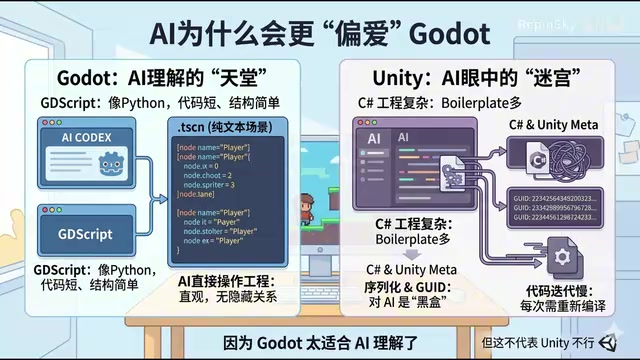
Why does this matter? Because when LLMs generate code, the complexity of the language directly affects output accuracy. Python is one of the languages with the highest representation and most stable generation quality across all major LLM training corpora — by some estimates, Python-related code typically accounts for 15%-25% of mainstream code LLM training sets. GDScript inherits Python's clean style, sharing core features like indentation-based syntax, dynamic typing, and concise expressions, while deliberately avoiding Python's more complex metaprogramming and decorator syntax, making it a "purer" Python-like language. This means models can almost seamlessly transfer their existing Python coding abilities, directly leveraging their deep understanding of Python without needing to learn a large set of new syntax rules — resulting in very high accuracy when generating GDScript.
By contrast, Unity's C# project structure is more complex, with more syntax elements like namespaces, class inheritance hierarchies, and attribute annotations, which correspondingly increases the probability of errors during generation.
It's also worth noting that Godot's own rise has created a positive feedback loop for AI generation quality. In 2023, when Unity announced changes to its Runtime Fee policy, it triggered a strong backlash from the developer community, and a massive wave of indie developers migrated to Godot — its GitHub star count surged by tens of thousands within a single week. This "exodus" brought more high-quality tutorials, plugins, and community resources, further enriching Godot-related training corpora and deepening AI's understanding of GDScript.
Plain-Text Scene Files: AI Can Directly "Assemble" Entire Games
An even more critical difference lies in the scene file format. Godot's .tscn scene files are essentially plain text — node trees, property configurations, and resource references are all stored in human-readable text form. This design philosophy stems from the Godot team's commitment to being "version control friendly" — plain text files can be precisely diff-tracked by Git. Specifically, .tscn files use a custom INI-like text format where every node, property, and signal connection is stored as human-readable key-value pairs. For example, a Sprite2D node's position is written directly as position = Vector2(100, 200), and resource references are expressed as plaintext relative paths.
This means AI can do more than just write logic code — it can directly assemble entire game scenes — reading and writing the entire game project like a configuration file, understanding node hierarchy relationships, and even completing scene construction without opening the editor — adding nodes, adjusting parameters, and setting up signal connections, all through text operations.
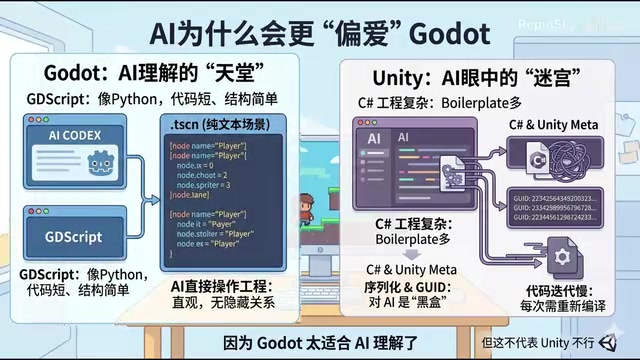
Unity is completely different. Behind a Unity project lies a massive amount of hidden GUIDs, Meta files, and serialized references. A Prefab's .prefab file is technically in YAML format, but it's filled with unreadable resource reference IDs — these 128-bit hash values carry no semantic information for AI, making it impossible to establish logical associations between resources. Many of the relationships between resources are essentially a black box for AI — it cannot directly understand and manipulate the entire project structure the way it would with ordinary text.
This is why, in AI-assisted development scenarios, Godot's "transparency" becomes an enormous advantage.
Compilation Cost: The Hidden Efficiency Killer in High-Frequency Iteration
When you develop with AI assistance, your workflow fundamentally changes — from "write a large chunk of code then test" to "verify immediately after every small change." In a single day, you might iterate back and forth with AI dozens or even hundreds of times.
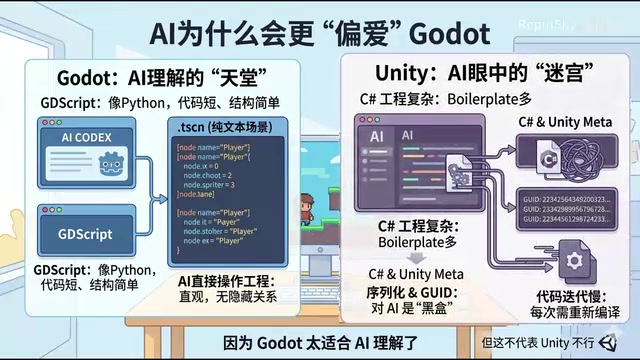
To understand this issue, you first need to know the two execution models of programming languages. C# (used by Unity) is a compiled language — after code modification, it must go through lexical analysis, syntax analysis, intermediate code generation, JIT compilation, and other stages before it can run. Unity's Roslyn compiler takes roughly 3-15 seconds on small projects, and can exceed 1 minute on large ones. GDScript, on the other hand, is an interpreted language, executed line-by-line by Godot's built-in interpreter. After modification, it can hot-reload almost instantly with near-zero wait time.
In traditional development workflows, developers compile a limited number of times per day, so this difference isn't significant. But in the high-frequency iteration mode of AI collaboration, every round of conversation with AI can produce a code change — 100 iterations per day means Unity users may accumulate 10-25 minutes of waiting, while that time is virtually zero in Godot, directly affecting the creative flow state. This difference may not be very noticeable in traditional development, but under the high-frequency rhythm of AI collaboration, it gets amplified many times over.
It's Not About Which Is Stronger — It's About Which Is Better Suited for AI Collaboration
It's important to emphasize that this doesn't mean Unity or Unreal are inferior.

For truly large-scale commercial projects — mobile distribution, console platforms, cross-platform adaptation — Unity and Unreal remain the undisputed workhorses. They have mature toolchains, massive plugin ecosystems, and industrial-grade stability proven across countless projects — none of which Godot can currently replace. While Godot 4.x has made significant upgrades to core systems like rendering, physics, and animation, giving it the capability to handle mid-scale projects, the gap with Unity/Unreal remains significant in areas like multi-platform distribution, console certification, and commercial support.
So at its core, this isn't a debate about "which engine is stronger" — it's about which architecture happens to be a better fit for the AI-assisted development paradigm.
Related articles
Meta Muse Hits 900K Downloads in Six D…
Meta Muse Hits 900K Downloads in Six Days: The AI Agent Era Has Officially Arrived
Meta's AI agent Muse hit 902K downloads in 6 days, topping US App Store and Google Play charts above ChatGPT and Claude. A deep dive into Muse's capabilities and the AI Agent race.
 Industry Insights
IRS Fully Embraces Claude AI, Accelerating Federal Government's AI Adoption
The IRS is recruiting staff with 24/7 Claude AI access, marking Anthropic's breakthrough into the federal government. Explore the strategic implications and tax use cases.
 Industry Insights
The IRS Mobile App Debate: A Trust Crisis in Government Digital Transformation
The IRS's proposed mobile app has sparked heated debate. This article analyzes the core arguments, exploring data security, privacy, and the trust crisis in government digital transformation.